
PISEN 140W 3-Port GaN Fast Charger
PISEN 140W PD3.1 GaN 3-Port USB-C Fast Charger Instruction Manual
Model: 140W 3-Port GaN Fast Charger
Увод
The PISEN 140W PD3.1 GaN 3-Port USB-C Fast Charger is designed to provide efficient and versatile charging for a wide range of devices. Utilizing advanced GaN technology, this compact power adapter offers high power output and multiple charging ports, ensuring your devices are powered quickly and safely.
Кључне карактеристике укључују:
- PD3.1 140W Fast Charging: Compatible with PD 3.1, QC 3.0/4.0, SCP, and PPS protocols, delivering up to 140W for single USB-C port usage.
- ГаН технологија: Compact design, 36% smaller than original 140W chargers, with a foldable plug for portability.
- 3-Port Multiple Charging: Features two USB-C ports and one USB-A port, supporting simultaneous charging of up to three devices.
- 8-Point Safety Protection: Comprehensive safety features including overcurrent, overvoltage, short circuit, overcharge, temperature, lightning, flame retardant, and overpower protection.
Шта је у кутији
Молимо вас да проверите да ли су све ставке присутне у вашем пакету:
- PISEN 140W USB C Charger (x1)
- 6FT 240W USB C to C Cable (x1)
- Упутство за употребу (к1)
Сетуп
Follow these steps to set up your PISEN 140W charger:
- Расклопите утикач: Gently pull out the foldable prongs from the charger body.
- Повежите се са утичницом: Insert the charger into a standard 110-240V AC wall outlet.
- Повежите уређаје: Use appropriate USB cables (including the provided 6FT 240W USB-C to C cable) to connect your devices to the charger's USB-A, USB-C1, or USB-C2 ports.
- Потврдите пуњење: Ensure your device displays a charging indicator.

Image: The PISEN 140W charger with its foldable prongs extended, ready to be plugged into a wall outlet. This design enhances portability and prevents damage during travel.
Упутство за употребу
The PISEN 140W charger features intelligent power distribution across its three ports. The total output wattage is dynamically allocated based on the connected devices.
Режими пуњења:
- Пуњење са једним портом:
- USB-C1 or USB-C2: Up to 140W Max. Ideal for fast-charging high-power devices like MacBook Pro 16-inch.
- USB-A: Up to 22.5W Max. Suitable for smartphones and smaller accessories.
- Пуњење преко два порта:
- USB-C1 + USB-C2: 65W + 65W. Efficient for charging two laptops simultaneously.
- USB-C1 or USB-C2 + USB-A: 120W + 18W. For one laptop and one smartphone.
- Пуњење са три порта:
- USB-C1 + USB-C2 + USB-A: 60W + 60W + 18W. Allows charging two laptops and one smartphone concurrently.

Image: Visual representation of the charger's multi-port capabilities, showing how it can charge three devices (laptop, tablet, phone) or two laptops simultaneously with intelligent power distribution.

Image: A diagram illustrating the maximum power output for each port when used individually: 140W for USB-C1 or USB-C2, and 22.5W for USB-A.

Image: A diagram showing power distribution when two ports are in use. For example, 65W each for two USB-C ports, or 120W for one USB-C and 18W for USB-A.

Image: A diagram detailing the power distribution when all three ports are simultaneously active: 60W for each USB-C port and 18W for the USB-A port.
Одржавање
To ensure the longevity and optimal performance of your PISEN charger, follow these maintenance guidelines:
- Чишћење: Disconnect the charger from the power outlet and all devices before cleaning. Use a soft, dry cloth to wipe the surface. Avoid liquid cleaners or abrasive materials.
- Складиштење: Када се не користи, чувајте пуњач на хладном и сувом месту. Пресавијте контактне жице да бисте их заштитили од оштећења.
- Нега каблова: Avoid sharp bends or kinks in the charging cable. Do not pull the cable by the cord; always grasp the plug when disconnecting.
- Услови животне средине: Не излажите пуњач екстремним температурама, влази или директној сунчевој светлости.
Решавање проблема
If you encounter issues with your PISEN 140W charger, refer to the following common problems and solutions:
| Проблем | Могући узрок | Решење |
|---|---|---|
| Уређај се не пуни. | Loose connection, faulty cable, incompatible device, power outlet issue. | Ensure all connections are secure. Try a different cable or power outlet. Verify device compatibility with USB-C PD. |
| Споро пуњење. | Кабл не подржава велику снагуtage, multiple devices connected, device not supporting fast charging. | Use the provided 240W USB-C cable or another high-wattage cable. Disconnect other devices if maximum speed is needed for one. Check device specifications for fast charging support. |
| Charger is hot. | Normal operation under heavy load, poor ventilation. | Some warmth is normal. Ensure adequate ventilation around the charger. If it becomes excessively hot or emits smoke/odor, disconnect immediately and contact support. |
Спецификације
| Феатуре | Детаљ |
|---|---|
| Бранд | ПИСЕН |
| Модел | 140В 3-портни ГаН брзи пуњач |
| Боја | Греи |
| Хардверски интерфејс | УСБ тип Ц |
| Компатибилни уређаји | MacBook, Laptops, Tablets, Smartphones, and Other Devices |
| Укупно УСБ портова | 3 (2x USB-C, 1x USB-A) |
| Димензије производа | 2.9 cm D x 2.9 cm Š x 1.31 cm V |
| Ватtage | 140 вати (макс.) |
| Улазни волtage | 110-240 волти |
| Технологија | ГаН (галијум нитрид) |
Гаранција и подршка
гаранција: This PISEN charger comes with a 1-year warranty from the date of purchase, covering manufacturing defects. Please retain your proof of purchase for warranty claims.
Корисничка подршка: For any questions, concerns, or technical assistance, please contact PISEN customer support. PISEN is committed to providing user-centric services and offers 7/24 online support.
You can find more information and contact details on the official PISEN webсајту или путем канала за подршку вашег продавца.
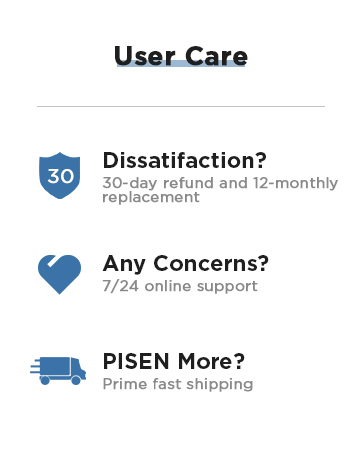
Image: PISEN User Care details, highlighting a 30-day refund, 12-month replacement policy, and 24/7 online support for customer satisfaction.
Видео снимци производа
PISEN BOLT Series Charger Overview
Видео: Званичник прекоview of the PISEN BOLT Series chargers, showcasing their design and features, including the 140W model.
Ask a question about this manual
Ask about setup, troubleshooting, compatibility, parts, safety, or missing instructions. Manuals+ will review the question and use this page’s manual context to help answer it.