
Гоогле Пикел 9а
Упутство за употребу за Гоогле Пикел 9а
Model: Pixel 9a (GA05769-GB)
1. Увод
Welcome to the user manual for your new Google Pixel 9a smartphone. This guide provides essential information to help you set up, operate, maintain, and troubleshoot your device. The Pixel 9a combines advanced AI capabilities with a powerful camera and long-lasting battery, designed to enhance your daily mobile experience.

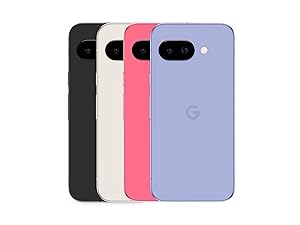
Figure 1: Google Pixel 9a in Obsidian
2. Водич за подешавање
2.1. Шта је у кутији
- Google Pixel 9a Smartphone
- USB-C to USB-C Cable (1m, USB 2.0)
- СИМ Тоол

Слика 2: Садржај кутије
2.2. Почетно подешавање
- Уметните СИМ картицу: Use the provided SIM tool to open the SIM tray. Insert your nano-SIM card.
- Укључено: Press and hold the power button on the side of the device until the Google logo appears.
- Пратите упутства на екрану: The phone will guide you through connecting to Wi-Fi, signing in to your Google account, and transferring data from your old device.
- Напуните батерију: Connect the USB-C cable to the phone and a compatible power adapter (sold separately) to charge the device.
3. Управљање вашим уређајем
3.1. Карактеристике камере
The Pixel 9a camera is equipped with advanced AI features to capture stunning photos and videos.
Include Me (Inclúyeme)
This feature ensures no one is left out of group photos. Take one group photo, switch photographers, take another, and Pixel will magically merge both photos.

Macro Focus
Use Macro Focus to reveal vivid colors and surprising contrast in photos and videos of the smallest details, such as raindrops, flowers, or splashes.

Best Take (Mejor Versión)
Capture group photos where everyone looks their best. The phone can combine different facial expressions from a burst of photos to create the perfect group shot.

3.2. Џемини вештачка интелигенција асистент
Gemini is your integrated AI assistant, simplifying multitasking and information retrieval across your Google applications.
Single Request, Multiple Apps
Ask Gemini to find information and perform actions for you across your Google apps, streamlining your workflow.

Близанци уживо
Interact with Gemini through voice commands for quick assistance and information.

3.3. Управљање батеријом
The Pixel 9a features an intelligent battery designed for extended use.
- The smart battery can last over 24 hours with typical usage.
- Активирај Extreme Battery Saver to extend battery life up to 100 hours.

4. Нега и одржавање
Proper care ensures the longevity and optimal performance of your Pixel 9a.
- Чишћење: Користите меку крпу која не оставља влакна за чишћење екрана и кућишта. Избегавајте абразивне материјале или јаке хемикалије.
- температура: Избегавајте излагање уређаја екстремним температурама (врућим или хладним) јер то може утицати на век трајања батерије и унутрашње компоненте.
- Отпорност на воду и прашину: The Pixel 9a is rated IP68 for water and dust resistance, meaning it can withstand submersion in up to 1.5 meters of fresh water for up to 30 minutes. However, this is not permanent and resistance may decrease over time with normal wear. Avoid intentional submersion.
Слика 3: Отпорност на воду
- Рециклирани материјали: The Pixel 9a is manufactured with recycled materials, contributing to environmental sustainability.
КСНУМКС. Решавање проблема
This section addresses common issues you might encounter with your Pixel 9a.
| Иссуе | Могући узрок | Решење |
|---|---|---|
| Кратко трајање батерије | High screen brightness, excessive app usage, background processes. | Reduce screen brightness, close unused apps, activate Extreme Battery Saver, check battery usage in settings. |
| Setup Issues / Freezing | Software glitch, network connectivity problems during setup. | Restart the device. Ensure a stable Wi-Fi connection. If issues persist, perform a factory reset (data will be erased). |
| Сензор отиска прста не ради | Dirty sensor, screen protector interference, un-registered fingerprint. | Clean the sensor. Re-register your fingerprint. Ensure screen protector is compatible with in-display sensors. |
| Camera Quality Concerns | Dirty lens, poor lighting conditions, incorrect settings. | Clean the camera lens. Ensure adequate lighting. Adjust camera settings (e.g., HDR, night mode). |
6. Техничке спецификације
Detailed specifications for the Google Pixel 9a.
| Феатуре | Спецификација |
|---|---|
| Оперативни систем | Андроид 15 |
| Димензије | 7.33 к 15.47 к 0.89 цм |
| Тежина | 186 г |
| Величина екрана | 6.3 инча |
| Резолуција | 2340 к 1080 |
| РАМ | 8 ГБ |
| Капацитет складиштења | 128 ГБ |
| ЦПУ модел | Снапдрагон |
| Оцена снаге батерије | 5100 mAh (Approximate) |
| Талк Тиме | 30 сата |
| Повезивање | 5G |
| Аудио Цоннецтор | 3.5 мм |
| Број модела | ГА05769-ГБ |
| Први доступан датум | 14. априла 2025. године |
For detailed product information and energy efficiency, refer to the EPREL database:
View Информације о производу EPREL

Слика 4: Енергетска ознака ЕУ
7. Гаранција и подршка
Your Google Pixel 9a is manufactured by Google and comes with a standard warranty. For specific warranty terms and conditions, please refer to the documentation included with your device or visit the official Google support webсајту.
- Произвођач: Гоогле
- Званична подршка: For technical assistance, troubleshooting, and warranty claims, please visit the official Google Support page or contact Google customer service.
- Трајање гаранције: Information regarding the warranty duration is typically provided at the point of purchase or within the device's packaging.