
Увод
This manual provides essential information for the safe and efficient use of your Cerwin Vega VEGAMINI Compact Powerhouse Bluetooth Speaker. Please read these instructions carefully before operating the device and retain them for future reference.
Укључене компоненте:
- Блуетоотх звучник
- Кабл за пуњење
- Упутство за употребу
Производ је завршенview
Familiarize yourself with the various parts and controls of your VEGAMINI speaker.
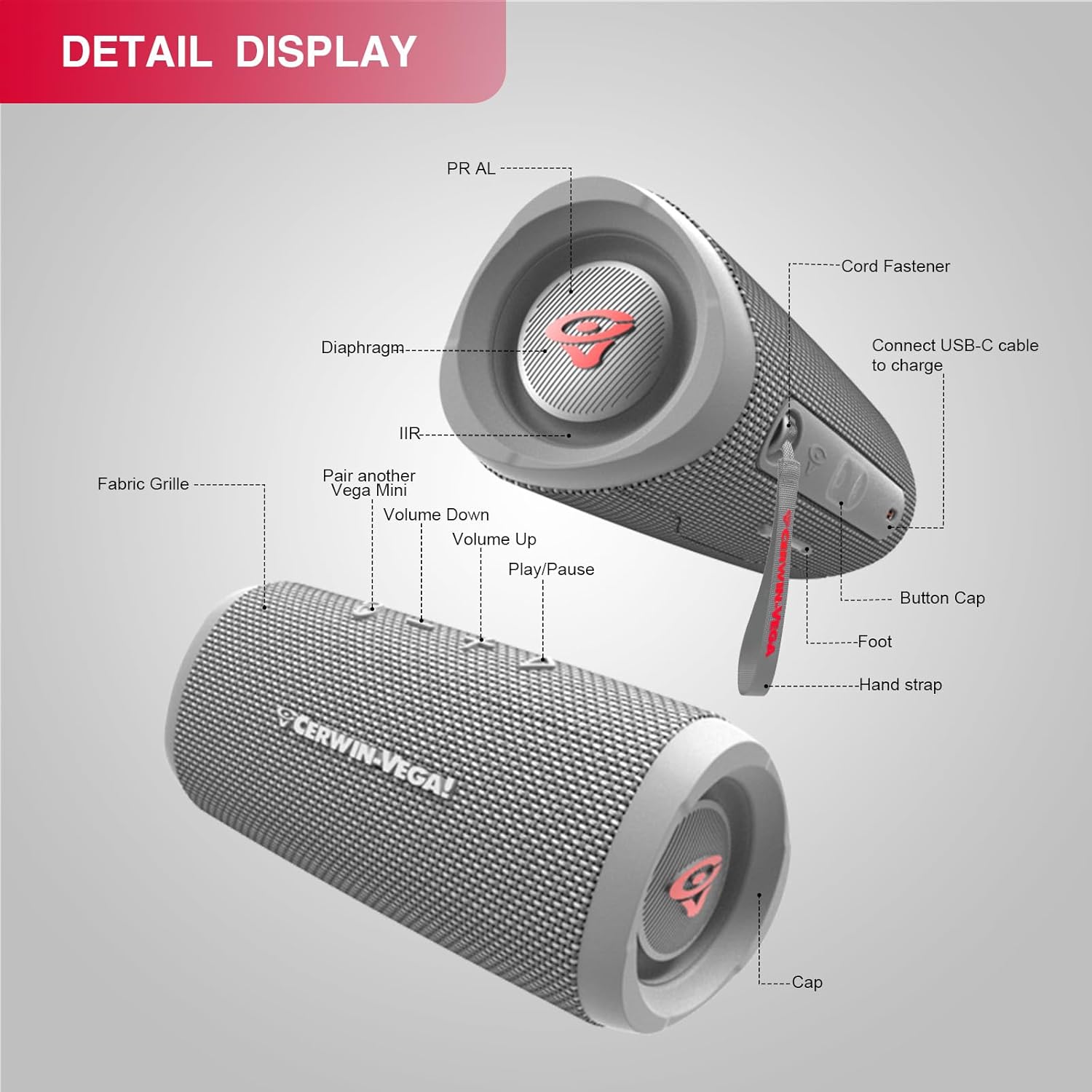
слика: Детаљно view of the VEGAMINI speaker components.
Идентификација компоненте:
- Fabric Grille: Protects the speaker drivers.
- Дугме за смањивање јачине звука: Смањује јачину звука.
- Дугме за појачавање звука: Повећава јачину звука.
- Дугме за репродукцију/паузу: Контролише репродукцију звука.
- Pair another Vega Mini Button: Initiates True Wireless Stereo (TWS) pairing.
- УСБ-Ц порт: За пуњење звучника.
- Трака за руку: For portability and secure carrying.
- Passive Radiators (PR AL / IIR): Located at each end, enhance bass response.
- Button Cap: Protects the control buttons.
- стопало: Provides stability when placed on a surface.
- Капа: End cap of the speaker.
Сетуп
1. Пуњење звучника
Before first use, fully charge the speaker. Connect the provided USB-C charging cable to the speaker's USB-C port and the other end to a compatible USB power adapter (not included). The charging indicator will show the charging status. A full charge takes approximately 2.5 hours (with a 5V/3A adapter).

слика: The VEGAMINI speaker offers up to 12 hours of continuous music playback on a full charge.
2. Укључивање/искључивање
- За укључивање: Press and hold the Power button until you hear an audible cue and the indicator light illuminates.
- За искључивање: Press and hold the Power button again until the indicator light turns off.
3. Блуетоотх упаривање
Да бисте повезали звучник са уређајем који подржава Bluetooth:
- Уверите се да је звучник укључен и у режиму упаривања (индикаторска лампица за Bluetooth ће трептати).
- На свом уређају (паметном телефону, таблету итд.) идите на подешавања Блутут-а.
- Select "VEGAMINI" from the list of available devices.
- Once connected, the Bluetooth indicator light will become solid, and you will hear a confirmation tone.
слика: The VEGAMINI speaker can connect to various Bluetooth-enabled devices.
4. Упаривање са правим бежичним стерео (TWS) системом
For an immersive stereo experience, you can pair two VEGAMINI speakers together:
- Ensure both VEGAMINI speakers are powered on and not connected to any other Bluetooth device.
- On one speaker, press the TWS pairing button (often indicated by a chain link icon). The speaker will enter TWS pairing mode.
- The two speakers will automatically connect to each other. Once connected, one speaker will act as the primary (left channel) and the other as the secondary (right channel).
- Connect your Bluetooth device to the primary speaker as described in the Bluetooth Pairing section.
Операција
Контроле:
- Дугме за напајање: Притисните и држите за укључивање/искључивање.
- Дугме за репродукцију/паузу: Притисните једном да репродукујете или паузирате звук.
- Јачина звука (+): Press to increase volume. Press and hold for continuous volume increase.
- Утишавање (-): Press to decrease volume. Press and hold for continuous volume decrease.
- ТВС дугме: Притисните да бисте покренули упаривање са правим бежичним стерео уређајем.
Отпорност на воду (ИПКС4)
The VEGAMINI speaker features an IPX4 water-resistant rating, meaning it is protected against splashing water from any direction. This makes it suitable for outdoor use and environments where it might be exposed to light splashes. Не урањајте звучник у воду.

слика: The VEGAMINI speaker is designed with IPX4 water resistance for outdoor use.
Соунд Перформанце
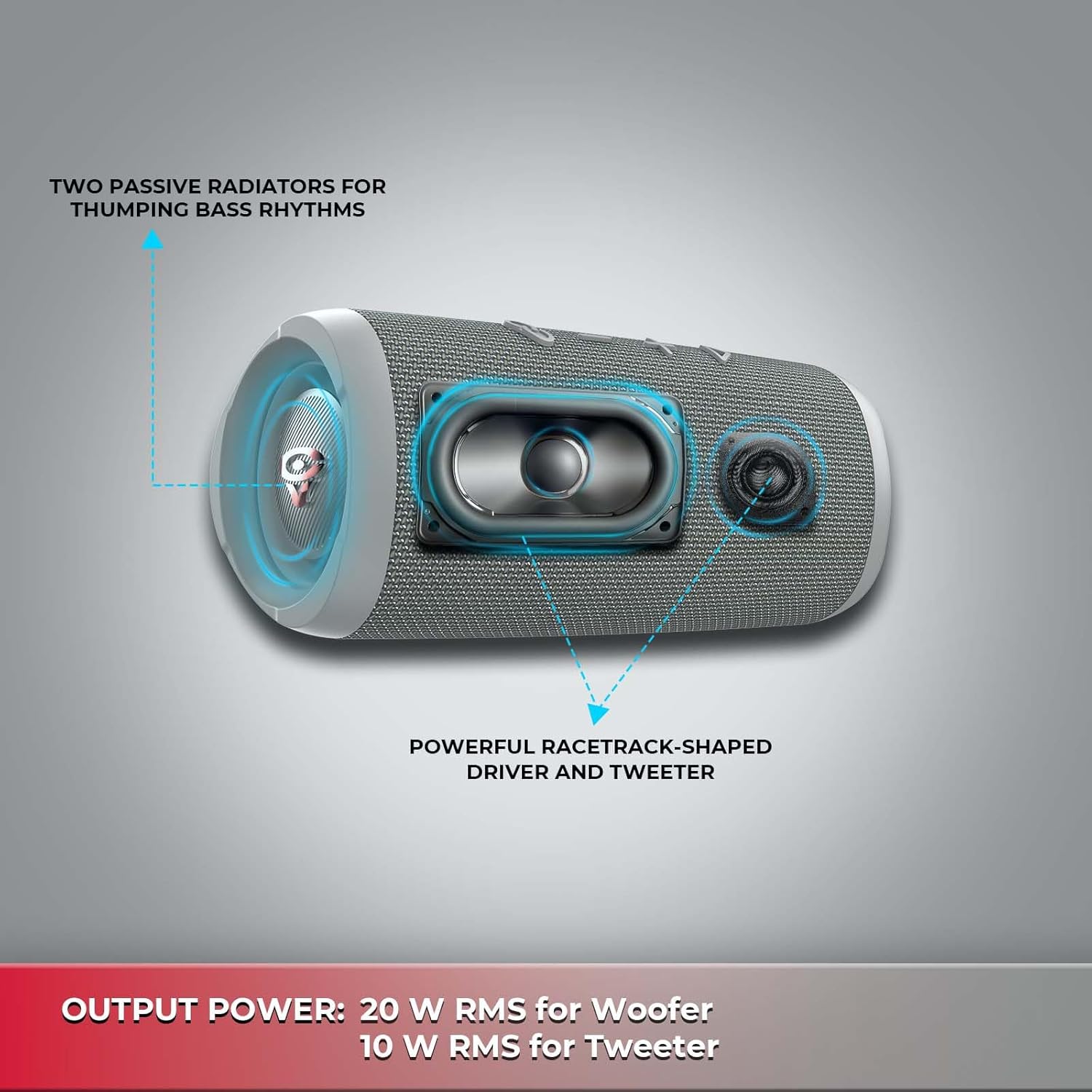
The speaker is equipped with a 20W RMS woofer and a 10W RMS tweeter, complemented by two passive radiators, to deliver clear highs and deep bass.
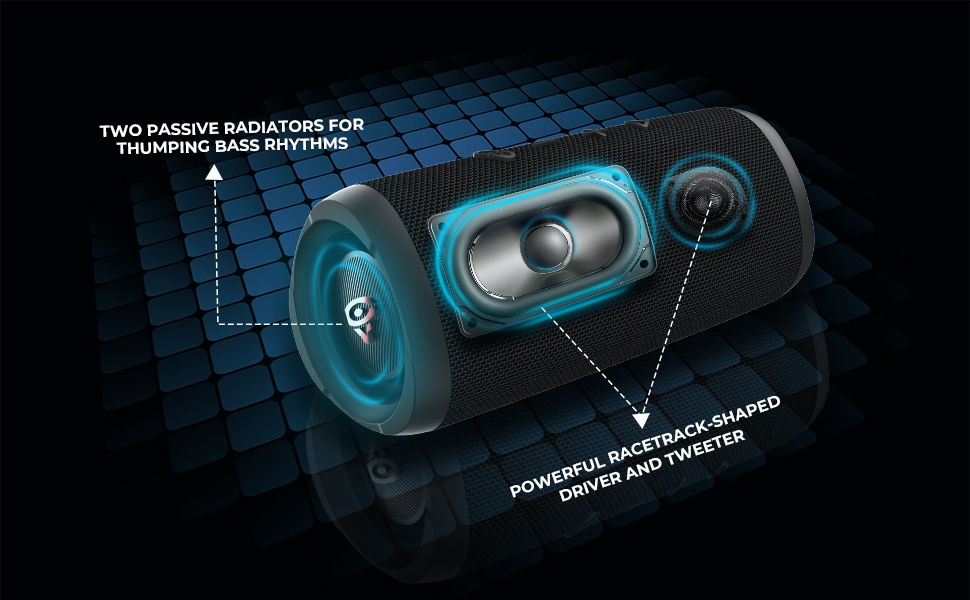
слика: Унутрашње view showing the speaker's woofer, tweeter, and passive radiators.
Одржавање
Proper maintenance ensures the longevity of your speaker.
- Чишћење: Use a soft, dry cloth to wipe the speaker's exterior. Do not use abrasive cleaners or solvents.
- Складиштење: Чувајте звучник на хладном и сувом месту, даље од директне сунчеве светлости и екстремних температура када се не користи дуже време.
- Одржавање батерије: To maintain battery health, avoid fully discharging the battery frequently. Charge the speaker regularly, even if not in active use.
Решавање проблема
If you encounter issues with your VEGAMINI speaker, refer to the following common solutions:
| Проблем | Решење |
|---|---|
| Звучник се не укључује. | Уверите се да је батерија напуњена. Прикључите кабл за пуњење и покушајте поново. |
| Није могуће упаривање преко Bluetooth-а. | Make sure the speaker is in pairing mode (flashing Bluetooth indicator). Turn off Bluetooth on your device and turn it back on. Ensure no other devices are connected to the speaker. |
| Нема звука или је јачина звука ниска. | Проверите нивое јачине звука и на звучнику и на повезаном уређају. Уверите се да је звучник правилно упарен. |
| Упаривање TWS-а не успева. | Ensure both speakers are powered on and not connected to any other Bluetooth device before initiating TWS pairing. Place speakers close to each other. |
| Пуњење је споро или не ради. | Verify the charging cable is securely connected. Use a compatible 5V/3A USB power adapter. |
Спецификације
Detailed technical specifications for the Cerwin Vega VEGAMINI speaker.
| Феатуре | Детаљ |
|---|---|
| Назив модела | VMGRY |
| Материјал | Пластика |
| Спеакер Типе | Full-Range Bluetooth Speaker |
| Димензије производа (Д x Ш x В) | 3.9 cm x 3.2 cm x 7.7 cm |
| Тежина артикла | 2.2 Pounds (0.58 kg / 1.27 lbs net) |
| Извор напајања | Баттери Поверед |
| Тип батерије | Li-ion polymer 17.28 WH (Equivalent to 3.6 V / 4800 mAh) |
| Капацитет батерије | 14000 Милиamp Сати |
| Време пуњења | 2.5 сата (5 В / 3 А) |
| Време репродукције музике | Up to 12 hours (Dependent on volume level and audio content) |
| Блуетоотх® верзија | 5.3 (A2DP 1.3, AVRCP 1.6) |
| Фреквенцијски одзив | 63 Hz - 20 kHz |
| Излазна снага | 20 W RMS for Woofer, 10 W RMS for Tweeter (Total 30 Watts Max) |
| Претварачи | Woofer: 80 mm, Tweeter: 44.5mm |
| Однос сигнала и шума | > 80 дБ |
| Ниво отпорности на воду | ИПКС4 (отпоран на воду) |
| Компатибилни уређаји | Паметни телефон, таблет |
| Контролни метод | Додирните |
Видео о производу
Погледајте овај званични видео производа за визуелни прегледview of the Cerwin Vega VEGAMINI speaker.
видео: Званичник прекоview of the Cerwin Vega VEGAMINI Bluetooth Speaker, highlighting its portable design and sound capabilities.
Информације о гаранцији
The Cerwin Vega VEGAMINI speaker comes with a Limited Warranty. For detailed information regarding warranty coverage, terms, and conditions, please refer to the warranty card included with your product or visit the official Cerwin Vega webсајту.
Подршка
For further assistance, technical support, or customer service inquiries, please visit the official Cerwin Vega website or contact their customer support team. Contact information can typically be found on the product packaging or the brand's official webсајту.