
1. Увод
Хвала вам на куповиниasing the Urageuxy Wireless Indoor/Outdoor Thermometer with 3 Sensors. This device provides accurate, real-time temperature and humidity readings for up to four locations simultaneously (one indoor, three outdoor/remote). It features a clear LCD display with backlight, comfort indicators, and records of daily maximum and minimum values. This manual will guide you through the setup, operation, and maintenance of your new thermometer.
2. Безбедносне информације
- Do not expose the main unit or sensors to extreme force, shock, dust, temperature, or humidity.
- Do not immerse the main unit in water. The remote sensors are splash-proof but should not be submerged.
- Do not attempt to open the main unit or sensors. This will void the warranty.
- Use only fresh batteries of the specified type. Do not mix old and new batteries.
- Истрошене батерије одлажите одговорно, поштујући локалне прописе.
- Чувати ван домашаја деце.
3. Садржај пакета
Молимо вас да проверите садржај пакета како бисте били сигурни да су сви предмети присутни:
- 1 x Main Display Unit (Indoor Console)
- 3 x Бежични даљински сензори
- 1 к Упутство за употребу
4. Производ је готовview
Главна јединица дисплеја
The main display unit shows indoor temperature and humidity, along with readings from up to three remote sensors. It features a large LCD screen with a backlight for easy viewинг.


Wireless Remote Sensors
Each remote sensor measures temperature and humidity and transmits data wirelessly to the main unit. They are designed for outdoor use but should be placed in a sheltered location to avoid direct rain or prolonged sun exposure.
5. Подешавање
5.1 Инсталација батерије
For the Main Display Unit:
- Отворите поклопац одељка за батерије на задњој страни главне јединице.
- Insert 3 AAA batteries (not included) according to the polarity markings (+ and -).
- Затворите поклопац одељка за батерије.
For the Wireless Remote Sensors:
- Open the battery compartment cover on the back of each sensor.
- Insert 2 AAA batteries (not included) according to the polarity markings (+ and -).
- Затворите поклопац одељка за батерије.

5.2 Упаривање сензора
The main unit will automatically search for and connect to the remote sensors once batteries are installed. Ensure both the main unit and sensors are within range during initial setup.
- Place the main unit and sensors close to each other during the initial pairing process.
- The main unit will display readings for each connected sensor (CH1, CH2, CH3).
- If a sensor does not connect, press the 'CHANNEL' button on the main unit to cycle through channels or press the 'RESET' button on the sensor to re-initiate pairing.
5.3 Смернице за постављање сензора
For optimal performance and accurate readings, consider the following:
- Опсег преноса: The wireless sensors have a transmission range of up to 328 feet (100 meters) in open areas. Walls, metal structures, and other electronic devices can reduce this range.
- Положај на отвореном: While splash-proof, place outdoor sensors under a roof or in a sheltered area to protect them from direct rain and prolonged direct sunlight.
- Избегавајте изворе топлоте: Do not place sensors near heat sources (e.g., vents, appliances) or in direct sunlight, as this can lead to inaccurate temperature readings.
- Више локација: Utilize the three sensors to monitor different areas such as a greenhouse, baby room, wine cellar, kitchen, or garage.


6. Упутство за употребу
6.1 Очитавања на екрану
ЛЦД екран приказује следеће информације:
- Температура и влажност у затвореном простору: Shown at the top of the display.
- Remote Sensor Readings: Температура и влажност за сваки повезани сензор (CH1, CH2, CH3) приказани су испод очитавања унутрашње температуре.
- Comfort Icons: Indicates the current humidity level (DRY, COMFORT, WET).
- Индикатори тренда: Arrows next to temperature and humidity values show if they are rising, falling, or stable.
6.2 °C/°F Switcher
To switch between Celsius (°C) and Fahrenheit (°F), press the '°C/°F' button located on the back of the main unit.
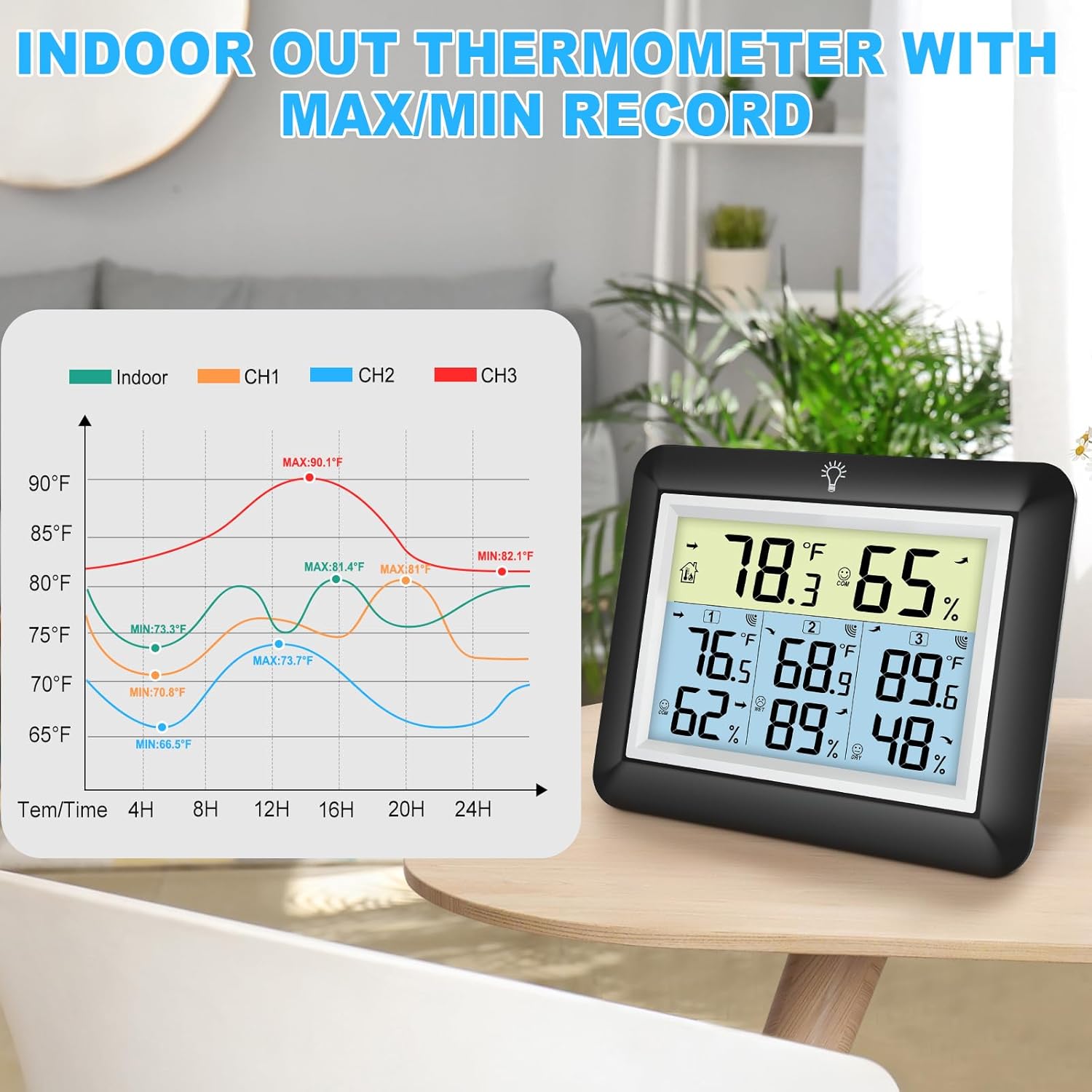
6.3 MAX/MIN Records
The device automatically records the daily maximum and minimum temperature and humidity values for both indoor and all remote sensors. These records reset every 24 hours.
- Press the 'MIN/MAX' button on the back of the main unit to view the maximum recorded values.
- Press the 'MIN/MAX' button again to view the minimum recorded values.
- Press a third time to return to current readings.

6.4 Рад позадинског осветљења
The main unit features an adjustable backlight for improved visibility in low-light conditions.
- Touch the light bulb icon on the top of the main unit to activate the backlight for 5 seconds.
- Press and hold the light bulb icon for more than 5 seconds to keep the backlight on for 30 minutes.


6.5 Индикатор удобности
The comfort indicator provides a quick visual reference for the current humidity level, helping you maintain an ideal environment.
- СУВО: Влажност < 45%
- УДОБНОСТ: 45% ≤ Влажност ≤ 65%
- МОКАР: Влажност > 65%


7. Одржавање
7.1 Чишћење
Обришите главну јединицу и сензоре меком крпомamp cloth. Do not use abrasive cleaners or solvents, as they may damage the plastic components and electronic circuits.
7.2 Замена батерије
Замените батерије када се на екрану појави индикатор ниске напуњености батерије. Увек замените све батерије у уређају истовремено новим батеријама истог типа.
7.3 Складиштење
If the device will not be used for an extended period, remove the batteries from both the main unit and sensors to prevent leakage and damage.
КСНУМКС. Решавање проблема
| Проблем | Могући узрок | Решење |
|---|---|---|
| Нема дисплеја на главној јединици. | Батерије су истрошене или неправилно постављене. | Замените батерије новим, водећи рачуна о исправном поларитету. |
| Remote sensor not displaying readings or showing '---'. | 1. Sensor out of range. 2. Batteries are dead. 3. Интерференција. 4. Sensor not paired. | 1. Move sensor closer to the main unit. 2. Replace sensor batteries. 3. Move away from other electronic devices. 4. Press the 'RESET' button on the sensor and then cycle channels on the main unit. |
| Нетачна очитавања. | 1. Sensor exposed to direct sunlight or heat source. 2. Poor ventilation around sensor. | 1. Relocate sensor to a shaded, well-ventilated area. 2. Ensure proper airflow around the sensor. |
| Позадинско осветљење не ради. | Слаба батерија или квар. | Replace main unit batteries. If issue persists, contact support. |
9. Спецификације
- Бренд: Урагеуки
- Модел: WS0170BKY
- Опсег унутрашње температуре: 32°Ф до 140°Ф (0°Ц до 60°Ц)
- Опсег спољне температуре: -40°Ф до 140°Ф (-40°Ц до 60°Ц)
- Прецизност температуре: ±2°Ф / ±1°Ц
- Опсег влажности: 10% до 99% РХ
- Прецизност влажности: ±5% РХ
- Опсег бежичног преноса: Up to 328 feet (100 meters) in open areas
- Извор напајања (главна јединица): 3 к ААА батерије (нису укључене)
- Power Source (Remote Sensor): 2 к ААА батерије (нису укључене)
- Посебне карактеристике: Backlit LCD, Comfort Indicator, Min/Max Record, Fast Refresh
- Материјал: акрилонитрил бутадиен стирен (АБС)
- Product Dimensions (Main Unit): 0.78 cm D x 4.33 cm Š x 0.78 cm V (približno)
- Тежина артикла: 9.9 унци (0.28 килограма)
10. Гаранција и подршка
10.1 Информације о гаранцији
Urageuxy products are manufactured to high-quality standards. This product is covered by a limited warranty against defects in materials and workmanship for a period of one year from the original purchase date. This warranty does not cover damage caused by misuse, accident, unauthorized modification, or improper installation.
10.2 Корисничка подршка
If you encounter any issues or have questions regarding your Urageuxy Wireless Indoor/Outdoor Thermometer, please contact our customer support team. For the quickest assistance, please refer to the contact information provided on the product packaging or the official Urageuxy webсајту.
Подршка на мрежи: Посетите Urageuxy Store on Amazon за често постављана питања и информације о производу.
Овај видео пружа визуелни прегледview of the Urageuxy Indoor Outdoor Thermometer with 3 Remote Sensors, demonstrating its features and functionality.