
IMIKI D2 GREEN
IMIKI XPLORER SCOUT D2 Smartwatch
Упутство за употребу
Производ је завршенview
The IMIKI XPLORER SCOUT D2 is a versatile smartwatch designed for both men and women, featuring a vibrant 1.43-inch AMOLED display. It offers seamless Bluetooth connectivity for calls and smart assistant integration, comprehensive health monitoring capabilities including blood oxygen and heart rate tracking, and support for over 100 sports modes. Its robust design is IP68 waterproof, making it suitable for various activities, and it boasts exceptional battery life with fast charging.
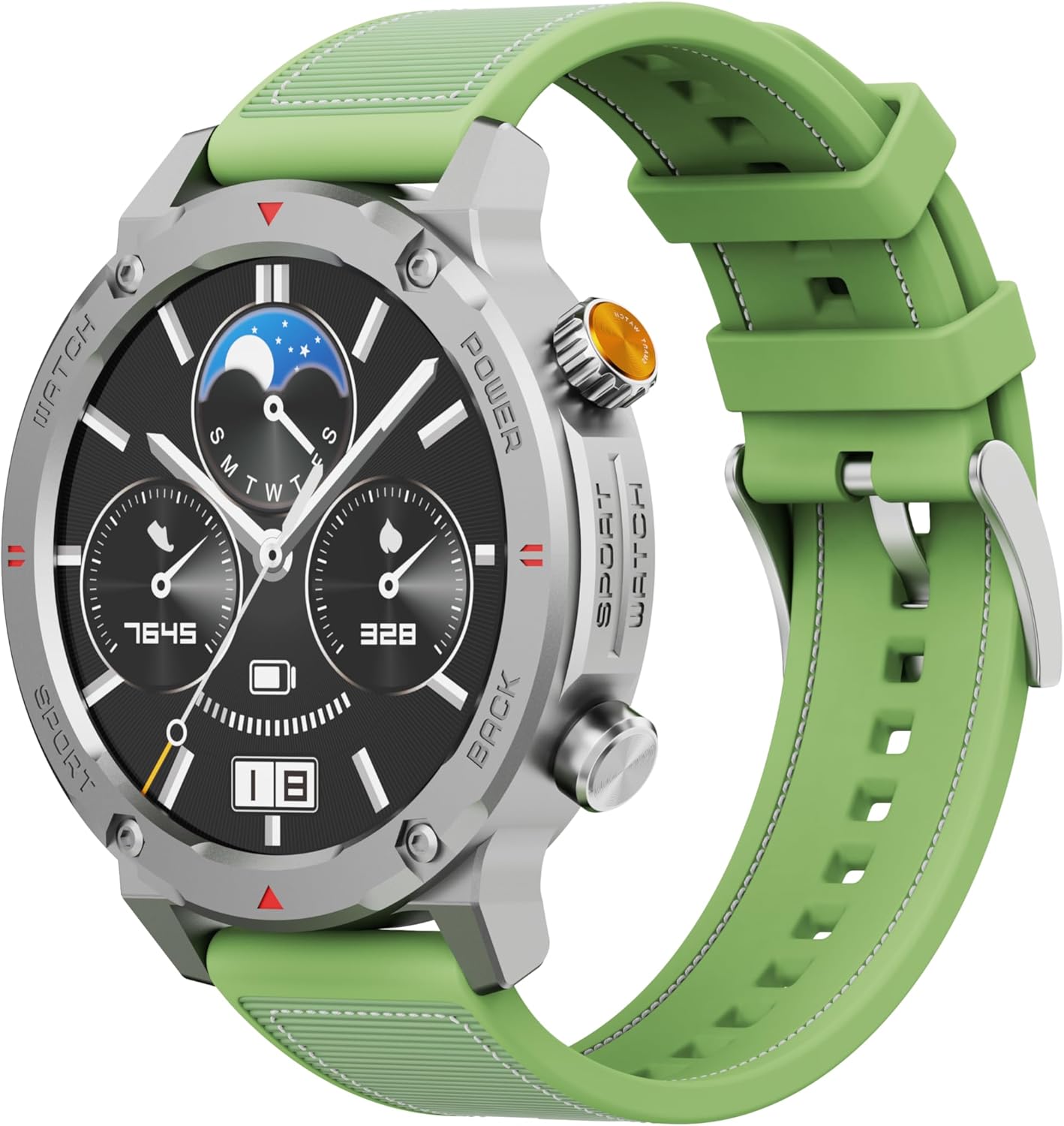
Слика 1: Предња страна view of the IMIKI XPLORER SCOUT D2 Smartwatch with its green strap.
Водич за подешавање
1. Шта је у кутији
Upon unboxing your IMIKI XPLORER SCOUT D2 Smartwatch, ensure all components are present:
- IMIKI XPLORER SCOUT D2 Smartwatch
- Кабл за пуњење

Figure 2: The IMIKI XPLORER SCOUT D2 Smartwatch module separated from its bezel and strap, illustrating its modular design.
2. Пуњење паметног сата
Before first use, fully charge your smartwatch. The 400 mAh battery provides up to 30 days of autonomy on a single charge, and it supports fast charging for quick power-ups.
- Повежите кабл за пуњење са портом за пуњење на задњој страни паметног сата.
- Укључите други крај кабла у УСБ адаптер за напајање (није укључен) или УСБ порт рачунара.
- The watch display will indicate charging status. Allow sufficient time for a full charge.

Слика 3: Задња страна view of the IMIKI XPLORER SCOUT D2 Smartwatch, highlighting the charging contacts and health sensors.
3. Почетно подешавање и упаривање
To unlock the full potential of your smartwatch, pair it with your smartphone via Bluetooth.
- Преузмите апликацију: Тражи the official IMIKI companion app on the Apple App Store (for iOS) or Google Play Store (for Android) and install it on your smartphone.
- Омогући Блуетоотх: Уверите се да је Блуетоотх омогућен на вашем паметном телефону.
- Power On Watch: Press and hold the power button on the smartwatch to turn it on.
- Отвори апликацију: Launch the IMIKI app on your smartphone and follow the on-screen instructions to add a new device.
- Упаривање: Select "IMIKI XPLORER SCOUT D2" from the list of available devices in the app. Confirm the pairing request on both your phone and the smartwatch if prompted.
Once paired, you can customize settings, view health data, and receive notifications directly on your smartwatch.
Упутство за употребу
1. Приказ и навигација
The IMIKI XPLORER SCOUT D2 features a 1.43-inch AMOLED display with a high resolution of 466x466 pixels, protected by tempered glass. Navigate the watch interface using touch gestures and the physical buttons.
- Превуците нагоре/надоле: Листајте кроз меније и обавештења.
- Превуците лево/десно: Приступите брзим виџетима или различитим изгледима сата.
- Додирните: Изаберите ставку или отворите апликацију.
- Физичка дугмад: Use the side buttons for power on/off, returning to the home screen, or quick access to sports modes.

Figure 4: Close-up of the smartwatch display, illustrating the clear AMOLED screen and various data points.
2. Праћење здравља
The smartwatch is equipped with an optical sensor to monitor key health metrics:
- Откуцаји срца (ХР): Континуирано прати ваш пулс током целог дана.
- Кисеоник у крви (SpO2): Мери ниво засићености крви кисеоником.
- Квалитет сна: Monitors your sleep patterns and provides insights into sleep quality.
Access detailed health reports and historical data through the companion app.
3. Workout Modes
With over 100 integrated sports modes, the XPLORER SCOUT D2 accurately records your exercise statistics. Select your desired activity from the watch's sports menu to begin tracking.

Figure 5: Visual representation of the smartwatch's diverse functionalities, including health tracking and sports modes.
4. Bluetooth Calling and Voice Assistant
The single-chipset Bluetooth 5.3 ensures stable and high-quality connectivity, allowing you to answer calls directly from your wrist. The integrated voice assistant enables hands-free control of your device with simple voice commands.
5. Обавештења
Receive real-time notifications for calls, SMS messages, and app alerts directly on your smartwatch. Manage notification settings through the companion app.
6. Отпорност на воду (IP68)
The IMIKI XPLORER SCOUT D2 is IP68 rated, meaning it is resistant to dust and water. This allows it to withstand splashes, rain, and brief immersion in shallow water. Напомена: While IP68 rated, it is not recommended for swimming, diving, or high-pressure water activities.

Figure 6: Illustration of the smartwatch's IP68 water resistance and exceptional battery autonomy.
Одржавање
Proper care and maintenance will extend the lifespan of your IMIKI XPLORER SCOUT D2 Smartwatch.
- Чишћење: Regularly wipe the watch and strap with a soft, dry, lint-free cloth. For stubborn dirt, slightly dampИсперите крпу водом. Избегавајте употребу јаких хемикалија или абразивних материјала.
- Брига о сензорима: Keep the optical sensors on the back of the watch clean for accurate health monitoring.
- Складиштење: Store the smartwatch in a cool, dry place away from direct sunlight and extreme temperatures.
- Трајање батерије: To maximize battery life, avoid fully discharging the battery frequently. Charge it before it completely runs out.
- Заменљиве компоненте: The watch features a removable central case and interchangeable straps (Oyster, Active, Scout styles). Handle these components with care when changing them.

Figure 7: The IMIKI XPLORER series showcasing interchangeable straps and case styles.
Решавање проблема
If you encounter issues with your IMIKI XPLORER SCOUT D2 Smartwatch, try the following solutions:
| Проблем | Могуће решење |
|---|---|
| Сат се не укључује. | Уверите се да је сат потпуно напуњен. Прикључите га на пуњач и сачекајте неколико минута пре него што покушате да га поново укључите. |
| Не може се упарити са паметним телефоном. |
|
| Нетачна очитавања здравственог стања. |
|
| Обавештења нису примљена. |
|
Спецификације
| Феатуре | Детаљ |
|---|---|
| Бранд | ИМИКИ |
| Назив модела | IMIKI SMART WATCH XPLORER SCOUT D2 GREEN |
| Број модела ставке | D2 GREEN |
| Величина екрана | 1.43 инча |
| Дисплаи Типе | АМОЛЕД |
| Технологија повезивања | Блуетоотх 5.3 |
| Капацитет батерије | 400 мАх |
| Просечно трајање батерије | До 30 дана |
| Отпорност на воду | ИП68 |
| Мониторинг здравља | Heart Rate, Blood Oxygen (SpO2), Sleep Quality |
| Режими вежбања | Over 100+ integrated modes |
| Посебне карактеристике | Bluetooth Calling, Voice Assistant, Fast Charging, Removable Central Case, Tempered Glass Screen |
| Компатибилни уређаји | Smartphones (Android and iOS) |
| Тежина артикла | 68 грама |
| Димензије пакета | 10.5 к 10.5 к 6 цм |
Гаранција и подршка
For warranty information and customer support, please refer to the documentation included with your purchase or visit the official IMIKI webсајт. Сачувајте доказ о куповини за евентуалне рекламације по гаранцији.
For further assistance, you may also contact the seller or Amazon customer service if purchased through Amazon.
Ask a question about this manual
Ask about setup, troubleshooting, compatibility, parts, safety, or missing instructions. Manuals+ will review the question and use this page’s manual context to help answer it.