
1. Увод
This manual provides comprehensive instructions for the setup, operation, maintenance, and troubleshooting of your YARDCARE Robotic Lawn Mower. Please read this manual thoroughly before using the product to ensure safe and efficient operation.
The YARDCARE Robotic Lawn Mower is designed to automate lawn care for areas up to 1/8 acre, featuring smart app control, auto-charging capabilities, and advanced obstacle detection for a pristine lawn with minimal effort.
2. Кључне карактеристике
- Smart App Control & Powerful Brushless Motor: Manage mowing schedules and settings via a mobile app. The brushless motor ensures quiet and efficient operation with reduced maintenance.
- Collision Detection System: A sensitive contact bumper sensor allows the mower to automatically change direction upon encountering obstacles, ensuring safe operation on various terrains.
- Auto Charging & Weather Sensor: The mower returns to its charging dock when battery is low or rain is detected. IPX5 weatherproof rating ensures durability in outdoor conditions.
- Manual Adjustable Cutting Height: Easily adjust cutting height from 0.8 to 2.4 inches to suit different grass types and seasons. The triple-blade design provides an even trim.
- Quick DIY Setup: All necessary accessories are included for immediate use. Simply lay the boundary wire and connect the charging dock.
3. Садржај пакета
Проверите да ли су све ставке наведене у наставку укључене у ваш пакет:

Image: All components included in the YARDCARE Robotic Lawn Mower package, neatly laid out.
| Ставка | Количина |
|---|---|
| Станица за пуњење | 1 ком |
| Косилица | 1 ком |
| Упутство за употребу | 1 ком |
| Measurement Gauge | 1 ком |
| Charging Station Fixing Screws | 6 ком |
| Boundary Wire Pegs | 100 ком |
| 6 meters Extension Cord | 1 ком |
| Хексадекадни кључ | 1 ком |
| Гранична жица (100 метара) | 1 ком |
| Батерија | 1 ком |
| Бладес | 6 ком |
| М4 к 12 Вијци | 3 ком |
| Повер Адаптер | 1 ком |
| Цоннецтион Цлип | 2 ком |
4. Водич за подешавање
Follow these steps to set up your robotic lawn mower:
- Set up the Charging Dock: Choose a flat, level area with access to a power outlet. Secure the charging station using the provided fixing screws.

Image: Illustration of setting up the charging dock.
- Lay the Boundary Wire: Use the boundary wire and pegs to define the mowing area. Ensure the wire is laid securely and follows the perimeter of your lawn, avoiding obstacles or areas you do not wish to mow.

Image: The robotic lawn mower operating within a defined boundary wire, suitable for lawns up to 1/8 acre.
- Connect the Mower to the App: Download the dedicated mobile app. Follow the in-app instructions to pair your robotic lawn mower and configure initial settings, including mowing schedules.
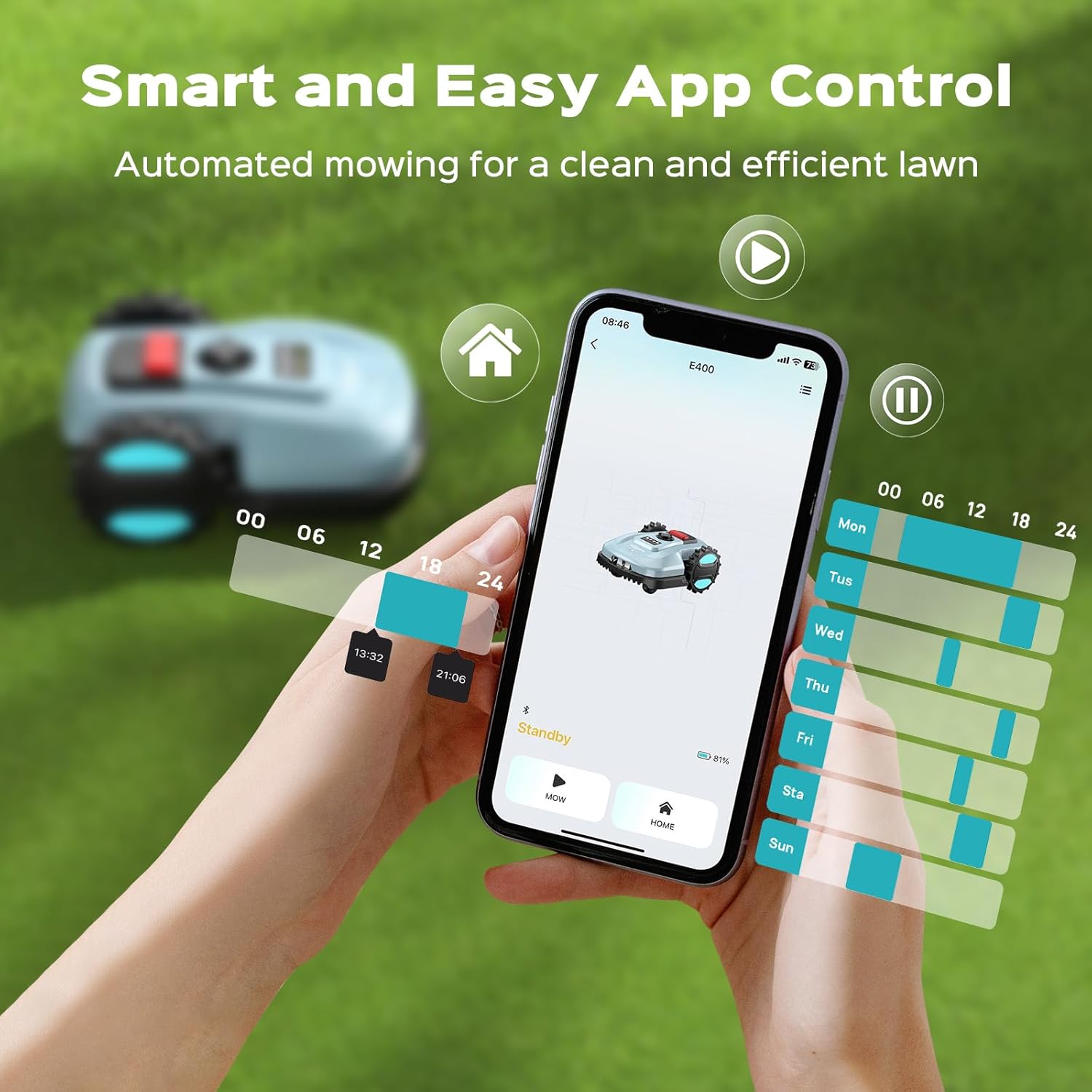
Image: The smart app control interface for scheduling and managing the robotic lawn mower.
5. Упутство за употребу
5.1 Покретање и заустављање
To start the mower, ensure it is within the boundary wire and has sufficient battery. You can initiate mowing via the mobile app or directly on the mower's control panel. To stop, press the STOP button on the mower or use the app.
5.2 Контрола апликација
The YARDCARE app allows for comprehensive control:
- Set daily or weekly mowing schedules.
- Adjust cutting height remotely.
- Monitor the mower's status and location.
- Manually start, pause, or send the mower back to the charging station.
5.3 Аутоматско пуњење
The mower is equipped with a smart recharge function. When the battery level drops below 20%, or if rain is detected, the mower will automatically return to its charging station to recharge. Once fully charged, it will resume mowing if scheduled.

Image: The robotic lawn mower intelligently returning to its charging dock for automatic recharging.
5.4 Obstacle Detection and Safety Features
The mower utilizes a collision detection system to navigate around obstacles. Upon contact, it will change direction to continue mowing. Additionally, a lift/tilt sensor stops the blades immediately if the mower is lifted or tilted, enhancing safety.

Image: The mower's obstacle avoidance system and the integrated tilt sensor for safety.
5.5 Подешавање висине кошења
The cutting height can be manually adjusted between 0.8 and 2.4 inches to achieve your desired lawn length. Refer to the mower's control panel or app for specific adjustment mechanisms.
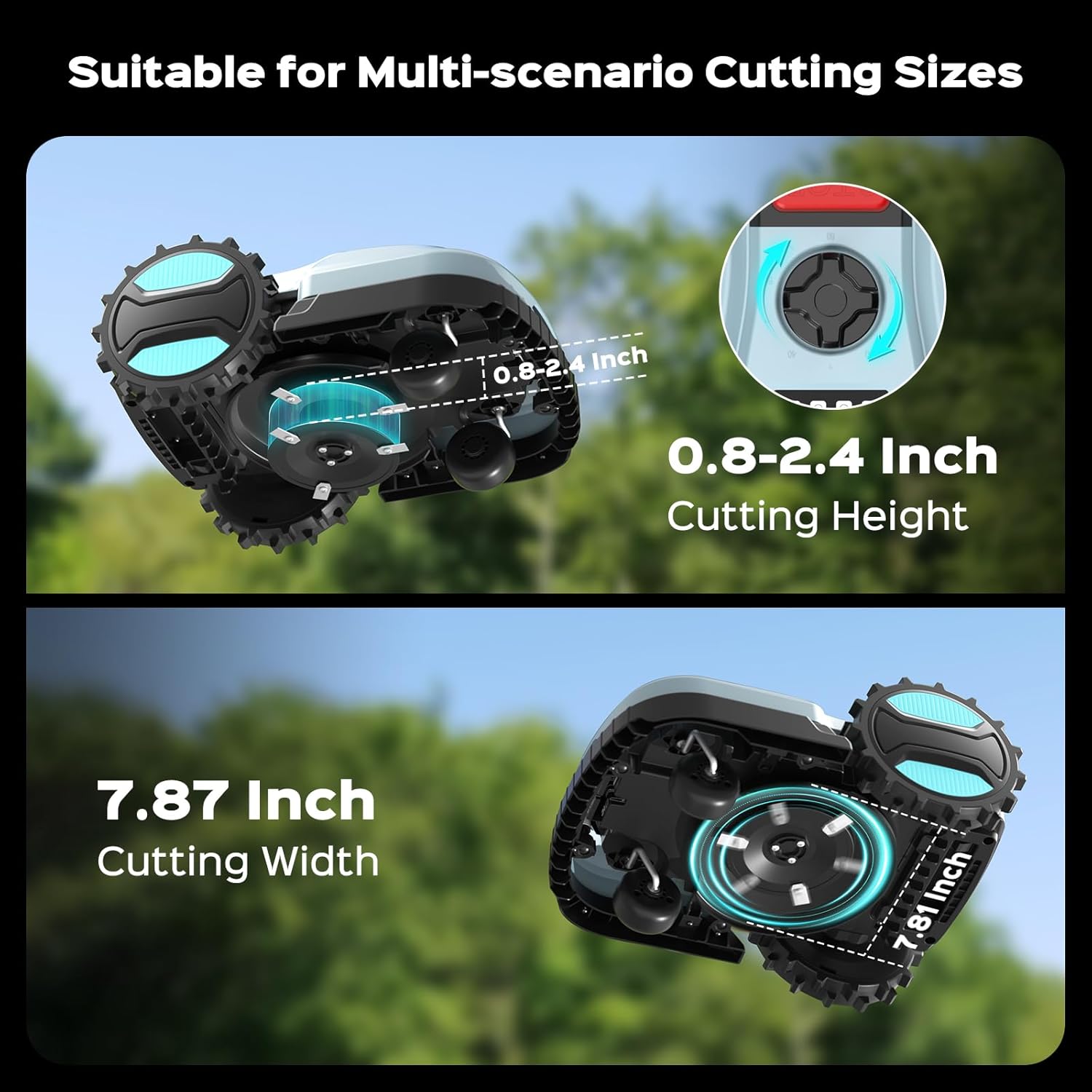
Image: Visual representation of the adjustable cutting height and cutting width.
6. Одржавање
Regular maintenance ensures optimal performance and longevity of your YARDCARE Robotic Lawn Mower.
- Чишћење: The mower has an IPX5 waterproof rating, allowing for easy cleaning with water. Regularly clean the cutting deck and wheels to prevent grass buildup.
- Замена оштрице: Inspect blades regularly for wear and tear. Replace dull or damaged blades using the provided hex key and screws to maintain cutting efficiency. (Blades are included in package contents).
- Одржавање батерије: The 2000mAh high-capacity lithium battery is designed for long-lasting power and easy replacement. Store the mower in a dry place when not in use for extended periods.

Image: The IPX5 waterproof design allows for easy cleaning of the mower.
КСНУМКС. Решавање проблема
Овај одељак се бави уобичајеним проблемима на које можете наићи са роботском косилицом.
| Проблем | Могући узрок | Решење |
|---|---|---|
| Mower not starting or charging. | Power supply issue, charging station not connected, or battery low/faulty. | Check power adapter and charging station connections. Ensure the mower is correctly docked. Verify battery is properly inserted. |
| Mower not staying within boundary. | Boundary wire improperly laid or damaged, or connection issue. | Inspect the entire boundary wire for breaks or loose connections. Ensure the wire is securely pegged to the ground. |
| Mower frequently stops or gets stuck. | Obstacles in mowing area, uneven terrain, or dull blades. | Clear the mowing area of debris. Ensure the lawn is relatively even. Check and replace blades if dull. |
| Неравномерно сечење. | Dull or damaged blades, or incorrect cutting height setting. | Replace blades. Adjust cutting height to a suitable level for your grass type. |
| Проблеми са повезивањем апликација. | Bluetooth/Wi-Fi interference, app not updated, or mower not in pairing mode. | Ensure Bluetooth/Wi-Fi is enabled on your device. Restart the app and the mower. Re-pair the device if necessary. |
8. Спецификације
| Атрибут | Детаљ |
|---|---|
| Бранд | ОДРЖАВАЊЕ ДВОРИШТА |
| Број модела | E400 Deep Grey AA |
| Извор напајања | Баттери Поверед |
| Материјал | Пластика |
| Боја | Тамно сива |
| Тежина артикла | 29.3 фунти |
| Ширина сечења | 7.87 инча |
| Број положаја (висина кошења) | 16 |
| Оперативни режим | Аутоматски |
| Димензије производа | 20.47"Д к 14.96"Ш к 8.93"В |
| Максимална подесива висина кошења | 2.4 инча |
| Минимална подесива висина кошења | 0.8 инча |
| Батерије | 1 нестандардна батерија (укључена) |
9. Гаранција и подршка
Your YARDCARE Robotic Lawn Mower is covered by a manufacturer's warranty. For detailed warranty information, please refer to the warranty card included in your package or visit the official YARDCARE webсајту.
For technical support, troubleshooting assistance, or to inquire about replacement parts, please contact YARDCARE customer service. Contact information can typically be found on the product packaging, the official website, or within the mobile application.
We recommend registering your product online to receive updates and support.