
1. Увод
Thank you for choosing the HOU iPad Keyboard Case. This manual provides detailed instructions for setting up, operating, and maintaining your new keyboard case. Designed for enhanced productivity and protection, this accessory transforms your iPad into a versatile workstation.
2. Компатибилност
This keyboard case is designed to be compatible with specific iPad models. Please verify your iPad's model number to ensure proper fit and functionality.
How to Check Your iPad Model:
- Иди на Подешавања на вашем иПад-у.
- Додирните генерал, онда Абоут.
- Лоцирајте Број модела. It typically starts with 'A' followed by four digits (e.g., A2602).
- Alternatively, the model number is printed in tiny text on the back case of your iPad.
Компатибилни иПад модели:
- iPad 9th Generation 10.2 inch 2021 (Model Numbers: A2602/A2603/A2604/A2605)
- iPad 8th Generation 10.2 inch 2020 (Model Numbers: A2270/A2428/A2429/A2430)
- iPad 7th Generation 10.2 inch 2019 (Model Numbers: A2200/A2197/A2198)
- iPad Air 3 (10.5 inch)
- iPad Pro 10.5 inch 2017

3. Кључне карактеристике
The HOU iPad Keyboard Case offers a range of features designed to enhance your iPad experience:
- Silent & Responsive Typing: Equipped with premium silicone-coated scissor switches for quiet, comfortable, and efficient typing.
- Магнетни одвојиви дизајн: The keyboard can be easily detached from the case, allowing for flexible use in tablet mode or laptop mode.
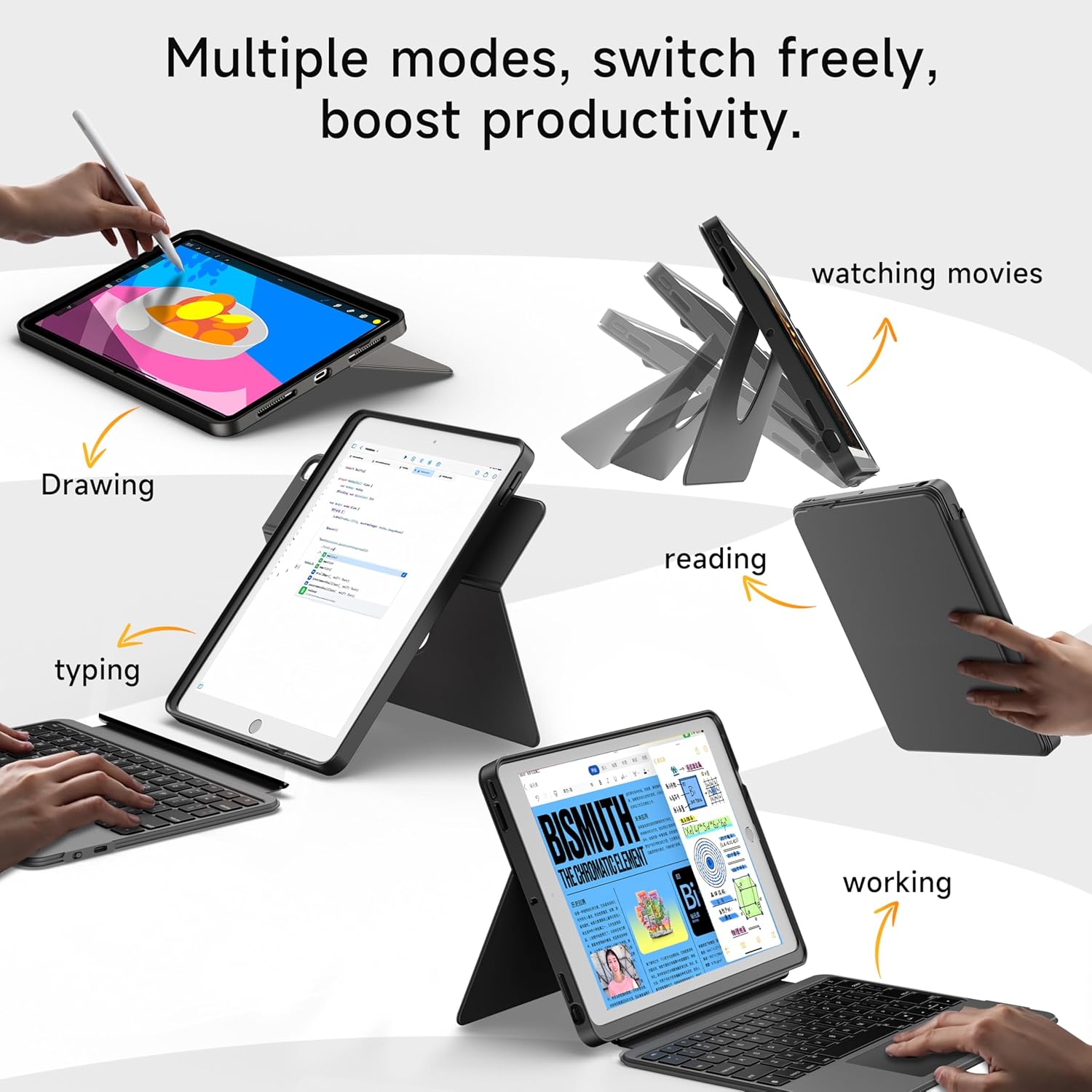
- 360° Rotating Stand with Adjustable Angles: Provides versatile viewing angles, supporting both portrait and landscape orientations for various activities like reading, watching, or presenting.
- Тастатура са 7 боја позадинског осветљења: Features adjustable 7-color backlighting for typing in low-light conditions, with customizable brightness levels.
- Military-Grade Protection: The shockproof silicone case offers 360° protection against drops and spills.
- Secure Apple Pencil Storage: Includes an elastic strap to securely hold your Apple Pencil.
- Интегрисана тачпед: A large multi-touch touchpad supports iOS gestures for precise navigation.
- Дуг век трајања батерије: The keyboard features a 500mAh battery, providing up to 50 hours of use with backlighting off, or 4-6 hours with backlighting on.

4. Упутства за подешавање
4.1. Пуњење тастатуре
Before first use, ensure the keyboard is fully charged.
- Пронађите USB-C порт за пуњење са стране тастатуре.
- Connect the provided USB-C cable to the keyboard and a compatible power adapter (not included).
- The LED indicator will turn red during charging and turn off when fully charged. A 2-hour charge provides weeks of use.

4.2. Блуетоотх упаривање
Пратите ове кораке да бисте повезали тастатуру са iPad-ом путем Bluetooth-а:
- Ensure the keyboard is charged and turn it on using the power switch.
- На вашем iPad-у идите на Подешавања > Блуетоотх.
- Притисните и држите FN + CONTROL + R keys on the keyboard for 3 seconds to enter pairing mode. The Bluetooth indicator light on the keyboard will flash.
- On your iPad, select "HOU Keyboard" from the list of available devices.
- Once paired, the Bluetooth indicator light on the keyboard will turn off.
5. Упутство за употребу
5.1. Коришћење тастатуре
The keyboard provides a full QWERTY layout with dedicated iOS command keys for efficient workflow.
- Тастери пречица: Access one-tap shortcuts for screen brightness, media playback, volume control, Lock, Home, and Emoji functions.
- куцање: Enjoy a comfortable and quiet typing experience for documents, emails, and more.

5.2. Подешавање позадинског осветљења
The keyboard features 7-color backlighting with adjustable brightness.
- Промени боју: Притисните FN + Light Bulb icon to cycle through the 7 available colors.
- Подесите осветљеност: Притисните ФН + стрелица нагоре or ФН + стрелица надоле да бисте повећали или смањили јачину позадинског осветљења.
5.3. Using the Touchpad
The large multi-touch touchpad supports various iOS gestures for intuitive navigation:
- Додир једним прстом: Кликните/Изаберите.
- Two Fingers Swipe: Померање горе/доле/лево/десно.
- Three Fingers Swipe Up: Идите на почетни екран.
- Three Fingers Swipe Down: View Контролни центар.
- Pinch In/Out: Увећање/умањивање.
5.4. Utilizing the 360° Rotating Stand
The integrated stand allows for flexible viewинг опције:
- Пејзажни режим: Ideal for watching videos, presentations, or typing.
- Портретни режим: Perfect for reading documents, browsing social media, or video calls.
- Подесиви нагиб: Tilt the screen from 90° (typing) to 170° (movie nights) for optimal comfort.


6. Одржавање
To ensure the longevity and optimal performance of your HOU iPad Keyboard Case, follow these maintenance guidelines:
- Чишћење: Користите меку, дamp крпу за брисање спољашњости кућишта и тастатуре. Избегавајте јаке хемикалије или абразивне материјале.
- Складиштење: When not in use, keep the keyboard case closed to protect the screen and keyboard. Store in a cool, dry place away from extreme temperatures.
- Избегавајте течности: While the case offers some protection, avoid direct exposure to liquids to prevent damage to the electronic components.
КСНУМКС. Решавање проблема
If you encounter any issues with your HOU iPad Keyboard Case, refer to the following common solutions:
- Keyboard Not Connecting via Bluetooth:
- Ensure the keyboard is fully charged and powered on.
- Turn off and on your iPad's Bluetooth, then try pairing again.
- Make sure your iPad's operating system is iOS 15.3 or later.
- Тастатура не реагује:
- Check the keyboard's battery level. Recharge if necessary.
- Поново повежите Блуетоотх везу.
- Позадинско осветљење не ради:
- Уверите се да је тастатура укључена.
- Притисните FN + Light Bulb icon to activate or change backlight settings.
- Touchpad Lag or Unresponsiveness:
- Ensure the keyboard battery is not critically low.
- Restart the Bluetooth connection on your iPad.
8. Спецификације производа
| Феатуре | Детаљ |
|---|---|
| Бранд | ХОУ |
| Број модела | B0DTKBTV4H |
| Компатибилни уређаји | iPad 9th/8th/7th Gen 10.2", iPad Air 3, iPad Pro 10.5" 2017 |
| Технологија повезивања | Блуетоотх |
| Опис тастатуре | Ergonomic, Ultra-Silent Keys, X-shaped high-rebound keys |
| Посебне карактеристике | Backlit (7-Color), Detachable Case, Hotkeys and Media Keys, Portable, Trackpad, 360° Rotating Stand, Apple Pencil Holder |
| Капацитет батерије | 500mAh (Lithium) |
| Трајање батерије | Up to 50 hours (backlight off), 4-6 hours (backlight on) |
| Порт за пуњење | УСБ-Ц |
| Материјал | Silicone (Shockproof, Military-Grade Protection) |
| Тежина артикла | 1.34 фунти (приближно 608 г) |
| Укључене компоненте | Keyboard, Case, USB-C Charging Cable |
9. Гаранција и корисничка подршка
Your HOU iPad Keyboard Case is backed by a comprehensive warranty and dedicated customer support.
- 1-годишња гаранција замене: Enjoy peace of mind with a 1-year replacement warranty covering manufacturing defects.
- Политика повраћаја новца у року од 30 дана: Ако нисте потпуно задовољни куповином, можете је вратити у року од 30 дана за потпуни повраћај новца.
- 24/7 корисничка подршка: For any questions, concerns, or assistance, please contact our customer support team available 24 hours a day, 7 days a week.