
Aqualin YL21177
Aqualin Water Timer Garden Irrigation Hose Timer User Manual
Модел: ИЛ21177
Производ је завршенview
The Aqualin Water Timer is an advanced irrigation system designed for efficient and automated watering of lawns, gardens, and pools. It features three independent irrigation programs, rain delay functionality, and a manual watering mode, providing flexible control over your watering schedule. Its durable and waterproof design ensures reliable performance in various outdoor conditions.

Слика 1: Предња страна view of the Aqualin Water Timer, showing the large LCD display, rotary dial, and control buttons.
Кључне карактеристике:
- 3 Independent Irrigation Programs: Customize watering schedules with distinct start times, durations (1 to 360 minutes), and frequencies (1 hour to 15 days).
- Waterproof and Durable Design: Constructed with waterproof materials and a sealed battery cover to prevent internal leakage. Features a sturdy metal thread connection.
- Интерфејс једноставан за коришћење: Large LCD screen for clear display of watering information and intuitive controls for programming.
- Режим одлагања кише: Pause scheduled watering for 6, 12 hours, or 1-7 days to conserve water during rainfall.
- Ручни режим: Allows for on-demand watering without affecting programmed schedules.
- Intelligent Timing System: Built-in solenoid valve for precise and stable program execution.
Сетуп
1. Распакивање и компоненте
Carefully remove the Aqualin Water Timer from its packaging. Ensure all components are present. The main unit includes the timer body, an integrated metal filter, and a connection nut.

Figure 2: The Aqualin Water Timer highlighting the built-in metal filter for durability and the easy-to-operate rotary dial.
2. Инсталација батерије
- Пронађите одељак за батерије на задњој страни тајмера.
- Отворите запечаћени поклопац батерије.
- Insert two (2) AA 1.5V batteries (not included) into the compartment, ensuring correct polarity (+/-).
- Securely close the battery cover to maintain its waterproof seal.
3. Installation to Faucet
- Ensure your outdoor faucet is turned off.
- Thread the Aqualin Water Timer onto your standard outdoor faucet. The top connection features a durable metal thread for a secure fit.
- Tighten the connection by hand until snug. Avoid over-tightening.
- Connect your garden hose to the bottom outlet of the water timer.
- Slowly turn on your outdoor faucet. Check for any leaks at the connections.
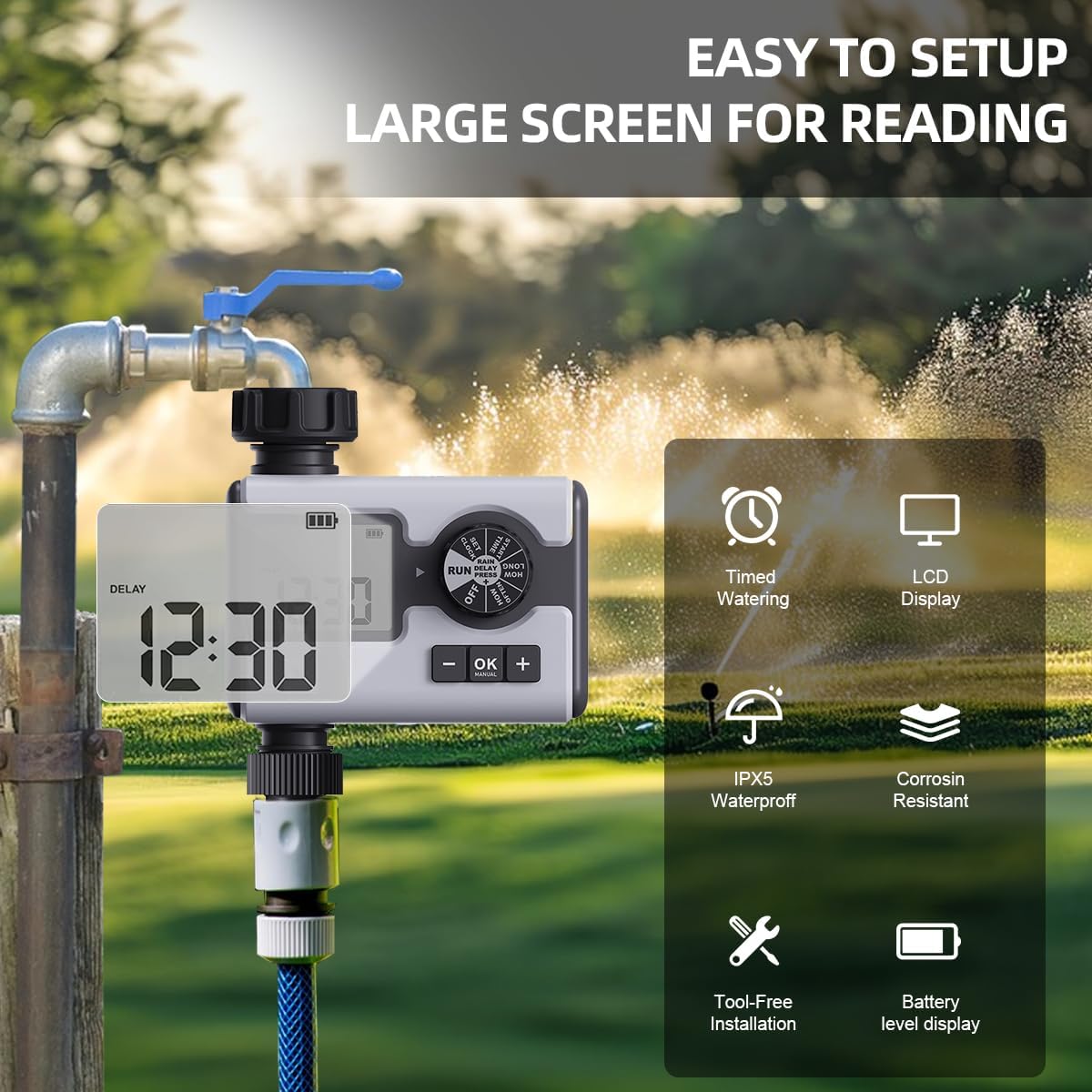
Figure 3: The Aqualin Water Timer connected to a faucet, illustrating its large LCD display for easy reading, IPX5 waterproof rating, corrosion resistance, and tool-free installation.
4. Подешавање сата
- Rotate the dial to the "SET CLOCK" position.
- Use the "+" and "-" buttons to adjust the current time.
- Press "OK" to confirm the setting and move to the next digit or exit the setting mode.
Упутство за употребу
1. Understanding the Control Dial
The central rotary dial allows you to navigate through different settings and modes. The available positions are:
- ВАН: Turns off all watering programs.
- ТРЦАТИ: Activates the programmed watering schedules.
- ПОДЕШИТЕ САТ: Користи се за подешавање тренутног времена.
- ПОЧЕТНО ВРЕМЕ: Sets the beginning time for a watering program.
- КОЛИКО ДУГО: Sets the duration of watering.
- КОЛИКО ЧЕСТО: Sets the frequency of watering.
- КАШЊЕЊЕ КИШЕ: Activates the rain delay function.
2. Programming Irrigation Schedules (P1, P2, P3)
The Aqualin Water Timer supports three independent programs (P1, P2, P3). Each program can be configured with its own start time, duration, and frequency.
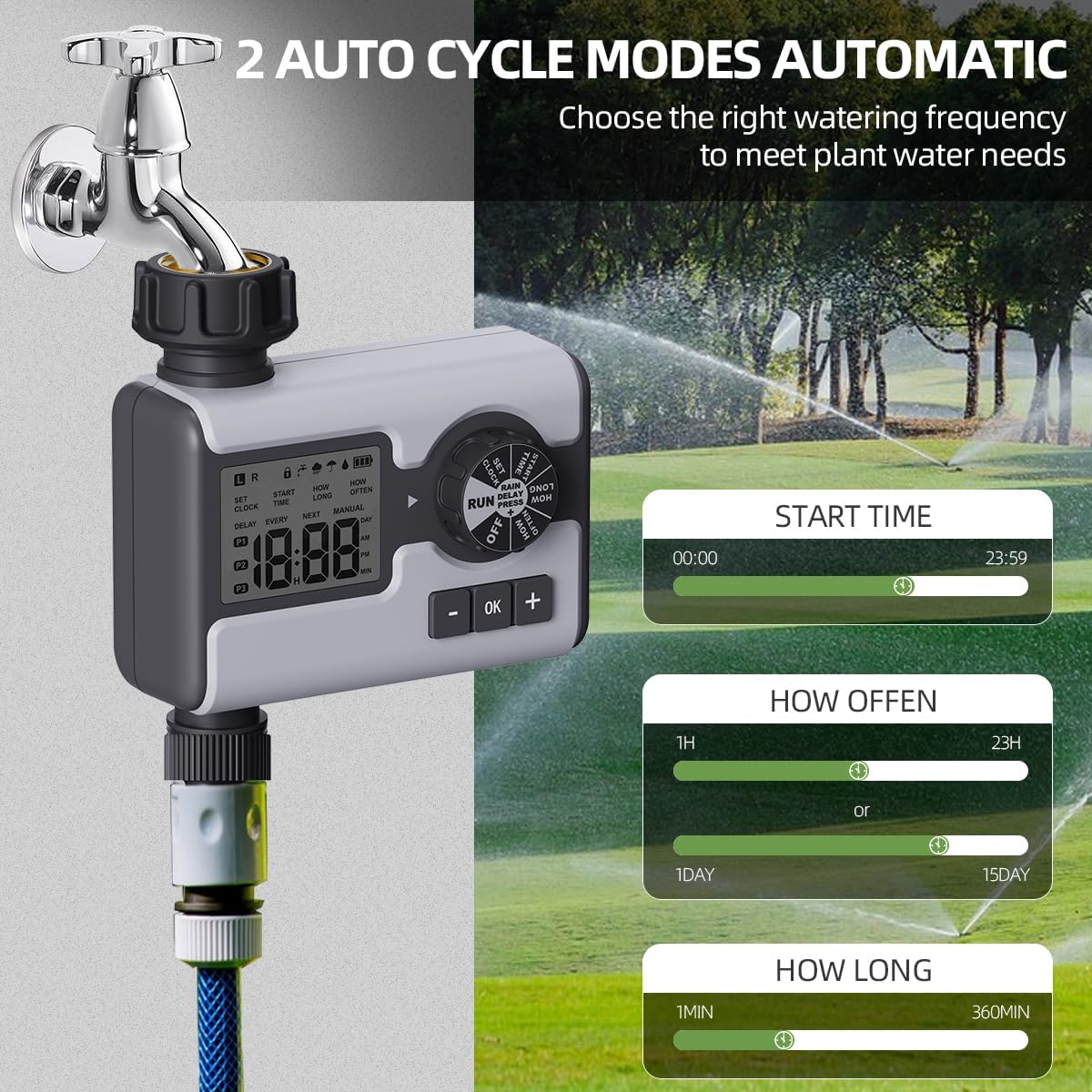
Figure 4: Display illustrating the settings for Start Time (00:00-23:59), How Often (1 hour-23 hours or 1 day-15 days), and How Long (1 minute-360 minutes) for the automatic watering cycles.
- Изаберите програм: While in "RUN" mode, press the "OK" button repeatedly to cycle through P1, P2, P3. The active program will be displayed on the LCD.
- Подесите време почетка:
- Rotate the dial to "START TIME".
- Use "+" and "-" buttons to set the desired start time for the selected program.
- Притисните „ОК“ да бисте потврдили.
- Подесите трајање заливања („КОЛИКО ДУГО“):
- Rotate the dial to "HOW LONG".
- Use "+" and "-" buttons to set the watering duration from 1 minute to 360 minutes.
- Притисните „ОК“ да бисте потврдили.
- Подесите учесталост заливања („КОЛИКО ЧЕСТО“):
- Rotate the dial to "HOW OFTEN".
- Use "+" and "-" buttons to set the frequency: from 1 hour to 23 hours, or from 1 day to 15 days.
- Притисните „ОК“ да бисте потврдили.
- After setting all parameters for a program, rotate the dial back to "RUN" to activate the schedule.
3. Режим одлагања кише
The rain delay feature allows you to temporarily pause your watering schedule to avoid overwatering during or after rainfall.

Figure 5: The Aqualin Water Timer displaying the rain delay function, which can be set for 6/12 hours or 1-7 days.
- While the timer is in "RUN" mode, press the "+" button.
- The display will show "DELAY". Use the "+" or "-" buttons to select the desired delay duration: 6 hours, 12 hours, or 1 to 7 days.
- Press "OK" to confirm the rain delay. The timer will resume its schedule automatically after the delay period ends.
4. Ручни режим заливања
The manual mode allows for immediate, on-demand watering without interrupting your pre-programmed schedules.

Figure 6: A person using the manual watering feature with the Aqualin Water Timer, indicating that temporary water use does not alter automatic watering schedules. The watering duration can be set from 1 minute to 360 minutes.
- While the timer is in "RUN" mode, press the "MANUAL" (OK) button.
- The display will show the manual watering duration. Use the "+" and "-" buttons to adjust the desired manual watering time.
- Press "OK" to start manual watering.
- To stop manual watering prematurely, press the "MANUAL" (OK) button again.
Одржавање
- Чишћење: Периодично обришите спољашњост тајмера адитивомamp крпом да бисте уклонили прљавштину и остатке. Не користите абразивна средства за чишћење.
- Чишћење филтера: The timer has a built-in metal filter. If water flow is reduced, unscrew the timer from the faucet, remove and clean the filter screen under running water. Reinstall the filter before reattaching the timer.
- Замена батерије: Replace batteries when the low battery indicator appears on the LCD screen. Always use fresh AA 1.5V alkaline batteries.
- Зимско складиштење: Before freezing temperatures, disconnect the timer from the faucet and hose. Remove the batteries. Store the timer indoors in a dry, frost-free location to prevent damage.
Решавање проблема
| Проблем | Могући узрок | Решење |
|---|---|---|
| Тајмер се не укључује/LCD екран је празан. | Мртве или неправилно инсталиране батерије. | Replace with new AA 1.5V batteries, ensuring correct polarity. |
| Нема протока воде или је притисак воде низак. |
|
|
| Timer not watering at scheduled times. |
|
|
| Вода цури из прикључака. | Loose connection or missing/damaged washer. | Ensure connections are hand-tight. Check and replace rubber washers if damaged. |
Спецификације
| Феатуре | Детаљ |
|---|---|
| Бранд | Aqualin |
| Број модела | ИЛ21177 |
| Материјал | Plastic (with metal thread connection) |
| Боја | Греи |
| Димензије производа (Д x Ш x В) | 2.56"Д к 5.24"Ш к 5.91"В |
| Тежина артикла | 357 грама (12.6 унци) |
| Опсег притиска воде | 14.5 пси до 116 пси |
| Извор напајања | 2 к АА 1.5В батерије (нису укључене) |
| Трајање заливања | 1 минут до 360 минута |
| Учесталост заливања | 1 hour to 15 days |
| Опције одлагања кише | 6 hours, 12 hours, 1-7 days |
| Водоотпорна оцена | IPX5 (implied from "IPX5 Waterproff" image) |
Гаранција и подршка
For warranty information and customer support, please refer to the documentation provided with your purchase or contact the retailer where the product was acquired. You may also visit the official Aqualin webсајт за даљу помоћ.
Note: No official product videos from the seller were found in the provided data.
Ask a question about this manual
Ask about setup, troubleshooting, compatibility, parts, safety, or missing instructions. Manuals+ will review the question and use this page’s manual context to help answer it.