
1. Производ је готовview
The TP-Link TL-MC102 is a media converter designed to facilitate the conversion between 1000BASE-SX fiber and 1000Base-T copper media. It supports Gigabit Ethernet standards (IEEE802.3ab 1000Base-T and IEEE802.3z 1000Base-SX) and is compatible with multi-mode fiber optic cables using SC-Type connectors. This device operates at 850nm wavelength for both transmitting and receiving data, offering full wire-speed forwarding. It can function as a standalone unit or be integrated into TP-Link's MC1400 chassis. Key features include Auto MDI/MDI-X for the TX port and front panel status LEDs for easy monitoring.
The TL-MC102 extends fiber optic distances up to 0.55 kilometers (550 meters) when using 50/125µm multi-mode fiber, or 220 meters with 62.5/125µm multi-mode fiber.
2. Садржај пакета
Проверите да ли ваш пакет садржи следеће ставке:
- 1 x TL-MC102 Gigabit SFP to RJ45 Fiber Media Converter
- 1 к адаптер за напајање
- 1 к Упутство за инсталацију
3. Карактеристике производа
- Конвертује 1000BASE-SX оптички кабл у 1000Base-T бакарни кабл и обрнуто.
- Supports auto-negotiation for Half-Duplex / Full-Duplex transfer modes.
- Features auto MDI/MDI-X for the TX port.
- Омогућава конфигурацију прекидача за режим присилног/аутоматског преноса на FX порту.
- Extends fiber distance up to 550m (1,800 feet) using 50/125µm Multi-Mode Fiber.
- Extends fiber distance up to 220m (720 feet) using 62.5/125µm Multi-Mode Fiber.
- Equipped with easy-to-view ЛЕД индикатори за праћење мрежне активности.
- External power supply for operation.
- Operates at a wavelength of 850nm.
- Maximum power consumption: 1.66W.
- Complies with IEEE 802.3ab and IEEE 802.3z standards.
4. Хардвер је готовview
The TL-MC102 features a compact design with essential ports and LED indicators for status monitoring.
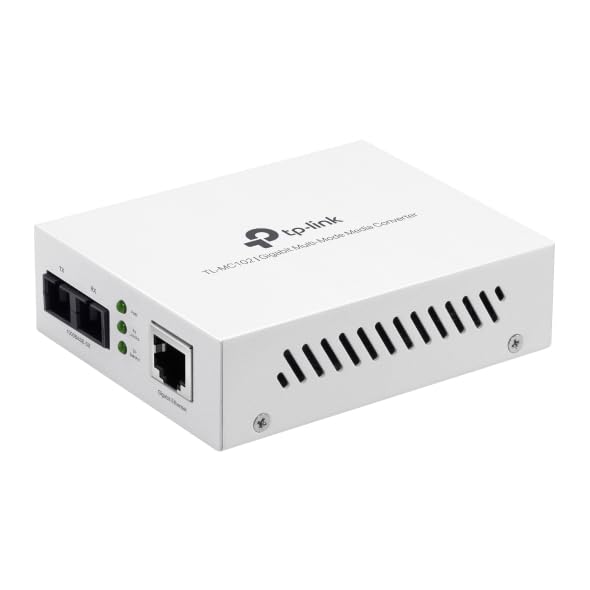
Слика 1: Фронт view of the TL-MC102 Gigabit SFP to RJ45 Fiber Media Converter. This image shows the compact white casing of the device, highlighting its ports and LED indicators on the front panel.
Портови и конектори:
- RJ45 Port (TX): Standard Ethernet port for connecting to copper-based network devices (e.g., switch, router, computer) using an Ethernet cable. Supports 10/100/1000Mbps speeds and Auto MDI/MDI-X.
- SFP Port (FX): Slot for an SFP (Small Form-Factor Pluggable) module. This port is used for fiber optic connections. The TL-MC102 is designed for 1000BASE-SX multi-mode SFP modules.
- Улазна снага: Конектор за спољни адаптер за напајање.
ЛЕД индикатори:
The front panel LEDs provide real-time status information about the converter's operation:
- ПВР (снага):
- на: The converter is powered on.
- Искључено: The converter is powered off.
- FX линк/акција (фибер линк/активност):
- на: A fiber link is established.
- Трепери: Подаци се преносе или примају преко оптичке везе.
- Искључено: No fiber link is established.
- TX Link/Act (Copper Link/Activity):
- на: A copper Ethernet link is established.
- Трепери: Data is being transmitted or received over the copper link.
- Искључено: No copper Ethernet link is established.
- TX 1000 (Copper Speed):
- на: The copper port is operating at 1000Mbps.
- Искључено: The copper port is operating at 10/100Mbps.
5. Упутства за подешавање
Follow these steps to set up your TL-MC102 media converter:
- Уређаји за искључивање: Before making any connections, ensure that all devices (e.g., switch, router, computer) to be connected to the media converter are powered off.
- Insert SFP Module: Carefully insert a compatible 1000BASE-SX multi-mode SFP module into the SFP port (FX) of the TL-MC102. Ensure it clicks into place.
- Повежите оптички кабл: Connect one end of a multi-mode fiber optic cable (with SC-Type connectors) to the SFP module in the TL-MC102. Connect the other end of the fiber cable to a compatible fiber optic device (e.g., fiber switch, another media converter).
- Повежите Етернет кабл: Connect one end of an Ethernet cable to the RJ45 port (TX) of the TL-MC102. Connect the other end of the Ethernet cable to the Ethernet port of your copper-based network device (e.g., switch, router, PC).
- Повежите адаптер за напајање: Plug the provided power adapter into the power input of the TL-MC102, then plug the other end into a standard electrical outlet.
- Уређаји за укључење: Power on the TL-MC102. The PWR LED should illuminate. Then, power on your connected network devices.
- Проверите везе: Check the LED indicators on the TL-MC102. The FX Link/Act and TX Link/Act LEDs should illuminate, indicating successful link establishment. If data is flowing, these LEDs will flash. The TX 1000 LED should be on if the copper connection is at Gigabit speed.
Напомена: Ensure that the fiber optic cable type (multi-mode) and connector type (SC) match the requirements of the SFP module and the connected fiber device.
6. Упутство за употребу
Once properly set up, the TL-MC102 operates automatically to convert signals between fiber and copper media. No further configuration is typically required for basic operation.
Статус надгледања:
Regularly observe the LED indicators on the front panel to monitor the status of your network connections:
- Чврсто ПВР LED indicates the device is receiving power.
- Чврсто ФКС Линк/Акт и ТКС Линк/Акт LEDs confirm active network links on both fiber and copper sides.
- Трепери ФКС Линк/Акт и ТКС Линк/Акт LEDs indicate active data transmission.
- Чврсто ТКС 1000 LED confirms a Gigabit Ethernet connection on the copper side.
If any Link/Act LED is off when it should be on, refer to the Troubleshooting section.
7. Одржавање
To ensure optimal performance and longevity of your TL-MC102, consider the following maintenance guidelines:
- Одржавати уредним одржавати чистим: Regularly clean the exterior of the device with a soft, dry cloth. Avoid using liquid or aerosol cleaners.
- вентилација: Уверите се да је уређај постављен у добро проветреном простору како бисте спречили прегревање. Не блокирајте вентилационе отворе.
- Управљање кабловима: Keep fiber and Ethernet cables neatly organized and free from kinks or excessive bends, especially fiber optic cables which are sensitive to bending.
- Напајање: Use only the power adapter provided with the device. If a replacement is needed, ensure it meets the exact specifications.
- Окружење: Operate the device within its specified environmental conditions (temperature, humidity) to prevent damage.
- Ажурирања фирмвера: While media converters typically do not require frequent firmware updates, check the TP-Link support website periodically for any recommended updates for your model.
КСНУМКС. Решавање проблема
If you encounter issues with your TL-MC102, refer to the following common problems and solutions:
- Нема напајања (PWR LED искључена):
- Ensure the power adapter is securely connected to the converter and a working electrical outlet.
- Проверите да ли је електрична утичница функционална тако што ћете укључити други уређај.
- Check if the power adapter is damaged.
- Нема оптичке везе (FX Link/Act LED искључена):
- Verify that the SFP module is correctly inserted into the SFP port.
- Проверите да ли је оптички кабл оштећен или савијен.
- Ensure the fiber cable connectors are clean and properly seated at both ends.
- Confirm that the connected fiber device is powered on and functioning correctly.
- Ensure the SFP module and the connected fiber device are compatible (e.g., multi-mode to multi-mode, correct wavelength).
- No Copper Link (TX Link/Act LED Off):
- Check the Ethernet cable for damage and ensure it is securely connected to both the TL-MC102 and the network device.
- Проверите да ли је повезани мрежни уређај (нпр. прекидач, рутер, рачунар) укључен и да ли је његов етернет порт активан.
- Пробајте други Етернет кабл.
- Ensure the network device's Ethernet port is configured correctly (e.g., not disabled).
- Мала брзина мреже:
- Check the TX 1000 LED. If it's off, the copper connection is not at Gigabit speed. This could be due to the connected device or cable.
- Ensure all connected devices (including the SFP module) support Gigabit Ethernet.
- Inspect Ethernet and fiber cables for damage or poor connections.
- Повремено повезивање:
- Check all cable connections (power, Ethernet, fiber) for looseness.
- Уверите се да се уређај не прегрева.
- Verify that the power supply is stable.
- Consider testing with different cables or SFP modules if available.
9. Спецификације
| Феатуре | Опис |
|---|---|
| Бранд | ТП-Линк |
| Број модела | ТЛ-МЦ102 |
| Хардверски интерфејс | Ethernet, SFP |
| Компатибилни уређаји | NICs, Network Switch, Router |
| Протокол везе података | Етхернет |
| Брзина преноса података | 1 гигабита у секунди |
| Тип влакна | Вишемодно влакно (1000BASE-SX) |
| Таласна дужина | 850нм |
| Максимална удаљеност влакана | 550m (50/125µm MMF), 220m (62.5/125µm MMF) |
| Потрошња енергије | Мак 1.66В |
| Стандарди | IEEE 802.3ab, IEEE 802.3z |
| Тежина артикла | 0.46 фунти |
| УПЦ | 810142823715 |
10. Гаранција и подршка
Информације о гаранцији:
The TP-Link TL-MC102 comes with a 2-годишња гаранција произвођача. Please retain your proof of purchase for warranty claims. For detailed warranty terms and conditions, refer to the official TP-Link webсајт или гарантни лист који је испоручен уз ваш производ.
техничка подршка:
For technical support, product updates, and additional resources, please visit the official TP-Link support webсајт. Тамо обично можете пронаћи честа питања, водиче за решавање проблема и контакт информације за корисничку подршку.
Званични ТП-Линк Webсајт: ввв.тп-линк.цом