
Electronic Spices W88-B
Electroni Spices W88-B 20A Solar Charger Controller User Manual
Модел: W88-B
1. Увод
The Electronic Spices W88-B 20A Solar Charger Controller is designed to efficiently manage the charging and discharging of 12V/24V solar power systems. This controller optimizes battery performance and extends battery life by preventing overcharging, over-discharging, and short circuits. It features dual USB ports for charging mobile devices and other USB-powered gadgets directly from the solar system. Utilizing intelligent PWM charging technology, it enhances energy conversion efficiency, making it suitable for off-grid solar setups, RVs, boats, and small solar installations. The user-friendly LCD display provides real-time data for effective monitoring and management. Constructed with durable and heat-resistant materials, the W88-B controller offers reliable long-term performance in various environmental conditions.
2. Кључне карактеристике
- Модел: В88-Б
- Ратед Волtage: 12V/24V automatic identification
- Називна струја: 20А
- Макс. ПВ Волtage: 50В
- Макс. улазна снага фотонапонског система: 130W (for 12V system) / 260W (for 24V system)
- Тип приказа: LCD/LED display for real-time monitoring
- Технологија пуњења: PWM battery charging
- УСБ портови: Два УСБ порта за пуњење уређаја
- Заштитне карактеристике: Overcharging, over-discharging, short circuit, over-current, over-voltage, overheating, and lightning protection.
- Компатибилност батерија: Suitable for lead-acid battery, lithium iron battery, lithium battery.
- Материјал: Durable plastic and metal construction.
3. Производ је готовview и Димензије
The W88-B solar charge controller features a compact design with clearly labeled terminals and an intuitive LCD display. Below are images illustrating the product's appearance and its key dimensions.

Слика 3.1: Предња страна view of the Electroni Spices W88-B Solar Charger Controller, showing the LCD display, control buttons, USB ports, and terminal connections.

Figure 3.2: Dimensions of the W88-B Solar Charger Controller, indicating a length of 131 mm and a width of 69 mm.
4. Safety Information and Protection Features
Always observe safety precautions when working with electrical systems. Ensure all connections are secure and correct before applying power. The W88-B controller incorporates multiple protection features to ensure safe operation of your solar system:
- Прекострујна заштита: Спречава оштећења од прекомерног протока струје.
- Заштита од прекомерне наплате: Stops charging when the battery is full to prevent overcharging.
- Заштита од кратког споја: Automatically disconnects in case of a short circuit.
- Овер Волtagе Заштита: Protects against damage from excessively high voltage.
- Заштита од прегревања: Искључује се ако унутрашња температура пређе безбедне границе.
- Заштита од грома: Нуди заштиту од удара грома.

Figure 4.1: Visual representation of the various protection features integrated into the W88-B Solar Charger Controller.
5. Подешавање и инсталација
Proper installation is crucial for the optimal performance and longevity of your solar charge controller. Follow these steps carefully:
- Прво повежите батерију: Connect the battery to the charge controller. Ensure correct polarity (+ to + and - to -). The controller will detect the battery voltagе (12V или 24V) аутоматски.
- Connect Solar Panels: Connect the solar panels to the charge controller. Again, observe correct polarity.
- Повежите једносмерно оптерећење (опционо): Connect your DC load (e.g., DC lights) to the load terminals of the controller.
- Connect Inverter (Optional): If using an inverter for AC loads, connect it to the battery terminals (not directly to the controller's load terminals).
Важно: Always connect the battery to the controller first, then the solar panels, and finally the load. Disconnect in the reverse order: load, then solar panels, then battery.
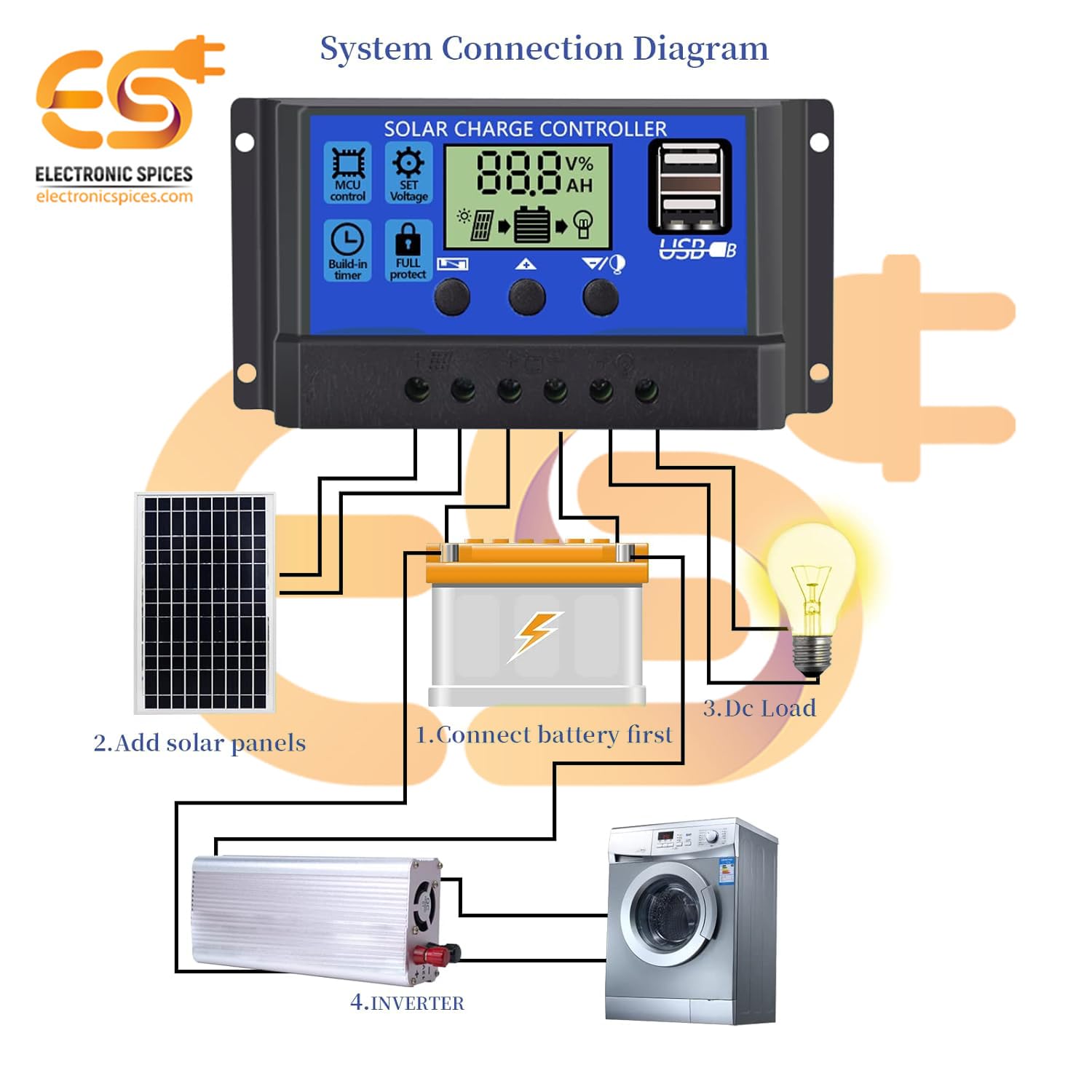
Figure 5.1: System connection diagram illustrating the proper sequence for connecting the battery, solar panels, DC load, and inverter to the solar charge controller.

Figure 5.2: A quick visual guide for connecting the solar panels, battery, and DC load to the W88-B controller.
6. Упутство за употребу
The W88-B controller features an LCD display that provides real-time information about your solar system's status.

Figure 6.1: Explanation of the digital display on the W88-B controller, showing indicators for solar panel charge, battery status, and load output.
6.1. Режими приказа
The LCD cycles through various display modes automatically. You can also manually cycle through them using the control buttons. Common displays include:
- Баттери Волtage: Приказује тренутну јачину звукаtagе прикључене батерије.
- Solar Panel Charge Status: Indicates if the solar panels are actively charging the battery.
- Load Output Status: Shows if the load output is active or inactive.
6.2. Контролна дугмад
The controller has three buttons for navigation and setting adjustments:
- Дугме менија: Користи се за улазак и излазак из режима подешавања.
- Дугме горе: Користи се за повећање вредности или навигацију нагоре у менијима.
- Дугме доле: Used to decrease values or navigate downwards in menus.
Refer to the specific icons on the controller for functions like MCU control, set voltage, build-in timer, and full protect indicators.
7. Одржавање
To ensure the long-term reliability and performance of your W88-B solar charge controller, follow these maintenance guidelines:
- Редовно чишћење: Одржавајте контролер чистим и без прашине и прљавштине. Користите меку, суву крпу за чишћење.
- Проверите везе: Periodically inspect all wiring connections to ensure they are tight and free from corrosion. Loose connections can lead to power loss or overheating.
- вентилација: Ensure the controller is installed in a well-ventilated area to prevent overheating. Do not block the ventilation holes.
- Услови животне средине: While designed for durability, avoid exposing the controller to extreme moisture or direct sunlight for prolonged periods if not rated for such exposure.
- Здравље батерије: Monitor your battery's health regularly. A failing battery can impact the controller's performance.
КСНУМКС. Решавање проблема
If you encounter issues with your W88-B solar charge controller, refer to the following common problems and their solutions:
| Проблем | Могући узрок | Решење |
|---|---|---|
| Нема дисплеја нити напајања | Батерија није повезана или је низак ниво напуњеностиtage; reversed polarity; loose connection. | Проверите прикључке батерије и волtage. Ensure correct polarity. Tighten all terminals. |
| Батерија се не пуни | Solar panels not connected; insufficient sunlight; faulty solar panel; controller fault. | Check solar panel connections. Ensure panels are receiving adequate sunlight. Test solar panel output. |
| Учитавање не ради | Load disconnected; battery voltage too low (low voltage disconnect); overload protection activated. | Check load connections. Charge battery. Reduce load or check for short circuit in load. |
| Прегревање контролера | Poor ventilation; excessive load; short circuit. | Ensure adequate airflow around the controller. Reduce load. Check for short circuits in the system. |
Ако проблем и даље постоји након покушаја ових решења, обратите се корисничкој подршци.
9. Спецификације
| Параметар | Валуе |
|---|---|
| Модел | В88-Б |
| Ратед Волtage | 12V/24V (аутоматски) |
| Називна струја | 20А |
| Макс. ПВ Волtage | 50В |
| Max. PV Input Power (12V) | 130В |
| Max. PV Input Power (24V) | 260В |
| Дисплаи Типе | ЛЦД/ЛЕД |
| Тип прикључка за пуњење | USB (Dual) |
| Тежина артикла | 150 грама |
| Димензије (ДкШ) | 13.1 цм к 6.9 цм |
| Материјал | Пластика, метал |
| Боја | Плава |
| Земља порекла | Индија |
10. Гаранција и подршка
This product is manufactured by Electronic Spices. For any technical assistance, troubleshooting beyond this manual, or warranty inquiries, please contact Electronic Spices customer support. Please have your product model number (W88-B) and purchase details ready when contacting support.
Произвођач: Електронски зачини
Контакт информације: Refer to the contact details provided with your purchase or visit the official Electronic Spices webсајт за најновије информације о подршци.
Ask a question about this manual
Ask about setup, troubleshooting, compatibility, parts, safety, or missing instructions. Manuals+ will review the question and use this page’s manual context to help answer it.