
1. Увод
Thank you for choosing the Rubicon DX14 Electric Wheelchair. This manual provides essential information for the safe operation, maintenance, and care of your new mobility device. Please read this manual thoroughly before using the wheelchair to ensure proper function and to prevent injury.
The Rubicon DX14 is designed for individuals requiring assistance with mobility, offering a blend of power, portability, and comfort. Its foldable design and extended battery range make it suitable for both indoor and outdoor use, including travel.
2. Безбедносне информације
Your safety is paramount. Adhere to all warnings and instructions in this manual.
- Капацитет тежине: Не прекорачујте максималну носивост од 150 кг (330 фунти).
- Безбедност батерије: Use only the provided charger. Do not expose batteries to extreme temperatures or puncture them. Charge in a well-ventilated area.
- Радно окружење: Avoid operating the wheelchair on excessively steep inclines (maximum recommended 12 degrees), uneven surfaces, or in heavy rain. While designed for all-terrain, exercise caution.
- кочење: The electromagnetic brake system provides automatic stopping when the joystick is released. Always ensure the brake is functioning correctly before use.
- Преклапање/расклапање: Ensure the wheelchair is powered off and stable before attempting to fold or unfold it. Keep hands and fingers clear of moving parts.
- Деца и кућни љубимци: Keep children and pets away from the wheelchair during operation and when folding/unfolding.
- Путовање авионом: The DX14 is airline approved. Consult your airline for specific regulations regarding battery transport before travel.
3. Компоненте производа
Familiarize yourself with the main parts of your Rubicon DX14 Electric Wheelchair.
- Главни оквир: Aircraft-grade aluminum alloy with weatherproof coating.
- Џојстик контролер: 360-degree control with adjustable speed, horn, and SOS call function.
- Мотори: Dual 300W motors (total 600W).
- батерије: Dual 12AH Lithium-Ion batteries.
- Седиште: High-density single-cell foam seat with breathable, removable leather cushion.
- Ослонац за ноге: Foldable for easy entry and exit.
- Наслони за руке: Foldable for easy entry and exit.
- Точкови: Solid wheels for durability.
- Складиштење: Includes one compartment behind the seat and two armrest bags.
- Блутут даљински управљач: For remote assistance.
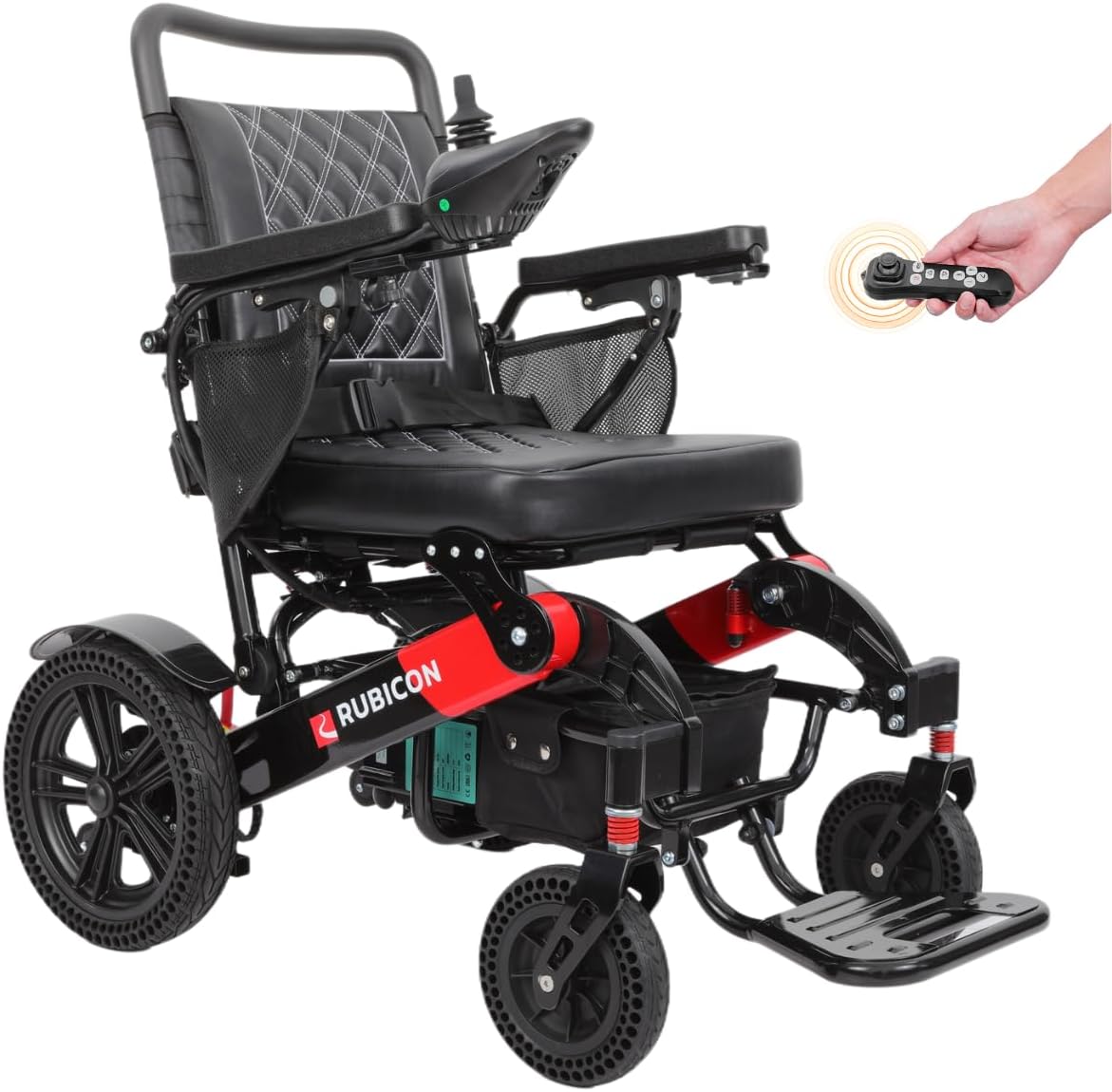
Figure 3.1: The Rubicon DX14 Electric Wheelchair in its fully assembled, ready-to-use state. This image highlights the overall design and key features such as the joystick and leather cushion.

Слика 3.2: Крупни план view of the 360-degree joystick controller, showing buttons for power, speed adjustment, horn, and SOS call. This is the primary control interface for the wheelchair.
4. Подешавање и монтажа
- Расклапање инвалидских колица: Place the folded wheelchair on a flat, stable surface. Release any locking mechanisms. Gently pull the backrest upwards and outwards until the frame locks into place. Ensure all parts are securely engaged.
- Attaching the Joystick: The joystick can be mounted on either the left or right armrest. Slide the joystick into the designated slot until it clicks securely. Connect the joystick cable to the corresponding port, ensuring a firm connection.
- Инсталација/повезивање батерије: The DX14 comes with dual 12AH lithium batteries. Ensure they are properly inserted into their compartments and connected. The off-vehicle charging cable allows charging without removing the seat.
- Adjusting Footrest and Armrests: Adjust the footrest and armrests to a comfortable position. They can be folded up for easier entry and exit.

Figure 4.1: The Rubicon DX14 Electric Wheelchair in its folded state, demonstrating its compact design for transport and storage. It folds to only 13 inches high.
5. Упутство за употребу
- Укључивање/искључивање: Press the power button on the joystick controller to turn the wheelchair on or off.
- вожња: Use the 360-degree joystick to control direction and speed. Push forward to move forward, pull back to move backward, and push left or right to turn. The wheelchair features responsive steering with no dead spots.
- Подешавање брзине: Use the '+' and '-' buttons on the joystick to increase or decrease speed.
- рог: Press the horn button to alert others.
- СОС позив: In an emergency, press the SOS button to activate an alert.
- Ручни режим: To operate the wheelchair manually, locate and flip the red lever near the motors. This disengages the motors, allowing it to be pushed like a traditional wheelchair. Remember to re-engage the motors for electric operation.
- Блутут даљински управљач: The DX14 includes a Bluetooth remote. This allows a caregiver to drive or adjust the wheelchair from a distance. Refer to the separate remote control guide for pairing and operation.
Video 5.1: This video demonstrates the Rubicon DX14 Electric Wheelchair's all-terrain capabilities, extended range, auto brake system, leather cushions, 360-degree joystick, and Bluetooth remote control features. It shows the wheelchair navigating various outdoor environments and highlights its maneuverability.

Figure 5.2: The Rubicon DX14 demonstrating its all-terrain performance, capable of handling various surfaces including grass, rampс, песак, блато, снег и неравни путеви.

Figure 5.3: Image showing the Bluetooth remote control for the Rubicon DX14, allowing for remote operation and assistance.
6. Одржавање
- Чишћење: Обришите оквир и седиште огласомamp cloth. Avoid using harsh chemicals. The leather cushion is removable for easy cleaning.
- Одржавање батерије: Charge batteries regularly, even if not in frequent use, to prolong their lifespan. Do not allow batteries to fully discharge for extended periods.
- Преглед гума: Periodically check the solid tires for wear and tear.
- Општи преглед: Regularly check all bolts, screws, and connections to ensure they are tight and secure.
КСНУМКС. Решавање проблема
| Проблем | Могући узрок | Решење |
|---|---|---|
| Wheelchair does not power on. | Battery not connected, low battery, power button not pressed. | Ensure batteries are connected and charged. Press power button firmly. |
| Wheelchair does not move. | Motors disengaged (manual mode), joystick not connected, error code. | Check red levers are engaged for electric mode. Ensure joystick cable is secure. Consult error codes if displayed. |
| Смањен домет или снага. | Low battery charge, aged batteries, operating on steep inclines. | Fully charge batteries. Consider battery replacement if performance consistently degrades. Avoid prolonged use on steep slopes. |
| Unresponsive joystick. | Loose connection, internal fault. | Check joystick cable connection. If issue persists, contact customer support. |
8. Спецификације
| Феатуре | Детаљ |
|---|---|
| Модел | DX14 (Model16) |
| Бранд | Рубикон |
| Мак домет | До 30 миља |
| Мотори | 2 x 300W (Total 600W) |
| Батерије | Dual 12AH Lithium-Ion |
| Тежина Капацитет | 330 лбс |
| Тежина инвалидских колица | 64 лбс |
| Радијус окретања | 32 инча |
| Материјал оквира | Легура алуминијума авионског квалитета |
| Дубина седишта | 16 инча |
| Браке Стиле | Електромагнетно |
| Вхеел Типе | Чврсто |
9. Гаранција и подршка
Rubicon, a US-based company headquartered in California, provides comprehensive customer support.
- Гаранција на оквир: 1 година
- Motor and Joystick Controller Warranty: 1 година
- Гаранција на батерију: 6 месеци
For technical assistance, warranty claims, or any questions regarding your Rubicon DX14 Electric Wheelchair, please contact our Gold Standard Customer Support. Refer to your purchase documentation for specific contact details or visit the official Rubicon Mobility webсајту.