
1. Увод
The DJI Air 3S Drone with RC 2 Fly More Combo is an advanced aerial photography platform designed for capturing high-quality images and videos. It features a dual-camera system, extended flight time, and comprehensive safety mechanisms. This manual provides essential information for the safe and effective setup, operation, and maintenance of your DJI Air 3S drone.
2. Шта је у кутији
Проверите да ли су све компоненте присутне у вашем пакету:
- DJI Air 3S Drone
- РЦ 2 даљински управљач
- 3 x Intelligent Flight Battery
- 128GB Extreme microSD Memory Card
- High USB Speed Memory Card Reader
- Торба за раме
- Drone Photography Backpack
- 3 x Extra Pair of Low-Noise Propellers
- Гимбал Протецтор
- УСБ-Ц ПД кабл
- ND Filter Set (ND8, ND32 & ND128)
- Чвориште за пуњење батерије
- Плошта за слетање дронова
- Camera Lens Cleaning Kit
- 6-Slot Memory Card Wallet
- CPS 2 Year Warranty
- Крпица за сочива Bundle It Better

Image: Contents of the DJI Air 3S Drone Fly More Combo package, including drone, controller, batteries, and accessories.
Видео: Распакивање и готовоview of the DJI Air 3S Fly More Combo components, demonstrating what is included in the package.
Video: A user's experience with the DJI Air 3S, showcasinњегове карактеристике и компоненте.
3. Подешавање
3.1 Расклапање дрона
- Place the drone on a flat, stable surface.
- Gently unfold the front arms, then the rear arms, until they lock into position.
- Уверите се да су сви пропелери безбедно причвршћени и да немају оштећења.

Image: The DJI Air 3S Drone fully unfolded, ready for flight, showing its front camera and sensors.
Video: Demonstrates the process of unfolding the DJI Air 3S drone's arms and preparing it for flight.
3.2 Preparing the RC 2 Remote Controller
- Remove the control sticks from their storage slots on the controller.
- Screw the control sticks into the designated ports.
- Ensure the controller is fully charged using the provided USB-C PD cable.
Video: A demonstration of setting up the RC 2 remote controller, including attaching the control sticks.
3.3 Инсталација и пуњење батерије
- Insert a fully charged Intelligent Flight Battery into the drone's battery compartment until it clicks into place.
- Use the Battery Charging Hub to charge multiple batteries efficiently. Connect the hub to a suitable power adapter (not included) and then to a power source.
3.4 Initial Power On and Activation
- Press the power button on the drone once, then press and hold for two seconds to power on. Repeat for the remote controller.
- Follow the on-screen instructions on the RC 2 controller to activate the drone and link it to your DJI account. Ensure a stable internet connection for activation.
4. Управљање дроном
4.1 Основне контроле лета
Familiarize yourself with the RC 2 controller's joysticks and buttons. The left stick typically controls altitude and yaw, while the right stick controls forward, backward, and sideways movement. Always perform a pre-flight check before takeoff.
4.2 Рад камере
The DJI Air 3S features a dual-camera system: a 1" CMOS 24mm 50MP wide-angle camera and a 1/1.3" CMOS 70mm 48MP medium telephoto camera. It supports 4K/60fps HDR video recording and 48MP still images. Use the DJI Fly app on the RC 2 controller to switch between cameras, adjust settings, and initiate recording or photo capture.
- МастерСхотс: Automated flight and shooting sequences for cinematic results.
- КуицкСхотс: Pre-programmed flight paths for dynamic video clips.
- 2.7K Vertical Shooting: Available on both cameras for social media content.

Image: The DJI Air 3S Drone in mid-flight, showcasing its design and operational capabilities.
4.3 Сигурносне карактеристике
The Air 3S is equipped with advanced safety features:
- Omnidirectional Obstacle Sensing (APAS): Detects obstacles in all directions, providing comprehensive protection.
- Advanced Return-to-Home (RTH): The drone can intelligently return to its takeoff point, utilizing a forward-facing LiDAR sensor for obstacle avoidance during nighttime RTH.
- Non-GPS RTH: If GPS is unavailable, the drone can retrace its flight path to return safely.
4.4 O4 HD Video Transmission
The O4 HD video transmission system, with its six-antenna array, provides a stable 1080p/60fps live feed up to 20 km, ensuring clear and reliable communication between the drone and controller.
Видео: Поновоview of the DJI Air 3S Drone with RC 2 Fly More Combo, highlighting its operational features and performance.
5. Одржавање
5.1 Одржавање батерије
- Charge batteries fully before each flight.
- Store batteries at approximately 50-60% charge if not used for extended periods.
- Avoid extreme temperatures during charging and storage.
5.2 Преглед и замена пропелера
- Before each flight, inspect propellers for cracks, bends, or damage.
- Replace damaged propellers immediately using the extra pairs provided. Follow the drone's manual for correct installation.

Слика: Врх view of the DJI Air 3S Drone, showing its propellers and overall design.
5.3 Gimbal and Lens Care
- Always attach the gimbal protector when transporting or storing the drone.
- Use the provided lens cleaning kit to keep the camera lenses free from dust and smudges.
5.4 Ажурирања фирмвера
Regularly check for and install firmware updates via the DJI Fly app to ensure optimal performance, new features, and enhanced safety.
КСНУМКС. Решавање проблема
This section addresses common issues you might encounter. For detailed troubleshooting, refer to the official DJI support resources.
- Нема GPS сигнала: Уверите се да летите на отвореном простору, даље од високих зграда или јаких магнетних сметњи.
- Remote Controller Disconnection: Ensure the drone and controller are within range and there is no significant interference. Re-link the controller if necessary.
- Упозорења о избегавању препрека: Pay attention to on-screen warnings and adjust flight path. Ensure sensors are clean and unobstructed.
- Неисправност гимбала: Check for physical obstructions. Restart the drone and controller. If the issue persists, contact support.
- Батерија се не пуни: Verify the charging cable and adapter are functioning correctly. Ensure batteries are inserted properly into the charging hub.
7. Спецификације
| Феатуре | Спецификација |
|---|---|
| Бранд | ДЈИ |
| Назив модела | Ер 3С |
| Посебне карактеристике | Omnidirectional Obstacle Sensing, Six-Antenna Array |
| Резолуција снимања видео записа | 4K |
| Ефективна резолуција мировања | 50 MP (Wide-angle), 48 MP (Telephoto) |
| Максимално време лета | До 45 минута |
| Максимални домет | 20 Kilometers (O4 HD Transmission) |
| Тип батерије | Литхиум Ион |
| Тежина артикла | 151 Grams (Drone only, approximate) |
| Димензије артикла (Д к Ш к В) | 12.8"L x 10.5"W x 4.2"H (Unfolded, approximate) |
| Технологија повезивања | УСБ, Ви-Фи |
| Технологија оптичког сензора | ЦМОС |
8. Гаранција
This product includes a CPS 2 Year Warranty, providing coverage for protection, repair, and replacement services. Please refer to the warranty documentation included in your package for full terms and conditions.
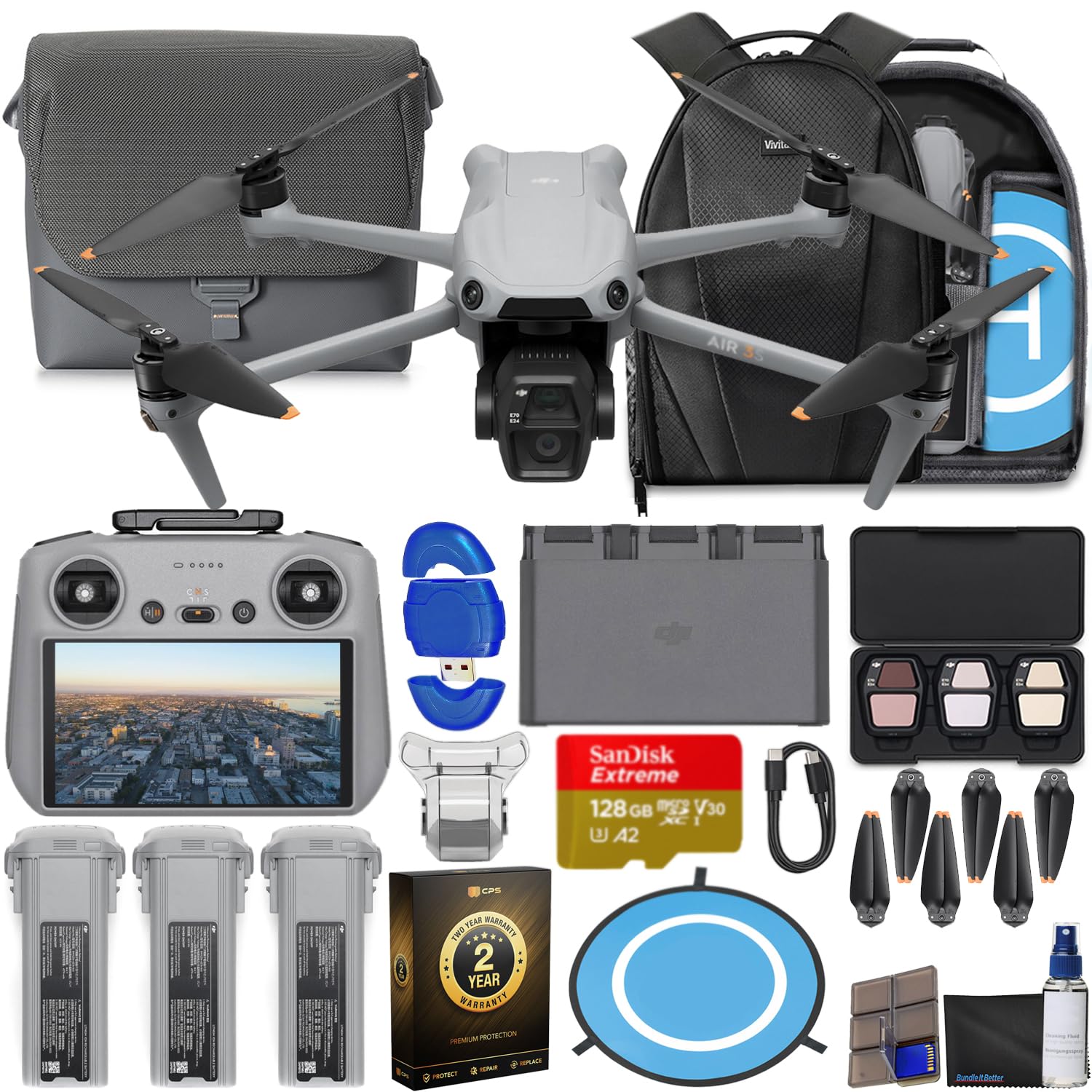
Image: The CPS 2 Year Warranty box, indicating premium protection, repair, and replacement services.
9. Подршка
For further assistance, detailed user guides, firmware downloads, and technical support, please visit the official DJI support website. You can also find FAQs and community forums for additional help.
Званични ДЈИ Webсајт: ввв.дји.цом/суппорт