
1. Увод
This manual provides essential information for the safe and efficient use of your AT&T Cingular Flex 2 Smart Flip Phone (Model 6723D). Please read these instructions carefully before operating your device to ensure optimal performance and longevity.
The Cingular Flex 2 is a compact flip phone designed for reliable communication. It features a vibrant display, a built-in camera for capturing moments, and 4GB of internal storage for essential files and applications. The device operates on KaiOS, offering a streamlined user experience.
2. Шта је у кутији
Проверите да ли су све ставке присутне у паковању вашег производа:
- AT&T Cingular Flex 2 Smart Flip Phone
- Повер Адаптер
- Литијум-јонска батерија (унапред инсталирана или засебно)
3. Девице Оверview
Familiarize yourself with the physical components of your AT&T Cingular Flex 2 phone.
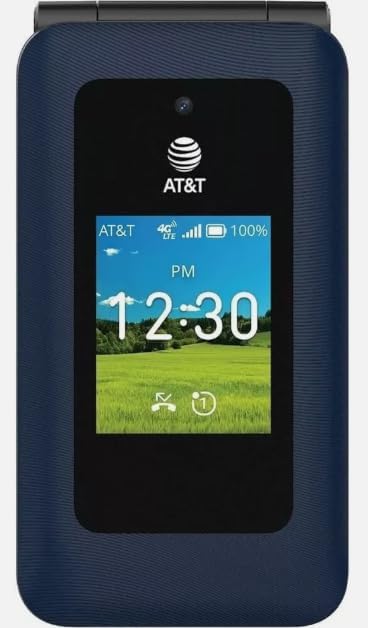
Слика 3.1: Фронт view of the AT&T Cingular Flex 2 Smart Flip Phone, showing the main display with time, network signal, and battery indicator.

Слика 3.2: Позади view of the AT&T Cingular Flex 2 Smart Flip Phone, highlighting the textured back cover and the speaker grille at the top.
Кључне компоненте:
- Спољашњи екран: Shows notifications, time, and caller ID when closed.
- Главни екран: Internal screen for navigation and content.
- Тастатура: Numeric and navigation buttons for input.
- камера: Located on the device for capturing photos and videos.
- Дугмад за јачину звука: Подесите нивое звука.
- Power/End Call Button: Turns the device on/off and ends calls.
- Порт за пуњење: За повезивање адаптера за напајање.
4. Подешавање
4.1. Уметање SIM картице и батерије
- Уверите се да је телефон искључен.
- Пажљиво уклоните задњу маску телефона.
- If the battery is installed, remove it by gently lifting it from the notch.
- Locate the SIM card slot, typically beneath the battery compartment. Insert your SIM card with the gold contacts facing down and the notched corner aligned correctly.
- Insert the battery, ensuring the contacts align with those in the phone.
- Вратите задњи поклопац док не кликне чврсто на своје место.
4.2. Пуњење уређаја
- Connect the power adapter to the charging port on your phone.
- Укључите адаптер за напајање у стандардну електричну утичницу.
- Дозволите телефону да се потпуно напуни пре прве употребе. Индикатор батерије на екрану ће приказивати статус пуњења.
4.3. Укључивање/искључивање
- За укључивање: Притисните и држите дугме за напајање/прекид позива док се екран не осветли.
- За искључивање: Press and hold the Power/End Call button, then select 'Power Off' from the options on the screen.
5. Управљање телефоном
5.1. Основна навигација
The Cingular Flex 2 uses a physical keypad for navigation. Use the directional pad (D-pad) to move between menu items and the center button to select. The left and right soft keys perform actions indicated on the screen above them.
5.2. Упућивање и примање позива
- Да бисте упутили позив: Enter the phone number using the keypad and press the Call button (usually the green button).
- Да одговорите на позив: Када телефон зазвони, притисните дугме за позив.
- Да бисте прекинули позив: Press the Power/End Call button (usually the red button).
5.3. Слање и примање порука
Идите до апликације „Поруке“ из главног менија.
- To Send a New Message: Select 'New Message', enter the recipient's number or select from contacts, then type your message using the keypad.
- Note on Multimedia Messaging: Sending photos via text message may not be consistently supported. Receiving multimedia messages can also be intermittent.
- Voice to Text: This device does not support voice-to-text input for messaging.
5.4. Употреба камере
The phone includes a built-in camera. You can access it via the main menu or by pressing the dedicated camera shortcut button on the side of the device.
- Фотографисање: Open the camera app, frame your shot, and press the center button or camera button to capture.
- Снимање видео записа: Switch to video mode within the camera app and press the record button.
5.5. Internet and Applications
The Cingular Flex 2 runs on KaiOS. Access the KaiOS store for additional applications. Pre-installed apps include YouTube and a feature-reduced version of Google Maps. Be aware that some utility apps downloaded from the store may display advertisements.
6. Одржавање
6.1. Брига о батерији
- Избегавајте излагање батерије екстремним температурама.
- Charge the battery using only the provided power adapter.
- Unplug the charger once the battery is fully charged to conserve energy.
6.2. Чишћење уређаја
Користите меку, суву крпу која не оставља влакна за чишћење екрана и кућишта телефона. Избегавајте употребу јаких хемикалија или абразивних материјала.
6.3. Ажурирања софтвера
Periodically check for software updates in the phone's settings menu to ensure your device has the latest features and security enhancements.
КСНУМКС. Решавање проблема
If you encounter issues with your Cingular Flex 2, refer to the following common problems and solutions:
| Проблем | Могуће решење |
|---|---|
| Slow interface or app loading | Close unused applications. Restart the phone. Consider uninstalling less frequently used apps to free up resources. |
| Operating System crashes | Restart the device. Ensure the software is up to date. If persistent, a factory reset may be necessary (back up data first). |
| Wi-Fi or network connectivity issues | Toggle Wi-Fi/Mobile Data off and on. Restart the phone. Check router or network settings. Ensure notifications for network disconnections are managed in settings to avoid excessive alerts. |
| Keyboard input errors (e.g., double key strokes) | Ensure you are pressing keys firmly and deliberately. If the issue persists, contact customer support. |
| Cannot send photos via text message | This is a known limitation for some devices. Try alternative methods for sharing images if available, or reduce image size if an option. |
| Лош век трајања батерије | Reduce screen brightness. Close background apps. Limit use of power-intensive features like GPS. Ensure the battery is fully charged. |
7.1. Фацтори Ресет
Фабричко враћање ће обрисати све податке са вашег телефона и вратити га на оригинална фабричка подешавања. Ово може решити сталне проблеме са софтвером. Back up all important data before performing a factory reset. Consult your phone's settings menu for the 'Reset' or 'Erase all data' option.
8. Спецификације
Detailed technical specifications for the AT&T Cingular Flex 2 Smart Flip Phone (Model 6723D):
| Феатуре | Спецификација |
|---|---|
| Назив модела | Cingular Flex 2 |
| Број модела ставке | 6723Д |
| Бранд | АТ&Т |
| Оперативни систем | КаиОС |
| Капацитет меморије | 4 ГБ |
| Величина инсталиране РАМ меморије | 512 МБ |
| ЦПУ модел | Медиатек Дименсити 1100 |
| Резолуција | 720 к 1520 |
| Технологија повезивања | 4Г ЛТЕ |
| Целлулар Тецхнологи | 4G |
| Вирелесс Царриер | Откључано |
| ГПС | Истина |
| Форм Фацтор | Флип |
| Боја | Classic Navy |
| Капацитет батерије | 1400 Милиamp Сати |
| Оцена снаге батерије | 2800 Amp Сати |
| Тежина артикла | 7.4 унци (0.21 килограма) |
| Димензије пакета | 4.69 к 2.91 к 2.13 инча |
| Произвођач | АТ&Т |
| Датум првог доступног | 11. фебруара 2025. године |
9. Гаранција и подршка
For warranty information, please refer to the documentation provided with your purchase or visit the official AT&T support website. If you require technical assistance or have questions not covered in this manual, please contact AT&T customer support.
Додатне ресурсе за подршку и контакт информације можете пронаћи на AT&T продавница на Амазону.