
1. Производ је готовview
The zelotes C-12 Professional Wired Gaming Mouse is designed for high-performance gaming and office use. It features an ergonomic design, 12 programmable buttons, adjustable DPI settings, multi-modes RGB backlighting, and a customizable weight system.

Image 1.1: The zelotes C-12 Professional Wired Gaming Mouse, showcasing its ergonomic shape and customizable RGB lighting.
Садржај пакета:
- 1 x zelotes C-12 Gaming Mouse
- 1 к Упутство за употребу
- 1 к ЦД са софтвером
- 1 x Set jastučića za stopala
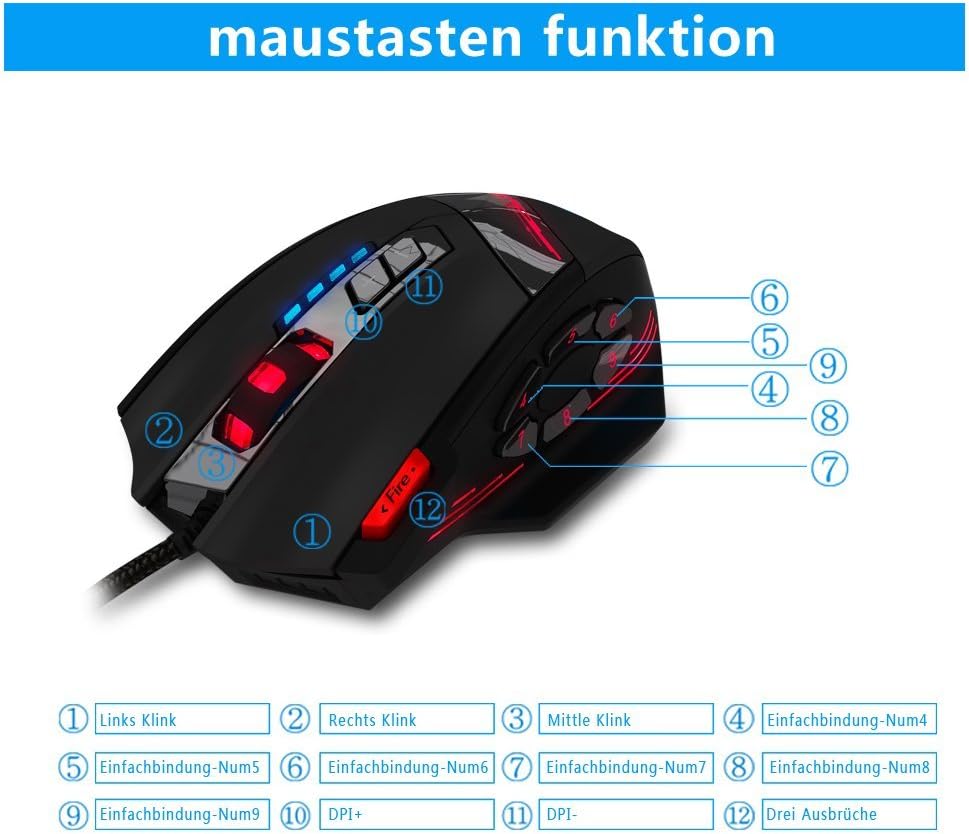
Image 1.2: The complete package contents of the zelotes C-12 Gaming Mouse.
2. Подешавање
2.1 Повезивање миша
Connect the USB cable of the zelotes C-12 Gaming Mouse to an available USB port on your computer. The mouse is plug-and-play for basic functionality.
2.2 Инсталација софтвера (опционо)
For full customization of buttons, DPI, and lighting, install the provided software from the included CD. Insert the CD into your computer's optical drive and follow the on-screen instructions. If your computer does not have an optical drive, please visit the official zelotes website to download the latest software driver.
Note: The programming software is not fully compatible with Mac operating systems.
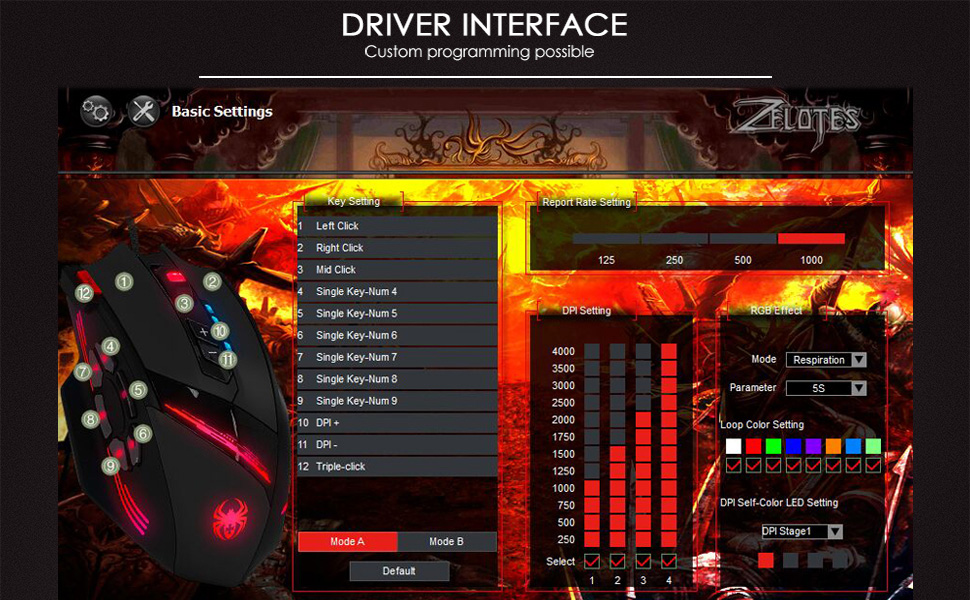
Image 2.1: The software interface for customizing the zelotes C-12 Gaming Mouse.
2.3 Weight Tuning
The mouse includes 8 removable weight blocks, each weighing 2.5 grams, located in a compartment on the underside of the mouse. To adjust the mouse's weight:
- Gently twist and remove the circular cover on the bottom of the mouse.
- Add or remove the 2.5g weight blocks as desired to achieve your preferred mouse feel.
- Replace the circular cover by twisting it back into place.
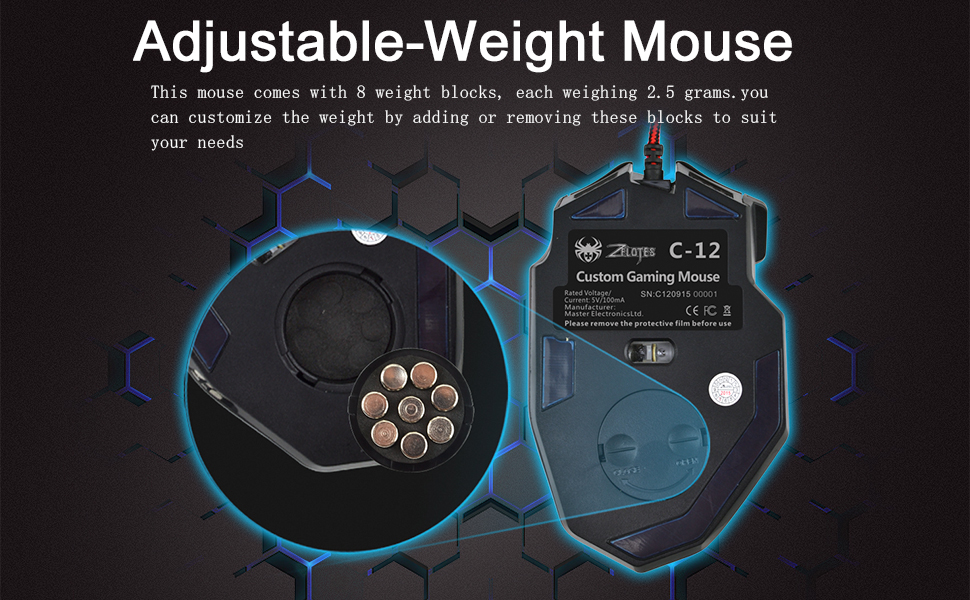
Image 2.2: Adjusting the weight of the zelotes C-12 mouse by adding or removing the 2.5g blocks.
Video 2.1: A demonstration of the weight tuning feature and programmable buttons on the zelotes C-12 Gaming Mouse.
3. Упутство за употребу
3.1 Функције дугмета
The zelotes C-12 mouse features 12 programmable buttons. The default functions are:
- Кликните левим кликом (дугме 1)
- Десни клик (дугме 2)
- Средњи клик / точкић за померање (дугме 3)
- Бочна дугмад (Buttons 4-9): Default to various functions, customizable via software.
- ДПИ+ (Button 10): Increases DPI sensitivity.
- ДПИ- (Button 11): Decreases DPI sensitivity.
- Фире Буттон (Button 12): Default to triple-click, customizable via software.

Image 3.1: Labeled diagram of the zelotes C-12 mouse buttons.
3.2 ДПИ подешавање
The mouse offers 4 default DPI levels: 1000/1500/2000/4000 DPI. You can cycle through these levels using the dedicated DPI+ and DPI- buttons. For finer control and to reach up to 8000 DPI, use the included software.
3.3 RGB осветљење
The mouse features multi-modes RGB backlighting, including 7-color cycle breathing and monochromatic constant bright modes. Lighting effects can be customized through the software to match your preferences.
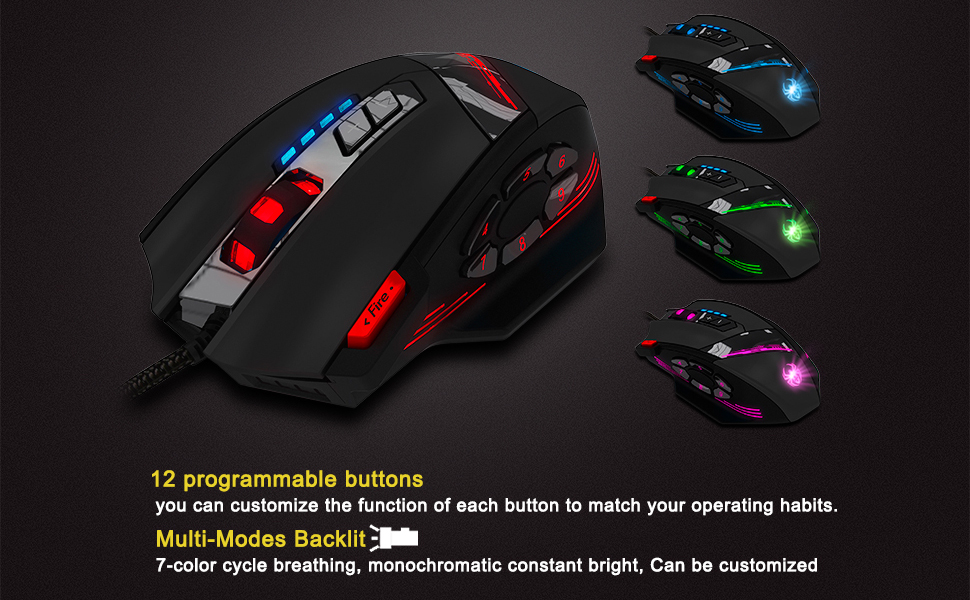
Image 3.2: The zelotes C-12 mouse showcasing its multi-color RGB lighting options.
3.4 Ергономски дизајн
The mouse is designed for comfort during extended use, featuring a sweat-resistant and anti-slip rubber surface. Its ergonomic shape helps prevent wrist fatigue.

Image 3.3: The ergonomic design of the zelotes C-12 mouse provides a comfortable grip.
4. Одржавање
To ensure the longevity and optimal performance of your zelotes C-12 Gaming Mouse, follow these maintenance guidelines:
- Чишћење: Користите меку, суву крпу да обришете површину миша. За тврдокорну прљавштину, благо обришитеampОбришите крпу водом или благим раствором за чишћење. Избегавајте јаке хемикалије или абразивне материјале.
- Брига о сензорима: Одржавајте оптички сензор на доњој страни миша чистим и без прашине или прљавштине. По потреби користите памучни штапић или компримовани ваздух.
- Управљање кабловима: Избегавајте оштра савијања или прекомерно повлачење USB кабла како бисте спречили оштећења.
- Складиштење: Када се не користи, чувајте миш на чистом и сувом месту, даље од екстремних температура.
КСНУМКС. Решавање проблема
5.1 Миш не реагује
- Уверите се да је УСБ кабл безбедно повезан са рачунаром.
- Покушајте да повежете миш са другим УСБ портом.
- Test the mouse on another computer to rule out a computer-specific issue.
- Поново покрените рачунар.
5.2 DPI or Button Settings Not Changing
- Ensure the zelotes C-12 software is correctly installed and running.
- Check if the settings are saved within the software after making changes.
- For Mac users, note that the programming software has limited compatibility. Basic DPI changes via mouse buttons should still function.
5.3 RGB Lighting Not Working or Incorrect
- Verify lighting settings within the zelotes C-12 software.
- Уверите се да је миш правилно повезан и да прима напајање.
5.4 Mouse Movement Is Erratic
- Очистите оптички сензор на дну миша.
- Уверите се да користите миш на одговарајућој површини (нпр. подлога за миш). Избегавајте површине са високим рефлектујућим својствима или провидне површине.
6. Спецификације
| Феатуре | Опис |
|---|---|
| Бранд | zelotes |
| Назив модела | Ц-12 |
| Технологија повезивања | УСБ Виред |
| Технологија детекције покрета | Optical (A3050 Gaming Chip) |
| ДПИ подешавања | 1000/1500/2000/4000 (Adjustable up to 8000 DPI via software) |
| Количина дугмета | 12 Програмабилна дугмад |
| Подешавање тежине | 8 x 2.5g removable weights |
| Оријентација руке | Десноруки |
| Компатибилност оперативног система | Win11, Win10, Win8, Win7, Mac OS (limited software compatibility for Mac) |
| Димензије (Д к Ш к В) | 130 мм к 81.5 мм к 39.8 мм |
| Поллинг Рате | 125-1000Хз |
| Цабле Ленгтх | 1.8м |
| Материјал | Plastic (Matte Finish) |

Image 6.1: Detailed technical specifications and dimensions of the zelotes C-12 Gaming Mouse.
7. Информације о гаранцији
The zelotes C-12 Professional Wired Gaming Mouse comes with a 1-годишња гаранција произвођача од датума куповине. Ова гаранција покрива недостатке у материјалу и изради при нормалној употреби. Не покрива штету насталу услед злоупотребе, несреће, неовлашћене модификације или спољних узрока.
Сачувајте доказ о куповини за гаранцијске захтеве.
8. Подршка
For further assistance, technical support, or warranty inquiries, please refer to the contact information provided with your product packaging or visit the official zelotes webсајту.