
1. Увод
This manual provides detailed instructions for the operation and maintenance of your LEOTEC FM Radio with Bluetooth. Please read this manual thoroughly before using the device to ensure proper function and to prevent damage.

Слика 1: Предња страна view of the LEOTEC FM Radio with Bluetooth. The radio features a wooden exterior, a black speaker grille, a digital display, and a numeric keypad with function buttons.
2. Безбедносне информације
- Не излажите уређај води или прекомерној влази.
- Избегавајте екстремне температуре, директну сунчеву светлост и прашњава окружења.
- Не растављајте и не покушавајте сами да поправите уређај. Обратите се квалификованом сервисеру.
- Чувати ван домашаја деце.
- Користите само назначени кабл за пуњење и адаптер за напајање.
- Обезбедите одговарајућу вентилацију приликом рада уређаја.
3. Садржај пакета
Молимо вас да проверите пакет за следеће ставке:
- LEOTEC FM Radio with Bluetooth (Model: LT-1812)
- Кабл за пуњење типа Ц
- Упутство за употребу
- Ланиард
- Antenna (pre-attached or included separately)
4. Производ је готовview
The LEOTEC FM Radio with Bluetooth is a versatile device combining multiple audio functions with emergency features. Key components include:
- Дигитални екран: Shows frequency, time, and mode.
- Нумеричка тастатура: For direct frequency input and other functions.
- Функционална дугмад: Power, Mode, Play/Pause, Skip, Volume, Alarm, SOS.
- Extendable Antenna: За пријем ФМ радија.
- говорник: Интегрисани аудио излаз.
- Порт за пуњење типа Ц: For battery charging.
- УСБ порт: За репродукцију са УСБ диска.
- АУКС улаз: За екстерне аудио уређаје.
- 3.5 мм прикључак за слушалице: За приватно слушање.
- ЛЕД лампа: Интегрисани извор светлости.
- СОС дугме: Activates emergency alarm.

Слика 2: Завршеноview of the radio's main features and connectivity options.
5. Подешавање
5.1. Пуњење батерије
The radio is equipped with a built-in 1800mAh rechargeable battery. Before first use, or when the battery indicator on the display shows low power, charge the device.
- Connect the provided Type-C charging cable to the Type-C port on the side of the radio.
- Повежите други крај кабла са УСБ адаптером за напајање (није укључен) или УСБ портом рачунара.
- The charging indicator on the display will show charging status. A full charge typically takes approximately 2.5 hours.

Figure 3: The radio connected to a power source for charging via its Type-C port.
5.2. Продужавање антене
For optimal FM radio reception, fully extend the telescopic antenna located on the top of the radio.
6. Упутство за употребу
6.1. Укључивање/искључивање
To power on the radio, press and hold the power button (usually marked with a power symbol or integrated with the mode button). The display will light up, and a voice prompt will indicate 'Power on'. To power off, press and hold the same button again.
6.2. Рад ФМ радија
After powering on, the radio typically defaults to FM mode. If not, press the 'M' (Mode) button to switch to FM mode. The display will show the current FM frequency.
- Аутоматско скенирање: Press and hold the 'Play/Pause' button to initiate an automatic scan for available FM stations. The radio will scan and save stations with strong signals.
- Ручно подешавање: Користите „Претходно“ (|<) и „Следеће“ (>> |) buttons to fine-tune the frequency step by step.
- Директни фреквентни улаз: Use the numeric keypad (0-9) to directly enter the desired FM frequency (e.g., 98.5).
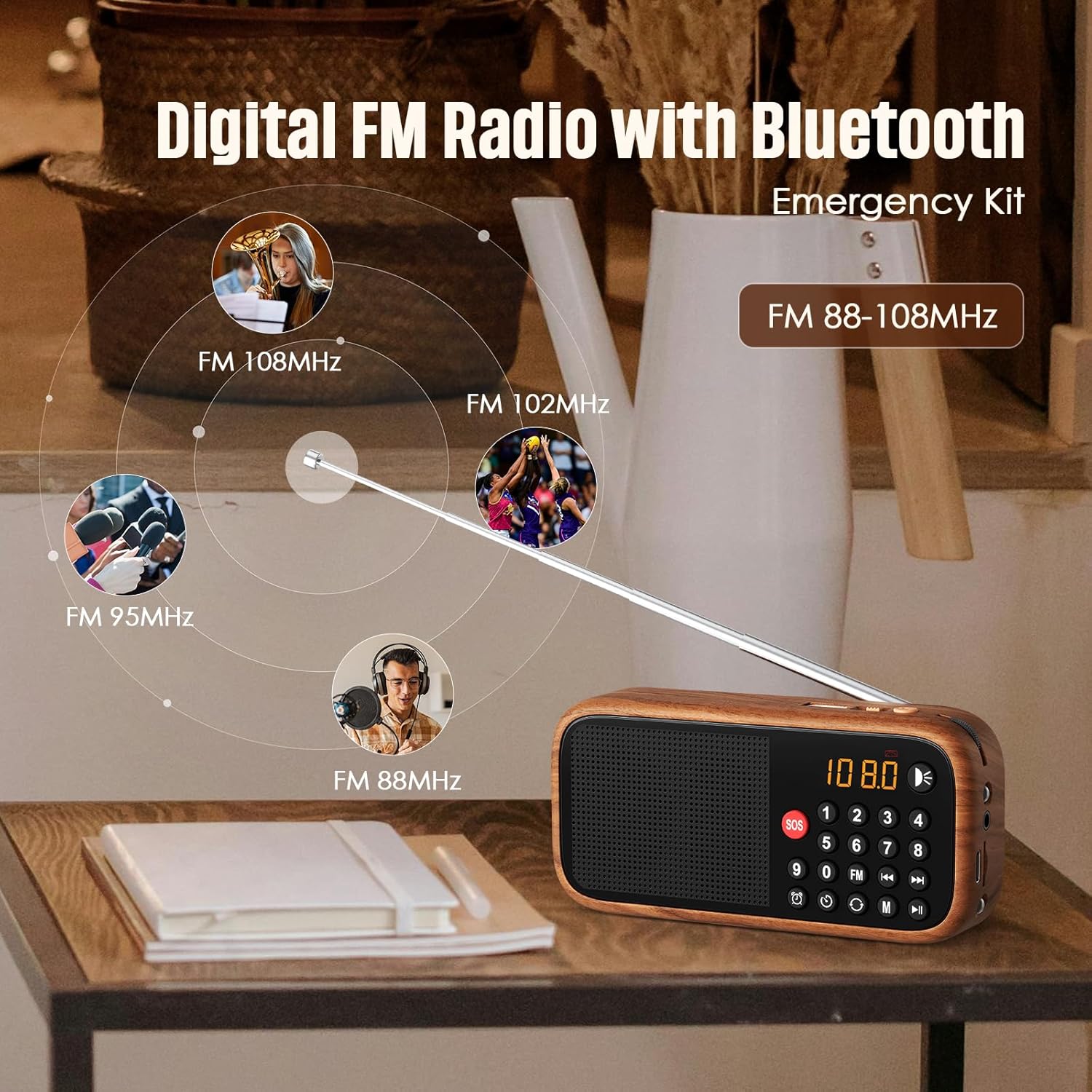
Figure 4: The radio's extendable antenna helps in receiving various FM frequencies.
6.3. Блуетоотх упаривање
Press the 'M' (Mode) button to switch to Bluetooth mode. The radio will enter pairing mode, indicated by a flashing Bluetooth icon on the display or a voice prompt.
- Омогућите Блутут на свом паметном телефону или другом аудио уређају.
- Тражи available Bluetooth devices and select 'LEOTEC LT-1812' (or similar name).
- Once paired, the radio will confirm with a voice prompt, and the Bluetooth icon will stop flashing.
- You can now play audio from your connected device through the radio.
6.4. AUX/USB Playback
The radio supports audio playback via AUX input and USB drives.
- АУКС режим: Connect an external audio device (e.g., MP3 player, phone) to the 3.5mm AUX input port using an audio cable (not included). Press the 'M' (Mode) button until 'AUX' mode is selected.
- УСБ режим: Убаците УСБ флеш диск који садржи аудио files into the USB port. The radio should automatically switch to USB mode and begin playback. If not, press the 'M' (Mode) button to select USB mode.
6.5. Alarm Clock Setting
Да бисте подесили време аларма:
- Press the 'Alarm' button (often indicated by a clock icon).
- Use the numeric keypad or navigation buttons to set the desired hour and minute.
- Confirm the setting by pressing the 'Alarm' button again or a designated 'Set' button.
6.6. SOS функција
The SOS function activates a loud emergency alarm.
- To activate, press and hold the red 'SOS' button.
- To deactivate, press the 'SOS' button again or power off the device.

Figure 5: The SOS button for emergency alerts and the integrated LED light for illumination.
6.7. LED Lantern Operation
The radio includes a built-in LED lantern for illumination.
- To turn on the LED light, press the 'Light' button (often indicated by a light bulb icon).
- Press the button again to turn off the LED light.
7. Одржавање
- Очистите радио меком, сувом крпом. Не користите абразивна средства за чишћење или раствараче.
- Избегавајте излагање уређаја екстремним температурама или директној сунчевој светлости током дужег периода.
- When not in use for an extended period, store the radio in a cool, dry place.
КСНУМКС. Решавање проблема
| Проблем | Могући узрок | Решење |
|---|---|---|
| Радио се не укључује. | Батерија је празна или је истрошена. | Напуните батерију помоћу Type-C кабла. |
| Лош ФМ пријем. | Antenna not fully extended or weak signal area. | Fully extend the antenna. Try repositioning the radio for better signal. |
| Блутут се не повезује. | Radio not in Bluetooth pairing mode or device too far. | Ensure radio is in Bluetooth mode. Move device closer to the radio. Restart both devices. |
| Нема звука из звучника. | Јачина звука је прениска или искључена. | Increase the volume. Check if headphones are connected. |
9. Спецификације
| Феатуре | Детаљ |
|---|---|
| Број модела | ЛТ-1812 |
| Димензије производа | 14.3 x 4.4 x 10.2 цм |
| Тежина артикла | 4.2 унце (119 грама) |
| Технологија повезивања | Блуетоотх |
| Технологија тјунера | FM |
| Подржани радио бендови | FM |
| Извор напајања | Battery Powered (1800mAh rechargeable battery included) |
| Порт за пуњење | Тип-Ц 5В |
| Посебне карактеристике | Portable, Digital Display, Alarm Clock, SOS Function, LED Lantern, USB/AUX Input |

Figure 6: The compact dimensions of the radio, emphasizing its portability.
10. Гаранција и подршка
For warranty information and customer support, please refer to the documentation included with your product packaging or visit the official LEOTEC webсајт. Сачувајте рачун као доказ о куповини за потребе гаранције.