
1. Увод
This manual provides essential information for the safe and efficient operation, setup, and maintenance of your YARDCARE N1600 Pro Wireless Robot Lawn Mower. Please read this manual thoroughly before using the product and retain it for future reference.
2. Безбедносне информације
Observe all safety precautions to prevent injury or damage. The N1600 Pro is equipped with sharp blades and moving parts. Keep hands, feet, and clothing away from the cutting deck. Ensure children and pets are not in the mowing area during operation. Do not operate the mower on excessively steep slopes or during heavy rain. Always turn off the mower and remove the battery before performing any maintenance or cleaning.
3. Садржај пакета
Проверите да ли су све ставке присутне у пакету:
- N1600 Pro Lawn Mower (x1)
- Charging Station (x1)
- RTK Mounting Pole (x2)
- Trident Ground Stake (x1)
- RTK Reference Station Module (x1)
- Хек кључ (к1)
- RTK Base Station Extension Cable (x1)
- Charging Station Fixing Screw (x6)
- M4*10 Blade Screws (x3)
- Cutting Blade (x3)
- Адаптер за напајање (к1)
- Батерија (к1)
- Упутство за употребу (к1)
4. Производ је готовview
4.1 Кључне карактеристике
- RTK+AI Vision Dual Positioning: Utilizes RTK and AI vision sensors for precise lawn mapping and centimeter-level positioning.
- Wireless Boundary & Multi-Zone Management: Allows setting virtual boundaries and managing multiple mowing zones via the YARDCARE App, supporting areas up to 0.4 acres.
- Smart APP Control & Real-Time Monitoring: Customize mowing schedules, adjust cutting modes, and track mower progress from a smartphone. Features intelligent auto-resume after charging.
- 3D Obstacle Avoidance & AI Safety Detection: Equipped with a 3D obstacle detection system and intelligent sensors to recognize over 300 types of obstacles, ensuring safe operation.
- Precise Trimming & Efficient Performance: Achieves precise trimming with an arched cutting path. Powered by a high-efficiency brushless motor, it operates on 20° slopes and supports grass heights from 0.8 to 2.4 inches.
4.2 Компоненте
The YARDCARE N1600 Pro includes the main robotic mower unit, a charging station, and an RTK reference station for precise navigation.
5. Подешавање
5.1 Choose RTK Location
Select an open, unobstructed spot for the RTK base station to ensure stable GPS reception. This is crucial for accurate positioning.

Image: The N1600 Pro utilizing RTK+3D Vision for precise navigation.
5.2 Connect & Install
Set up your network, mount the RTK base station, and place the charging dock in a shaded, level area. Ensure the charging station is connected to power.

Image: Connecting the mower and installing the base station.
5.3 Map Your Lawn
Use the YARDCARE app to draw your mowing area for precise coverage. This allows for virtual boundaries without physical wires.

Image: Custom mapping of the lawn using the app.
5.4 Start Full-Lawn Mowing
After mapping, press the start button in the app to initiate automatic mowing of the entire lawn.

Image: Starting full-lawn mowing via the app.
6. Упутство за употребу
6.1 Режими кошења
The N1600 Pro uses a systematic U-shaped mowing pattern for efficient and precise cuts. It also supports a spiral mowing mode for specific areas.

Image: Breakpoint resume cutting and spiral mowing mode.
6.2 Adjustable Cutting Height
Adjust the cutting height from 0.8 to 2.4 inches (20 to 60 mm) directly through the YARDCARE app to suit your lawn's needs.
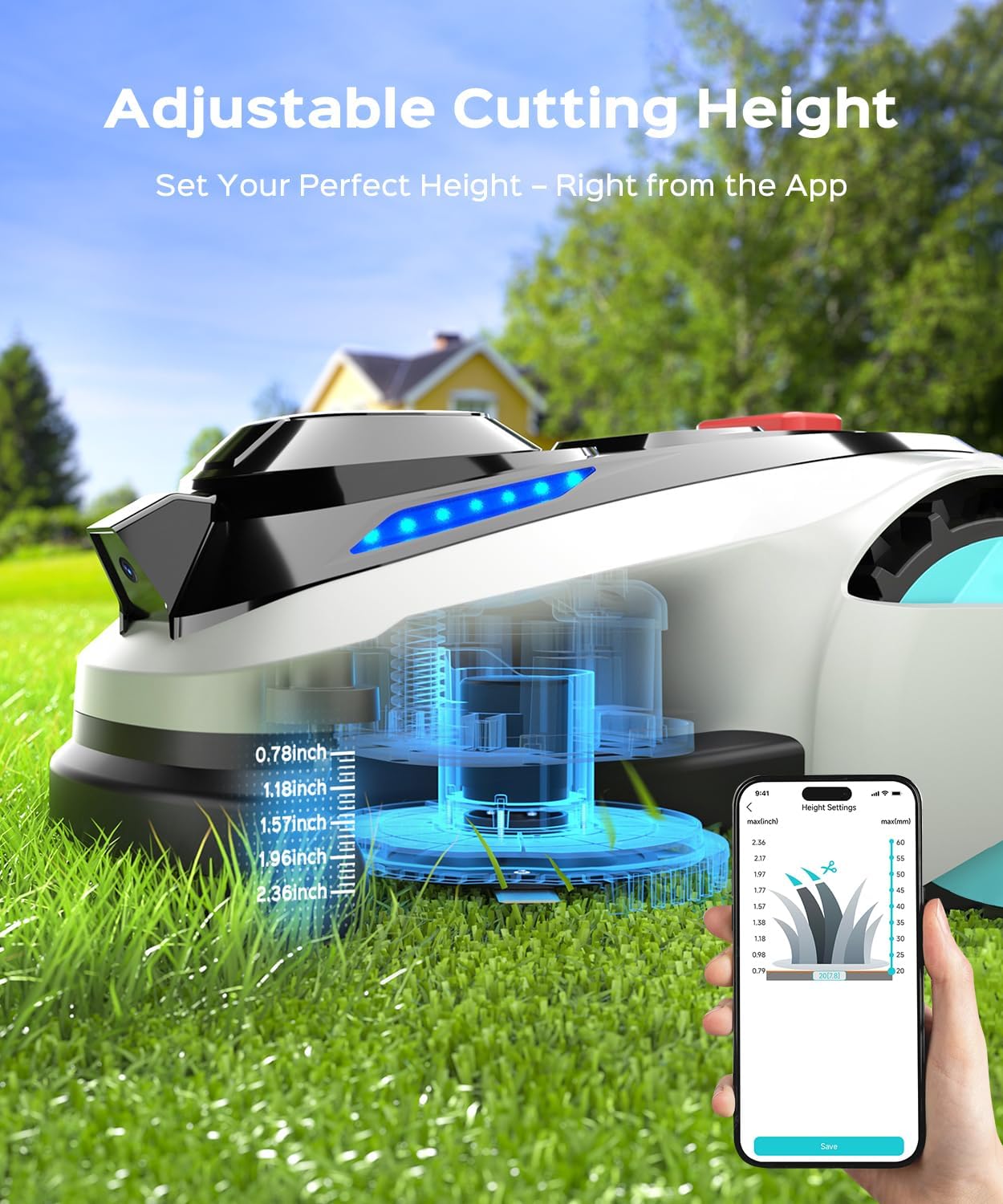
Image: Adjustable cutting height settings via the app.
6.3 Планирање
Customize mowing schedules for different zones and times using the YARDCARE app.
6.4 Automatic Recharging and Breakpoint Continuation
The mower automatically returns to its charging station when the battery level drops below 20%. After recharging, it resumes mowing from where it left off, ensuring complete lawn coverage.

Image: Mower returning to charging station and built-in rain sensor.
6.5 Сензор за кишу
The built-in rain sensor detects precipitation, prompting the mower to return to its charging station to protect it from adverse weather conditions.
6.6 Избегавање препрека
The AI Vision system detects over 300 types of obstacles, including trees, people, pets, toys, and tools, allowing the mower to navigate safely around them.

Image: Mower identifying and avoiding obstacles.
6.7 Обрезивање ивица
The mower performs precise edge trimming with a 7.09-inch cutting width, ensuring clean edges around your lawn.

Image: Clean edge cutting performance.
6.8 Slope Climbing Capability
The N1600 Pro can handle slopes up to 36.4% (20°), maintaining consistent mowing performance on varied terrain.
Видео: Готовоview of the YARDCARE N1600 Pro Robot Lawn Mower's features, including efficient mowing, RTK positioning, automatic mapping, multi-zone management, multi-level cutting height adjustment, lawn edge trimming, AI vision obstacle recognition, U-shaped mowing path, automatic recharging, breakpoint continuation, rain sensor, and 20-degree climbing ability.
7. Контрола апликација
The YARDCARE app provides comprehensive control over your N1600 Pro mower. Functions include:
- ОТА ажурирања
- Мулти-Зоне Манагемент
- Set Mowing Schedule
- Позиционирање
- Блуетоотх повезивање
- Ви-Фи повезивање

Image: App control interface for the N1600 Pro.
7.1 OTA Updates
The mower supports Over-The-Air (OTA) updates to ensure the device is always running with the latest features and improvements.

Image: OTA updates for the robot mower.
8. Одржавање
8.1 Чишћење
The N1600 Pro features an IPX4 waterproof system, allowing for easy cleaning with low-pressure water flow. Ensure the mower is powered off and the battery is removed before cleaning.

Image: Easy cleaning with IPX4 waterproof system.
8.2 Замена оштрице
Regularly inspect the cutting blades for wear and tear. Replace dull or damaged blades using the provided M4*10 blade screws and hex key. Always ensure the mower is powered off and the battery is removed before replacing blades.
КСНУМКС. Решавање проблема
If you encounter issues with your YARDCARE N1600 Pro, refer to the following general troubleshooting steps:
- Косилица се не покреће: Check battery level and ensure it is properly charged. Verify the mower is correctly placed on the charging station.
- Poor navigation or mapping issues: Ensure the RTK base station has a clear, unobstructed view of the sky. Check Wi-Fi and Bluetooth connections to the app.
- Mower stopping unexpectedly: Check for obstacles in the mowing path. Ensure the cutting deck is not clogged with grass clippings. Verify the rain sensor is not activated if it is not raining.
- Кодови грешака: If specific error codes appear on the mower display or app, consult the YARDCARE support website or contact customer service for detailed solutions.
10. Спецификације
| Атрибут | Валуе |
|---|---|
| Бранд | ОДРЖАВАЊЕ ДВОРИШТА |
| Извор напајања | Баттери Поверед |
| Материјал | Пластика |
| Боја | Светло сива |
| Стиле | Косилица |
| Ширина сечења | 7.09 инча |
| Оперативни режим | Аутоматски |
| Димензије производа | 10.43"Д к 15.75"Ш к 22.43"В |
| Обавезна монтажа | бр |
| Максимална подесива висина кошења | 2.4 инча |
| Минимална подесива висина кошења | 0.8 инча |
| Произвођач | ОДРЖАВАЊЕ ДВОРИШТА |
| Тежина артикла | 41.1 фунти |
| Број модела ставке | Н1600 Про |
| Батерије | Потребна је 1 батерија од 12В (укључена) |
11. Гаранција и подршка
For warranty information, technical support, or service inquiries, please refer to the warranty card included with your product or visit the official YARDCARE website. Contact customer support for assistance with any product-related issues.