
1. Увод
The PGST A107F Wireless Home Security System is a comprehensive alarm solution designed to protect your home or property. This system features a main control panel, various sensors, and remote access capabilities through the Tuya or Smart Life app. It supports both Wi-Fi and 4G connectivity for reliable alerts and control. This manual provides detailed instructions for setting up, operating, and maintaining your security system.

Слика 1.1: Готовоview of the PGST A107F Wireless Home Security System components, including the main panel, motion detector, door sensor, remote controls, and RFID tags.
2. Садржај пакета
Молимо вас да проверите да ли су све ставке присутне у вашем пакету:
- 1 x PGST A107F Alarm System Main Panel
- 1 x PIR detektor pokreta
- 1 x Сензор за врата/прозоре
- 2 к даљински управљач
- 2 к РФИД Tags
- 1 к адаптер за напајање
- Mounting Hardware (screws, adhesive pads)
- Упутство за употребу

Image 2.1: The PGST A107F system components displayed alongside a smartphone showing the control application interface.
3. Безбедносне информације
Да бисте осигурали безбедан рад и спречили оштећења, молимо вас да се придржавате следећих безбедносних смерница:
- Do not expose the main panel or sensors to extreme temperatures, humidity, or direct sunlight.
- Користите само испоручени адаптер за напајање.
- Држите систем даље од јаких електромагнетних поља.
- Не покушавајте сами да раставите или поправите уређај. Обратите се корисничкој подршци за помоћ.
- Ensure proper ventilation for the main panel.
4. Подешавање
4.1 Укључивање главне табле
- Connect the power adapter to the main panel's USB Type C port.
- Plug the power adapter into a standard electrical outlet. The panel will power on automatically.
4.2 Network Configuration (Wi-Fi & 4G)
The system supports dual-channel connectivity (Wi-Fi and 4G) for enhanced reliability. Insert a 4G SIM card (not included) into the designated slot on the main panel if you wish to use 4G SMS/calling features.

Image 4.1: A hand interacting with the PGST A107F control panel, illustrating its support for both Wi-Fi and 4G network connectivity.
To connect to your Wi-Fi network:
- Метод 1 (Конфигурација софт приступне тачке):
- On the Host: Go to Мени > Ви-Фи > Софт АП Цонфигуре.
- On your Phone: Enable Wi-Fi (2.4GHz) and Bluetooth. Open the Smart Life APP, select 'Add devices', and follow the on-screen instructions for auto search.
- Метод 2 (Конфигурација ваздушне везе):
- On the Host: Go to Мени > Ви-Фи > Аирлинк Цонфигуре.
- On your Phone: Enable Wi-Fi (2.4GHz). Open the Smart Life APP, select 'Add devices' > 'Sensors' > 'Alarm' > 'Wi-Fi', and ensure the indicator blinks quickly as prompted.

Image 4.2: Visual guide detailing two methods for configuring the network connection for the PGST A107F system using the main panel and a smartphone app.
4.3 Инсталирање сензора
The system includes a PIR Motion Detector and a Door/Window Sensor. These are typically screw-in installations, but adhesive options may also be available.
- Сензор врата/прозора: Install the two parts of the sensor on the door/window frame and the moving part, ensuring they are aligned and within 1 cm of each other when closed.
- PIR детектор покрета: Mount the motion detector in a corner or on a wall, ensuring it covers the desired area without obstructions. Avoid placing it near heat sources or direct sunlight.

Image 4.3: Illustration of a PGST A107F Door/Window Sensor installed on a window frame, demonstrating its magnetic contact detection.

Image 4.4: A PGST A107F PIR Motion Detector mounted in a room, designed to detect movement within its wide-angle detection range.
5. Упутство за употребу
5.1 Наоружавање и разоружавање система
Систем се може активирати или деактивирати помоћу више метода:
- Главни панел: Use the touchscreen interface to select 'Arm', 'Stay Arm', or 'Disarm'.
- даљински управљач: Press the corresponding buttons on the provided remote controls.
- РФИД картица: Додирните овлашћени РФИД tag on the main panel's RFID reader.
- Smartphone App (Tuya/Smart Life): Control the system remotely via the app.
- Контрола гласом: Integrate with Alexa or Google Assistant for voice commands (e.g., "Alexa, disarm my home").
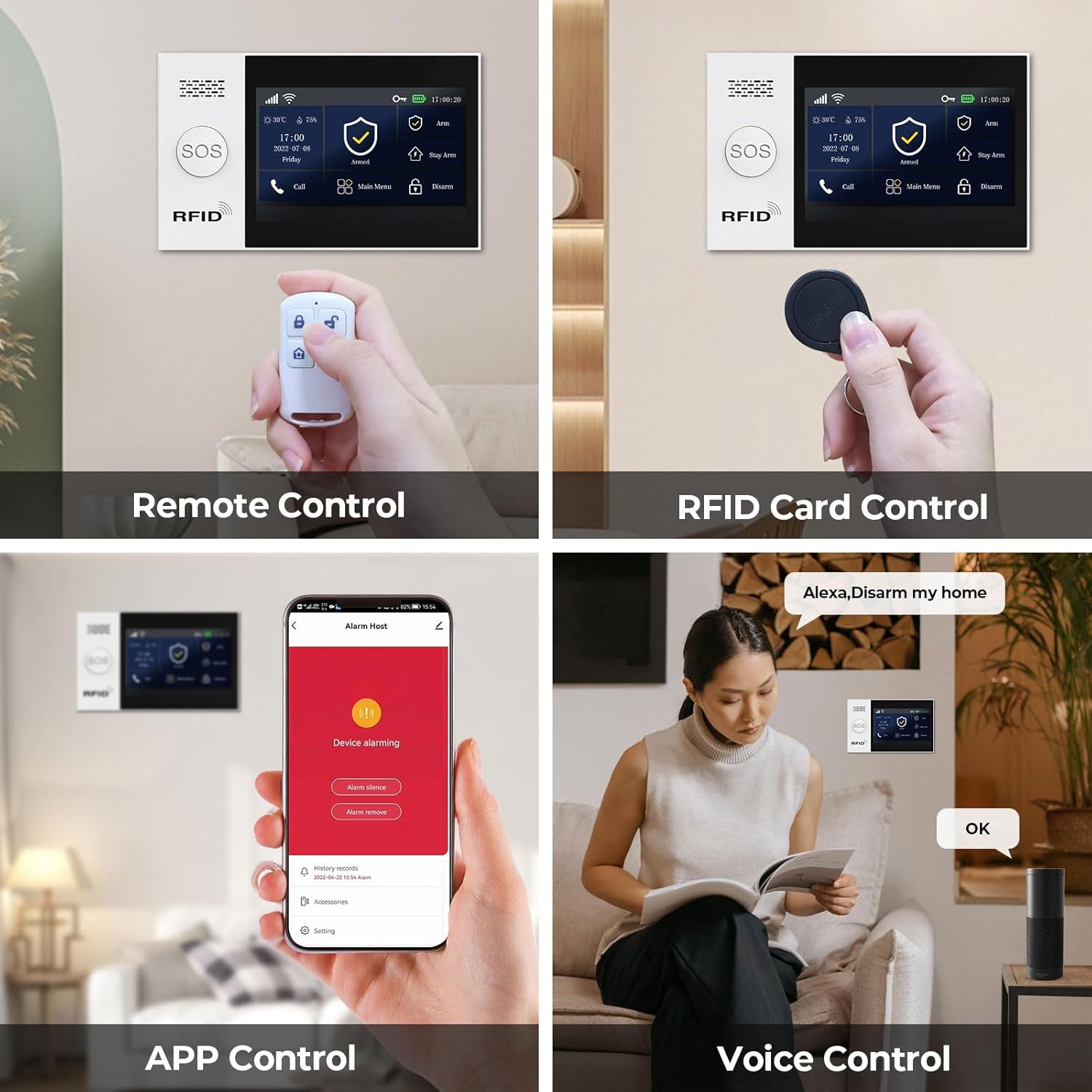
Image 5.1: Depiction of various control methods for the PGST A107F system, including remote control, RFID card, smartphone app, and voice commands via smart assistants.
5.2 App Control and Alerts
The Tuya or Smart Life app allows you to manage your security system from anywhere. You will receive instant push notifications and phone calls directly to your smartphone when sensors are triggered or motion is detected.

Image 5.2: A smartphone screen showing real-time alert messages from the PGST A107F security system app, indicating triggered sensors or SOS events.
5.3 СОС функција
In an emergency, activate the SOS function by pressing the dedicated SOS button on the main panel or remote. The system will immediately send a distress signal and call pre-set emergency contacts.

Image 5.3: An SOS button, highlighting its utility for elderly individuals or in emergency situations, triggering an immediate alert.
5.4 Scheduling Arm/Disarm
You can program up to four sets of timing for automatic arming and disarming through the app, aligning with your daily schedule.
Image 5.4: The Smart App Remote Control interface demonstrating the scheduling feature for automatic arming and disarming of the PGST A107F system at specific times.
5.5 Preset Alarm Calls
Configure up to five family numbers to receive alarm calls. This ensures that alerts are not missed and appropriate action can be taken quickly.
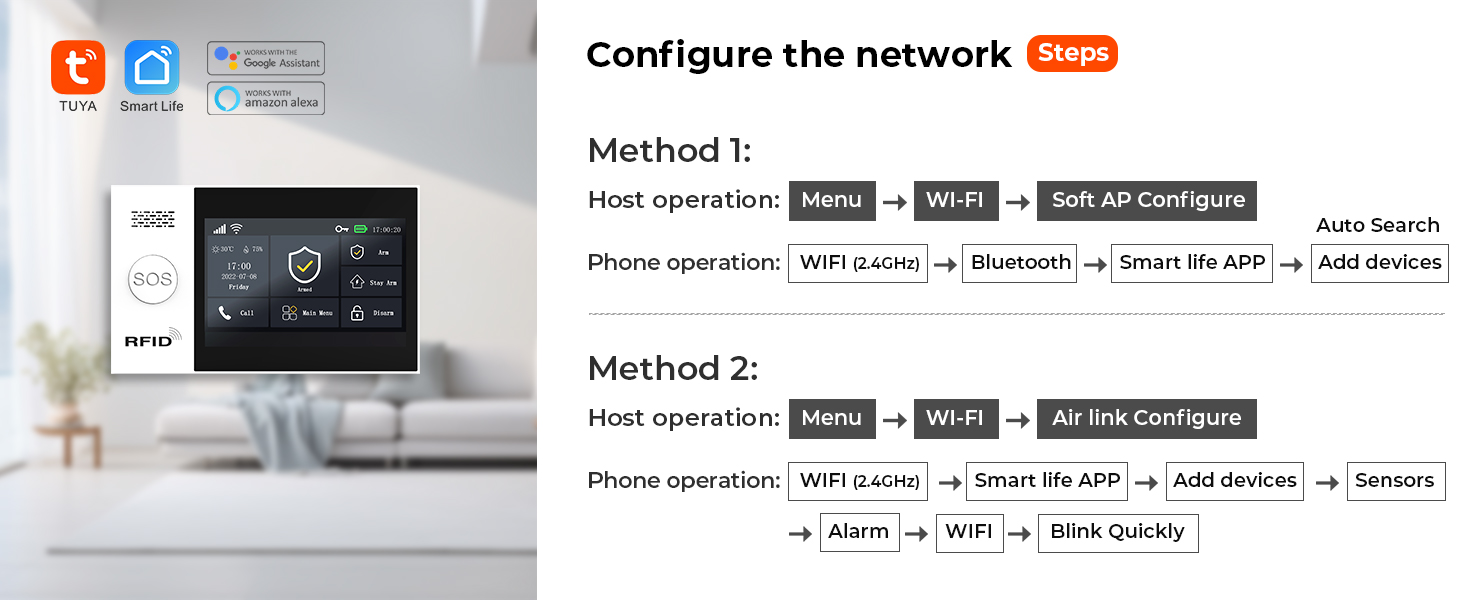
Image 5.5: A visual representation of the 'Preset Five Alarm Calls' feature, showing a user receiving an alert on their phone and a list of contacts who will also be notified.
6. Одржавање
Редовно одржавање осигурава оптималне перформансе вашег безбедносног система:
- Чишћење: Wipe the main panel and sensors with a soft, dry cloth. Do not use abrasive cleaners or solvents.
- Провера батерије: Periodically check the battery status of wireless sensors through the app or main panel. Replace batteries as needed (Alkaline batteries are used).
- Ажурирања фирмвера: Check the app regularly for available firmware updates for the main panel to ensure the latest features and security enhancements.
- Положај сензора: Ensure sensors remain securely mounted and free from obstructions.
КСНУМКС. Решавање проблема
If you encounter issues with your PGST A107F system, refer to the following common problems and solutions:
| Проблем | Могући узрок | Решење |
|---|---|---|
| Систем се не повезује на Wi-Fi | Incorrect Wi-Fi password; Router too far; 5GHz Wi-Fi network | Verify password; Move panel closer to router; Ensure 2.4GHz Wi-Fi is used. |
| Сензори не активирају аларм | Low sensor battery; Sensor out of range; System disarmed | Replace sensor battery; Relocate sensor closer to panel; Arm the system. |
| Нема обавештења о апликацијама | App permissions disabled; Phone not connected to internet; App not running in background | Enable app notifications; Check phone's internet connection; Allow app to run in background. |
| SOS function not calling contacts | No 4G SIM card; Incorrectly set emergency numbers | Ensure 4G SIM card is inserted and active; Verify emergency contact numbers in settings. |
For further assistance, please contact PGST customer support.
8. Спецификације
| Феатуре | Детаљ |
|---|---|
| Бранд | ПГСТ |
| Број модела | ПГСТ А107Ф |
| Технологија повезивања | Бежично (Wi-Fi, 4G) |
| Компатибилни уређаји | Smartphone, Tablet (Tuya/Smart Life App) |
| Извор напајања | Цордед Елецтриц |
| Врста инсталације | Сцрев-Ин |
| Тип упозорења | Audio & Motion, App Push Notifications, Phone Calls, SMS |
| Контролни метод | App, Remote Control, RFID Card, Voice (Alexa, Google) |
| Сензорна технологија | Motion Sensor, Door/Window Magnetic Sensor |
| Састав батерије батерије | Alkaline (for sensors) |
| Димензије артикла (Д к Ш к В) | 8 к 6 к 4 инча |
| Тежина артикла | 1.34 фунти |
| УПЦ | 704444490037 |
9. Гаранција и подршка
The PGST A107F Home Alarm System comes with a 1 година гаранције од датума куповине. Ова гаранција покрива производне недостатке и кварове при нормалној употреби.
For technical support, warranty claims, or any questions regarding the use of your system, please contact PGST customer service through the retailer where you purchased the product or visit the official PGST webсајт за контакт информације.
Молимо вас да сачувате доказ о куповини ради потврде гаранције.