
1. Увод
Thank you for choosing the Sunffice Wireless Bluetooth 5.3 Earbuds. This manual provides essential information for setting up, operating, and maintaining your new earbuds and charging case. Please read it carefully to ensure optimal performance and longevity of your device.
2. Садржај пакета
Молимо вас да проверите да ли се у вашем пакету налазе све доле наведене ставке:
- Sunffice Wireless Bluetooth Earbuds (Left and Right)
- LED Touch Screen Charging Case
- USB кабл за пуњење (тип C)
- Упутство за употребу

Image: Contents of the Sunffice Earbuds package, including the earbuds, charging case, USB cable, and user manual.
3. Производ је готовview
Familiarize yourself with the components of your Sunffice Wireless Earbuds and Charging Case.

Image: The Sunffice Wireless Earbuds placed in their charging case, showcasing the LED touch screen.
Image: Detailed diagram illustrating the various components of the earbuds and charging case, including the flashlight, USB interface, Type-C port, earplug, charging port, left/right charging compartments, magnetic edge, charging compartment cover, screen off button, multi-functional screen, time display, and battery levels for both earbuds and the charging case.
- Еарбудс: In-ear design with touch control.
- Футрола за пуњење: Features a full-color LED touch screen, USB-A output for phone charging, and a Type-C input for charging the case.
- ЛЕД екран осетљив на додир: Displays date, time, battery levels, Bluetooth connection status, and provides access to various functions like music control, equalizer, illumination, camera trigger, alarm, volume adjustment, and games.
4. Подешавање
4.1 Charging the Charging Case and Earbuds
Пре прве употребе, потпуно напуните кућиште за пуњење и слушалице.
- Connect the provided Type-C USB cable to the charging port on the case and a power source.
- The LED screen will indicate the charging status.
- Place the earbuds into their respective slots in the charging case. They will automatically begin charging.
The 5000mAh charging case can charge the earbuds approximately 4-5 times, providing extended listening time. The case can also be used as a power bank to charge your phone.

Image: The Sunffice charging case connected to a laptop, illustrating the charging process for the case itself.
4.2 Блуетоотх упаривање
The earbuds utilize Bluetooth 5.3 for a fast and stable connection.
- Отворите кућиште за пуњење. Слушалице ће аутоматски ући у режим упаривања.
- На свом уређају (паметном телефону, таблету, лаптопу) омогућите Блутут и потражите доступне уређаје.
- Select "Bluetooth Earbuds" (or similar name) from the list to connect.
- Једном упарене, слушалице ће се аутоматски повезати са вашим уређајем када их касније извадите из футроле.

Image: A smartphone displaying its Bluetooth settings, showing a successful connection to the earbuds, labeled as 'A98 TWS'.
5. Упутство за употребу
5.1 LED Touch Screen Functions
The charging case features an intelligent LED touch screen for various controls and information.

Image: The LED touch screen of the charging case displaying various functions, including music control, system settings, calculator, stopwatch, equalizer, and lock screen wallpaper options.
- Време и датум: Check current date and time.
- Ниво батерије: View battery status of both earbuds and the charging case.
- Контрола музике: Play, pause, skip tracks, and adjust volume directly from the screen.
- Екуализер: Select different audio profiles (e.g., Pop, Rock, Class, Jazz, Rural, Normal).
- Осветљење: Control lighting features (if applicable).
- Окидач камере: Користите као даљински окидач за камеру вашег телефона.
- Аларм: Подесите аларме.
- игре: Access built-in games.
- Лампа: Активирајте уграђену батеријску лампу.
5.2 Додирне контроле слушалица
The earbuds feature touch-sensitive areas for controlling playback and calls. Specific functions can often be customized via a mobile application (if available).
- Једнократни додир: Пуштање/паузирање музике, одговарање/прекидање позива.
- Двапут додирните: Next track (Right earbud), Previous track (Left earbud).
- Трипле Тап: Активирајте гласовног асистента.
- Дуго притисните: Reject call, Switch between Noise Cancellation/Transparency modes (if applicable).
5.3 Charging Your Phone with the Case
The charging case can act as a portable power bank for your mobile phone.
- Connect your phone's charging cable to the USB-A output port on the charging case.
- The charging case will begin to charge your phone.
Video: This video demonstrates the various features of the Sunffice Wireless Earbuds and Charging Case, including unboxing, navigating the touch screen for games and calculators, and using the charging case to charge a smartphone. It also shows the flashlight function.
6. Одржавање
Да бисте осигурали дуготрајност и оптималне перформансе ваших слушалица, пратите ова упутства за одржавање:
- Чишћење: Редовно чистите слушалице и кућиште за пуњење меком, сувом крпом која не оставља влакна. Избегавајте употребу јаких хемикалија или абразивних материјала.
- Отпорност на воду: The earbuds feature IPX waterproof coating technology, protecting them from sweat and rain. However, they are not designed for submersion in water. Do not use them while swimming or showering.
- Складиштење: Када се не користе, чувајте слушалице у њиховој футроли за пуњење како бисте их заштитили и одржали напуњеним. Чувајте их на хладном и сувом месту, даље од екстремних температура.
- Пуњење: Користите само приложени кабл за пуњење или сертификовани еквивалент. Избегавајте прекомерно пуњење.

Image: Sunffice earbuds with water droplets, illustrating their water-resistant design suitable for sports activities.
КСНУМКС. Решавање проблема
Ако имате проблема са слушалицама, погледајте следећа уобичајена решења:
- Нема звука: Ensure earbuds are charged, properly paired, and volume is turned up on both the earbuds and your connected device.
- Не може се упарити: Make sure Bluetooth is enabled on your device and the earbuds are in pairing mode. Try turning Bluetooth off and on again on your device, or resetting the earbuds (refer to manufacturer's webсајт за посебна упутства за ресетовање ако је потребно).
- Интермитентна веза: Ensure you are within the Bluetooth range (up to 10 meters) and there are no significant obstructions between the earbuds and your device.
- Проблеми са наплатом: Check that the charging cable is securely connected and the power source is active. Clean the charging contacts on both the earbuds and the case.
- Екран на додир не реагује: Ensure the screen is clean and dry. Try restarting the charging case by holding the screen off button (if available) or allowing the battery to drain and recharge.
8. Спецификације
| Феатуре | Спецификација |
|---|---|
| Назив модела | Wireless Bluetooth Earbuds with charging case |
| Блуетоотх верзија | 5.3 |
| Блуетоотх домет | 10 метара |
| Трајање батерије слушалица | Прибл. 5 сата |
| Капацитет кућишта за пуњење | 5000mAh (approx. 4-5 earbud charges) |
| Ниво отпорности на воду | Water Resistant (IPX) |
| Тип контроле | Контрола додиром |
| Компатибилни уређаји | Cellphones, Laptops, Music Production Equipment, Smart Speaker, Tablets |
| Тежина артикла | 100 грама (3.53 унци) |
| Материјал | Пластика |
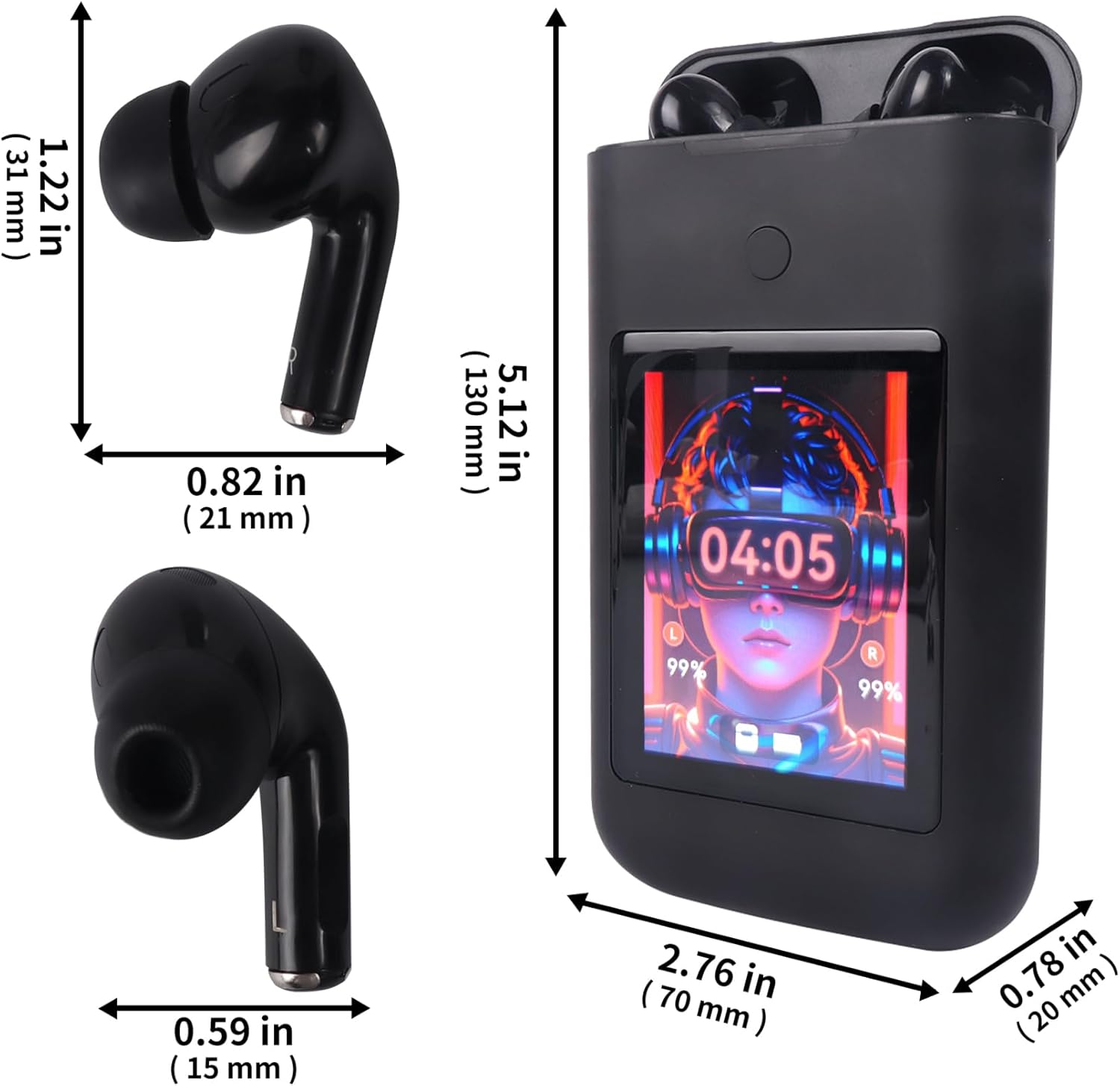
Image: Diagram showing the dimensions of the Sunffice Wireless Earbuds and their charging case in inches and millimeters.
9. Безбедносне информације
- Немојте растављати, поправљати или модификовати производ.
- Држите производ даље од екстремних температура, директне сунчеве светлости и отвореног пламена.
- Avoid exposing the product to excessive moisture or liquids beyond its water resistance rating.
- Не користите слушалице на високој јачини звука током дужег временског периода како бисте спречили оштећење слуха.
- Чувати ван домашаја деце и кућних љубимаца.
10. Гаранција и подршка
За информације о гаранцији и корисничку подршку, погледајте документацију која је достављена уз куповину или контактирајте директно продавца. Сачувајте доказ о куповини за евентуалне рекламације у вези са гаранцијом.