
1. Увод
This manual provides essential instructions for the proper setup, operation, and maintenance of your Keeson CU380 JLDK.30.03.20 adjustable bed base remote control. Please read this manual thoroughly before use to ensure correct functionality and to prevent any issues.
2. Подешавање и упаривање
2.1 Инсталација батерије
The remote control requires 2 AAA batteries (not included). To install, slide open the battery compartment cover on the back of the remote. Insert the batteries, ensuring correct polarity (+/-). Close the battery compartment cover securely.
2.2 Remote Pairing Procedure
If your remote control is not already paired with your adjustable bed base, follow these steps:
- 1. корак: Disconnect the power cord of your adjustable bed base from the electrical outlet. Wait approximately 5 seconds, then plug it back into the outlet.
- 2. корак: Within 10 seconds of plugging in the power cord, locate the PAIR button on the back of the remote control. Press and hold this PAIR button. The button will illuminate blue and begin flashing.
- 3. корак: Continue holding the PAIR button until it stops flashing and the LED light on the control box of your bed base goes out. Release the PAIR button. The remote is now paired with the adjustable base.
- 4. корак: Test all remote functions to confirm successful pairing.

Image: Remote control pairing instructions, illustrating the steps to connect the remote to the bed base.
3. Управљање даљинским управљачем
The remote control provides intuitive buttons for adjusting your bed base. Familiarize yourself with the button layout and their corresponding functions:
- Глава горе/доле: Подешава узглавље кревета.
- Нога горе/доле: Подешава део кревета за ноге.
- Раван: Returns the bed to a flat position.
- Zero G: Activates the pre-programmed Zero Gravity position, designed to relieve pressure.
- Пресет меморије (ако су доступне): Some remotes may have programmable memory buttons to save your favorite positions. Consult your bed base manual for specific instructions.

Слика: Фронт view of the Keeson CU380 JLDK.30.03.20 remote control, displaying buttons for head/foot adjustment, Zero G, and other functions.
4. Одржавање
4.1 Замена батерије
Замените батерије када даљински управљач постане спор или престане да ради. Увек користите нове ААА батерије и одговорно одложите старе батерије.
4.2 Чишћење
To clean the remote control, gently wipe it with a soft, dry cloth. Avoid using liquid cleaners or abrasive materials, as these can damage the remote's surface or internal components.
КСНУМКС. Решавање проблема
5.1 Даљински управљач не реагује
- Уверите се да су батерије правилно инсталиране и да нису истрошене. Замените их ако је потребно.
- Verify the remote is properly paired with the bed base by following the pairing procedure in Section 2.2.
- Check that the bed base is plugged into a functional power outlet.
5.2 Проблеми са компатибилношћу
This remote control is specifically designed for Keeson CU380 JLDK.30.03.20 adjustable bed bases. It is not a universal remote. Before purchasing or attempting to use, ensure your bed base's control box model number matches CU380 JLDK.30.03.20.
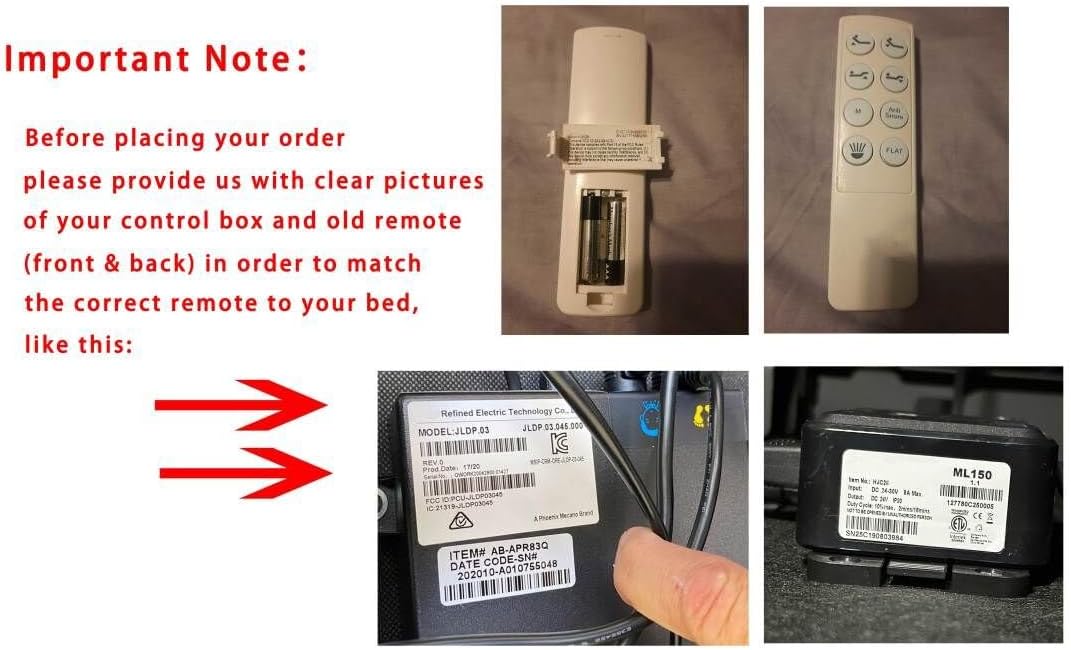
Image: Visual guide emphasizing the importance of verifying the control box model number and comparing it with the old remote for compatibility.
6. Спецификације
- Модел: CU380 JLDK.30.03.20
- Компатибилни уређаји: Adjustable bed base (Keeson CU380 JLDK.30.03.20)
- Извор напајања: 2 ААА батерије (нису укључене)
- Боја: Црно
- Посебна карактеристика: Not a universal remote
7. Гаранција и подршка
7.1 Информације о гаранцији
Specific warranty details for this remote control are not provided in the product information. Please refer to the documentation that came with your adjustable bed base or contact the original seller for warranty inquiries.
7.2 Корисничка подршка
If you encounter issues not covered in this manual or require further assistance, please contact the seller or manufacturer of your adjustable bed base. When contacting support, provide detailed information about your bed base, control box, and the remote control, including any serial numbers or model identifiers.