
Увод
Thank you for choosing the Cherub WST-670 Rechargeable Clip-On Tuner. This compact and versatile tuner is designed for precise tuning of various musical instruments, including chromatic, guitar, ukulele, and violin. Featuring a high-contrast color LCD display and a long-lasting rechargeable battery, it offers convenience and accuracy for musicians of all levels.
Садржај пакета
Молимо вас да проверите пакет за следеће ставке:
- 1 x Cherub WST-670 Clip-On Tuner
- 1 к УСБ кабл за пуњење
- 1 x Упутство за употребу (овај документ)
Производ је завршенview
The Cherub WST-670 tuner features a robust clip mechanism and a clear display for easy readability. Its intuitive controls allow for quick mode selection and precise tuning.

Слика: Фронт view of the Cherub WST-670 Clip-On Tuner, showing the display and clip mechanism.

Image: Close-up of the Cherub WST-670 Tuner's color LCD display, showing tuning indicators and battery level.
Кључне карактеристике:
- Режими подешавања: Chromatic (C), Guitar (G), Ukulele (U), Violin (V).
- Пуњива батерија: Built-in Li-Po battery provides over 10 hours of continuous use per charge.
- High-Contrast LCD: Bright and clear color display shows tuning status.
- Подесиви клип: Strong and flexible clip for optimal viewугао уласка.
- Аутоматско искључивање: Automatically turns off to maximize battery life.
Сетуп
1. Charging the Tuner
Before first use, fully charge the tuner. The built-in rechargeable battery ensures long operation time.
- Connect the included USB charging cable to the tuner's charging port.
- Повежите други крај USB кабла са стандардним USB адаптером за напајање (није укључен) или USB портом рачунара.
- The battery indicator on the display will show charging status. Once fully charged, the indicator will show a full battery.
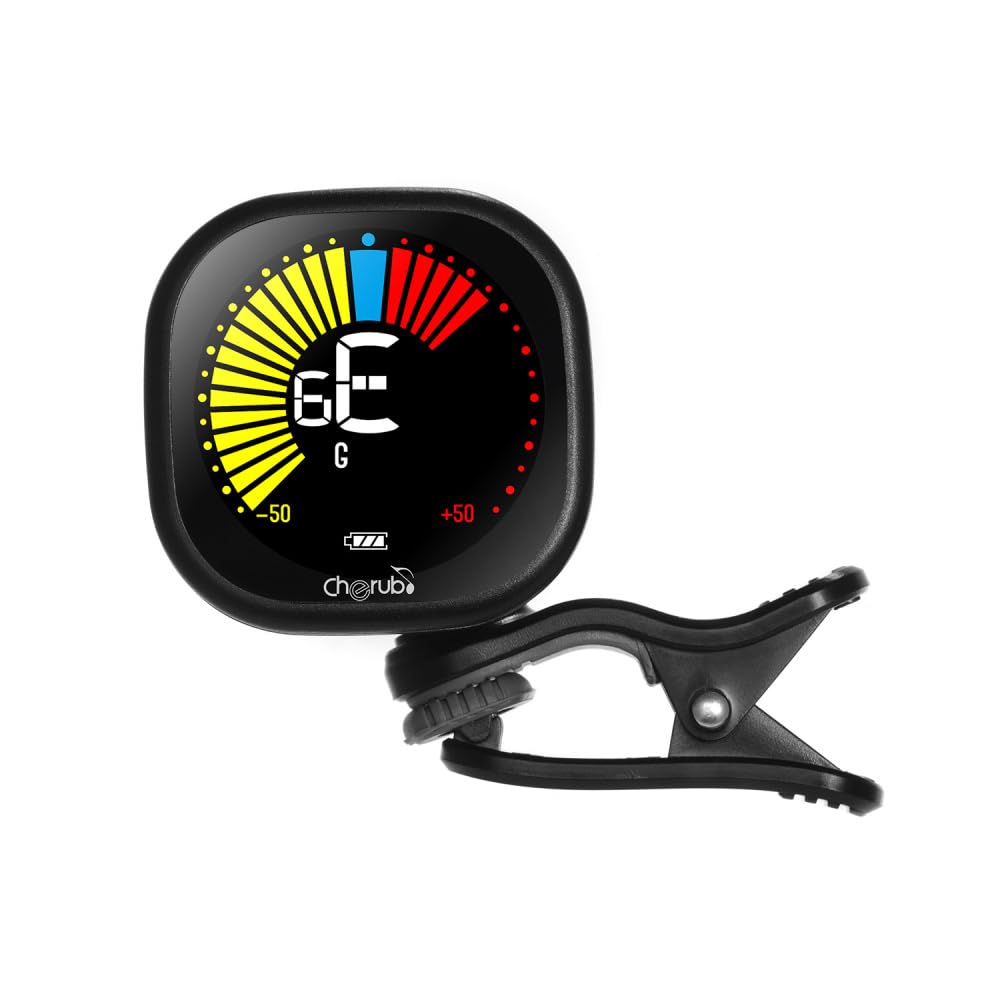
Image: Diagram illustrating how to connect the USB charging cable to the Cherub WST-670 Tuner for recharging.
2. Attaching the Tuner
The clip-on design allows for easy attachment to the headstock of your instrument.
- Gently open the clip and attach it securely to the headstock of your guitar, ukulele, or violin.
- Adjust the tuner's display angle for optimal visibility.

Image: The Cherub WST-670 Tuner securely clipped onto the headstock of an acoustic guitar.
Упутство за употребу
1. Укључивање/искључивање
- To power on, press and hold the power button (usually marked with a power symbol) for a few seconds.
- To power off, press and hold the power button again. The tuner also features an auto power-off function to save battery.
2. Selecting Tuning Mode
The WST-670 supports multiple tuning modes:
- Хроматски (C): For all instruments, displays the exact note.
- Гитара (Г): Optimized for guitar tuning.
- Ukulele (U): Optimized for ukulele tuning.
- Виолина (В): Optimized for violin tuning.
To change the tuning mode, press the "MODE" button repeatedly until the desired mode (C, G, U, or V) is displayed on the screen.
3. Tuning Your Instrument
- Ensure the tuner is powered on and the correct tuning mode is selected for your instrument.
- Тргните једну жицу на инструменту. Штимер ће детектовати вибрацију и приказати ноту.
- Тумачење приказа:
- If the needle points to the left and the display is red/yellow, the note is flat. Tighten the string.
- If the needle points to the right and the display is red/yellow, the note is sharp. Loosen the string.
- When the note is in tune, the needle will be centered, and the display will turn green.
- Repeat for all strings until your instrument is perfectly in tune.
Одржавање
Чишћење
To clean the tuner, use a soft, dry cloth. Do not use liquid cleaners or abrasive materials, as they may damage the display or casing.
Баттери Царе
- Избегавајте често потпуно пражњење батерије како бисте продужили њен век трајања.
- If storing the tuner for an extended period, charge it to about 50% capacity and recharge every few months.
- Use only the provided USB cable or a compatible cable for charging.
Решавање проблема
Tuner not turning on:
- Ensure the battery is charged. Connect the tuner to a USB power source and allow it to charge for at least 30 minutes before attempting to power on again.
- Чврсто притисните и држите дугме за напајање неколико секунди.
Нетачно подешавање:
- Check that the tuner is securely clipped to the instrument's headstock. Loose attachment can affect vibration detection.
- Ensure the correct tuning mode (C, G, U, or V) is selected for your instrument.
- Tune in a quiet environment to avoid interference from external sounds.
- If using Chromatic mode, ensure you are aware of the specific notes for your instrument's standard tuning.
Екран је затамњен или трепери:
- The battery might be low. Recharge the tuner using the provided USB cable.
Спецификације
| Бренд: | Цхеруб |
| Модел: | ВСТ-670 |
| Режими подешавања: | Chromatic (C), Guitar (G), Ukulele (U), Violin (V) |
| Опсег детекције: | A0 (27.50 Hz) - C8 (4186 Hz) |
| Метод детекције: | пиезо (клип) |
| Референтна висина: | 440 Хз |
| Тачност подешавања: | +/-1 цент |
| Напајање: | Built-in Rechargeable Li-Po Battery (3.7V 180mAh) |
| Тежина артикла: | 30 г / 1.1 оз |
| Димензије производа: | 10.5 x 9.5 x 5 цм (приближно 4.1 x 3.7 x 2 инча) |
Гаранција и подршка
This product comes with a standard manufacturer's warranty. For specific warranty details, please refer to the documentation provided at the time of purchase or contact your retailer. For technical support or further assistance, please contact the customer service department of your retailer.
Note: The guitar shown in images is for illustration purposes only and is not included with the tuner.