
Увод
Thank you for choosing the TELE System TS9019HEVC Satellite Decoder. This device is designed to provide stable and seamless reception of Tivùsat digital satellite channels, including over 70 free HD channels. This manual will guide you through the setup, operation, and maintenance of your new decoder to ensure an optimal viewинг искуство.
Садржај пакета
Молимо вас да проверите да ли су све ставке наведене у наставку укључене у ваш пакет:
- TELE System TS9019HEVC Satellite Decoder
- Tivùsat HD Smartcard (Merlin)
- Екстерно напајање
- Ремоте Цонтрол
- 2к ААА батерије
- ХДМИ кабл

Image: The TELE System TS9019HEVC decoder, its remote control, and the included Tivùsat Smartcard.
Сетуп
1. Connecting the Decoder
- Повезивање сателитске антене: Connect your satellite dish cable to the "RF IN" port on the back of the decoder.
- ХДМИ веза: Connect one end of the supplied HDMI cable to the "HDMI" port on the decoder and the other end to an available HDMI input on your television.
- Прикључак за напајање: Connect the external power supply to the "12V DC" port on the decoder, then plug the power adapter into a wall outlet.
- Optional AV Connection: If your TV does not have an HDMI input, you can use an AV cable (not included) to connect to the "AV" port.
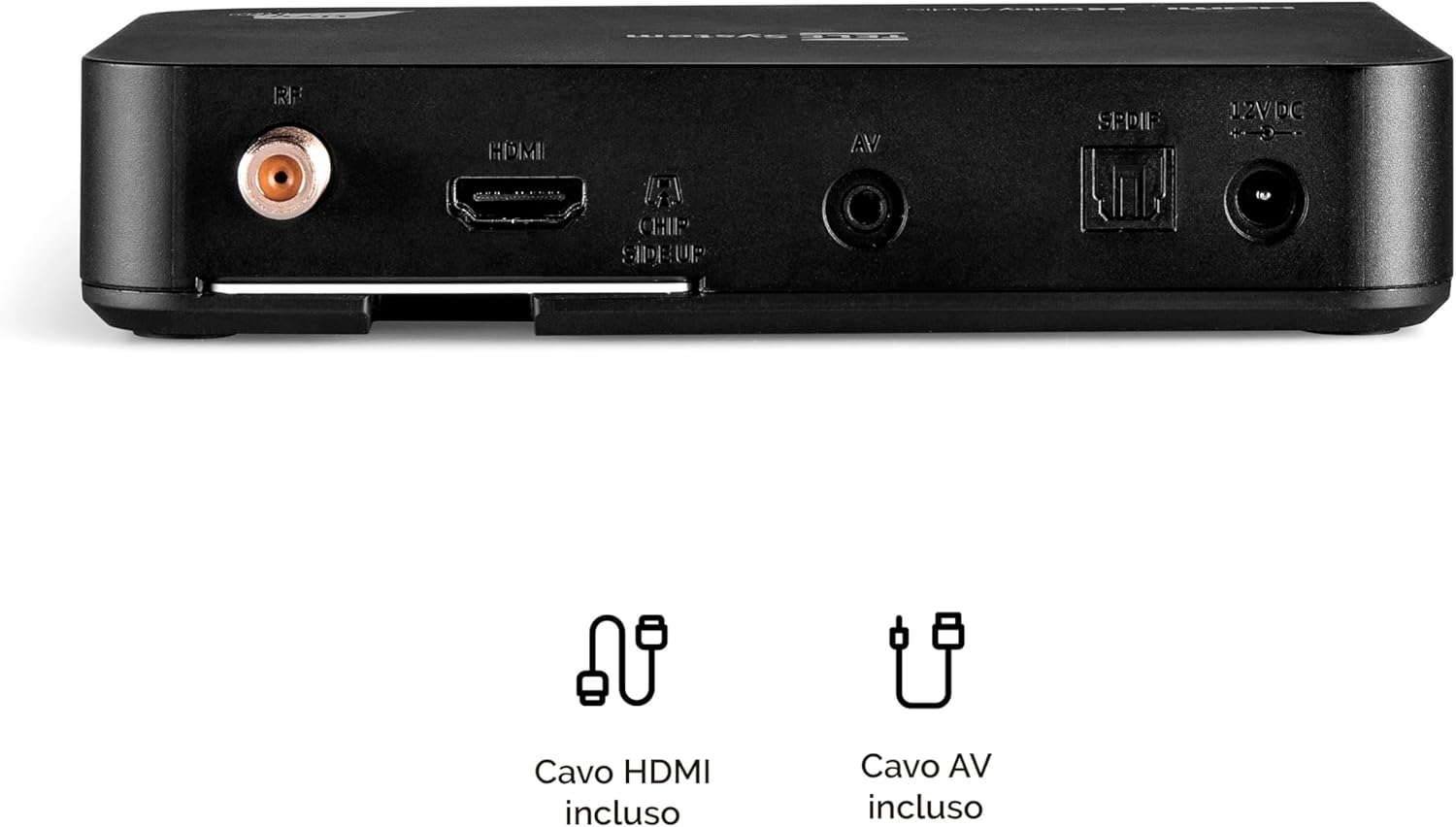
Image: Rear panel connections of the decoder, including RF IN, HDMI, AV, SPDIF, and 12V DC power input.
2. Inserting the Tivùsat Smartcard
The Tivùsat Smartcard is essential for accessing encrypted channels. Ensure it is inserted correctly:
- Locate the smartcard slot on the side of the decoder.
- Insert the Tivùsat Smartcard with the chip facing upwards and the arrow pointing into the slot. Push it gently until it clicks into place.
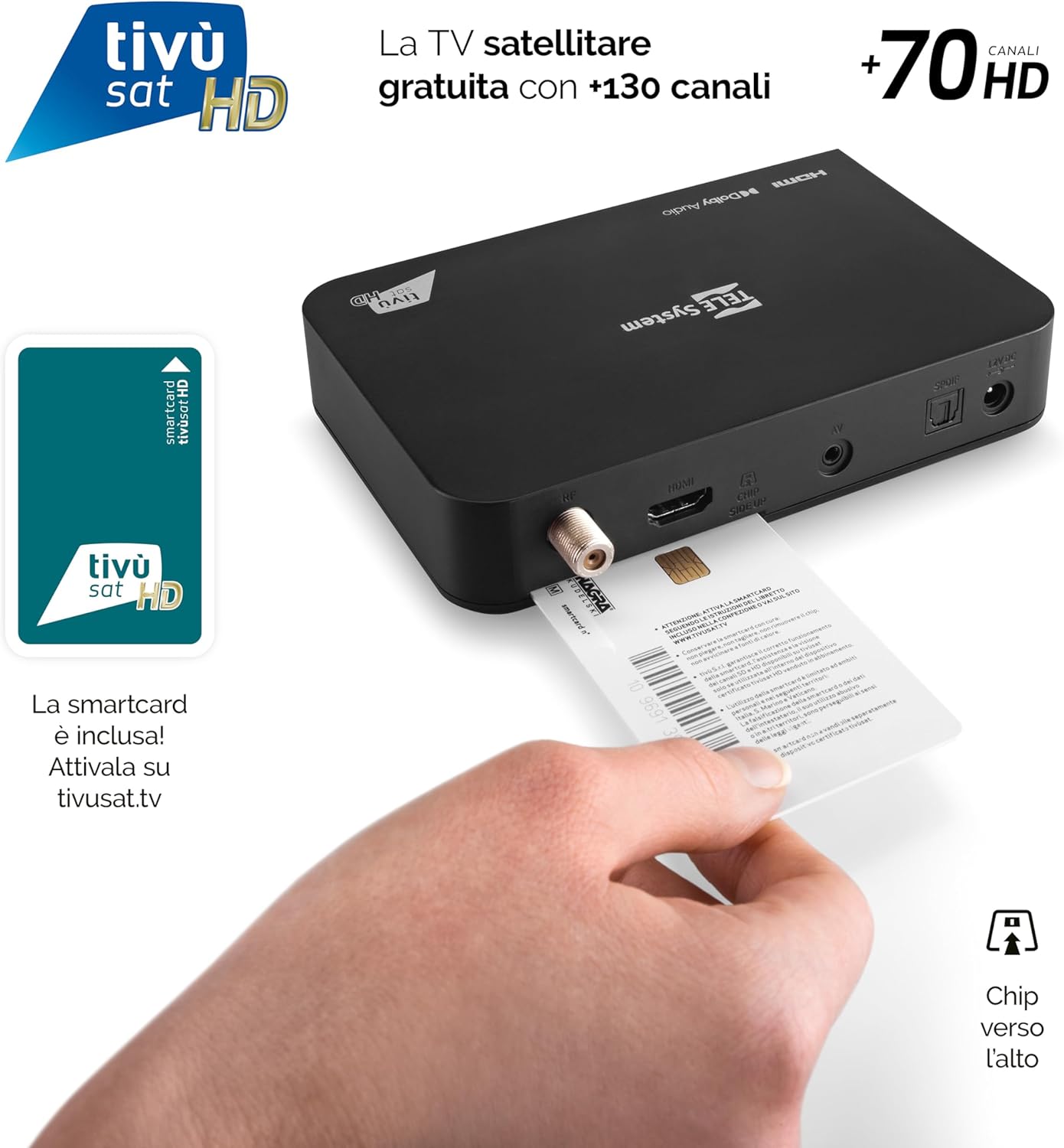
Image: Proper insertion of the Tivùsat Smartcard into the decoder's side slot.
3. Чаробњак за почетно подешавање
After connecting all cables and inserting the smartcard, turn on your TV and select the correct HDMI input. Power on the decoder. The initial setup wizard will guide you through:
- Избор језика
- Satellite dish configuration
- Automatic channel scan (EASY HD)
4. Activating the Tivùsat Smartcard
To access all Tivùsat channels, your smartcard must be activated. You can activate it easily on the official Tivùsat webсајт (www.tivusat.tv). Follow the instructions provided on the website for activation. Note that older Tivùsat Tiger smartcards may be obsolete and require replacement with a Merlin card.
Упутство за употребу
Основне функције
- Укључивање/искључивање: Користите ПОВЕР button on the remote control or the front panel of the decoder.
- Избор канала: Користите P+ / P- дугмад за секвенцијалну промену канала или директно унесите број канала помоћу нумеричке тастатуре.
- Контрола јачине звука: Користите ВОЛ + / ВОЛ- дугмад за подешавање јачине звука.
- Мени: Притисните тастер МЕНУ дугме за приступ главном менију за подешавања и функције.
- Дугме ОК: Confirms selections in menus or displays the channel list during live TV.
- Излаз/Назад: Враћа се на претходни екран или излази из менија.

Image: The remote control for the TELE System TS9019HEVC decoder, highlighting key function buttons.
Напредне функције
- Електронски програмски водич (ЕПГ): Притисните тастер ЕПГ button on the remote to view the program schedule for upcoming broadcasts.
- Favorite Lists: Create and manage personalized lists of your preferred channels for quick access. Refer to the on-screen menu for instructions.
- TV Pause (Timeshift): Connect a USB storage device (not included) to the USB port on the decoder. This feature allows you to pause live TV and resume viewинг касније.
- Automatic Channel Update: The decoder automatically updates Tivùsat channels, ensuring you always have access to the latest channel lineup.
- Функција тајмера: Set timers to automatically switch to a specific channel at a scheduled time.

Слика: прample of the channel list interface, displaying various Tivùsat channels.
Одржавање
Ажурирања софтвера
To ensure your decoder always has the latest features, improvements, and security updates, regularly check for software updates. Updates can be performed via:
- Over-The-Air (OTA): The decoder may receive updates automatically via satellite. You will be prompted on-screen if an update is available.
- УСБ: Download the latest firmware from the TELE System official website to a USB stick and follow the instructions provided with the firmware file for a manual update.
Always ensure the decoder remains powered on during a software update to prevent damage.
Општа нега
- Keep the decoder in a well-ventilated area to prevent overheating.
- Очистите спољашњост меком, сувом крпом. Не користите течна средства за чишћење или абразивне материјале.
- Avoid exposing the decoder to direct sunlight, high temperatures, or humidity.
Решавање проблема
| Проблем | Могући узрок | Решење |
|---|---|---|
| Нема сигнала / Црни екран | Incorrect HDMI input selected on TV; Satellite cable disconnected; Dish misalignment. |
|
| "Smartcard Error" Message | Smartcard incorrectly inserted; Smartcard not activated; Obsolete smartcard. |
|
| Нема звука | TV or decoder volume muted; Incorrect audio settings. |
|
| Даљински управљач не ради | Dead batteries; Obstruction between remote and decoder; Remote not paired (if applicable). |
|
Спецификације
| Феатуре | Детаљ |
|---|---|
| Бранд | ТЕЛЕ систем |
| Број модела | 58010100 |
| Боја | Црно |
| Технологија повезивања | УСБ |
| Режим аудио излаза | Стерео |
| Укупни ХДМИ портови | 1 |
| Компатибилни уређаји | Телевизија |
| Подржани аудио формати | Dolby Digital, DTS, AAC, MP3, PCM |
| Опис сателитске услуге | Tivùsat HD Classic and DAZN |
| Total Video Output Ports | 1 |
| Резолуција видео излаза | 1080п |
| Подржани стандарди | DVB-S, H.264, MP2, MP3, AAC, HD |
| Формат екрана | 16:9 |
| Земља порекла | Кина |
Информације о гаранцији
The TELE System TS9019HEVC Satellite Decoder comes with a 2-годишња гаранција на производ from the date of purchase. This warranty covers manufacturing defects and malfunctions under normal use. Please retain your proof of purchase for warranty claims. For detailed terms and conditions, please refer to the warranty card included in your package or visit the official TELE System webсајту.
Подршка
For further assistance, technical support, or frequently asked questions, please visit:
- TELE System Official Webсајт: ввв.телесистем.ит
- Tivùsat Support: For smartcard activation and Tivùsat specific inquiries, visit www.tivusat.tv
Пре него што контактирате подршку, уверите се да сте поновоviewed the troubleshooting section of this manual.