
Увод
This instruction manual provides guidance for the proper use and maintenance of your ZdalaMit RMT-AM120U replacement remote control. This remote is designed to be compatible with various Sony Home Audio Systems, offering direct functionality without the need for programming.
Компатибилност
The RMT-AM120U remote control is compatible with the following Sony Home Audio System models:
- SHAKE-X7D
- MHC-GT3D
- MHC-GT5D
- МХЦ-В7Д
- SHAKE-X1D
- SHAKE-X3D
- HCD-SHAKEX3
- HCD-SHAKEX1
- SS-SHAKEX3
- SS-SHAKEX1
Сетуп
Инсталација батерије
- Пронађите одељак за батерије на полеђини даљинског управљача.
- Померите поклопац одељка за батерије надоле или у смеру који показује стрелица да бисте га отворили.
- Insert two (2) 1.5V AAA alkaline batteries, ensuring the positive (+) and negative (-) terminals match the diagrams inside the compartment.
- Затворите поклопац одељка за батерију тако што ћете га вратити на место док не кликне чврсто.
Напомена: Batteries are not included with the remote control. Please use new alkaline batteries for optimal performance.
Почетна употреба
No programming is required for this replacement remote control. Once batteries are installed correctly, the remote is ready for immediate use with your compatible Sony Home Audio System.
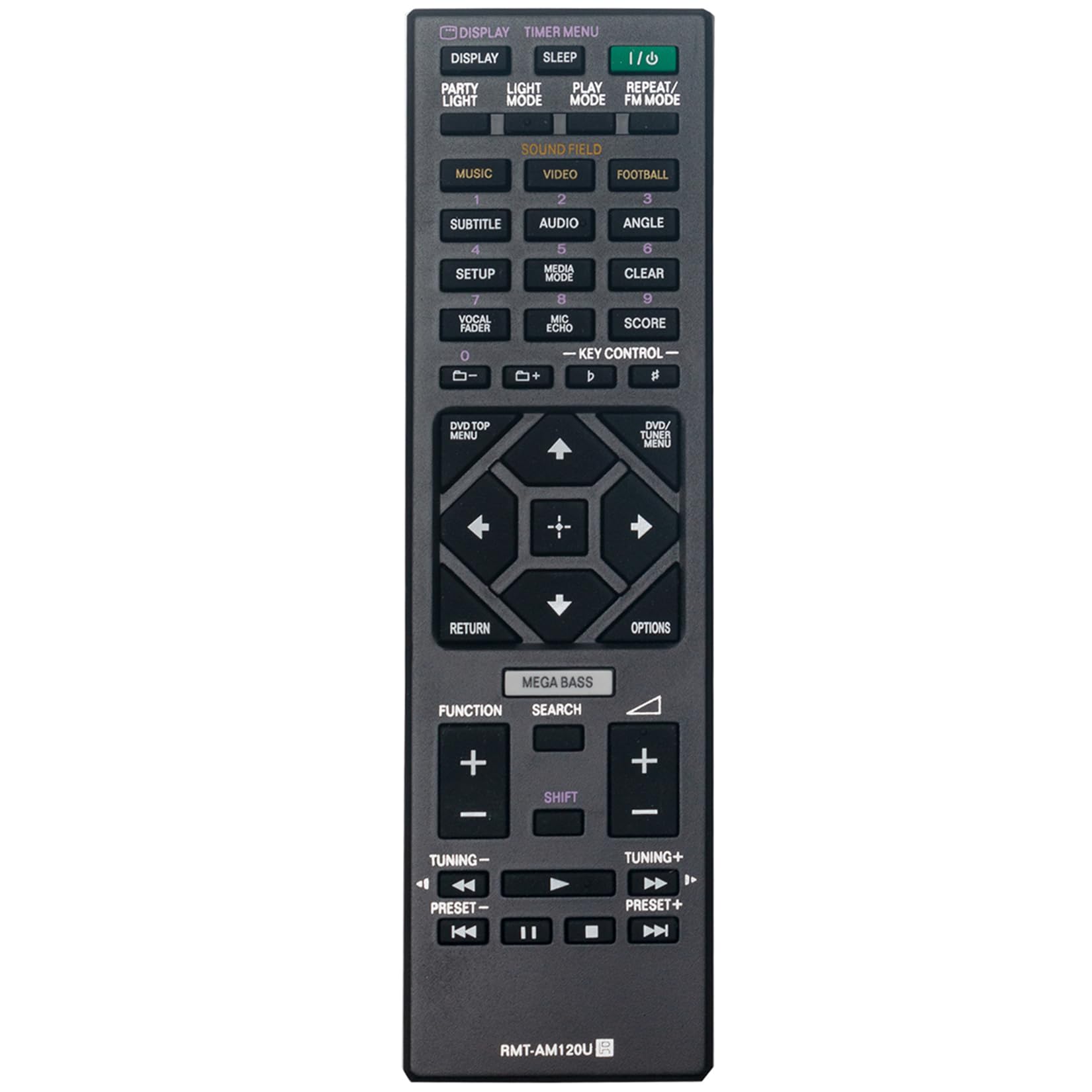
Слика 1: Предња страна view of the RMT-AM120U remote control.
Упутство за употребу
Point the remote control directly at the infrared sensor on your Sony Home Audio System. Ensure there are no obstructions between the remote and the system.
Кључне функције
The remote control features various buttons for controlling your audio system. Common functions include:
- Напајање (У/И): Укључује или искључује аудио систем.
- Приказ: Changes or shows display information.
- Timer Menu: Accesses timer settings.
- спавање: Sets a sleep timer.
- Режим репродукције: Selects playback modes (e.g., Normal, Shuffle).
- Понављање/ФМ режим: Toggles repeat playback or switches FM radio mode.
- Music/Video/Football: Selects input sources or sound modes.
- Subtitle/Audio/Angle: Controls DVD/Blu-ray playback options.
- Подешавање: Приступа системским подешавањима.
- Режим медија: Selects media input.
- Обриши: Clears entries or selections.
- Vocal Fader/Mic Echo/Score: Controls microphone and karaoke functions.
- Контрола тастера: Adjusts key for karaoke.
- Нумеричка дугмад (0-9): За директан избор или унос нумере.
- DVD/TOP MENU: Accesses the top menu of a DVD/Blu-ray disc.
- DVD/TUNER MENU: Accesses the menu for DVD or tuner functions.
- Навигациона дугмад (горе, доле, лево, десно, Ентер): За навигацију и избор у менију.
- Повратак: Враћа се на претходни екран или мени.
- Опције: Displays options menu.
- МЕГА БАС: Појачава звук баса.
- Претрага: Initiates search function.
- Функција: Cycles through functions or inputs.
- Јачина звука (+/-): Подешава ниво јачине звука.
- Tuning (+/-): Tunes radio frequencies.
- Preset (+/-): Selects preset radio stations.
- Playback Controls (Play, Pause, Stop, Fast Forward, Rewind, Skip Forward, Skip Back): Контролише репродукцију медија.

Слика 2: Под углом view highlighting the button layout.
Одржавање
Замена батерије
Replace batteries when the remote control's response becomes sluggish or stops functioning. Always replace both batteries at the same time with new 1.5V AAA alkaline batteries. Do not mix old and new batteries, or different types of batteries.
Чишћење
Wipe the remote control with a soft, dry cloth. Do not use abrasive cleaners, solvents, or alcohol, as these can damage the surface or internal components.
Складиштење
Ако даљински управљач неће бити коришћен дуже време, извадите батерије како бисте спречили цурење и потенцијално оштећење.
Решавање проблема
- Даљински не реагује:
- Проверите да ли су батерије правилно уметнуте са исправним поларитетом.
- Замените старе батерије новим.
- Ensure there are no obstructions between the remote control and the audio system's sensor.
- Make sure you are within the effective operating range (approximately 33 feet).
- Limited range or intermittent operation:
- Ensure the batteries are fresh.
- Verify that the remote control is pointed directly at the audio system.
- Avoid strong light sources (e.g., direct sunlight, fluorescent lights) that might interfere with the infrared signal.
Спецификације
| Феатуре | Спецификација |
|---|---|
| Модел | RMT-AM120U |
| Повер Суппли | 2 x 1.5 V AAA алкалне батерије |
| Технологија повезивања | Инфрацрвени |
| Количина дугмета | 15 |
| Максимални домет | 33 стопа (10 метара) |
| Димензије (Д к Ш к В) | 6.35" x 1.79" x 0.55" (16.13 цм x 4.55 цм x 1.40 цм) |
| Тежина артикла | 40 грама (0.09 фунте) |
| Боја | Црно |

Figure 3: Remote control with approximate dimensions.
Информације о гаранцији
This ZdalaMit RMT-AM120U replacement remote control comes with a 1 година гаранције од датума куповине. Ова гаранција покрива производне недостатке при нормалној употреби. Не покрива штету насталу услед злоупотребе, незгода, неовлашћених модификација или цурења батерије.
For warranty claims or support, please contact your retailer or the manufacturer directly.
Подршка
For further assistance or inquiries regarding your ZdalaMit RMT-AM120U remote control, please refer to the contact information provided by your seller or visit the ZdalaMit official support channels.