
1. Увод
This manual provides detailed instructions for the installation, operation, and maintenance of your PGST A107F-EU-A Wireless Home Alarm System. This intelligent security system offers comprehensive protection for your home or property, featuring 4G connectivity, Tuya App integration, and compatibility with smart assistants like Alexa and Google Assistant. Please read this manual thoroughly before using the system to ensure proper functionality and safety.
2. Садржај пакета
Carefully unpack the box and verify that all the following components are included:
- 1 x PGST A107F Main Control Panel
- 1 x Power Adapter (5V 2A)
- 2 к даљински управљач
- 2 к РФИД Tags
- 1 x Wireless Door/Window Sensor
- 1 x Wireless PIR Motion Sensor
- 1 x Бежична сирена
- Монтажни прибор (вијци, анкери)
- Кориснички приручник (овај документ)
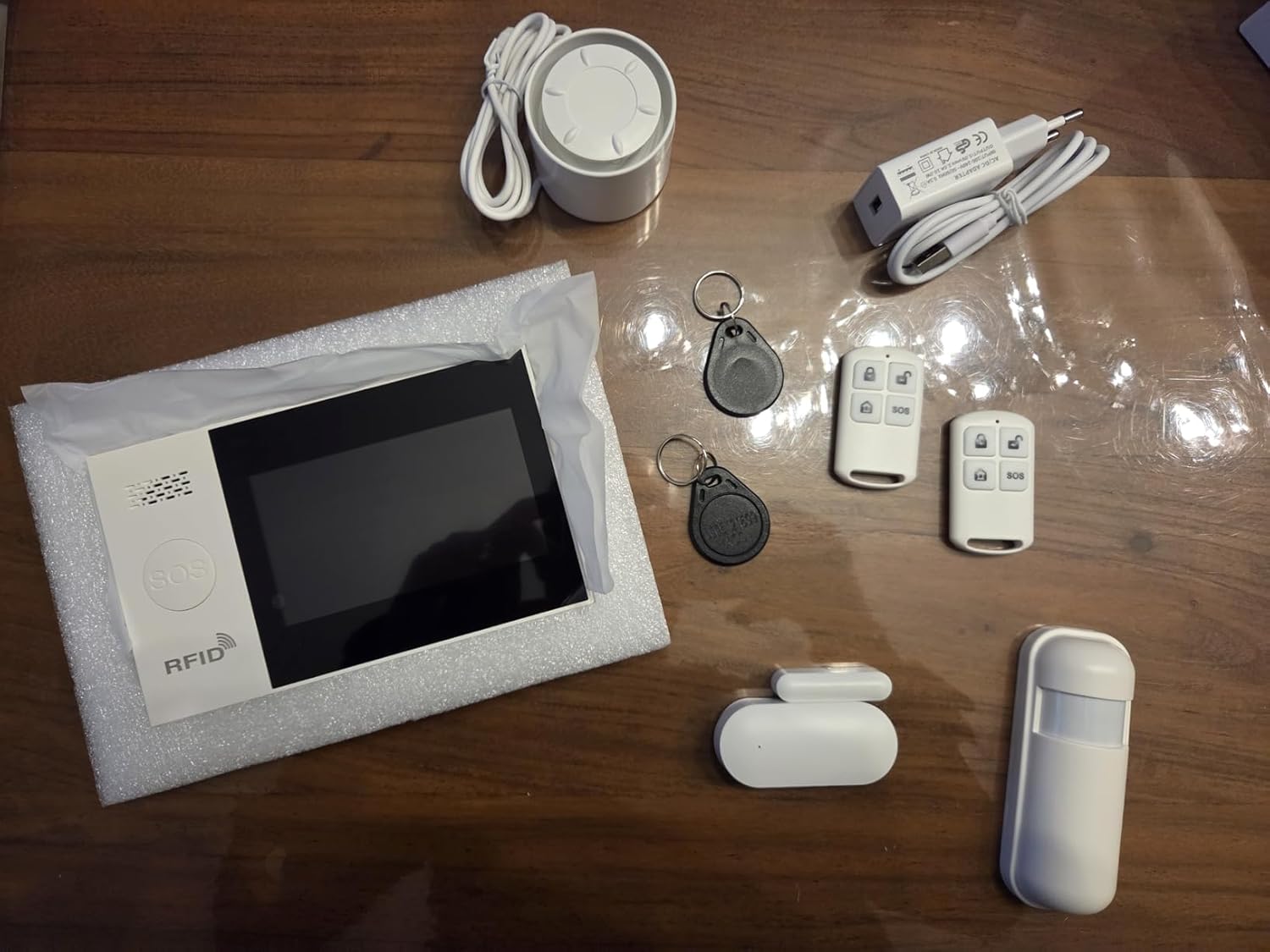
Слика 2.1: Готовоview of the PGST A107F-EU-A Wireless Home Alarm System components, including the main panel, remote controls, RFID tags, siren, power adapter, door/window sensor, and motion sensor.
3. Производ је готовview
The PGST A107F-EU-A system consists of a central control panel and various wireless sensors and accessories. The main panel acts as the brain of the system, processing signals from sensors and communicating alerts via 4G, SMS, or the Tuya App.
3.1 Главна контролна табла
The main control panel features a display, touch keypad, SOS button, and RFID reader. It houses the SIM card slot for 4G communication and connects to your home Wi-Fi network for app control.

Слика 3.1: Предња страна view of the PGST A107F-EU-A Main Control Panel, showing the display, keypad, SOS button, and RFID reader.

Слика 3.2: Бочна страна view of the PGST A107F-EU-A Main Control Panel, illustrating its slim profile.
3.2 SIM Card Slot and Connections
The back of the main panel provides access to the SIM card slot and power input. Ensure the SIM card is inserted correctly for 4G functionality.

Слика 3.3: Позади view of the PGST A107F-EU-A Main Control Panel with the cover removed, showing the SIM card slot and internal components. The IMEI number is visible: 863957076386736.
4. Подешавање
4.1 Почетно укључивање
- Connect the provided power adapter to the main control panel and plug it into a power outlet.
- The panel will power on and initiate its startup sequence.
4.2 SIM Card Installation (for 4G functionality)
- Уверите се да је главна табла искључена.
- Locate the SIM card slot on the back of the main panel (refer to Image 3.3).
- Insert a standard 4G SIM card into the slot, ensuring correct orientation.
- Replace the cover and power on the panel. The system will attempt to connect to the 4G network.
4.3 Интеграција са Туја апликацијом
- Преузмите апликацију „Tuya Smart“ или „Smart Life“ из продавнице апликација на вашем паметном телефону (iOS или Android).
- Региструјте се за нови налог или се пријавите ако га већ имате.
- On the app, tap "Add Device" or the "+" icon.
- Select "Security & Video Surveillance" > "Alarm (Wi-Fi)" or search for "Alarm System".
- Follow the on-screen instructions to connect the alarm panel to your home Wi-Fi network. This typically involves putting the panel into pairing mode (refer to the panel's display for instructions) and entering your Wi-Fi credentials in the app.
4.4 Упаривање сензора
The system comes with pre-paired sensors. If you need to add new sensors or re-pair existing ones:
- On the main panel, navigate to the "Sensor Management" or "Add Sensor" menu.
- Select the type of sensor you wish to add (e.g., Door Sensor, Motion Sensor).
- Activate the sensor (e.g., separate the two parts of a door sensor, or trigger a motion sensor). The panel will detect the sensor and prompt you to confirm pairing.
- Assign the sensor to a specific zone (e.g., "Main Door," "Living Room").
4.5 Remote Control and RFID Tag Упаривање
Remote controls and RFID tags are typically pre-paired. To add new ones:
- On the main panel, navigate to the "Remote Control Management" or "RFID Tag Management" menu.
- Follow the on-screen instructions to put the panel into pairing mode.
- For remote controls, press any button on the remote. For RFID tags, додирните tag against the RFID reader on the main panel.
- Confirm the pairing on the panel.
5. Руковање системом
5.1 Активирање и деактивирање
The system can be armed or disarmed using the main panel, remote controls, RFID tags, or the Tuya App.
- Наоружавање (режим одсуства): Activates all sensors. Any triggered sensor will set off the alarm.
- Кућна рука (режим стајања): Активира периметарске сензоре (нпр. сензоре за врата/прозоре) док истовремено омогућава слободно кретање унутар објекта (нпр. сензори покрета су деактивирани).
- деактивирај: Deactivates all sensors, allowing free entry and exit without triggering the alarm.
5.2 СОС функција
In an emergency, press the SOS button on the main panel or the remote control. The system will immediately trigger the alarm and send emergency notifications to pre-configured contacts via 4G call, SMS, and Tuya App alerts.
5.3 Управљање зонама
Each sensor is assigned to a zone. You can customize zone types (e.g., 24-hour zone, delay zone, home arm zone) through the main panel settings or the Tuya App to suit your security needs.
5.4 Гласовна контрола помоћу Алексе и Гугл асистента
After integrating the Tuya App with Amazon Alexa or Google Assistant, you can use voice commands to control your alarm system. Exampлес укључује:
- "Alexa, arm the alarm."
- "Hey Google, disarm the alarm."
- "Alexa, what is the status of the alarm?"
Refer to the Tuya App's integration guide for specific voice commands and setup instructions.
5.5 Instant Notifications
Upon an alarm trigger, the system will send instant alerts:
- 4G Call: Dials pre-set emergency numbers.
- СМС: Sends text messages to pre-set numbers.
- Туја апликација: Pushes real-time notifications to your smartphone.
6. Одржавање
6.1 Замена батерије
Wireless sensors (door/window, motion) are powered by batteries. The main panel will indicate low battery status for individual sensors. Replace batteries promptly to ensure continuous protection.
- Трајање батерије сензора: Approximately 2 years (varies with usage).
- Refer to the specific sensor's compartment for battery type (e.g., CR2032 for small sensors, AA/AAA for larger ones).
6.2 Чишћење
Wipe the main panel and sensors with a soft, dry cloth. Avoid using abrasive cleaners or solvents, as they may damage the surfaces.
КСНУМКС. Решавање проблема
- Систем се не укључује: Ensure the power adapter is securely connected to both the panel and a working power outlet.
- No 4G signal: Check if the SIM card is correctly inserted and activated. Verify that your area has 4G coverage.
- Сензори који не активирају аларм: Check sensor battery levels. Ensure sensors are within range of the main panel and correctly paired. Verify zone settings in the app or on the panel.
- Tuya App connection issues: Ensure the main panel is connected to your Wi-Fi network. Check your Wi-Fi signal strength. Restart the app and the main panel.
- Лажни аларми: Check sensor placement to avoid environmental triggers (e.g., direct sunlight on motion sensors, loose doors/windows). Adjust sensor sensitivity if applicable.
8. Спецификације
| Феатуре | Спецификација |
|---|---|
| Број модела | АКСНУМКСФ |
| Бранд | ПГСТ |
| Технологија повезивања | Wireless, 4G, Wi-Fi |
| Компатибилни уређаји | Smartphone (Tuya App), Alexa, Google Assistant |
| Power Source (Main Panel) | AC Power Adapter (5V 2A) |
| Димензије артикла (ДкШкВ) | 22 к 15 к 10 цм |
| Тип аларма | Ентри |
| Average Battery Life (Sensors) | 2 године |
| Метод инсталације | Причврстити завртњем |
| УПЦ / ГТИН | 704444493779 |
9. Гаранција и подршка
9.1 Гаранција произвођача
The PGST A107F-EU-A Wireless Home Alarm System is covered by a Двогодишња гаранција произвођача од дана куповине. Ова гаранција покрива недостатке у материјалу и изради при нормалној употреби.
9.2 Корисничка подршка
For any questions, technical assistance, or warranty claims, please contact PGST customer support. Refer to the product packaging or the PGST official webсајт за контакт информације.