
1. Увод
Thank you for choosing the MONODEAL 707-Black Portable CD Player. This device is designed to provide a versatile audio experience, supporting various formats including CD, CD-R, CD-RW, MP3, and WMA. It features built-in high-fidelity speakers, a 2.0-inch TFT color display, Bluetooth 5.3 for wireless connections, TF card support for expanded music options and recording, and AUX input for wired connections. Its compact and portable design makes it ideal for use at home, in the car, or on the go.

Image 1.1: The MONODEAL 707-Black Portable CD Player, showcasing its compact design and TFT color display.
2. Садржај пакета
Молимо вас да проверите пакет за следеће ставке:
- MONODEAL 707-Black Portable CD Player
- УСБ кабл за пуњење типа Ц
- 3.5 мм АУКС кабл
- Жичане слушалице
- Кориснички приручник (овај документ)
- Регистрациони картон

Image 2.1: All items included in the MONODEAL 707-Black Portable CD Player package.
3. Производ је готовview
The MONODEAL 707-Black features a user-friendly interface with clearly labeled buttons and a vibrant TFT color display. Key components include:
- 2.0-инчни TFT екран у боји: Provides clear and colorful information.
- Уграђени звучници: High-fidelity audio output without external headphones.
- Контролна дугмад: Play/Pause, Skip/Fast Forward/Rewind, Mode, Repeat, Program, Function, Volume Up/Down.
- Портови: USB-C for charging, 3.5mm Headphone Jack, AUX In, TF Card Slot.
- Прекидач: Located on the side for easy on/off control.

Image 3.1: The 2.0-inch TFT color display offers vibrant colors and sharp details compared to older LCD screens.
4. Подешавање
4.1 Пуњење уређаја
The CD player has a built-in 2000mAh rechargeable battery. Before first use, fully charge the device using the provided USB Type-C cable.
- Connect the USB Type-C cable to the charging port on the device.
- Повежите други крај кабла са УСБ адаптером за напајање (није укључен) или УСБ портом рачунара.
- The charging indicator on the display will show charging status. A full charge typically takes 3-4 hours and provides 7-10 hours of continuous playback.

Image 4.1: The CD player being charged via its USB-C port, indicating its large capacity battery.
4.2 Убацивање CD-a
- Slide the power switch to the 'ON' position.
- Gently open the CD compartment cover.
- Place the CD with the label side facing up onto the spindle.
- Close the CD compartment cover firmly until it clicks.
- The player will automatically read the disc.

Image 4.2: Proper method for inserting a CD into the player.
5. Упутство за употребу
5.1 Основна репродукција CD-ова
- After inserting a CD, the player will automatically begin playback.
- Притисните тастер [Пусти/Пауза] дугме за паузирање или наставак репродукције.
- Притисните тастер [Претходна/Следећа] дугмад за прелазак на претходну или следећу нумеру.
- Дуго притисните [Претходна/Следећа] buttons to fast forward or rewind within a track.
- Подесите јачину звука помоћу наменских контрола јачине звука.

Image 5.1: The player supports various playback modes for CDs.
5.2 Bluetooth Connectivity (BT 5.3)
The player supports both Bluetooth receiving (RX) and transmitting (TX) modes. Note: Car Bluetooth connection is not supported for direct audio streaming from the player to the car's Bluetooth system. Use AUX or FM transmission for car audio.
- Bluetooth Receiving (RX): Connect your smartphone or tablet to the CD player to use its built-in speakers.
- Bluetooth Transmitting (TX): Connect the CD player to Bluetooth headphones or speakers for wireless audio output.
- To activate Bluetooth mode, press the [БТ] button. The Bluetooth icon on the display will flash.
- On your external Bluetooth device (headphones/speaker), search for "CD Player" or similar and pair.

Image 5.2: The CD player supports both receiving and transmitting Bluetooth signals.
For a visual guide on connecting to Bluetooth in a car (via FM transmission), refer to the video below:
Video 5.1: Demonstration of connecting the CD player to a car's audio system, likely via FM transmission, as direct Bluetooth car connection is not supported by the player itself.
5.3 TF Card Playback and Recording
The CD player supports TF card music playback and can transcribe CD contents to a TF card (up to 32GB).
- Insert a TF card into the designated slot.
- To play music from the TF card, select the TF card mode using the [режим] дугме.
- To transcribe a CD to the TF card, ensure a CD is playing and a TF card is inserted. Follow the on-screen prompts or refer to the full function demonstration video for specific steps.

Image 5.3: The CD player supports TF card functionality for playback and direct recording from CDs.
5.4 ФМ предајник
Use the FM transmitter function to broadcast audio from the CD player to an FM radio, useful for car audio systems without an AUX input.
- Притисните тастер [ФМ] button to activate the FM transmitter.
- Tune your car's FM radio to the same frequency displayed on the CD player's screen.
- Adjust the volume on both the CD player and your car stereo for optimal sound.

Image 5.4: The CD player can connect to car audio systems via AUX cable or FM transmission.
5.5 АУКС веза
Connect the CD player to external audio devices, such as car stereos or home audio systems, using the provided 3.5mm AUX cable.
- Повежите један крај 3.5 мм AUX кабла са [AUX In] port on the CD player.
- Connect the other end to the AUX input of your external audio system.
- Select the AUX input on your external audio system to hear the CD player's audio.
5.6 Repeat Modes and Song Programming
The player offers various repeat modes and the ability to program a sequence of songs.
- Режими понављања: Притисните тастер [поновити] button to cycle through repeat options (e.g., repeat one, repeat all, random play, A-B repeat).
- Song Programming: У режиму заустављања притисните [ПРОГ] дугме. Користите [Претходна/Следећа] buttons to select tracks, then press [ПРОГ] again to add them to the program list. Press [Игра] да бисте започели програмирану репродукцију.
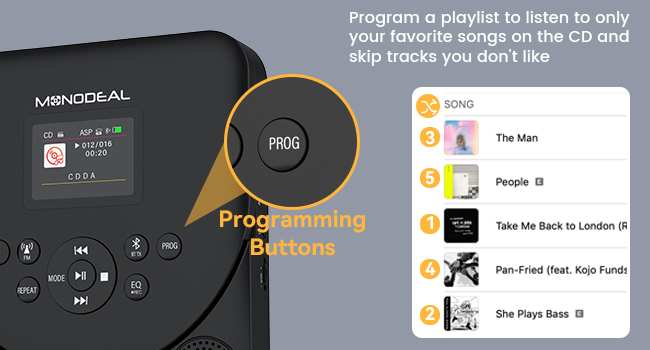
Image 5.5: The programming buttons allow users to create custom playlists.
5.7 Тајмер за спавање
Set a sleep timer to automatically turn off the player after a specified duration.
- Дуго притисните [СПАВАЈ] дугме.
- Користите [Претходна/Следећа] buttons to select a sleep time from 10 to 90 minutes.
- The player will automatically power off after the set time.
For a comprehensive demonstration of various functions including CD mode, repeat, programming, sleep timer, Bluetooth receiver, Bluetooth transmitter, and FM transmitter, please watch the video below:
Video 5.2: Detailed function operation demonstration for the CD player, covering various playback and connectivity features.
6. Одржавање
- Одржавајте уређај чистим брисањем меком, сувом крпом. Избегавајте употребу абразивних средстава за чишћење или растварача.
- Ensure the CD compartment is free of dust and debris.
- Handle CDs by their edges to prevent scratches and fingerprints.
- Чувајте плејер на хладном и сувом месту, даље од директне сунчеве светлости и екстремних температура.
КСНУМКС. Решавање проблема
7.1 Disc Not Reading / Skipping
- Уверите се да је CD чист и без огреботина. Нежно обришите од средине ка споља меком крпом.
- Verify the CD is inserted correctly with the label side facing up.
- Check if the disc format is supported (CD/CD-R/CD-RW/MP3/WMA).
- The player features advanced anti-skip protection, but severe shocks may still cause skipping.
7.2 Нема звука
- Adjust the volume on the CD player and any connected external devices.
- If using headphones, ensure they are properly plugged into the 3.5mm jack.
- If using Bluetooth, ensure the player is correctly paired and connected to the desired output device.
- If using AUX, ensure the cable is securely connected and the correct input is selected on the external device.
7.3 Проблеми са Bluetooth везом
- Ensure the CD player is in the correct Bluetooth mode (RX or TX).
- Make sure the external Bluetooth device is in pairing mode and within range.
- Forget previous pairings on both devices and attempt to re-pair.
- Restart both the CD player and the external Bluetooth device.
8. Спецификације
| Феатуре | Детаљ |
|---|---|
| Бранд | МОНОДЕАЛ |
| Број модела | 707-Црна |
| Компатибилни уређаји | Smartphone (for Bluetooth RX) |
| Подржани аудио формати | ЦД/ЦД-Р/ЦД-РВ/МП3/ВМА |
| Технологија повезивања | Bluetooth 5.3, AUX, TF Card, FM Transmitter |
| Јацк за слушалице | 3.5 мм Јацк |
| Капацитет батерије | 2000мАх |
| Play Time (Full Charge) | 7-10 сати |
| Време пуњења | 3-4 сати |
| Дисплаи | 2.0-инчни TFT екран у боји |
| Подршка за ТФ картицу | До 32 ГБ |
| Димензије | 22.9 к 18.5 к 5.4 цм |
| Тежина | 560 г |
9. Гаранција и подршка
MONODEAL is committed to providing high-quality products and excellent customer service. Your MONODEAL 707-Black Portable CD Player comes with:
- 12 Months Replacement: For any manufacturing defects or issues within the first year of purchase.
- Доживотна подршка: Dedicated customer support to assist you with any questions or problems you may encounter throughout the product's lifespan.
For assistance, please refer to the contact information provided on your Registration Card or visit the official MONODEAL webсајту.