
Увод
The Motorola DLR1060 is a 6-channel digital business radio designed for reliable and private communication in various professional environments. Operating in the digital 900 MHz ISM license-free band, this radio offers enhanced clarity and security compared to analog systems. Its compact and lightweight design, combined with robust features, makes it an essential tool for efficient team coordination.
Шта је укључено
The Motorola DLR1060 package typically includes the following items:
- Motorola DLR1060 2-Way Digital Business Radio (quantity as per pack size)
- Пуњива литијум-јонска батерија
- Пуњач са адаптером за напајање
- Окретна футрола за каиш
- User Guide and Safety Leaflet

Image: A typical 6-pack of Motorola DLR1060 digital business radios, showcasing the compact design of each unit.
Кључне карактеристике
- Digital 900 MHz ISM License-Free Band: Ensures private and reliable communication.
- Проширени опсег: Covers up to 300,000 square feet or 20 floors.
- 6 канала: Provides multiple communication lines for different teams or purposes.
- Гласовна упутства: User-friendly voice prompts for channel navigation, battery status, and feature customization.
- Радио Проfile ИД: Unique 4-digit ID for enhanced privacy and direct communication.
- Computer Programming Software (CPS): Allows for personalized setups, including Private Groups, custom channel names, and radio settings.
- Издржљива конструкција: Complies with Military Standards 810 C, D, E, F, and G for resistance against shock, vibration, extreme temperatures, and dust.
- Дуг век трајања батерије: Internal rechargeable battery provides up to 14 hours of continuous operation.
- Instant Mute: Quickly silence the radio when needed.
- Customizable Top Button: Assign frequently used functions for quick access.
Сетуп
1. Пуњење батерије
- Insert the rechargeable Lithium-Ion battery into the radio, ensuring it clicks securely into place.
- Place the radio into the charging tray.
- Connect the power adapter to the charging tray and plug it into a standard electrical outlet.
- The charging indicator light on the tray will illuminate to show charging status. A full charge typically takes several hours.

Image: The Motorola DLR1060 radio securely seated in its charging cradle, ready for power connection.
2. Attaching the Belt Holster
- Align the radio with the swivel belt holster.
- Slide the radio into the holster until it locks into position.
- Attach the holster to your belt or clothing for convenient carrying.
Упутство за употребу
1. Укључивање/искључивање
- Да бисте укључили, притисните и држите Напајање/Мени button (usually located on the top or side) until you hear a tone or voice prompt.
- За искључивање притисните и држите тастер Напајање/Мени button again until the radio shuts down.

Слика: Са стране view of the DLR1060 radio, highlighting the power button and volume controls for easy access.
2. Подешавање јачине звука
- Користите Јачина звука (+) и Смањивање јачине звука (-) buttons on the side of the radio to adjust the listening volume.
3. Избор канала
- Ротирајте Дугме за избор канала (typically on the top) to choose one of the 6 available channels.
- The radio will provide a voice prompt announcing the selected channel number.
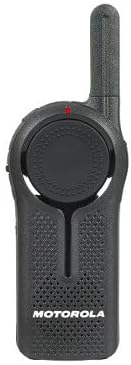
Слика: Фронт view of the DLR1060 radio, featuring the prominent channel selector knob and integrated speaker.
4. Пренос и пријем
- Да бисте послали, притисните и држите Притисни за разговор (ПТТ) дугме са стране радија. Говорите јасно у микрофон.
- Отпустите ПТТ дугме да бисте саслушали одговор.
- Уверите се да сте на истом каналу као и особа са којом желите да комуницирате.
5. Private Communication (Radio Profile ИД)
- The DLR1060 uses a unique 4-digit Radio Profile ID for private communication. This ID must be programmed into all radios intended for a private group.
- Refer to the Computer Programming Software (CPS) manual for detailed instructions on setting up and managing Radio Profile IDs and Private Groups.
Одржавање
Чишћење радија
- Обришите спољашњост радија меком крпомamp тканина.
- Не користите јаке хемикалије, раствараче за чишћење или јаке детерџенте, јер могу оштетити радио.asinг и унутрашње компоненте.
- Ensure the radio is powered off and disconnected from any charging accessories before cleaning.
Баттери Царе
- Always use genuine Motorola batteries and charging accessories.
- Избегавајте излагање батерије екстремним температурама.
- If the radio will not be used for an extended period, store the battery separately in a cool, dry place.
Решавање проблема
| Проблем | Могуће решење |
|---|---|
| Радио се не укључује. | Уверите се да је батерија потпуно напуњена и правилно уметнута. |
| Не може се преносити или примати. | Verify that all radios are on the same channel and have the correct Radio Profile ID. Check if the battery is low. |
| Лош квалитет звука или статички шум. | Move closer to the other radio or to an open area. Check for obstructions. Ensure the antenna is clear. |
| Трајање батерије је краће од очекиваног. | Ensure the battery is fully charged before use. Battery performance can degrade over time; consider replacing older batteries. |
Спецификације
| Феатуре | Детаљ |
|---|---|
| Фрекуенци Банд | 900 MHz ISM (License-Free) |
| Канали | 6 |
| Домет | Up to 300,000 sq ft / 20 Floors |
| Трајање батерије | До 14 сати (типична употреба) |
| Стандарди издржљивости | Military Standards 810 C, D, E, F, G |
| Материјал кућишта | Поликарбонат |
| ФЦЦ ИД | АЗ489ФТ5870 |
| Компатибилни уређаји | Speaker, Headphone, Laptop (for CPS) |
| Боја | Црно |
Гаранција и подршка
For detailed warranty information and technical support, please refer to the documentation provided with your product or visit the official Motorola Solutions webсајт. Сачувајте рачун као доказ о куповини за потребе гаранције.