
Производ је завршенview
The GOBOULT Y1 Pro Wireless Earbuds are designed to provide a high-quality audio experience with features like extended playtime, clear calling, and low-latency gaming. This manual provides detailed instructions for setting up, operating, and maintaining your earbuds.

Слика: Изложба колажаasing key features of the GOBOULT Y1 Pro Earbuds, including 60 hours playtime, Zen Quad Mic ENC, 45ms low latency gaming, 13mm bass drivers, Type-C fast charging, and Bluetooth 5.3.
Садржај пакета
- GOBOULT Y1 Pro Wireless Earbuds
- Футрола за пуњење
- УСБ кабл за пуњење типа Ц
- Јастучићи за уши (разних величина)
- Навлаке за уши (разних величина)
- Гарантни лист
Сетуп
1. Пуњење слушалица и футроле
Before initial use, ensure both the earbuds and the charging case are fully charged. This optimizes battery life and performance.
- Connect the provided USB Type-C charging cable to the charging port on the case and to a compatible USB power adapter (not included).
- The LED indicator on the charging case will illuminate to show charging status.
- A full charge typically takes a few hours. A quick 10-minute charge can provide approximately 120 minutes of playtime.

Image: The GOBOULT Y1 Pro earbuds and charging case, illustrating the Type-C fast charging capability, where 10 minutes of charge provides 120 minutes of playtime.
2. Почетно упаривање
Follow these steps to pair your earbuds with your device for the first time:
- Remove any protective film from the charging contacts on the earbuds.
- Place both earbuds into the charging case and close the lid for a few seconds.
- Open the charging case lid. The earbuds will automatically power on and enter pairing mode, indicated by flashing LED lights.
- На паметном телефону или другом уређају који подржава Bluetooth, идите на подешавања Bluetooth-а.
- Тражи доступне уређаје и изаберите „GOBOULT Y1 Pro“ са листе.
- Када се једном повеже, гласовна порука ће потврдити успешно упаривање.

Image: A diagram illustrating the initial setup steps, including removing protective film and opening the case, along with a detailed guide to the touch controls for both left and right earbuds.
3. Аутоматско поновно повезивање
After initial pairing, the earbuds will automatically connect to the last paired device when removed from the charging case and Bluetooth is enabled on the device.

Image: GOBOULT Y1 Pro earbuds and charging case, demonstrating Bluetooth 5.3 for stable, efficient, and fast pairing with a connected smartphone.
Упутство за употребу
Укључивање/искључивање
- Укључено: Open the charging case lid. The earbuds will power on automatically. Alternatively, if outside the case, long press the touch area on both earbuds for 3 seconds.
- Искључивање: Place both earbuds back into the charging case and close the lid. They will power off automatically. Alternatively, long press the touch area on both earbuds for 5 seconds.
Додирните контроле
The GOBOULT Y1 Pro earbuds feature intuitive touch controls for managing music, calls, and other functions. Refer to the diagram below and the following list for specific actions:
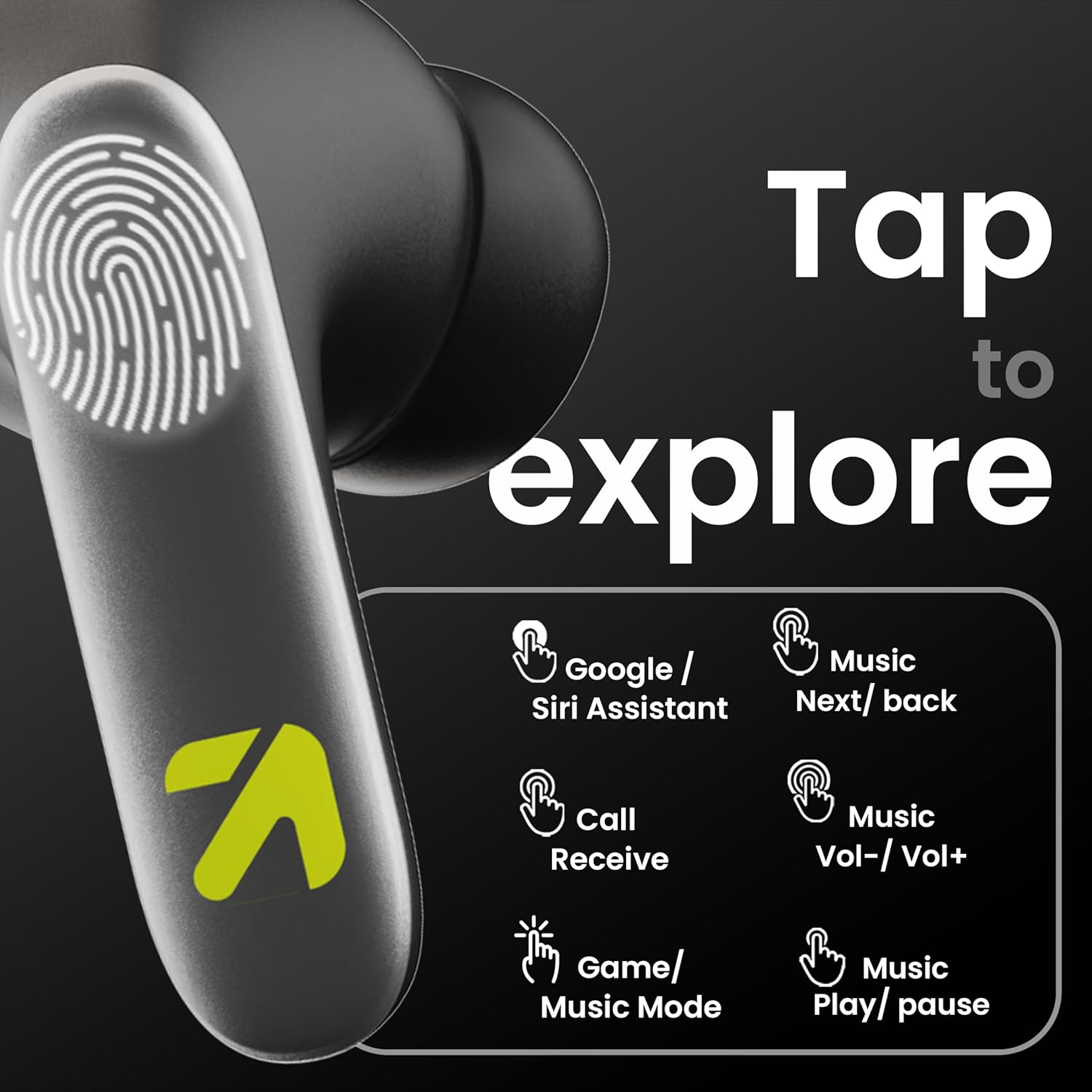
Image: A visual guide to the touch controls on the GOBOULT Y1 Pro earbuds, detailing actions for Google/Siri Assistant, music navigation, call management, volume control, and game/music mode switching.
- Single Tap (Left/Right): Пуштање/паузирање музике, одговарање/прекидање позива.
- Двапут додирните (лева слушалица): Претходна песма.
- Двапут додирните (десна слушалица): Следећа песма.
- Троструки додир (лева слушалица): Утишавање звука.
- Троструки додир (десна слушалица): Волуме Уп.
- Long Press (2 seconds, Left/Right): Reject incoming call, Activate Voice Assistant (Google/Siri).
- Four Taps (Left/Right): Activate/Deactivate Gaming Mode.
Режим игре
For an enhanced gaming experience, activate the ultra-low latency Gaming Mode:
- Активација: Tap the touch area four times on either earbud.
- Деактивација: Tap the touch area four times again.

Image: GOBOULT Y1 Pro earbuds and charging case, highlighting the 45ms low latency gaming mode for real-time audio synchronization, activated by four taps.
Гласовни асистент
Quickly access your device's voice assistant (Siri or Google Assistant) for hands-free control:
- Активација: Perform a long tap on the touch area of either earbud.

Image: Illustration showing how to access Siri or Google Assistant with a long tap on the earbud's touch sensor.
Уклањање буке из околине (ЕНЦ)
The GOBOULT Y1 Pro features Zen Quad Mic ENC technology, ensuring crystal-clear calls by effectively filtering out ambient noise from your surroundings.

Image: A diagram explaining how Environmental Noise Cancellation (ENC) works by isolating your voice from environmental noise, ensuring clear communication during calls.
Одржавање
Чишћење
- Редовно чистите слушалице и кућиште за пуњење меком, сувом крпом која не оставља влакна.
- Ensure the charging contacts on both the earbuds and inside the case are free from dust and debris to maintain proper charging.
- Не користите абразивна средства за чишћење, раствараче или јаке хемикалије, јер могу оштетити производ.
Отпорност на воду
The GOBOULT Y1 Pro earbuds are rated IPX5 water-resistant. This means they are protected against low-pressure water jets from any direction, making them suitable for workouts and light splashes.
- Не потапајте слушалице у воду.
- Avoid exposing them to heavy rain or extreme moisture.
- Уверите се да су слушалице суве пре него што их вратите у кућиште за пуњење како бисте спречили оштећења.

Image: GOBOULT Y1 Pro earbuds with water droplets, illustrating their IPX5 water resistance, providing protection against sweat and splashes.
Решавање проблема
If you encounter any issues with your GOBOULT Y1 Pro earbuds, refer to the following common troubleshooting steps:
Слушалице се не упарују или не повезују
- Ensure both earbuds and the charging case have sufficient battery.
- Turn off Bluetooth on your device, wait 5 seconds, then turn it back on.
- On your device, "Forget" or "Unpair" "GOBOULT Y1 Pro" from the Bluetooth list, then attempt the pairing process again.
- Place both earbuds back into the charging case, close the lid, wait 10 seconds, then open the lid to re-enter pairing mode.
Само једна слушалица ради
- Уверите се да су обе слушалице напуњене.
- Вратите обе слушалице у кутијицу за пуњење, затворите поклопац, а затим га поново отворите. Ово их често поново синхронизује.
- If the issue persists, try resetting the earbuds (refer to the manufacturer's webсајт за конкретна упутства за ресетовање ако нису детаљно описана овде).
Лош квалитет звука или ниска јачина звука
- Ensure the earbuds are properly seated in your ears to create a good seal. Try different sized eartips.
- Очистите све остатке са решетки слушалица.
- Проверите подешавања јачине звука и звука изворног аудио уређаја.
- Приближите се повезаном уређају да бисте избегли сметње сигнала.
Проблеми са пуњењем
- Уверите се да је кабл за пуњење безбедно повезан и са кућиштем и са извором напајања.
- Try a different USB Type-C charging cable or power adapter.
- Очистите контакте за пуњење на слушалицама и унутар кућишта сувим памучним штапићем.
Спецификације
| Феатуре | Детаљ |
|---|---|
| Бранд | ГОБУЛТ |
| Назив модела | AirBass |
| Блуетоотх верзија | 5.3 |
| Постављање уха | Ин Еар |
| Контрола буке | Уклањање буке из околине (ЕНЦ) |
| Величина аудио драјвера | 13 милиметара |
| Укупно време репродукције | До 60 сати (са кућиштем за пуњење) |
| Лов Латенци | 45ms (режим игре) |
| Цхаргинг Типе | Брзо пуњење типа Ц |
| Отпорност на воду | ИПКС5 |
| Контролни метод | Додирните |
| Компатибилни уређаји | Паметни телефони, таблети, лаптопови, десктоп рачунари, паметни звучници |
| Тежина артикла | 50 грама |
| Земља порекла | Кина |
Информације о гаранцији
The GOBOULT Y1 Pro Wireless Earbuds are covered by a 1 година гаранције произвођача од дана куповине.
This warranty covers manufacturing defects. Please retain your proof of purchase for any warranty claims. The warranty does not cover damage caused by misuse, accidents, unauthorized modifications, or normal wear and tear.
Подршка
For further assistance, technical support, or warranty inquiries, please contact:
- Произвођач: Exotic Mile Private Limited, B-67 Wazirpur Industrial Area, New Delhi 110052
- увозник: Exotic Mile Pvt. Ltd. , B67 Wazirpur Industrial Area , New Delhi 110052
- For customer service contact details, please refer to the GOBOULT official webсајт или платформа на којој сте купили производ.