
DEWIN QCXIRIIQY-98956-01zq
DEWIN 2P 63A 220V Automatic Transfer Switch (ATS) G2R Instruction Manual
Model: QCXIRIIQY-98956-01zq | Brand: DEWIN
1. Увод
The DEWIN 2P 63A 220V Automatic Transfer Switch (ATS) G2R is designed to automatically switch between two power sources, typically a main power supply and a backup power supply, to ensure continuous operation of electrical loads. This device provides a reliable solution for managing power transitions in residential and light commercial applications.
This manual provides essential information for the safe and correct installation, operation, and maintenance of your ATS. Please read it thoroughly before use.

Image: The DEWIN 2P 63A 220V Automatic Transfer Switch, highlighting its compact design, millisecond switching speed, compatibility with mains and generators, and 35mm DIN rail installation.
2. Безбедносне информације
WARNING: Electrical installation should only be performed by qualified personnel. Always disconnect power before installation or maintenance.
- Овај производ је НИЈЕ погодно for use with photovoltaic systems.
- It cannot be used as a backup power source for inverters, UPS systems, photovoltaic systems, or solar power generators.
- Ensure the input power supply is connected in the correct phase sequence.
- The operating temperature range is between -5°C and +40°C.
- The storage temperature range is between -25°C and +55°C, and can briefly reach +70°C.
- Installation altitude should not exceed 2000 meters.
- At an ambient temperature of +40°C, the temperature decreases with increasing relative humidity. Adequate measures must be taken to prevent condensation due to temperature fluctuations.
- The ATS enclosure has an IP30 protection rating.
- This product can be used in household distribution boxes. When purchasing a distribution box, pay attention to the height and dimensions of the cover.
- Волtage must not be too low and must be within a ±10% range.
- The manual operation lever cannot be operated in automatic mode.

Image: Operational requirements and safety notes for the DEWIN Automatic Transfer Switch, including environmental conditions and usage restrictions.
3. Карактеристике производа
- Високе перформансе: Operated by an excitation electromagnet, enabling extremely fast switching speeds (within milliseconds) to effectively resolve power outagе питања.
- Индикаторска светла: Equipped with power indicators for general power, emergency power, and load, providing clear status at a glance.
- Једноставна инсталација: Modular structure design with input lines on the same side for convenient wiring. Compact size supports 35mm DIN rail installation, suitable for household distribution boxes.
- Arc Extinguishing System: Features an internal arc extinguishing system capable of rapidly cooling and extinguishing electrical arcs.
- Издржљива конструкција: Made from flame-retardant ABS material with silver alloy contacts, ensuring high conductivity, dust resistance, and adaptability to extreme environments.

Image: Key features of the DEWIN Automatic Transfer Switch, including its electromagnetic drive, modular design, and fast switching capability.
4. Инсталација и подешавање
The DEWIN ATS is designed for 35mm DIN rail mounting. Ensure all power sources are disconnected before proceeding with installation.
4.1 Физичка инсталација
- Mount the ATS securely onto a 35mm DIN rail within your distribution box.
- Ensure adequate space for wiring and ventilation around the device.

Image: Technical view of the DEWIN ATS, illustrating its modular design and DIN rail mounting points.
4.2 Дијаграм ожичења
Refer to the diagram below for correct wiring connections. It is crucial to connect the input power supply in the correct phase sequence.

Image: Detailed wiring diagram for the DEWIN 2P 63A ATS, indicating connections for main power, backup power, and load output.
- Common N: Neutral wire for the common (main) power supply.
- Common L: Live wire for the common (main) power supply.
- Spare N: Neutral wire for the backup (emergency) power supply.
- Spare L: Live wire for the backup (emergency) power supply.
- Излаз оптерећења: Connections for the electrical load.
Уверите се да су сви спојеви чврсти и безбедни како бисте спречили лабаве контакте и потенцијалне опасности.
5. Упутство за употребу
The DEWIN ATS offers both automatic and manual operation modes.
5.1 Избор режима
The device features a selector switch (green lever) to choose between "Auto" and "Manual" modes.
- Аутоматски режим: In this mode, the ATS will automatically detect the presence of the main power supply (Source I) and switch to it. If the main power fails, it will automatically switch to the backup power supply (Source II).
- Ручни режим: In this mode, you can manually switch between Source I and Source II using the green lever. Важно: The lever cannot be operated manually when the device is in "Auto" mode.
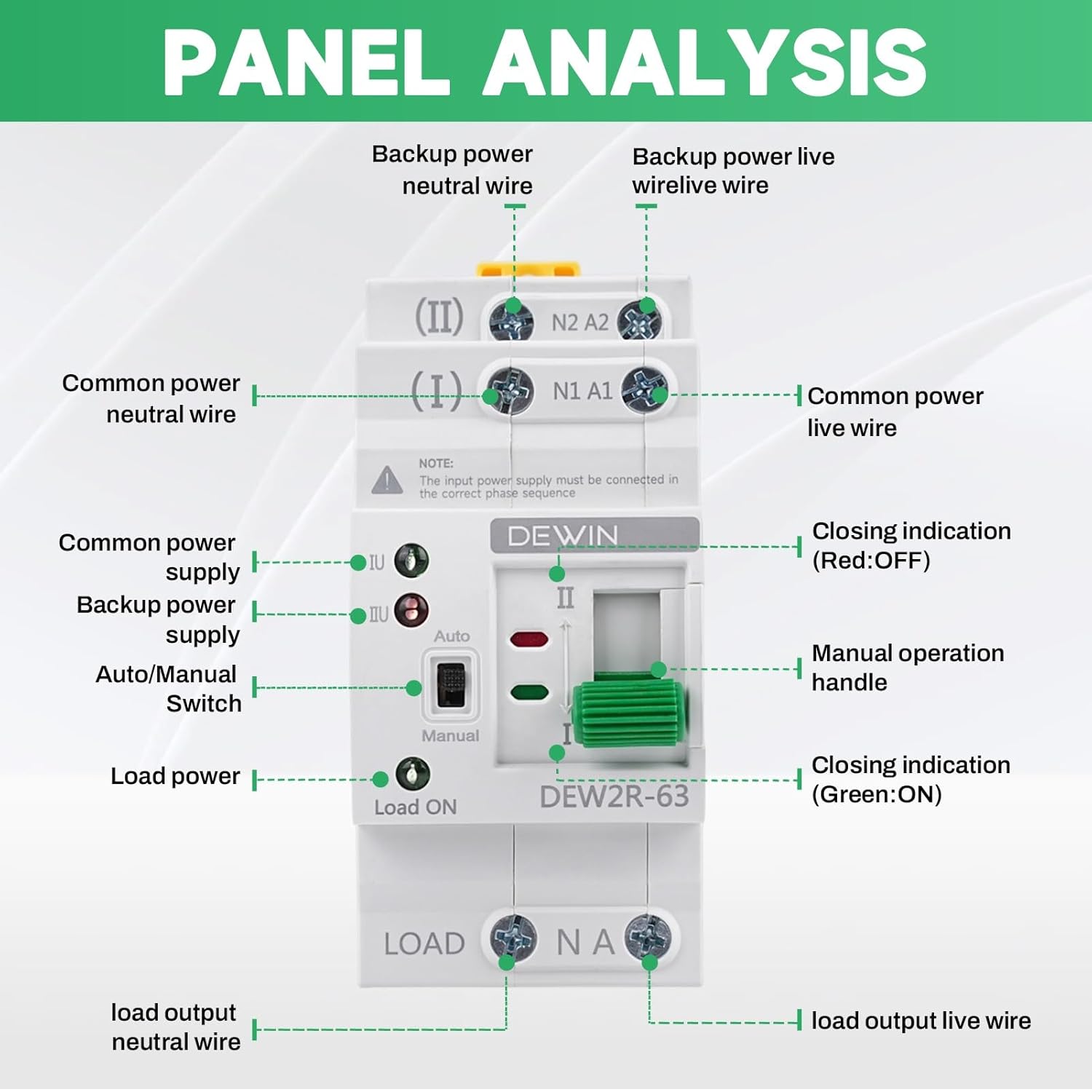
Image: Front panel view of the DEWIN ATS with labels for power inputs, output, mode selector, and indicator lights.
5.2 Индикаторска светла
The ATS is equipped with indicator lights to show its operational status:
- Green Light (Load ON): Indicates that power is being supplied to the load.
- Red Light (Closing Indication OFF): Indicates that the corresponding power source is not active or disconnected.
- Green Light (Closing Indication ON): Indicates that the corresponding power source is active and connected.
- If the common or emergency power indicator light flashes, it indicates a malfunction (undervoltagе или оверволtagи).

Слика: Крупни план view of the DEWIN ATS showing the status indicator lights (green for ON, red for OFF) and the Auto/Manual switch.
6. Одржавање
Regular maintenance helps ensure the longevity and reliable operation of your DEWIN ATS.
- Periodically inspect all wiring connections to ensure they remain tight and free from corrosion.
- Одржавајте уређај чистим и без прашине и прљавштине. Користите суву, меку крпу за чишћење.
- Немојте користити абразивна средства за чишћење или раствараче.
- If any damage is observed, disconnect power immediately and contact a qualified technician for repair or replacement.
КСНУМКС. Решавање проблема
If you encounter issues with your DEWIN ATS, refer to the following common troubleshooting steps:
| Проблем | Могући узрок | Решење |
|---|---|---|
| Device does not switch automatically. |
|
|
| Нема струје за пуњење. |
|
|
| Индикаторска светла трепћу. |
|
|
За проблеме који нису овде обрађени, обратите се корисничкој подршци.
8. Техничке спецификације
| Параметар | Валуе |
|---|---|
| Модел | DEW2R-63 2P |
| Материјал | PC + бакар |
| Rated Operating Current (Le) | 63 А |
| Називна изолација Волtagе (Уи) | 690 В |
| Ратед Оператинг Волtagе (Уе) | 220В АЦ |
| Називна фреквенција | 50/60 Хз |
| Број полова | 2P |
| Називна струја кратког споја (Iq) | 50 кА |
| Rated Impact Withstand Voltage | 8 кВ |
| Заједничко коло | 2 poles 220 V AC (mains network) |
| Аукилиари Цирцуит | 2 poles 220 V AC (mains network, generator) |
| Време конверзије контактора | < 50 мс |
| Време одговора | < 50 мс |
| Време опоравка | < 50 мс |
| Disconnection Time | < 50 мс |
| Време пребацивања | < 50 мс |
| Механичка издржљивост | 8000 циклуса пребацивања |
| Електрична издржљивост | 1500 циклуса пребацивања |
| Application Category | АЦ-31Б |
| Димензије (ДкШкВ) | 7.8 к 5 к 10.8 цм |
| Тип монтаже | ДИН шина |
| Контролни метод | Button (Manual), Automatic |
| Компатибилни уређаји | Standard household appliances (up to 63A) |

Image: Comprehensive technical specifications for the DEWIN ATS, detailing electrical parameters and performance metrics.
9. Гаранција и подршка
For warranty information, please refer to the documentation provided with your purchase or contact the seller directly. DEWIN is committed to providing quality products and customer satisfaction.
10. Корисничка подршка
If you have any questions, require technical assistance, or need to report an issue, please contact DEWIN customer support through the retailer's platform or the official DEWIN website. Please have your product model number (QCXIRIIQY-98956-01zq) and purchase details ready when contacting support.
Ask a question about this manual
Ask about setup, troubleshooting, compatibility, parts, safety, or missing instructions. Manuals+ will review the question and use this page’s manual context to help answer it.