
MRSCOZ TCR
MRSCOZ Toddlers Sleep Training Clock
Model: TCR
Упутство за употребу корисника
1. Увод
The MRSCOZ Toddlers Sleep Training Clock is a multifunctional device designed to assist children with sleep training, provide alarm clock functionality, act as a Bluetooth music player, and offer various night light and sound machine features. Its intuitive design and multiple settings aim to create a comfortable and consistent sleep environment for toddlers and kids.

Image: The MRSCOZ Sleep Training Clock displaying different light colors, highlighting its versatile illumination options.
2. Безбедносне информације
- Овај производ није играчка. За малу децу се препоручује надзор одраслих.
- Keep the device away from water and excessive moisture to prevent electrical hazards.
- Use only the provided USB-C cable for charging. Do not use damaged cables or chargers.
- Не покушавајте сами да раставите или поправите уређај. Обратите се корисничкој подршци за помоћ.
- Ensure the clock is placed on a stable, flat surface to prevent it from falling.
3. Садржај пакета
Молимо вас да проверите садржај паковања након отварања:
- MRSCOZ Toddlers Sleep Training Clock (White)
- УСБ-Ц кабл за пуњење
- Кориснички приручник (овај документ)
4. Производ је готовview
Familiarize yourself with the clock's components and controls.

Image: The multifunctional MRSCOZ Sleep Training Clock highlighting its use as an alarm clock, night light, Bluetooth music player, and sound machine.
Контроле и индикатори:
| Dugme/indikator | Функција |
|---|---|
| Time Setting Button (Clock icon) | Притисните да бисте ушли у режим подешавања времена. |
| Alarm Setting Button (Bell icon) | Press to set or adjust alarms. |
| Night Light Button (Sun icon) | Short press to change light color. Long press to adjust brightness. |
| Music/Sound Button (Music note icon) | Press to cycle through sleep sounds. |
| Bluetooth Button (M icon) | Дуго притисните да бисте ушли у режим Блуетоотх упаривања. |
| Volume Up/Down Buttons (+/-) | Adjust volume for sounds and music. |
| Дисплаи Сцреен | Shows time, AM/PM, sleep/wake icons, and other indicators. |
| USB-C Port (Rear) | За пуњење уређаја. |
5. Подешавање
5.1 Пуњење уређаја
Before first use, fully charge the sleep training clock. Connect the provided USB-C cable to the charging port on the back of the clock and plug the other end into a compatible USB power adapter (not included).

Image: The sleep training clock connected to a USB-C charging cable, indicating its portable night light feature.
5.2 Почетно укључивање
The clock will automatically power on when connected to power or if it has sufficient battery charge. The display will light up.
5.3 Time Synchronization via Bluetooth
When connected to a smartphone via Bluetooth, the clock will automatically synchronize with your phone's time, simplifying initial setup.
6. Упутство за употребу
6.1 Подешавање времена
Да бисте ручно подесили време:
- Притисните тастер Дугме за подешавање времена (Clock icon) to enter time setting mode.
- Користите +/- Дугмад да подесите сат.
- Притисните тастер Дугме за подешавање времена again to move to minute adjustment.
- Користите +/- Дугмад за прилагођавање минута.
- Притисните тастер Дугме за подешавање времена one more time to confirm and exit setting mode.
For a visual guide on setting up the time, please refer to the video below:
Video: A short demonstration on how to set up the time on the MRSCOZ Sleep Training Clock.
6.2 Sleep Training Function
The clock uses visual cues to help children understand when it's time to sleep and wake up:
- Time to Sleep: The clock displays a closed-eye icon and emits a blue light, indicating it's bedtime.
- Time to Wake Up: The clock displays an open-eye icon and emits a yellow light, signaling it's okay to wake up.
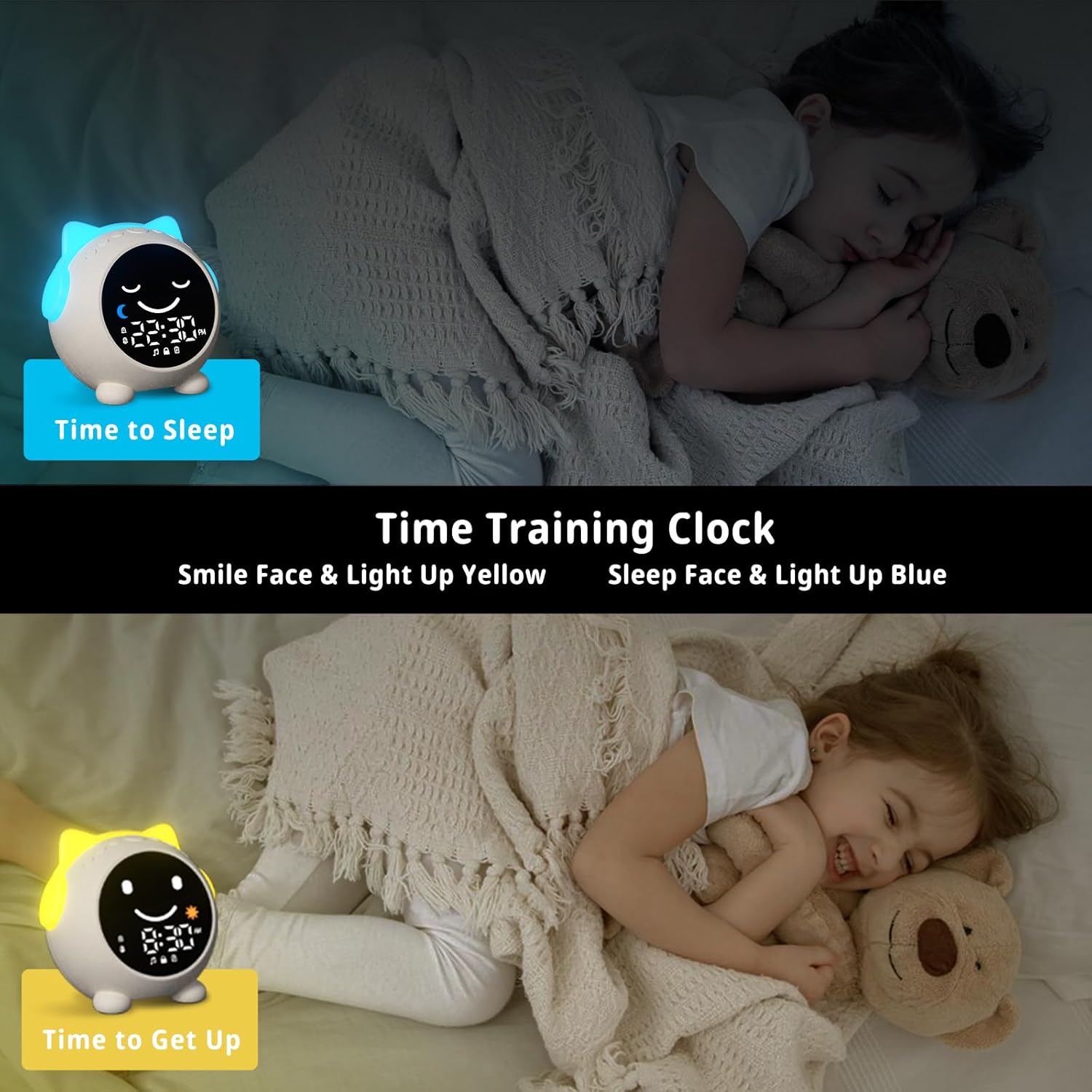
Image: The sleep training clock illustrating the "Time to Sleep" (blue light, closed eyes) and "Time to Get Up" (yellow light, open eyes) features.
6.3 Подешавања будилника
The clock features dual alarms and a snooze function:
- Притисните тастер Дугме за подешавање аларма (Bell icon) to select Alarm 1 or Alarm 2.
- Користите +/- Дугмад да подесите жељено време аларма.
- Притисните тастер Дугме за подешавање аларма поново да потврдим.
- To activate the snooze function, simply touch the clock when the alarm sounds. It will ring again after 10 minutes, up to 3 times.
- To stop the alarm, press any button on the clock.
Видео: Оверview of the Toddlers Sleep Training Clock and its alarm features, including snooze functionality.
6.4 Night Light Operation
The clock offers 9 light colors and 2 brightness levels:
- Промена боја: Кратко притисните на Дугме за ноћно светло (Sun icon) to cycle through the 9 available colors.
- Подешавање осветљености: Дуго притисните Дугме за ноћно светло to switch between the 2 brightness levels.

Image: The sleep training clock demonstrating its 9 distinct night light colors and two brightness settings.
6.5 Sleep Sound Machine
Choose from 7 soothing sleep sounds to help your child relax:
- Притисните тастер Music/Sound Button (Music note icon) to cycle through the available sounds: Ocean Wave, Rain, Campfire, Summer Night, Bird Songs, Wind Bell, and Fan.
- Користите +/- Дугмад to adjust the volume of the selected sound.

Image: The sleep training clock illustrating its 7 white noise options, including natural sounds like ocean waves and rain.
6.6 Bluetooth Music Player
Connect your smartphone or other Bluetooth-enabled device to play music through the clock's speaker:
- Дуго притисните Блуетоотх дугме (M icon) to enter Bluetooth pairing mode. The display will show a Bluetooth icon.
- On your device, enable Bluetooth and search for "C1" (or similar device name).
- Select "C1" to pair. Once connected, the clock will synchronize its time with your phone.
- You can now play music from your device through the clock. Use the +/- Дугмад за подешавање јачине звука.
7. Одржавање
- Очистите сат меком, сувом крпом. Не користите абразивна средства за чишћење или раствараче.
- Избегавајте излагање уређаја екстремним температурама или директној сунчевој светлости током дужег периода.
- Store the clock in a cool, dry place when not in use for extended periods.
КСНУМКС. Решавање проблема
| Проблем | Могуће решење |
|---|---|
| Clock display is blank or unresponsive. | Ensure the clock is charged. Connect it to a power source using the USB-C cable. If the issue persists, try resetting the device (if a reset button is available, otherwise let it fully discharge and recharge). |
| Аларм се не оглашава. | Проверите да ли је аларм омогућен и да ли је јачина звука подешена на нулу. Уверите се да је време аларма правилно подешено. |
| Не могу се повезати преко Bluetooth-а. | Ensure the clock is in Bluetooth pairing mode (long press M button). Make sure Bluetooth is enabled on your device and it's within range. Try forgetting the device on your phone and re-pairing. |
| Time format stuck in 24-hour mode. | Refer to the time setting instructions. Some models may automatically switch based on phone sync, or require specific button combinations (e.g., long press time button) not explicitly detailed in general instructions. |
| Night light not changing colors/brightness. | Ensure you are using short presses for color change and long presses for brightness adjustment on the Night Light button. |
9. Спецификације
| Феатуре | Детаљ |
|---|---|
| Бранд | МРСЦОЗ |
| Број модела | ТЦР |
| Боја | Бела |
| Дисплаи Типе | Дигитал |
| Димензије производа | 3.8" Ш x 3.9" В |
| Извор напајања | Електрични са каблом (пуњива батерија) |
| Материјал | акрилонитрил бутадиен стирен (АБС) |
| Посебне карактеристике | Bluetooth, Timer, Adjustable Brightness, LED Display, Adjustable Volume, Sleep Training, Night Light, Sound Machine |
| Број батерија | 1 12V battery required (internal) |
| Тежина артикла | 9.6 унци |
10. Гаранција и подршка
This MRSCOZ product comes with a limited warranty. For detailed warranty information, product support, or to report any issues, please contact MRSCOZ customer service through the retailer's platform or the official brand webсајт. Молимо вас да сачувате доказ о куповини за потребе гаранције.
Ask a question about this manual
Ask about setup, troubleshooting, compatibility, parts, safety, or missing instructions. Manuals+ will review the question and use this page’s manual context to help answer it.