
Увод
This manual provides essential information for setting up, operating, and maintaining your UPERFECT 15.6-inch FHD Portable Touchscreen Monitor. Please read it thoroughly before using the product to ensure optimal performance and longevity. This monitor is designed to enhance your productivity and entertainment experience with its versatile connectivity and intuitive touchscreen functionality.
Садржај пакета
Молимо вас да означите поље за следеће ставке:
- 15.6-инчни преносиви монитор
- Smart Cover (doubles as a stand)
- УСБ-Ц на УСБ-Ц кабл
- УСБ-А на УСБ-Ц кабл
- Мини ХДМИ на ХДМИ кабл
- Адаптер за напајање (5В 3А)
- M3*5mm VESA Screws (4 pcs)

Карактеристике производа
- Капацитивни екран осетљив на додир са 10 тачака: Provides precise and fluid interaction for various tasks.
- 15.6-inch Full HD (1920x1080) IPS Display: Offers clear images, vivid colors, and a wide 178-degree viewугао уласка.
- ХДР подршка: Enhances contrast and color range for a more immersive visual experience.
- Технологија за негу очију: Includes a blue light filter to reduce eye strain during prolonged use.
- Ултра преносиви дизајн: With only 0.4 inches thickness and 1.5 lbs weight, it is ideal for travel and remote work.
- Integrated Smart Cover: Protects the screen and functions as a stable stand for desktop use.
- Компатибилан са ВЕСА носачем: Supports 75x75mm VESA mounting for fixed installations or multi-monitor setups.
- Свестрано повезивање: Features two full-function USB-C ports, one Mini HDMI port, and a 3.5mm audio jack for wide device compatibility.
- Два интегрисана звучника: Delivers clear and balanced audio for an enhanced multimedia experience.
- Више режима приказа: Supports Mirror, Extend, and Second Monitor modes, as well as horizontal and vertical display orientations.


Подешавање и везе
The UPERFECT portable monitor offers flexible connectivity options. No drivers are required for most connections.
Understanding the Ports

- Мини ХДМИ порт: For video and audio input from devices with HDMI output.
- Type C 3.1 Ports (x2): Full-function ports for power, video, audio, and touch signal transmission.
- 3.5 мм аудио прикључак: За повезивање екстерних слушалица или звучника.
- Дугме за ременицу: Used to navigate the On-Screen Display (OSD) menu and adjust settings.
- Дугме за напајање/назад: Used to power the monitor on/off and to go back in the OSD menu.
Повезивање са уређајима
Refer to the diagram below for common connection methods:
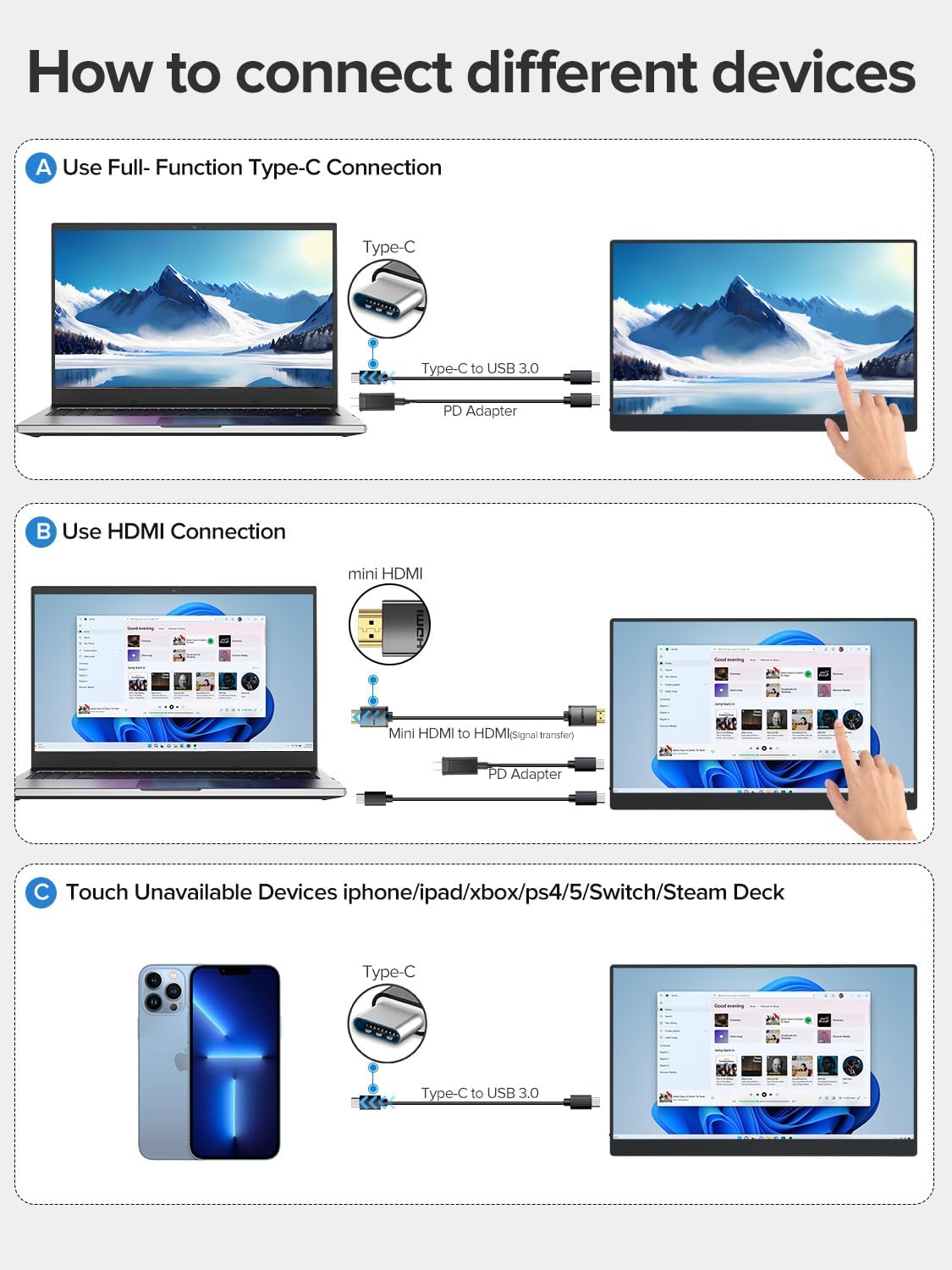
- Using a Full-Function USB-C Cable: Connect one end of the USB-C to USB-C cable to your device's full-function USB-C port and the other end to one of the monitor's Type C 3.1 ports. This single cable can transmit power, video, audio, and touch signals. An additional power adapter may be needed for some devices or if the monitor requires more power.
- Using HDMI and USB-A to USB-C Cables: Connect the Mini HDMI to HDMI cable from your device's HDMI port to the monitor's Mini HDMI port for video and audio. Then, connect the USB-A to USB-C cable from your device's USB-A port to one of the monitor's Type C 3.1 ports for power and touch functionality. An additional power adapter may be required.
- Devices Without Touch Support: For devices like iPhones, iPads, Xbox, PS5, Nintendo Switch, or Steam Deck, you can connect for display and audio using the appropriate cables (e.g., USB-C for video/power or HDMI for video/audio). Touch functionality will not be available for these devices.
Using the Protective Case as a Stand
The included smart cover can be folded to create a stable stand for your monitor. Watch the video below for a demonstration.
Упутство за употребу
Укључивање/искључивање
- To power on the monitor, press the Дугме за напајање/назад.
- To power off the monitor, press and hold the Дугме за напајање/назад for a few seconds until the screen turns off.
Он-Сцреен Дисплаи (ОСД) мени
The OSD menu allows you to adjust various display settings. Use the Пуллеи Буттон to navigate and select options, and the Дугме за напајање/назад to exit or go back.
- Притисните тастер Пуллеи Буттон да бисте отворили ОСД мени.
- Ролл тхе Пуллеи Буттон up or down to navigate through menu options.
- Притисните тастер Пуллеи Буттон да бисте изабрали опцију или потврдили подешавање.
- Притисните тастер Дугме за напајање/назад to go back to the previous menu or exit the OSD.
Додирните Функционалност
The monitor features a 10-point capacitive touchscreen for intuitive interaction. Touch functionality depends on the connected device.

- Мулти-тоуцх подршка: Fully supported for Windows PCs, Android phones, and tablets, allowing for gestures like pinch-to-zoom, scrolling, and swiping.
- Single-Touch Support: For Mac devices (MacBook, iMac, Mac mini), single-touch gestures are supported.
- No Touch Support: Devices such as iPhones, iPads, Xbox, PS5, Nintendo Switch, and Steam Deck do not support touch input on this monitor. The monitor will function as a non-touch display for these devices.

Режими приказа
The monitor supports various display configurations to suit your needs:

- Режим огледала: Duplicates your primary screen's content onto the portable monitor.
- Проширени режим: Extends your desktop across both screens, providing more workspace. You can set the portable monitor as your main screen.
- Режим другог екрана: Uses the portable monitor as a secondary display. Note that touch functionality may be limited or unavailable in this mode for certain operating systems or devices.
- Оријентација: The monitor supports both horizontal (landscape) and vertical (portrait) orientations. Adjust settings on your connected device as needed.
Одржавање
- Чишћење екрана: Користите меку крпу која не оставља длачицеampводом или раствором за чишћење екрана. Избегавајте јаке хемикалије или абразивне материјале.
- Чишћење тела: Обришите кућиште монитора меком, сувом крпом.
- Складиштење: When not in use, store the monitor in its protective case in a cool, dry place away from direct sunlight and extreme temperatures.
- Руковање: Avoid dropping the monitor or subjecting it to strong impacts. Do not place heavy objects on top of it.
Решавање проблема
| Проблем | Могући узрок | Решење |
|---|---|---|
| Нема дисплеја/Нема сигнала | Incorrect cable connection; Insufficient power; Incorrect input source selected. | Ensure cables are securely connected. Connect the power adapter. Check your device's display settings. Use the OSD menu to select the correct input source. |
| Функција додира не ради | Incorrect cable connection; Device does not support touch; Operating system limitations. | Ensure the USB-C cable (or USB-A to USB-C for HDMI) is connected and supports touch data. Verify your device's compatibility with touch input. Some devices/OS configurations may limit touch functionality. |
| Екран трепери | Cable issue; Power instability. | Try a different cable. Ensure the monitor is receiving stable power, especially if using a single USB-C connection. Connect the dedicated power adapter. |
| Нема звука | Volume too low; Incorrect audio output selected on device; Faulty cable. | Adjust monitor volume via OSD. Check your device's audio output settings. Ensure cables are properly connected. |
Спецификације
| Феатуре | Спецификација |
|---|---|
| Број модела | УП15605 |
| Величина екрана | 15.6 инча |
| Резолуција | FHD 1080p (1920 x 1080 пиксела) |
| Панел Типе | ИПС ЛЦД |
| Рефресх Рате | 60 Хз |
| Време одговора | 1 милисекунда |
| Аспецт Ратио | 16:9 |
| Однос контраста | 2000:1 |
| Осветљеност | 300 lm (nits) |
| Viewинг Англе | 178 степени |
| Површина екрана | Мат |
| Цолор Гамут Валуе | 125% |
| Посебне карактеристике | USB Hub, Touchscreen, Portable, Flicker-Free, Ultra-Thin, HDR, Eye Care, Contrast Enhancement, G-Sync Compatible |
| Хардверски интерфејс | Mini HDMI, USB-C (x2) |
| Димензије производа (ДкШкВ) | 35 к 22 к 1 цм |
| Тежина | 2 килограма (приближно 1.5 лбс) |
| Компатибилни уређаји | Desktop PC, Laptop, Smartphone, Tablet, Game Consoles |
Гаранција и подршка
Your UPERFECT monitor comes with a једногодишња гаранција од датума куповине, покривајући производне недостатке. Молимо вас да сачувате доказ о куповини за потребе гаранције.
For technical support, warranty inquiries, or any questions regarding your product, please contact UPERFECT customer service through the retailer's platform or the official UPERFECT webсајт. Наш тим за подршку је доступан да вам помогне у вези са свим проблемима на које можете наићи.