
1. Производ је готовview
The CHOETECH B695 is a versatile 10000mAh magnetic power bank designed for convenient charging of multiple devices. It features both wireless charging capabilities and multiple wired output options, including built-in USB-C and Lightning cables. Its compact design and integrated safety features make it an ideal portable power solution.

Слика: Предња и задња страна view of the CHOETECH B695 Magnetic Power Bank, showcasinг његов компактан дизајн и разне портове.
Кључне карактеристике:
- Капацитет 10000мАх: Обезбеђује ampле снага за вишеструка пуњења.
- 2-у-1 пуњење: Supports both magnetic wireless charging and wired charging.
- Уграђени каблови: Integrated USB-C and Lightning cables for direct device connection.
- Вишеструки излази: Includes USB-A, Type-C (input/output), and dedicated wireless charging for phones and watches.
- Магнетно поравнање: Ensures secure and efficient wireless charging for compatible devices.
- ЛЕД дигитални дисплеј: Clearly indicates remaining battery percentage.
- Свеобухватна безбедносна заштита: Built-in safeguards against overcharge, overdischarge, overcurrent, overvoltage, temperature, short circuit, overpower, recovery, and electromagnetic field issues.
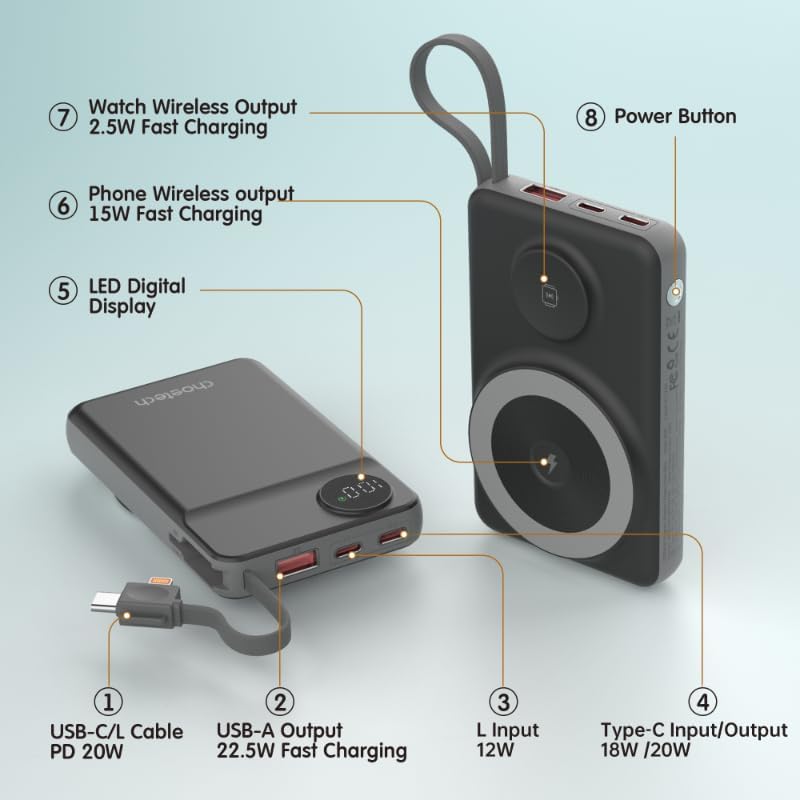
Image: Detailed diagram labeling the ports and features of the CHOETECH B695, including USB-C/L cable, USB-A output, L input, Type-C input/output, LED display, phone wireless output, watch wireless output, and power button.
2. Почетак рада: Подешавање
2.1 Пуњење преносног пуњача
Before initial use, fully charge your CHOETECH B695 power bank. This ensures optimal performance and battery longevity.
- Connect a compatible USB-C charging cable (not included) to the Type-C Input/Output port (4) on the power bank.
- Connect the other end of the cable to a USB wall adapter (not included).
- The LED Digital Display (5) will show the charging progress. It will display "100" when fully charged.
- Alternatively, you can use the built-in Lightning input (3) to charge the power bank with a Lightning cable and adapter.
Напомена: For fastest charging of the power bank, use a PD (Power Delivery) compatible wall adapter with the Type-C port.
3. Упутство за употребу
3.1 Провера нивоа батерије
Press the Power Button (8) once to activate the LED Digital Display (5), which will show the current battery percentage.
3.2 Жично пуњење
The CHOETECH B695 offers multiple wired charging options:
- Using Built-in USB-C/L Cable (1):
- Pull out the integrated USB-C or Lightning cable from its storage slot.
- Connect the appropriate cable end to your device's charging port.
- Пуњење ће почети аутоматски.
- Using USB-A Output (2):
- Connect your device's USB charging cable to the USB-A Output port (2).
- Connect the other end of your cable to your device.
- Charging will commence.
- Using Type-C Input/Output (4):
- Connect your device's USB-C charging cable to the Type-C Input/Output port (4).
- Connect the other end of your cable to your device.
- Charging will commence.

Image: The CHOETECH B695 power bank connected to a smartphone via its built-in USB-C cable, demonstrating wired charging.
3.3 Wireless Charging (Phone)
The power bank supports magnetic wireless charging for compatible smartphones (e.g., iPhone 12 series and newer, or Android phones with magnetic cases).
- Уверите се да је преносни пуњач довољно напуњен.
- Align your compatible smartphone with the larger magnetic charging pad (6) on the power bank.
- The phone should snap into place magnetically, and wireless charging will begin.

Image: A smartphone magnetically attached to the larger wireless charging pad and a smartwatch on the smaller pad of the CHOETECH B695, illustrating simultaneous wireless charging.
3.4 Wireless Charging (Watch)
The power bank includes a dedicated smaller magnetic charging pad for smartwatches.
- Уверите се да је преносни пуњач довољно напуњен.
- Place your compatible smartwatch onto the smaller magnetic charging pad (7).
- The watch should align magnetically, and wireless charging will begin.
3.5 Истовремено пуњење
The CHOETECH B695 can charge multiple devices simultaneously using a combination of its wired and wireless outputs.

Image: The CHOETECH B695 power bank connected to and wirelessly charging multiple devices, including smartphones and a smartwatch, demonstrating its multi-output capability.
4. Safety Information and Protection Features
The CHOETECH B695 is equipped with multiple safety mechanisms to protect your devices and the power bank itself.
- Заштита од преоптерећења: Prevents the battery from being charged beyond its capacity.
- Заштита од прекомерног пражњења: Protects the battery from being fully depleted, extending its lifespan.
- Прекострујна заштита: Заштитне мере од прекомерног протока струје.
- Оверволtagе Заштита: Штити од волуменаtagе сургес.
- Заштита од температуре: Monitors and regulates the internal temperature to prevent overheating.
- Заштита од кратког споја: Аутоматски се искључује у случају кратког споја.
- Заштита од пренапона: Prevents power output beyond safe limits.
- Recovery Protection: Allows the device to recover from protection states.
- Electromagnetic Field Protection: Shields against harmful electromagnetic interference.

Image: An infographic detailing the nine safety protection features integrated into the CHOETECH B695 power bank, including overcharge, overdischarge, overcurrent, overvoltage, temperature, short circuit, overpower, recovery, and electromagnetic field protection.
Важно: Do not expose the power bank to extreme temperatures, direct sunlight, or water. Do not disassemble or attempt to repair the device. Keep out of reach of children.
5. Одржавање
- Чишћење: Use a soft, dry cloth to clean the power bank. Avoid liquid cleaners.
- Складиштење: Чувајте преносни пуњач на хладном и сувом месту, даље од директне сунчеве светлости и екстремних температура.
- Здравље батерије: Да бисте одржали здравље батерије, потпуно је напуните и испразните најмање једном у три месеца ако је не користите редовно.
- Нега каблова: Пажљиво рукујте уграђеним кабловима. Избегавајте прекомерно савијање или повлачење да бисте спречили оштећења.
КСНУМКС. Решавање проблема
6.1 Преносна батерија се не пуни
- Уверите се да је кабл за пуњење безбедно повезан и са улазним портом преносне батерије и са адаптером за зид.
- Проверите да ли зидни адаптер исправно функционише и да ли је укључен у утичницу.
- Try a different USB-C or Lightning charging cable and wall adapter.
6.2 Уређај се не пуни преко преносног пуњача
- Жично пуњење:
- Check if the power bank has sufficient charge (refer to the LED display).
- Ensure the charging cable is securely connected to both the power bank's output port and your device.
- Try a different charging cable or a different output port on the power bank.
- Press the power button once to activate output if necessary.
- Бежично пуњење:
- Уверите се да је ваш уређај компатибилан са магнетним бежичним пуњењем.
- Remove any thick cases or metallic objects from your device that might interfere with wireless charging.
- Ensure your device is correctly aligned with the magnetic charging pad on the power bank.
- Проверите да ли је повер банк довољно напуњен.
6.3 Споро пуњење
- Ensure you are using a fast-charging compatible cable and adapter for both charging the power bank and charging your devices.
- Some devices may limit charging speed when multiple devices are connected simultaneously.
- Environmental factors (e.g., high temperature) can affect charging efficiency.
6.4 LED Display Not Working
- Чврсто притисните дугме за напајање.
- If the power bank is completely depleted, the display may not light up until it receives some charge.
7. Спецификације
| Модел | Б695 |
| Капацитет батерије | 10000мАх |
| Уграђени кабловски излаз | USB-C/L Cable PD 20W |
| УСБ-А излаз | 22.5В брзо пуњење |
| Улаз/излаз типа Ц | 18В / 20В |
| Лигхтнинг Инпут | 12В |
| Phone Wireless Output | 15В брзо пуњење |
| Гледајте бежични излаз | 2.5В брзо пуњење |
| Dimensions (L x W x Thickness) | 7.7 Д x 9.7 Ш x 16.2 центиметра |
| Тежина артикла | 0.05 килограма (50 г) |
| Боја | Црно |
8. Гаранција и подршка
CHOETECH products are designed and manufactured to the highest quality standards. For warranty information and customer support, please refer to the warranty card included with your purchase or visit the official CHOETECH webсајту.
If you encounter any issues or have questions regarding your CHOETECH B695 power bank, please contact CHOETECH customer service for assistance.


