
Womier MT75
Womier MT75 75% Wireless Mechanical Gaming Keyboard User Manual
Model: MT75 | Brand: Womier
Увод
Thank you for choosing the Womier MT75 75% Wireless Mechanical Gaming Keyboard. This keyboard is designed to provide a versatile and customizable typing and gaming experience with its tri-mode connectivity, hot-swappable switches, dynamic RGB lighting, and unique dot-matrix display. This manual will guide you through the setup, operation, and customization of your new keyboard.
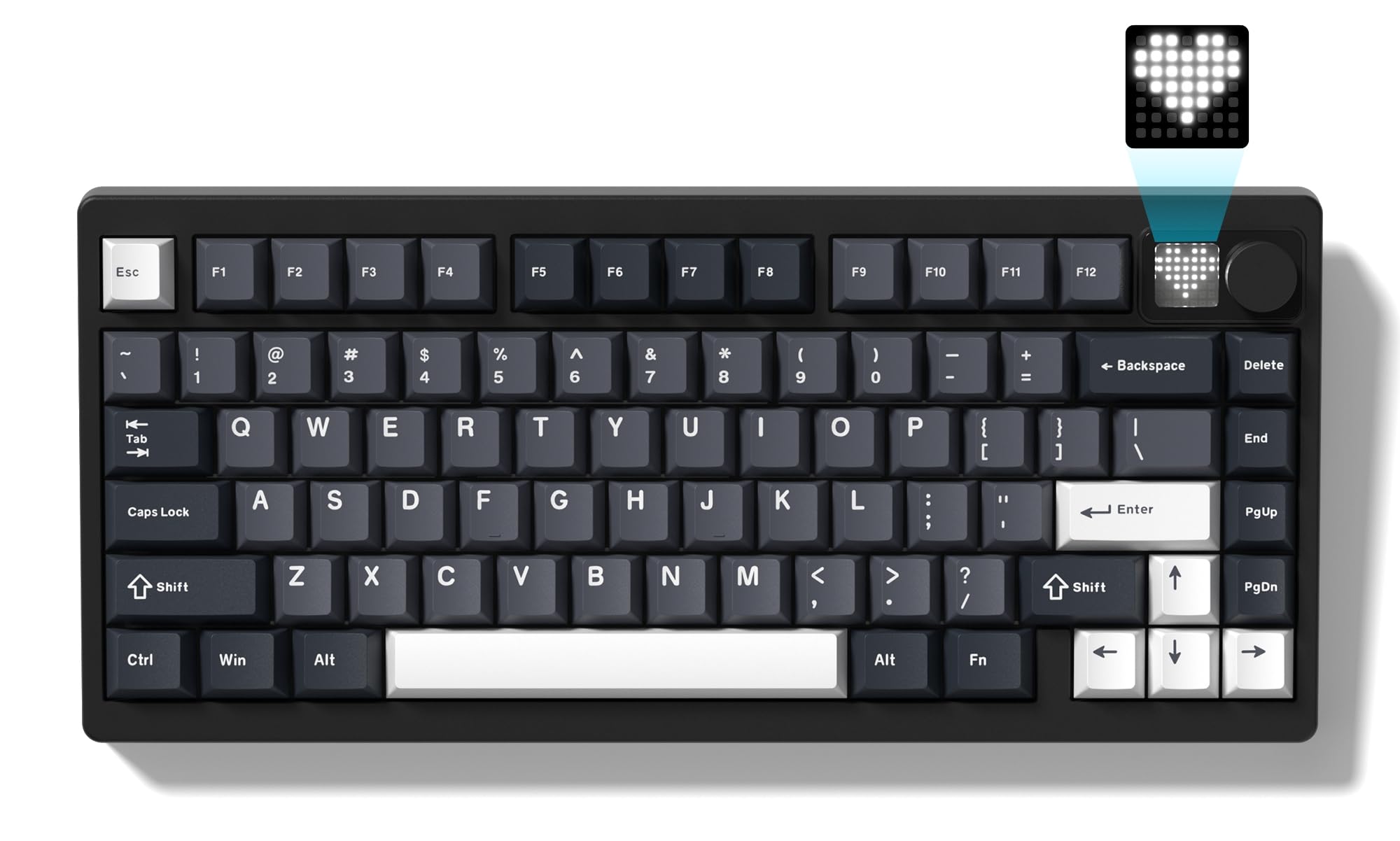
Image: The Womier MT75 keyboard in grey, showcasing its compact 75% layout, RGB backlighting, and integrated knob and dot-matrix display.
Садржај пакета
Молимо вас да проверите пакет за следеће ставке:
- Womier MT75 Keyboard
- УСБ-Ц кабл
- 2-у-1 капица за тастере и извлакач прекидача
- Extra Switches (3 pieces)
- Упутство за употребу

Image: A visual representation of the Womier MT75 keyboard and its included accessories, such as the USB cable, keycap/switch puller, and extra switches.
Карактеристике производа
- 75% компактан распоред: Efficient design with 79 keys, including function row and navigation keys, saving desk space.
- Тромодална повезаност: Supports Bluetooth 5.0, 2.4GHz wireless (via dongle), and wired USB-C connection. Connects up to 5 devices simultaneously.
- Custom Dot-Matrix Display: Features a 49 RGB lamp bead display with 6 preset modes, customizable images, colors, and dynamic effects via software.
- 8000мАх батерија великог капацитета: Ensures extended usage for productivity and gaming without frequent charging.
- Динамичко RGB позадинско осветљење: 16.8 million colors with various dynamic effects, monochrome, full-color modes, and musical rhythm mode. Fully programmable via software.
- Hot-Swappable Gasket Mount: Allows easy replacement of 3-pin or 5-pin mechanical switches to customize typing feel and acoustics.
- High-Quality POM Linear Switches: Pre-installed POM switches offer a smooth and creamy typing experience.
- Програмабилни софтвер: Supports professional keyboard editing software for key remapping, macro creation, and fine-tuning settings.
- Широка компатибилност: Compatible with Windows and Mac operating systems.
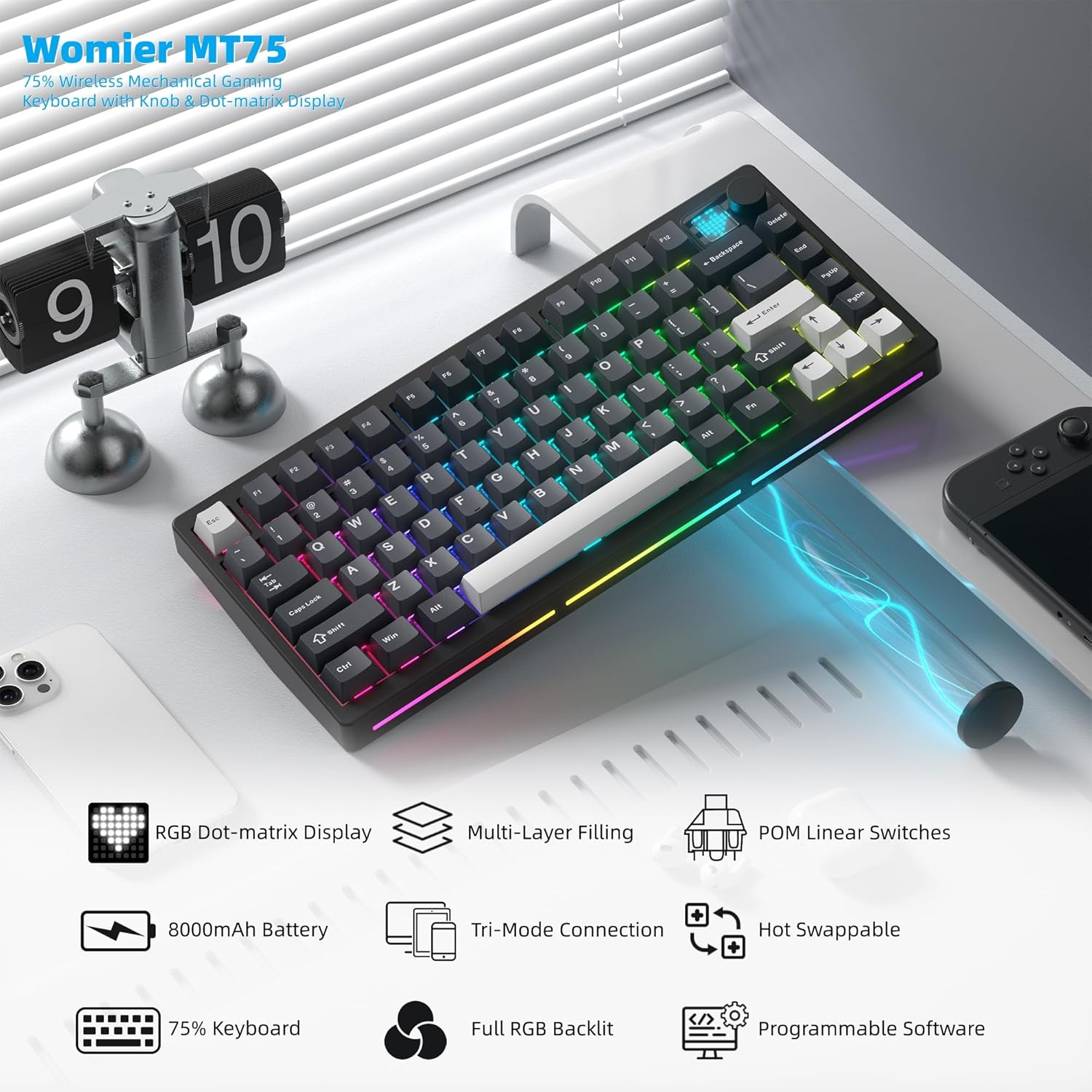
Слика: Оверview of the Womier MT75 keyboard highlighting its main features including RGB dot-matrix display, multi-layer filling, POM linear switches, 8000mAh battery, tri-mode connection, hot-swappable design, 75% layout, full RGB backlit, and programmable software.
Успостављање везе
The Womier MT75 keyboard offers three connection modes: wired, 2.4GHz wireless, and Bluetooth 5.0.
1. Жична веза
- Повежите приложени USB-C кабл са USB-C портом тастатуре.
- Укључите други крај УСБ-Ц кабла у слободан УСБ порт на рачунару.
- Тастатура ће бити аутоматски препозната и спремна за употребу.
2. Бежична веза од 2.4 GHz
- Locate the 2.4GHz wireless dongle stored under the detachable badge on the top right of the keyboard.
- Plug the 2.4GHz dongle into an available USB port on your computer.
- Turn the power switch on the keyboard to the 'ON' position.
- Притисните и држите ФН + Р for 3 seconds. The keyboard's backlight will flash, indicating it's in 2.4GHz pairing mode.
- Once connected, the backlight will stop flashing.
3. Bluetooth 5.0 веза
Тастатура се може повезати са највише три Bluetooth уређаја.
- Turn the power switch on the keyboard to the 'ON' position.
- Притисните и држите ФН + К, ФН + В, или ФН + Е for 3 seconds to enter Bluetooth pairing mode for the corresponding channel (BT1, BT2, BT3). The backlight will flash rapidly.
- On your device (PC, laptop, tablet, phone), enable Bluetooth and search for 'Womier MT75' or 'SK71 PRO'.
- Select the keyboard to pair. Once connected, the backlight will stop flashing.
- Да бисте пребацивали између упарених Bluetooth уређаја, једноставно притисните ФН + К, ФН + В, или ФН + Е.

Image: The Womier MT75 keyboard connected to various devices (PC, laptop, tablet, phone, game consoles) via USB-C, 2.4GHz, and Bluetooth, illustrating its versatile tri-mode connectivity.
Video: This video demonstrates the Womier MT75 keyboard's features, including its tri-mode connectivity, RGB lighting, and overall design, highlighting its suitability for PC gaming and computer use.
Key Functions & Customization
Комбиновани тастери ФН
The Womier MT75 utilizes FN key combinations for various functions:
| Комбинација | Функција |
|---|---|
| ФН + ↑/↓ | Осветљеност позадинског осветљења +/- |
| FN + ←/→ | Брзина позадинског осветљења +/- |
| ФН + Бацкспаце | Turn off all backlights (including screen) |
| ФН + ← | Пребаците ефекте позадинског осветљења |
| ФН + Ентер | Switch backlight colors |
| ФН + 0 | Turn side light on/off |
| ФН + - | Пребаци бочне светлосне ефекте |
| FN + Delete (hold 3s) | Вратите фабричка подешавања |
| ФН + 1/2/3 | Switch Bluetooth channel (1/2/3) |
| ФН + 4 | 2.4Г режим |
| FN + L_WIN | Lock/unlock Windows key (only works on Windows systems) |
| ФН + размак | Провера нивоа батерије |
| ФН + П | Принт Сцреен |
| ФН + = | Замените боје бочног светла |
| FN + [ / ] | Side light brightness +/- |
| FN + A (hold 3s) | Switch between Windows and Mac systems (Windows key flashes once for Windows, three times for Mac) |

Image: A table detailing the various FN key combinations for controlling backlight, connection modes, and system functions on the Womier MT75 keyboard.
РГБ позадинско осветљење
The MT75 features vibrant RGB backlighting with 16.8 million colors and numerous dynamic effects. Use the FN key combinations above to cycle through effects, adjust brightness, and change colors.
Dot-Matrix Display Customization
The unique dot-matrix display can be customized:
- Унапред подешени режими: Cycle through 6 built-in display modes using FN key combinations.
- Подешавање боје: Change the monochrome and color settings of the display.
- Custom Images: Use the keyboard editing software to design and upload custom static or dynamic icons to the display.

Image: A close-up of the Womier MT75's dot-matrix display, showing various customizable patterns and colors, along with the metal knob for volume control.
Video: This video demonstrates the customizable dot-matrix display on the Womier MT75 keyboard, showing how to change lighting effects, colors, and create custom patterns using the software.
Програмабилни софтвер
The Womier MT75 supports dedicated software for advanced customization. This software allows you to:
- Пребаците било који тастер на другу функцију.
- Креирајте и доделите сложене макрое.
- Adjust RGB lighting modes, colors, and effects.
- Customize the dot-matrix display with static or dynamic images.
Download the latest software from the official Womier webсајт за пуну функционалност.

Image: A screenshot of the Womier MT75's programmable software interface, showing options for lighting, key remapping, macros, and display customization.
Прекидачи са заменљивом брзином
The MT75 features a hot-swappable PCB, allowing you to easily change mechanical switches without soldering. This supports both 3-pin and 5-pin switches.
Changing Switches:
- Користите приложени алат за извлачење капица тастера да бисте пажљиво уклонили капицу тастера са жељеног прекидача.
- Use the switch puller to gently grip the top and bottom clips of the switch.
- Повуците прекидач право нагоре да бисте га уклонили са штампане плоче.
- Поравнајте пинове новог прекидача са отворима на штампаној плочи. Уверите се да су пинови прави како бисте избегли савијање.
- Пажљиво притисните нови прекидач на место док не кликне чврсто.
- Замените поклопац тастера.

Image: A demonstration of the hot-swappable feature of the Womier MT75 keyboard, showing a switch being removed and replaced using the included 2-in-1 puller tool. Details about the pre-installed POM linear switches are also visible.
Video: This video highlights the high-quality POM linear switches and the hot-swappable design of the Womier MT75 keyboard, demonstrating the ease of switch replacement and the smooth typing experience.
Информације о батерији
The Womier MT75 is equipped with a large 8000mAh Lithium Polymer battery, providing extended usage time. To check the battery level, press ФН + размак. The dot-matrix display will show the current battery status.
To charge the keyboard, connect it via the USB-C cable to a power source. The keyboard can be used while charging.

Image: An illustration emphasizing the Womier MT75's massive 8000mAh battery, highlighting its long-lasting power for uninterrupted work or gaming sessions.
Спецификације
| Феатуре | Детаљ |
|---|---|
| Модел | MT75 (JM-AZ-129) |
| Лаиоут | 75% (79 кључа) |
| Повезивање | Bluetooth 5.0, бежични 2.4GHz, USB-C жични |
| Прекидачи | Womier POM Linear (Hot-swappable 3/5-pin) |
| Кеицапс | ПБТ (полибутилен терефталат) |
| Позадинско осветљење | Full RGB (16.8 million colors) |
| Дисплаи | Custom Dot-Matrix Display (49 RGB lamp перле) |
| Батерија | Литијум полимер 8000мАх |
| Компатибилност | PC (Windows), Mac |
| Димензије производа | 13.39 к 6.69 к 1.38 инча |
| Тежина артикла | 3.53 фунти |
Решавање проблема
- Тастатура не реагује: Ensure the keyboard is charged and the power switch is ON. Check the connection mode (wired, 2.4GHz, Bluetooth) and ensure it matches your device.
- 2.4GHz connection issues: Ensure the dongle is securely plugged in and the keyboard is in 2.4GHz mode (FN + R). Try plugging the dongle into a different USB port.
- Грешка упаривања са Bluetooth-ом: Ensure the keyboard is in Bluetooth pairing mode (FN + Q/W/E) and your device's Bluetooth is enabled. Remove any previous pairings on your device and try again.
- Позадинско осветљење не ради: Check backlight brightness (FN + ↑/↓). Ensure backlights are not turned off (FN + Backspace).
- Кључеви се не региструју исправно: If you recently changed switches, ensure they are fully seated and their pins are not bent. Try resetting the keyboard to factory settings (FN + Delete for 3 seconds).
- Софтвер не препознаје тастатуру: Ensure the keyboard is connected via wired USB-C mode when using the software for customization.
Гаранција и подршка
Womier products come with a standard manufacturer's warranty. For detailed warranty information, technical support, or service inquiries, please refer to the official Womier webсајт или директно контактирајте њихову корисничку подршку. Сачувајте рачун о куповини за потребе рекламације у гаранцији.
Ask a question about this manual
Ask about setup, troubleshooting, compatibility, parts, safety, or missing instructions. Manuals+ will review the question and use this page’s manual context to help answer it.