
СвитчБот W5600000
SwitchBot Lock Ultra Accessory Kit User Manual
Модел: ВКСНУМКС
Марка: СвитчБот
Увод
This manual provides detailed instructions for the installation and use of the SwitchBot Lock Ultra Accessory Kit for Jimmy Proof & Mortise Locks. This accessory kit is designed to expand the compatibility of your SwitchBot Lock Ultra with specific types of door locks, ensuring a seamless smart home experience.
Important: This accessory kit requires the SwitchBot Lock Ultra (sold separately) to function.
Садржај пакета
Молимо вас да проверите да ли су све ставке присутне у вашем пакету:
- SwitchBot Lock Ultra Accessory Kit components
- Инсталациони завртњи
- Кориснички приручник (овај документ)

The image displays the various parts included in the SwitchBot Lock Ultra Accessory Kit, which are essential for adapting the Lock Ultra to Jimmy Proof and Mortise locks.
Компатибилност
The SwitchBot Lock Ultra Accessory Kit is specifically designed for use with:
- Jimmy Proof Locks
- Мортисе Браве
This kit allows the SwitchBot Lock Ultra to be installed on doors equipped with these lock types, providing a secure and convenient smart lock solution without replacing your existing lock hardware.

This diagram illustrates how the SwitchBot Lock Ultra can be installed on different lock types, specifically highlighting the need for the accessory kit for Jimmy Proof and Mortise locks.
Подешавање и инсталација
Before beginning installation, ensure you have your SwitchBot Lock Ultra ready and charged. A Phillips head screwdriver may be required.
1. Prepare Your Door Lock
Ensure your existing Jimmy Proof or Mortise lock is in good working condition. The accessory kit will attach to the interior side of your lock.
2. Attach the Adapter Base
Position the adapter base of the accessory kit over the interior mechanism of your Jimmy Proof or Mortise lock. Align the mounting holes with the existing screw points or use the provided adhesive if applicable and recommended by the main Lock Ultra manual.

This image details the adjustable latch claw and raised base features of the adapter kit, designed to accommodate various lock knob widths and door lock heights for a precise fit.
3. Secure the Adapter
Use the provided screws to firmly attach the adapter base to your door. Ensure it is securely fastened and does not wobble.
4. Mount the SwitchBot Lock Ultra
Once the accessory kit is securely installed, follow the instructions provided with your SwitchBot Lock Ultra to attach it to the newly installed adapter base. The Lock Ultra should fit snugly onto the adapter.
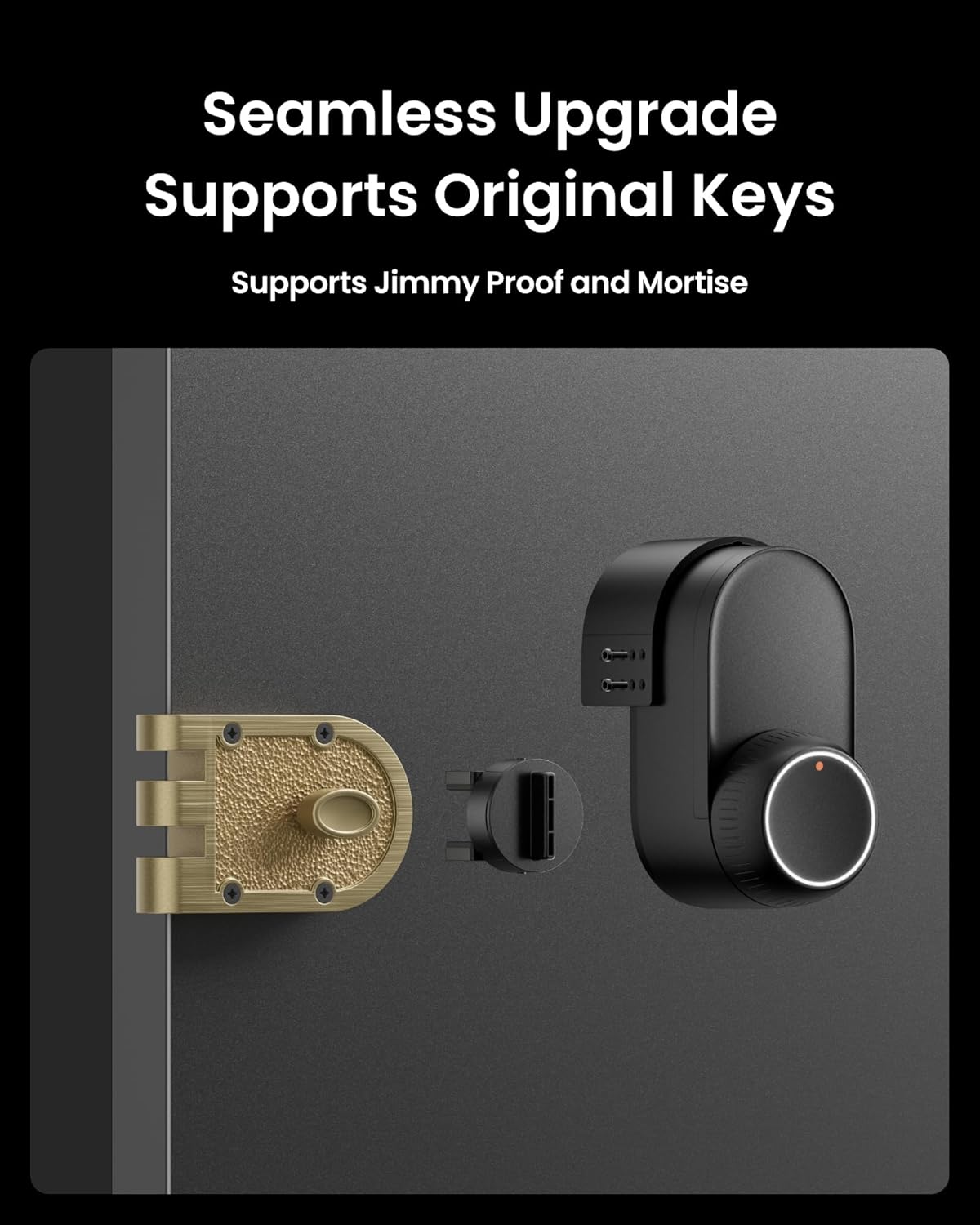
This image demonstrates the SwitchBot Lock Ultra seamlessly integrated with a Jimmy Proof lock, showcasing the accessory kit in its installed position.
5. Калибрација и тестирање
Refer to your SwitchBot Lock Ultra user manual for instructions on calibrating the lock after installation. Test the lock's operation manually and via the SwitchBot app to ensure proper functionality.
Operating the Accessory Kit
The accessory kit itself does not have operational controls. Its function is to enable the SwitchBot Lock Ultra to operate with Jimmy Proof and Mortise locks. All operations, including locking, unlocking, and smart features, are controlled via the SwitchBot Lock Ultra and its associated mobile application.
For detailed operating instructions, please refer to the SwitchBot Lock Ultra user manual.
Одржавање
The SwitchBot Lock Ultra Accessory Kit requires minimal maintenance.
- Чишћење: Wipe the surface with a soft, dry cloth. Avoid abrasive cleaners or solvents.
- инспекција: Periodically check the screws and mounting for tightness. Ensure the adapter remains securely attached to the door and the main lock.
- подмазивање: Do not lubricate the accessory kit components. If your existing Jimmy Proof or Mortise lock requires lubrication, follow the manufacturer's guidelines for that specific lock.
Решавање проблема
If you encounter issues with the accessory kit, consider the following:
Lock Not Engaging Properly
- Проверите поравнање: Ensure the accessory kit is perfectly aligned with your existing lock mechanism. Misalignment can prevent smooth operation.
- Затегните завртње: Verify that all installation screws are tight. Loose screws can cause movement and affect performance.
- Препреке: Check for any physical obstructions preventing the lock from engaging or disengaging fully.
Accessory Kit Feels Loose
- Re-tighten: Re-tighten all mounting screws.
- Adhesive (if used): If adhesive was used for initial positioning, ensure it has fully cured and provides adequate hold.
General Lock Ultra Issues
For issues related to the SwitchBot Lock Ultra's smart features, battery life, or app connectivity, please refer to the dedicated SwitchBot Lock Ultra user manual or contact SwitchBot support.
Спецификације
| Феатуре | Детаљ |
|---|---|
| Број модела | В5600000 |
| Димензије (Д к Ш к В) | 3.9 к 2.48 к 2.6 инча |
| Тежина артикла | 3.87 унци |
| Материјал | Метал |
| Компатибилност | SwitchBot Lock Ultra, Jimmy Proof Locks, Mortise Locks |
| УПЦ | 810150543896 |
Гаранција и подршка
For warranty information and customer support, please refer to the official SwitchBot website or the documentation included with your SwitchBot Lock Ultra. You can also contact SwitchBot customer service directly for assistance with this accessory kit.
Webсајт: ввв.свитцх-бот.цом
Емаил: суппорт@свитцх-бот.цом
Ask a question about this manual
Ask about setup, troubleshooting, compatibility, parts, safety, or missing instructions. Manuals+ will review the question and use this page’s manual context to help answer it.