
1. Увод
Thank you for choosing the suevery AMD Ryzen5 5600GT Gaming PC. This high-performance desktop computer is designed to provide a seamless experience for gaming, e-learning, video and audio streaming, home entertainment, business office tasks, video conferencing, photo and video editing, and daily trading. This manual provides essential information for setting up, operating, maintaining, and troubleshooting your new PC to ensure optimal performance and longevity.

Слика 1: Предња страна view of the suevery AMD Ryzen5 5600GT Gaming PC, showcasing its transparent side panel and vibrant RGB fans.
2. Безбедносне информације
Please read and follow these safety guidelines carefully to prevent damage to your PC and ensure personal safety:
- Напајање: Use only the power supply unit provided with your PC. Ensure the power outlet is properly grounded.
- вентилација: Do not block any ventilation openings. Maintain adequate space around the PC for proper airflow to prevent overheating.
- Течност и влага: Keep the PC away from liquids, moisture, and extreme temperatures. Do not operate the PC with wet hands.
- Пласман: Поставите рачунар на стабилну, равну површину. Избегавајте постављање у близини извора топлоте или на директној сунчевој светлости.
- Сервисирање: Do not attempt to service the PC yourself. Refer all servicing to qualified service personnel. Opening the PC case may void your warranty.
- Чишћење: Искључите кабл за напајање пре чишћења. Користите меку, суву крпу. Не користите течна или аеросолна средства за чишћење.
3. Садржај пакета
Приликом распакивања, проверите да ли су укључене све следеће ставке:
- suevery AMD Ryzen5 5600GT Gaming PC (Model: SUSU-V900W)
- Повер Цабле
- Документација (Упутство за брзи почетак, Гарантни лист)
- RGB Lighting (Integrated feature)
If any items are missing or damaged, please contact your retailer or suevery customer support immediately.
4. Водич за подешавање
Follow these steps to set up your suevery Gaming PC:
- Распакујте рачунар: Carefully remove the PC from its packaging. Retain all packaging materials for future transport or servicing.
- Повежите периферне уређаје:
- Монитор: Connect your monitor to the PC using an HDMI or VGA cable. The PC features one HDMI port and one VGA port.
- Тастатура и миш: Connect your keyboard and mouse to the available USB ports. The PC has 4 USB 2.0 ports and 2 USB 3.0 ports.
- Остали уређаји: Повежите све остале периферне уређаје као што су звучници, слушалице или екстерни дискови.
- Повежите се са напајањем: Plug the power cable into the PC's power input and then into a grounded electrical outlet.
- Мрежна конекција: The PC supports Wi-Fi 802.11ax for wireless internet connectivity. An Ethernet port is also available for a wired connection.

Image 2: Rear panel of the PC, illustrating the available USB, HDMI, VGA, and audio ports for connecting peripherals.

Image 3: Diagram detailing the PC's dimensions and the location of front and rear USB ports, along with signal interfaces.
5. Упутство за употребу
This section outlines the basic operation of your suevery Gaming PC.
5.1 Укључивање/искључивање
- За укључивање: Press the power button located on the front of the PC. The system will boot up, and the operating system (Windows) will load.
- За искључивање: It is recommended to shut down the PC through the operating system's shutdown procedure (Start Menu > Power > Shut down). Avoid direct power disconnection unless absolutely necessary.
5.2 Системске карактеристике
- процесор: Equipped with an AMD Ryzen5-5600GT 6-core, 12-thread processor (3.6GHz base, up to 4.6GHz Turbo) for efficient multitasking and gaming.
- Меморија: 16GB of high-speed DDR4 RAM at 3200MHz ensures smooth performance across multiple applications and demanding games.
- Складиштење: A 512GB NVMe SSD provides ultra-fast boot times, rapid application loading, and ampле складиште за ваше fileс и игре.
- Графика: Integrated AMD Radeon RX Vega7 Graphics (1.9G) supports popular games and provides clear visuals for 1080P gaming and 4K content streaming.
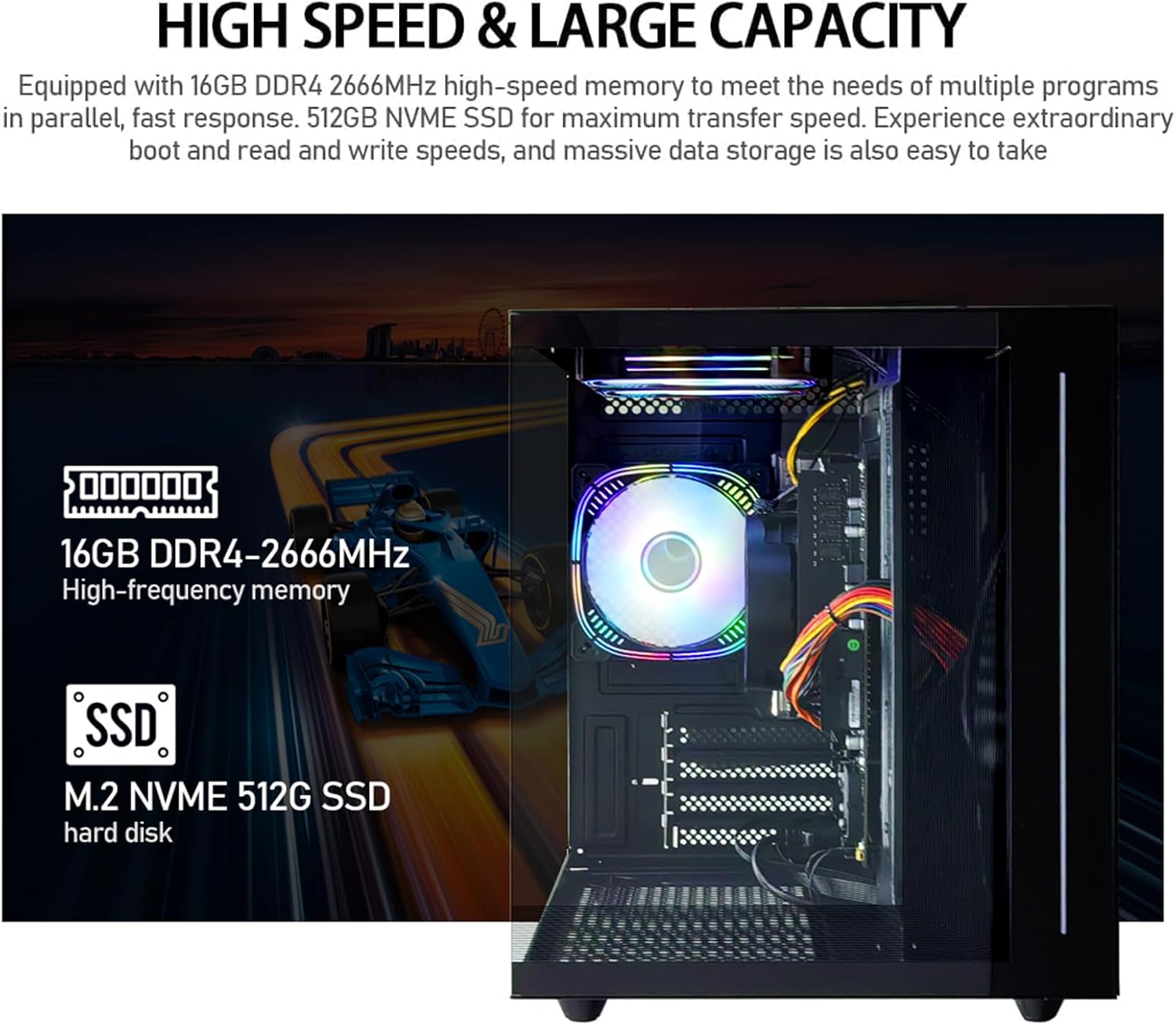
Слика 4: Унутрашњи view of the PC, emphasizing the 16GB DDR4 high-frequency memory and the M.2 NVMe 512GB SSD for high-speed data transfer.

Image 5: Visual representation of the AMD Radeon Vega Graphics 7 capabilities, suitable for esports games, video clips, graphic design, and corporate office tasks.
6. Одржавање
Proper maintenance ensures the longevity and performance of your PC.
6.1 Чишћење
- Екстеријер: Use a soft, lint-free cloth to wipe the exterior surfaces. For stubborn marks, slightly dampу крпу са водом.
- вентилација: Regularly check and clean the ventilation grilles to prevent dust buildup, which can impede airflow and cause overheating. Use compressed air to gently clear dust from fan blades and vents.
6.2 Ventilation and Cooling
The PC is equipped with three built-in 120mm chassis fans for rapid heat dissipation and cooling, ensuring stable performance during intensive use. Ensure these fans are not obstructed.

Image 6: Illustration of the PC's cooling system, highlighting the RGB-enabled fans designed for rapid and silent heat dissipation.
6.3 Ажурирања софтвера
Keep your operating system, drivers, and applications updated to ensure security, stability, and optimal performance. Windows updates are managed through the operating system settings.
КСНУМКС. Решавање проблема
Овај одељак пружа решења за уобичајене проблеме на које можете наићи.
- Нема напајања:
- Ensure the power cable is securely connected to both the PC and the electrical outlet.
- Проверите да ли је утичница функционална тако што ћете укључити други уређај.
- Check the power switch on the back of the PC (if present) is in the 'On' position.
- Нема приказа на монитору:
- Confirm the monitor is powered on and correctly connected to the PC's HDMI or VGA port.
- Уверите се да је на вашем монитору изабран исправан улазни извор.
- Try connecting the monitor to a different port if available, or test with another monitor.
- System is Slow or Unresponsive:
- Затворите непотребне апликације које раде у позадини.
- Проверите да ли има довољно слободног простора на вашем SSD-у.
- Покрените скенирање вируса да бисте проверили да ли постоји злонамерни софтвер.
- Уверите се да су ваш оперативни систем и драјвери ажурирани.
- Нема интернет везе:
- For Wi-Fi, ensure the Wi-Fi adapter is enabled and you are connected to the correct network with the correct password.
- For wired connection, ensure the Ethernet cable is securely connected to both the PC and the router/modem.
- Рестартујте рутер/модем.
If you encounter issues not covered here, or if the problem persists, please contact suevery customer support.
8. Спецификације
| Компонента | Спецификација |
|---|---|
| Број модела | SUSU-V900W |
| Процесор | AMD Ryzen5-5600GT (6 Cores, 12 Threads, 3.6GHz up to 4.6GHz Turbo) |
| Процесор Соцкет | Соцкет АМ4 |
| РАМ | 16GB DDR4 3200MHz (Max. 32GB) |
| Складиштење | 512GB NVMe SSD (PCIE x 4 interface) |
| Графика | Integrated AMD Radeon RX Vega 7 Graphics (1.9G) |
| Оперативни систем | Виндовс |
| Бежично повезивање | Wi-Fi 802.11ax |
| УСБ 2.0 портови | 4 |
| УСБ 3.0 портови | 2 |
| ХДМИ портови | 1 |
| VGA портови | 1 |
| Chassis Fans | 3 x 120mm (Built-in) |
| Димензије (Д к Ш к В) | 39.62 к 35.81 к 33.27 цм |
| Тежина | 6.89 кг |
9. Гаранција и подршка
Your suevery AMD Ryzen5 5600GT Gaming PC comes with a standard manufacturer's warranty. Please refer to the warranty card included in your package for specific terms and conditions, including warranty duration and coverage details.
For technical support, service inquiries, or to report any issues, please contact suevery customer support through the contact information provided on your warranty card or the official suevery website. Please have your model number (SUSU-V900W) and purchase details ready when contacting support.