
1. Увод
The AirheadStorm FS899C is a versatile digital multimeter designed for accurate electrical measurements. This device can measure AC/DC current and voltage, capacitance, continuity, resistance, frequency, non-contact voltage (NCV), and ambient temperature. Featuring a large backlit display and a rechargeable battery, it is suitable for both home and industrial electrical tasks.
This manual provides essential information for the safe and effective use of your FS899C Digital Multimeter. Please read it thoroughly before operation and retain it for future reference.
2. Садржај пакета
Проверите да ли су све ставке наведене у наставку присутне и у добром стању након отварања пакета:
- 1 x AirheadStorm FS899C Digital Multimeter
- 2 x мерне каблове (црвени и црни)
- КСНУМКС к УСБ-Ц кабл за пуњење
- 1 x Упутство за употребу (Овај документ)
- 1 к кутија за паковање

Figure 2.1: Contents of the FS899C package, including the multimeter, test leads, and charging cable.
3. Безбедносне информације
Always adhere to basic safety precautions when using electrical testing equipment to reduce the risk of fire, electric shock, or personal injury. Improper use can result in electric shock or damage to the meter.
- Inspect the Meter: Before each use, check the meter and test leads for any damage. Do not use the meter if it appears damaged or if the insulation on the test leads is compromised.
- Волtagе Ограничења: Немојте примењивати више од оцењеног волtagе, како је означено на мерачу, између терминала или између било ког терминала и уземљења.
- Proper Terminal Use: Ensure the test leads are connected to the correct input terminals for the measurement function selected.
- Избегавајте струјна кола под напоном: Do not measure current on a circuit with voltage exceeding the meter's specified limits.
- Радно окружење: Use the meter in a dry environment. Avoid using it in wet or damp условима.
- Лична заштитна опрема: Always wear appropriate personal protective equipment, such as safety glasses, when working with electrical circuits.
- Заштита од удара: The meter features an impact-resistant plastic housing designed to protect against damage from drops. However, avoid unnecessary drops and handle the device with care.
- Сервисирање: Refer all servicing to qualified service personnel. Do not attempt to repair the meter yourself.
4. Карактеристике производа
The AirheadStorm FS899C Digital Multimeter offers a range of features for efficient and accurate electrical testing:
- Разноврсне могућности мерења: Accurately measures AC/DC current and voltage, capacitance, continuity, resistance, frequency, non-contact voltage (NCV), and ambient temperature.
- Пуњива батерија: Equipped with a USB-C rechargeable battery, providing up to 8 hours of operation after approximately 2 hours of charging.
- Велики екран са позадинским осветљењем: Features a 4.8-inch display with backlight for clear visibility in various lighting conditions.
- Integrated Torch: A practical torch function assists in illuminating dark work areas.
- Функција задржавања података: Allows users to freeze the current reading on the display for convenient recording.
- Издржљива конструкција: Impact-resistant plastic housing provides protection against accidental drops.
- High Accuracy with True RMS: Offers precise measurements with a count capacity of up to 6000.
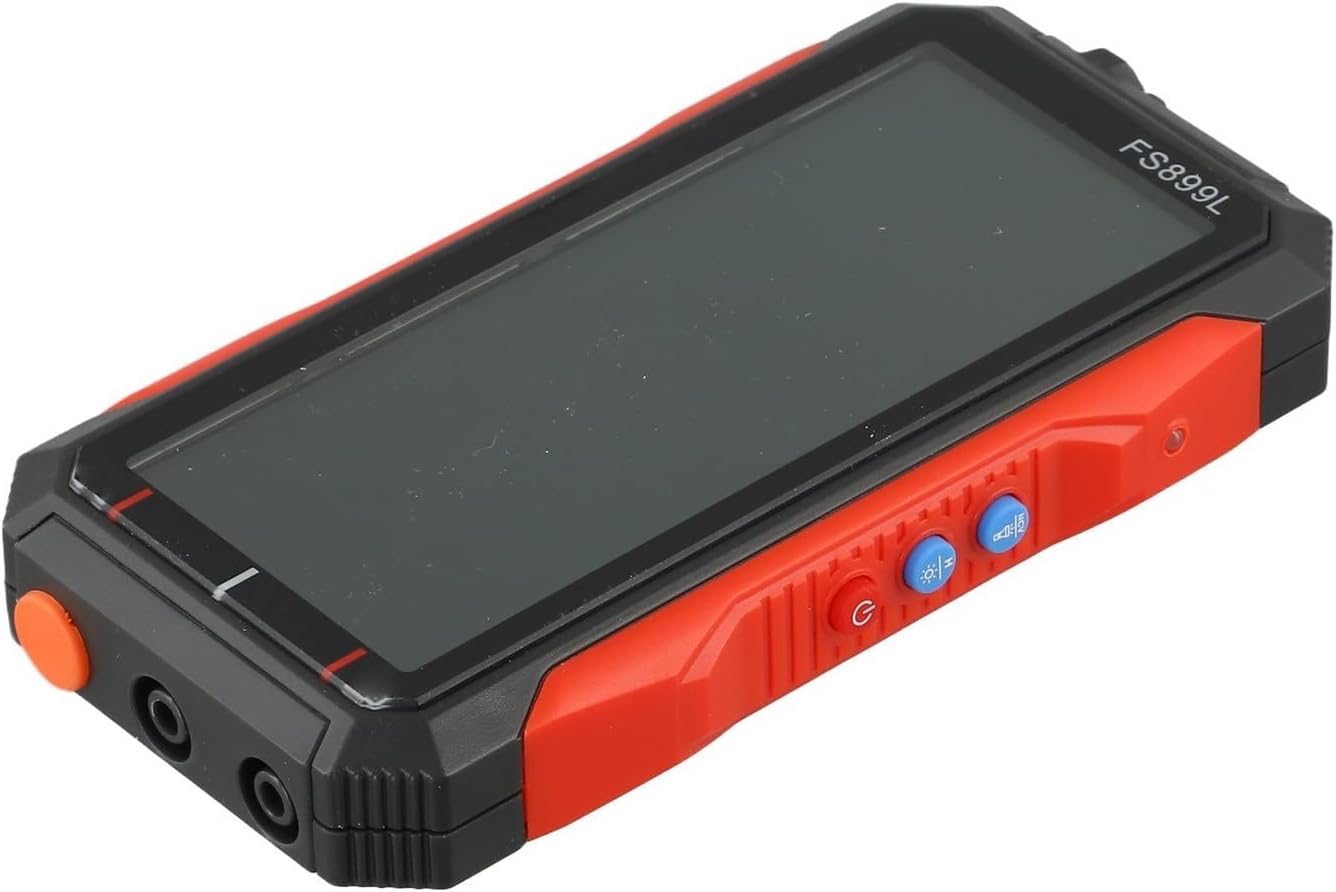
Слика 4.1: Страна view of the FS899C multimeter, highlighting its robust casing and control interface.
5. Подешавање
5.1 Пуњење мултиметра
- Locate the USB-C charging port on the side of the multimeter.
- Connect the provided USB-C charging cable to the multimeter and to a standard USB power adapter (not included).
- The charging indicator on the display will show the charging status. A full charge typically takes approximately 2 hours and provides up to 8 hours of operation.
5.2 Повезивање мерних каблова
Always ensure the multimeter is powered off before connecting or disconnecting test leads.
- Уметните црвена тест кабл у ВΩмА улазни прикључак за јачину звукаtage, resistance, capacitance, frequency, and low current measurements.
- Уметните црна тест кабл у ЦОМ (заједнички) улазни прикључак.
- For high current measurements (up to 10A), insert the црвена тест кабл у 10А улазни прикључак.
6. Упутство за употребу
6.1 Укључивање/искључивање
Притисните и држите Повер дугме за укључивање или искључивање мултиметра.
6.2 Избор функције
The FS899C typically features an auto-ranging function, simplifying operation. For specific modes, use the function buttons on the device.

Figure 6.1: The FS899C display showing active measurements for voltage, resistance, and temperature, along with mode indicators.
6.3 Уобичајене мере
- Волtage Measurement (AC/DC):
- Connect the red lead to VΩmA and the black lead to COM.
- Select the appropriate AC or DC voltage režim.
- Повежите мерне сонде паралелно са колом или компонентом која се тестира.
- Current Measurement (AC/DC):
- УПОЗОРЕЊЕ: Ensure the circuit is de-energized before connecting the meter in series.
- For low current, connect the red lead to VΩmA; for high current (up to 10A), connect the red lead to 10A. Connect the black lead to COM.
- Select the appropriate AC or DC current mode.
- Connect the test probes in series with the circuit.
- Мерење отпора:
- Connect the red lead to VΩmA and the black lead to COM.
- Select the resistance mode (Ω).
- Ensure the circuit or component is de-energized before measuring resistance. Connect the probes across the component.
- Тест континуитета:
- Connect the red lead to VΩmA and the black lead to COM.
- Select the continuity mode (often indicated by a speaker icon).
- Touch the probes to the ends of the circuit or component. A beep indicates continuity.
- Мерење капацитивности:
- Connect the red lead to VΩmA and the black lead to COM.
- Select the capacitance mode (F).
- Ensure the capacitor is fully discharged before testing. Connect the probes across the capacitor terminals.
- Мерење фреквенције:
- Connect the red lead to VΩmA and the black lead to COM.
- Select the frequency mode (Hz).
- Повежите сонде са извором сигнала.
- Нон-Цонтацт ВолtagДетекција е (НЦВ):
- Изаберите NCV режим.
- Hold the top of the multimeter near a live conductor. The meter will indicate the presence of AC voltage through an audible alarm and/or visual indicator.
6.4 Функција задржавања података
Притисните тастер ХОЛД button to freeze the current reading on the display. Press it again to release the hold function and resume live readings.
7. Одржавање
7.1 Чишћење
Обришите ц бројилаasinг са огласомamp крпом и благим детерџентом. Не користите абразивна средства или раствараче. Уверите се да је мерач потпуно сув пре употребе.
7.2 Одржавање батерије
The FS899C uses a rechargeable battery. To prolong battery life:
- Пре прве употребе напуните батерију до краја.
- Избегавајте често потпуно пражњење батерије.
- If storing the meter for an extended period, charge it periodically (e.g., every 3-6 months) to maintain battery health.
7.3 Преглед мерних каблова
Regularly inspect the test leads for any cuts, cracks, or damage to the insulation. Replace damaged leads immediately to prevent electric shock hazards.
КСНУМКС. Решавање проблема
| Проблем | Могући узрок | Решење |
|---|---|---|
| Мерач се не укључује. | Low or discharged battery. | Charge the multimeter using the provided USB-C cable. |
| Нетачна или нестабилна очитавања. | Incorrect function selected; poor test lead connection; external interference. | Verify the correct measurement function. Ensure test leads are securely connected. Move away from strong electromagnetic fields. |
| "OL" or "OVERLOAD" displayed. | Measurement exceeds the meter's range. | Select a higher range if available, or ensure the measured value is within the meter's specifications. |
| Нема звучног сигнала за континуитет. | Open circuit; continuity mode not selected. | Check the circuit for breaks. Ensure the meter is in continuity mode. |
9. Спецификације
| Параметар | Валуе |
|---|---|
| Модел | ФСКСНУМКСЦ |
| Дисплаи | 4.8-inch, Backlit |
| Count Capacity | Up to 6000 counts |
| ДЦ Волtagе Распон | 60mV to 600V (Accuracy: ±(1.2%+5d)) |
| АЦ Волtagе Распон | 60mV to 600V (Accuracy: ±(1.5%+8d)) |
| Опсег једносмерне струје | 300mA to 10A (Accuracy: ±(2.2%+8d)) |
| Опсег струје наизменичне струје | 300mA to 10A (Accuracy: ±(2.5%+8d)) |
| Опсег отпора | 600Ω to 60MΩ (Accuracy: ±(1.5%+10d)) |
| Опсег капацитивности | 10nF to 60mF (Accuracy: ±(10%+88d)) |
| Фреквенцијски опсег | (Specific range not provided, but implied by feature) |
| Батерија | Rechargeable (USB-C) |
| Оперативно време | Up to 8 hours (after 2 hours charge) |
| Димензије производа | 6.3 к 4.72 к 1.38 инча |
| Тежина артикла | 9.4 унци (267 грама) |
| Произвођач | AirheadStorm |
10. Гаранција и подршка
For warranty information, technical support, or service inquiries regarding your AirheadStorm FS899C Digital Multimeter, please contact the retailer or manufacturer directly. Retain your proof of purchase for warranty claims.