
FUWANG A3354 A3355 A3356 A2696 A2757 A2777
FUWANG Keyboard Case for iPad A16 11th/10th Generation User Manual
Model: A3354, A3355, A3356, A2696, A2757, A2777
1. Производ је готовview
The FUWANG Keyboard Case is designed to enhance your iPad experience, transforming it into a versatile laptop-like device. It features a detachable wireless Bluetooth keyboard with 7-color backlighting, multiple viewing angles, and a protective case with an integrated pencil holder. The case is crafted from durable synthetic leather with a unique marble pattern and a soft TPU inner shell for comprehensive protection.
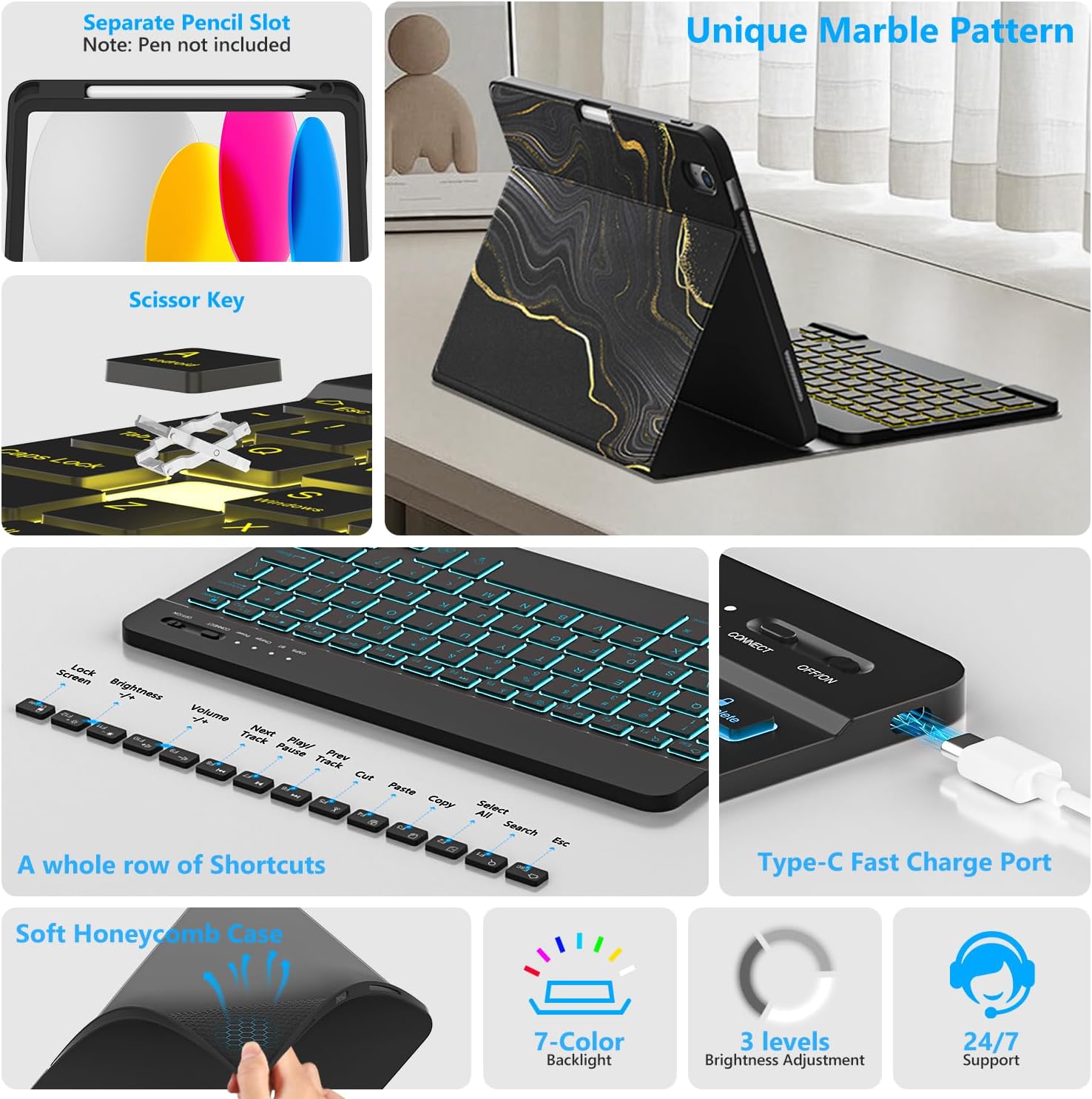
Слика 1.1: Готовоview of FUWANG Keyboard Case features, highlighting the pencil slot, scissor-key mechanism, keyboard shortcuts, Type-C charging port, and the soft honeycomb case for heat dissipation.
2. Садржај пакета
- 1 x FUWANG iPad Case (for A16 11th/10th Generation)
- 1 x Wireless Backlit Bluetooth Keyboard
- 1 к Типе-Ц кабл за пуњење
- 1 к Упутство за употребу
Note: iPad tablet and stylus are not included.
3. Компатибилност
Ова футрола са тастатуром је посебно дизајнирана за следеће моделе iPad-а:
- iPad A16 11th Generation 11" 2025: Model Numbers A3354, A3355, A3356
- iPad 10th Generation 10.9" 2022: Model Numbers A2696, A2757, A2777, A3162
To verify your iPad model, please check the back of your tablet for a model number starting with "A". This case is not compatible with other iPad models.
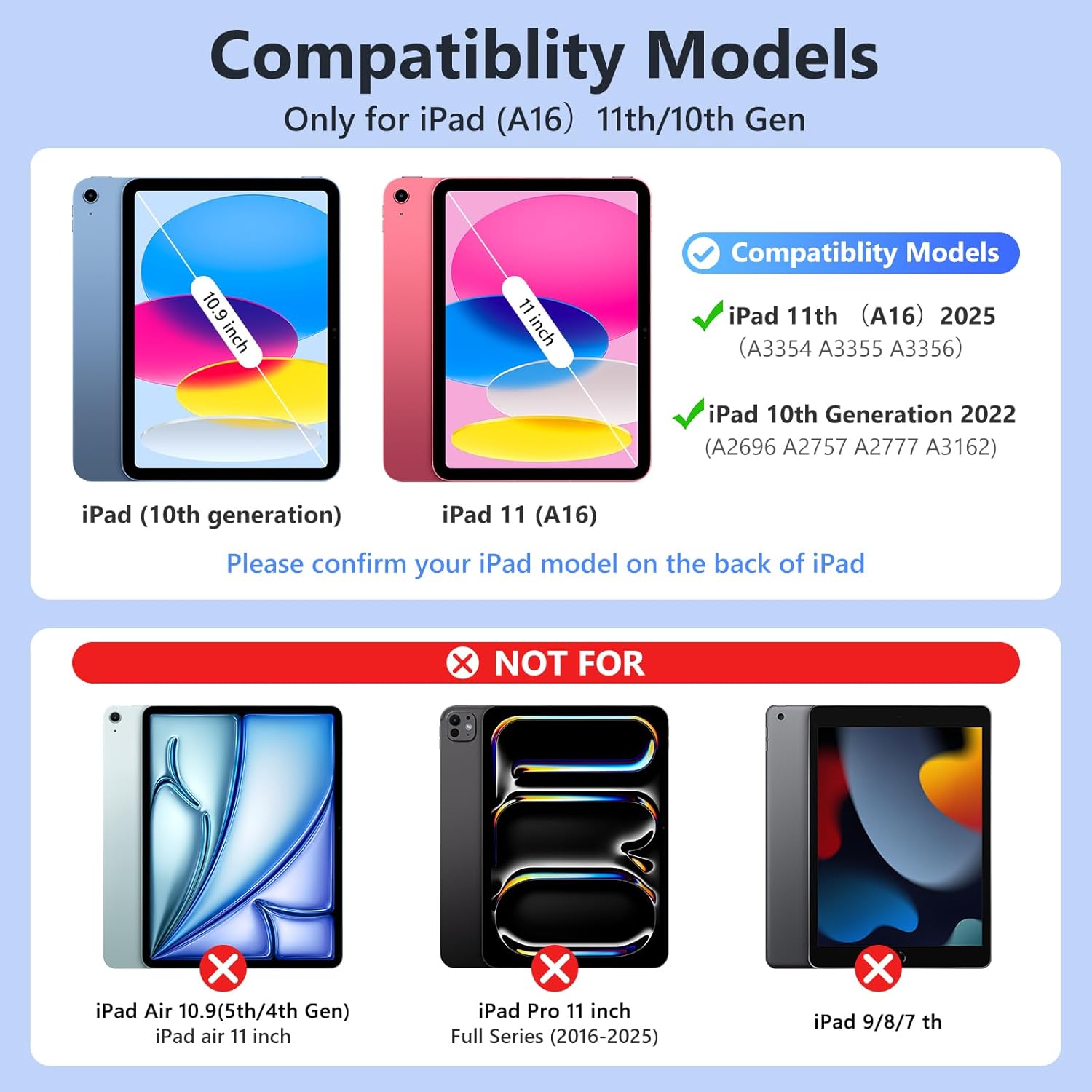
Слика 3.1: Visual guide for iPad model compatibility. Please confirm your iPad model number on the back of your device.
4. Упутства за подешавање
4.1 Initial Charging of the Keyboard
Before first use, fully charge the keyboard for 2 to 3 hours using the provided Type-C charging cable. Connect the cable to the keyboard's Type-C port and a USB power source. The power indicator light will flash during charging and turn off when fully charged.

Слика 4.1: Keyboard charging via Type-C port. Initial charge takes 2-3 hours.
4.2 Упаривање Bluetooth тастатуре
- Уверите се да је тастатура напуњена.
- Turn on the keyboard by sliding the power switch to the "ON" position. The power indicator will flash for approximately 3 seconds and then turn off.
- На вашем iPad-у идите на Подешавања > Блуетоотх и укључите Bluetooth.
- The iPad will search for available devices. Select "Bluetooth Keyboard" (or similar name) from the list.
- If prompted, enter the pairing code displayed on your iPad onto the keyboard and press Ентер.
- Once paired, the keyboard's indicator light will turn off, and your iPad will show the keyboard as "Connected".
For subsequent uses, simply turn on your iPad's Bluetooth and the keyboard's power. Press any key on the keyboard, and it should automatically reconnect.
4.3 Installing the iPad into the Case
Gently insert your iPad into the soft TPU inner shell of the case. Ensure all cutouts for the camera, speakers, and volume buttons align perfectly. The case provides full protection against drops and scratches.
5. Упутство за употребу
5.1 Коришћење позадински осветљене тастатуре
Тастатура има позадинско осветљење у 7 боја са 3 подесива нивоа осветљености.
- To change backlight colors: Press the Икона сијалице key (often next to the Spacebar or Function keys).
- Да бисте подесили осветљеност: Притисните дугме Икона сијалице тастер + Тастери са стрелицама горе/доле or a dedicated brightness key (if available).

Слика 5.1: Demonstrating the 7-color backlit keyboard with adjustable brightness settings.
5.2 Подешавање Viewинг Англес
The case is designed with three anti-slip grooves, allowing you to adjust your iPad to multiple viewing angles (e.g., 110°, 120°, 130°) for comfortable typing, viewње, или цртање.
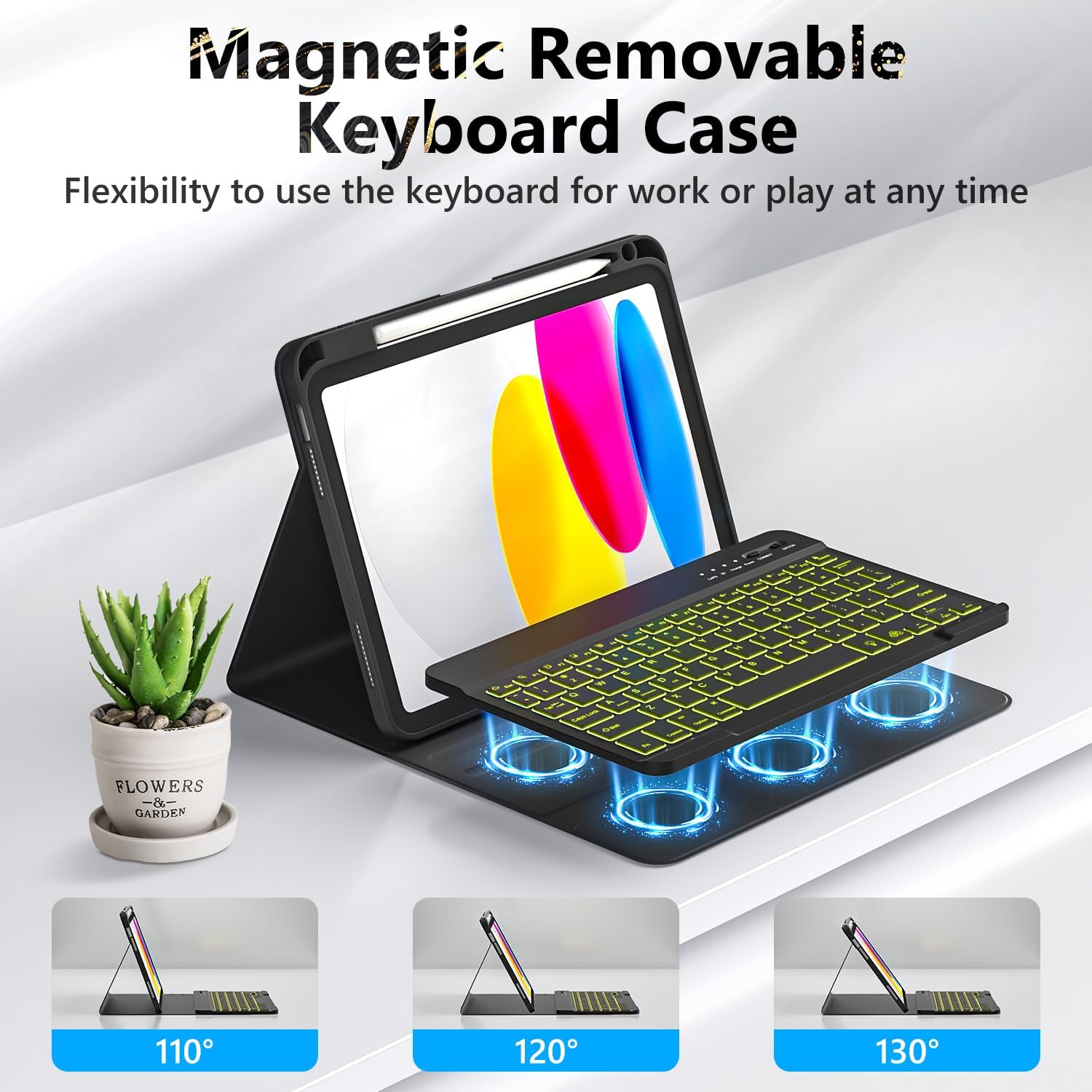
Слика 5.2: The magnetic removable keyboard case offers flexible viewуглове за различите задатке.
5.3 Keyboard Shortcuts
The keyboard includes a row of dedicated function keys and shortcuts for quick access to iPad features:
- Закључавање екрана
- Подешавање осветљености
- Контрола јачине звука
- Контроле репродукције медија (Previous Track, Play/Pause, Next Track)
- Copy, Cut, Paste
- Изаберите Све
- Pretraga
- Хоме
5.4 Функција аутоматског спавања/буђења
The case supports the iPad's automatic sleep/wake function, preserving battery life. When closing the case, the iPad will go to sleep; opening it will wake the iPad. For optimal performance of this feature, it is recommended to remove the wireless Bluetooth keyboard from the case, as the keyboard's magnetic components can interfere with the iPad's magnets.
5.5 Using the Pencil Holder
The integrated pencil holder securely stores your stylus, keeping it accessible and preventing loss. Simply slide your stylus into the designated slot.
6. Одржавање
- Чишћење кућишта: Wipe the synthetic leather case with a soft, damp крпу. Избегавајте јаке хемикалије или абразивна средства за чишћење.
- Чишћење тастатуре: Use a soft, dry cloth to clean the keyboard keys. For stubborn dirt, a slightly damp може се користити крпа, водећи рачуна да влага не уђе у тастатуру.
- Одржавање батерије: To prolong battery life, avoid fully discharging the keyboard frequently. Charge it regularly, especially if not used for extended periods.
КСНУМКС. Решавање проблема
- Тастатура се не повезује:
- Уверите се да је тастатура потпуно напуњена.
- Уверите се да је прекидач за напајање тастатуре УКЉУЧЕН.
- Проверите да ли је Bluetooth омогућен на вашем iPad-у.
- Заборавите уређај у Блутут подешавањима вашег iPad-а и покушајте поново да га упарите.
- Поново покрените и iPad и тастатуру.
- Backlight Not Working/Changing:
- Уверите се да је тастатура укључена.
- Press the backlight control key (light bulb icon) to cycle through colors and brightness levels.
- If the battery is low, backlighting may be disabled to conserve power. Charge the keyboard.
- Тастери не реагују:
- Проверите да ли је тастатура повезана преко Блутут-а.
- Уверите се да је тастатура напуњена.
- Очистите све остатке око тастера.
- Auto Sleep/Wake Function Issues:
- Уверите се да је iPad правилно постављен у футролу.
- Remove the detachable keyboard from the case when closing the cover, as its magnets can interfere with the auto sleep/wake feature.
8. Спецификације
| Бранд | ФУВАНГ |
| Модел Нумберс | А3354, А3355, А3356, А2696, А2757, А2777 |
| Повезивање | Блуетоотх |
| Тип тастатуре | Detachable, Backlit (7 colors, 3 brightness levels) |
| Капацитет батерије | 500 mAh Lithium-ion (rechargeable) |
| Време пуњења | 2-3 сати |
| Радно време | Approx. 120 hours (without backlight) |
| Време приправности | > 130 дана |
| Оперативна удаљеност | До 3 метара |
| Материјал | Premium Synthetic Leather, Thermoplastic Polyurethane (TPU) |
| Посебне карактеристике | Pencil holder, Full protection, Multiple viewing angles, Auto sleep/wake function |
9. Гаранција и подршка
For any questions or issues regarding your FUWANG Keyboard Case, please refer to the contact information provided with your purchase or reach out to the seller directly. Specific warranty details may vary by region and retailer.
Ask a question about this manual
Ask about setup, troubleshooting, compatibility, parts, safety, or missing instructions. Manuals+ will review the question and use this page’s manual context to help answer it.