
1. Увод
Thank you for choosing the OUILA LED Cabinet Lighting with Motion Sensor. This manual provides essential information for the safe and efficient use of your new lighting product. Please read it thoroughly before installation and operation, and retain it for future reference.
This product is a 60cm LED strip light designed for under-cabinet use, featuring a motion sensor, three adjustable color temperatures, and dimmable brightness. It is battery-powered and USB rechargeable, making it suitable for various indoor applications such as kitchens, bathrooms, bedrooms, closets, and bookshelves.
2. Безбедносна упутства
- Do not expose the light to water or excessive moisture. This product is designed for indoor use only.
- Не покушавајте да растављате, поправљате или модификујете уређај. Неовлашћене модификације могу поништити гаранцију и представљати безбедносне ризике.
- Држите уређај даље од извора топлоте, директне сунчеве светлости и запаљивих материјала.
- Use only the provided USB Type-C cable for charging. Ensure the charging voltagе је компатибилан (5V).
- Чувати ван домашаја деце.
- If the product is damaged or malfunctions, discontinue use immediately and contact customer support.
3. Садржај пакета
Молимо вас да проверите пакет за следеће ставке:
- OUILA LED Cabinet Light (x2)
- УСБ Типе-Ц кабл за пуњење (к2)
- Magnetic Adhesive Tape (x2 sets)
- Упутство за употребу

Image: Contents of the OUILA LED Cabinet Lighting package, showing two light bars and their respective USB charging cables.
4. Карактеристике производа
- Сензор покрета: Automatically detects motion within 3 meters and a 100-degree range. The light turns off after 20 seconds of no motion to conserve energy.
- 3 режима осветљења: Choose between Always On, Always Off, and Motion Sensor (Night Detection) modes.
- 3 температуре боје: Adjustable to Warm White (3000K), Neutral Light (4000K), and Cool White (6500K) to suit different environments and preferences.
- Безстепено затамњење: Adjust brightness from 10% to 100% with a long press. Features a memory function to recall the last brightness setting.
- Пуњива батерија: Built-in 5000mAh polymer lithium battery provides extended use.
- УСБ тип-Ц пуњење: Удобно и брзо пуњење.
- Ултра танак дизајн: Slim 9mm aluminum housing for discreet installation.
- Једноставна инсталација: Integrated magnets for direct attachment to metal surfaces or use with included adhesive magnetic tape for non-metal surfaces.

Image: Visual representation of the three color temperatures (6500K White, 4000K Natural, 3000K Warm) and the stepless dimming capability of the light.

Image: Illustration of the motion sensor's detection range, showing a 3-meter distance and 100-degree angle, with indicators for light turning on and off based on movement.
5. Подешавање и инсталација
The OUILA LED Cabinet Light offers two installation methods:
Method 1: Direct Magnetic Attachment (for iron surfaces)
The light bar has integrated magnets on its back. Simply attach it directly to any magnetic metal surface, such as a refrigerator or metal cabinet.
Method 2: Adhesive Magnetic Tape (for non-iron surfaces)
- Пажљиво очистите површину како бисте били сигурни да је сува и без прашине или масноће.
- Peel off the protective film from one side of the adhesive magnetic tape.
- Stick the adhesive side firmly onto the desired installation location.
- Attach the LED cabinet light to the magnetic strip. The built-in magnets in the light will securely hold it in place.

Image: Visual guide demonstrating how to install the light using either direct magnetic attachment to an iron surface or by using the provided super sticky magnetic tape for non-iron surfaces.
6. Операција
The light features a control panel with buttons for mode selection, brightness adjustment, and color temperature changes.
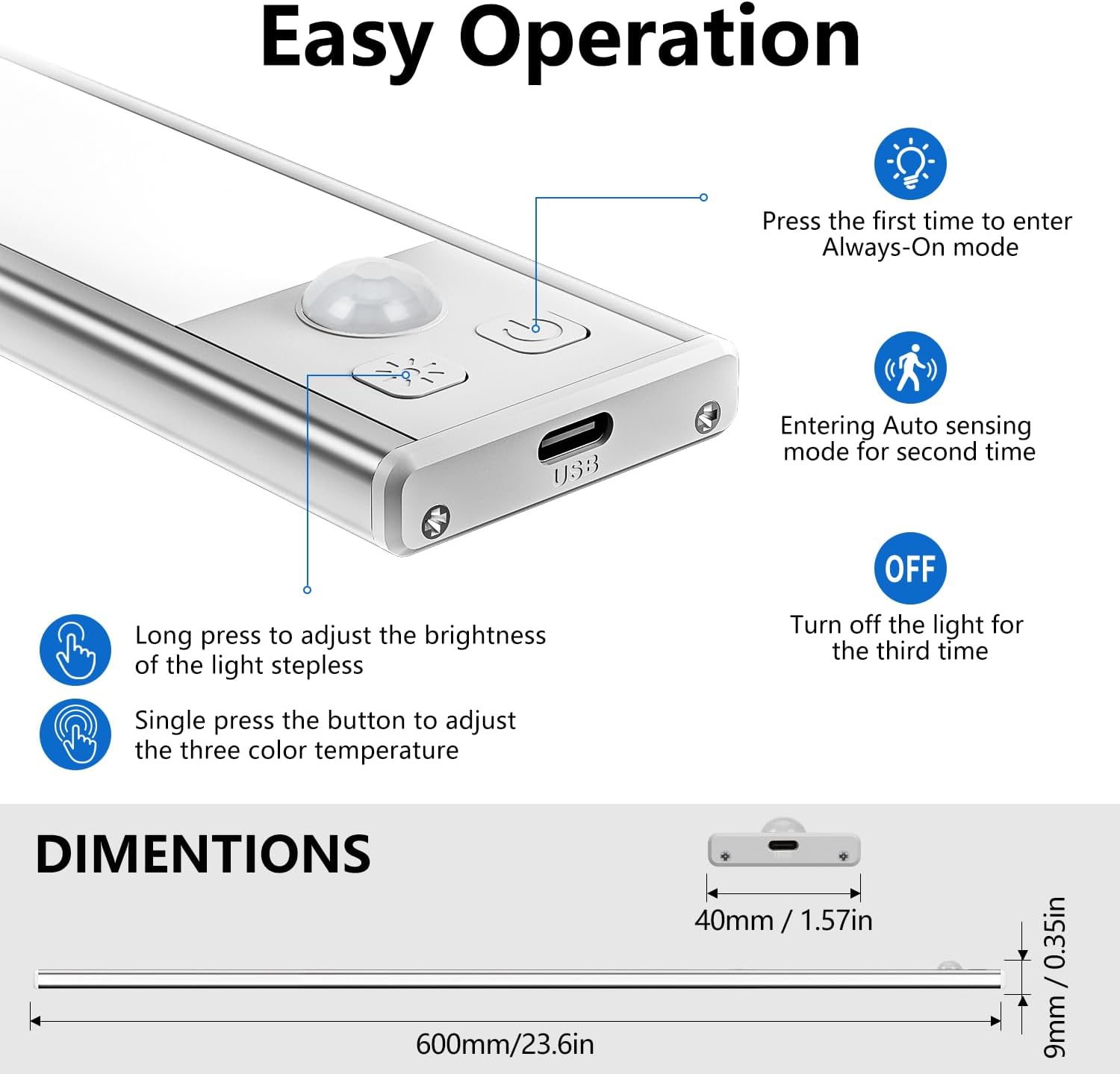
Image: Close-up of the light's control panel, detailing the functions of the buttons for power, mode selection, brightness adjustment, and color temperature changes.
Избор напајања и режима
- Први притисак: Улази Алваис Он mode. The light will remain on continuously.
- Други притисак: Улази Ауто Сенсинг (Motion Sensor) mode. The light will turn on when motion is detected in darkness and turn off after 20 seconds of no motion.
- Трећи притисак: Turns the light Офф.
Подешавање осветљености (затамњивање)
- Дуго притисните: Press and hold the brightness button to adjust the light intensity. The brightness will cycle between 10% and 100%. Release the button when the desired brightness is reached.
- The light has a memory function and will retain the last brightness setting when turned back on.
Подешавање температуре боје
- Појединачна штампа: Press the color temperature button to cycle through the three available color temperatures: Warm White (3000K), Neutral Light (4000K), and Cool White (6500K).
7. Пуњење
The OUILA LED Cabinet Light is equipped with a built-in 5000mAh rechargeable battery.
- Connect the provided USB Type-C charging cable to the charging port on the light.
- Plug the other end of the cable into a USB power source (e.g., USB charger, computer, power bank).
- Индикатор пуњења: A red light indicates that the device is charging. A green light indicates that the battery is fully charged.
- Потпуно пуњење обично траје отприлике 4 сата.
- At full brightness, the light can operate for at least 15 hours. Usage time varies depending on brightness settings and mode.
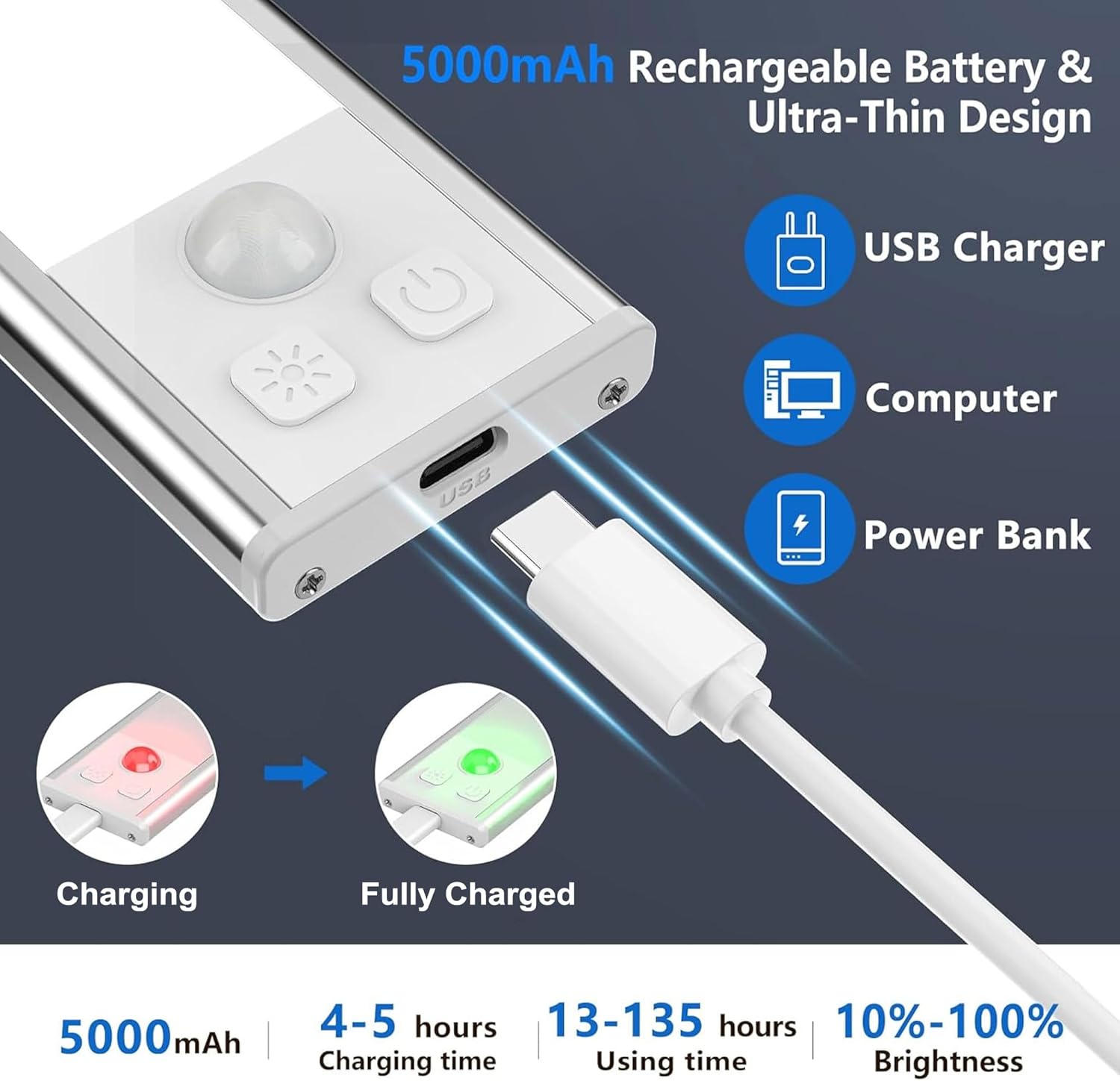
Image: Illustration of the USB-C charging process, showing the charging port, compatible power sources (USB charger, computer, power bank), and the red/green indicator lights for charging status.
8. Одржавање
- Clean the light surface with a soft, dry cloth. Do not use abrasive cleaners or solvents.
- Ensure the charging port is free of dust and debris to maintain proper connection.
- Чувајте лампу на хладном и сувом месту када је не користите дуже време.
КСНУМКС. Решавање проблема
Светло се не укључује:
- Check if the battery is charged. Connect to a power source and observe the charging indicator.
- Ensure the light is not in "Always Off" mode. Press the mode button to cycle through modes.
Motion sensor is not working:
- Ensure the light is in "Auto Sensing" (Motion Sensor) mode.
- Verify that the ambient light is low enough for the sensor to activate (night detection).
- Проверите да ли постоје препреке које блокирају сензор.
- Ensure motion is within the 3-meter, 100-degree detection range.
Светло неочекивано трепери или се пригушује:
- Батерија је можда празна. Потпуно напуните уређај.
10. Спецификације
| Број модела | ГЛС-Ц019 |
| Димензије | 60 к 4 к 0.9 цм |
| Тежина | 740 g (for the pack of 2) |
| Материјал | Алуминијум |
| Капацитет батерије | 5000 mAh (Polymer Lithium) |
| Време пуњења | Прибл. 4 сата |
| Оперативно време | 15+ hours (at full brightness, varies with settings) |
| Температуре боје | 3000K (Warm White), 4000K (Neutral Light), 6500K (Cool White) |
| Опсег сензора покрета | 3 meters / 100 degrees |
| Ауто-Офф Тиме | 20 секунди (након што није детектовано кретање) |
| Извор напајања | Баттери Поверед |
| Унутрашња/спољна употреба | Индоор |
11. Гаранција и подршка
OUILA products are manufactured to high-quality standards. For any questions, technical support, or warranty claims, please contact your retailer or the OUILA customer service team through the platform where you purchased the product. Please have your purchase details and model number (GLS-C019) ready when contacting support.