
HTC TWS6
HTC Wireless Earbuds TWS6 5.3 User Manual
Модел: ТВС6
Увод
Welcome and thank you for choosing the HTC Wireless Earbuds TWS6 5.3. This manual provides detailed instructions to help you set up, operate, and maintain your earbuds for optimal performance. Please read this manual thoroughly before using your device.
Садржај пакета
Молимо вас да проверите да ли су све ставке присутне у вашем пакету:
- 2 x HTC Earbuds
- КСНУМКС к УСБ-Ц кабл за пуњење
- 1 к кућиште за пуњење
- 2 Pairs x Rubber Eartips (S/L)
- 1 x Quick Start Guide (physical document)

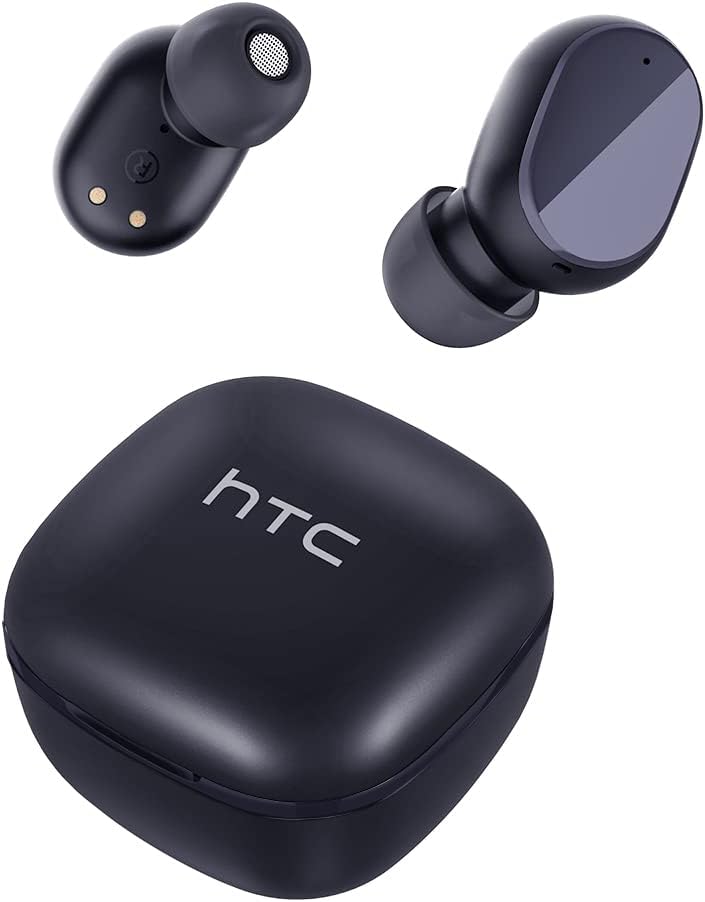
Производ је завршенview
Familiarize yourself with the components of your HTC TWS6 earbuds.

Сетуп
Пуњење слушалица и футроле
Пре прве употребе, потпуно напуните слушалице и кућиште за пуњење.
- Ставите слушалице у кућиште за пуњење.
- Повежите USB-C кабл са портом за пуњење на кућишту и извором напајања.
- Индикаторска лампица на кућишту ће показати статус пуњења.
- A full charge provides approximately 5 hours of playback for earbuds and up to 22 hours with the charging case.

Блуетоотх упаривање
Follow these steps to pair your earbuds with your device:
- Отворите кућиште за пуњење. Слушалице ће аутоматски ући у режим упаривања.
- На свом уређају (паметном телефону, таблету итд.) омогућите Блутут.
- Тражи "HTC TWS6" in the list of available Bluetooth devices.
- Select "HTC TWS6" to connect. A voice prompt will confirm successful pairing.

Ношење слушалица
For optimal sound quality and comfort, choose the correct eartip size and wear the earbuds properly.
- Select the eartips (S, M, L) that best fit your ears.
- Пажљиво уметните сваку слушалицу у ушни канал.
- Rotate slightly to ensure a secure and comfortable fit.
Упутство за употребу
Паметне контроле на додир
The HTC TWS6 earbuds feature intuitive touch controls:
- Пусти/паузирај музику: Један додир на обе слушалице.
- Следећа нумера: Двапут додирните десну слушалицу.
- Претходни запис: Двапут додирните леву слушалицу.
- Појачавање звука: Трипут додирните десну слушалицу.
- Смањивање јачине звука: Трипут додирните леву слушалицу.
- Одговори/заврши позив: Један додир на обе слушалице.
- Одбиј позив: Притисните и држите било коју слушалицу 2 секунде.
- Активирање гласовног помоћника: Притисните и држите било коју слушалицу 3 секунде.

Укључивање/искључивање
The earbuds automatically power on when removed from the charging case and power off when placed back into the case and the lid is closed.
To manually power on, press and hold the touch area for 3 seconds. To manually power off, press and hold the touch area for 5 seconds.
Одржавање и њега
Чишћење
Редовно чистите слушалице и кућиште за пуњење како бисте осигурали оптималне перформансе и хигијену.
- Користите меку, суву крпу која не оставља влакна да бисте обрисали слушалице и кућиште за пуњење.
- Уклоните врхове слушалица и очистите их благим сапуном и водом, а затим их добро осушите пре него што их поново ставите.
- Немојте користити абразивна средства за чишћење или раствараче.
Отпорност на воду (ИПКС5)
The HTC TWS6 earbuds are IPX5 sweatproof, meaning they are resistant to splashes and sweat.
Напомена: They are not designed for submersion in water. Avoid exposing them to heavy rain, showering, or swimming. Ensure the charging port is dry before charging.

Складиштење
Када се не користе, чувајте слушалице у њиховој футроли за пуњење како бисте их заштитили и одржали напуњеним.
Чувати на хладном и сувом месту, даље од екстремних температура.
Решавање проблема
| Проблем | Решење |
|---|---|
| Слушалице се не упарују | Ensure earbuds are charged. Turn off and on Bluetooth on your device. Forget "HTC TWS6" from your device's Bluetooth list and re-pair. |
| Само једна слушалица ради | Вратите обе слушалице у кутијицу за пуњење, затворите поклопац, а затим га поново отворите. Уверите се да су обе слушалице напуњене. |
| Ниска јачина звука или лош квалитет звука | Adjust volume on your device. Clean eartips and earbud mesh. Try different eartip sizes for a better seal. |
| Проблем са пуњењем | Check USB-C cable and power adapter. Ensure charging contacts on earbuds and case are clean and dry. |
| Слушалице се често искључују | Ensure your device is within the Bluetooth range (approx. 10 meters/33 feet) and there are no significant obstructions. |
Ако проблеми и даље постоје, обратите се корисничкој подршци.
Спецификације
| Феатуре | Детаљ |
|---|---|
| Назив модела | ТВС6 |
| Блуетоотх верзија | 5.3 |
| Технологија повезивања | Бежични |
| Бежична комуникациона технологија | Блуетоотх |
| Трајање батерије (слушалице) | 5 сата |
| Укупно време репродукције (са футролом) | 22 сата |
| Време пуњења (футрола) | Приближно 5 сати |
| Ниво отпорности на воду | IPX5 (отпоран на зној) |
| Контролни метод | Додирните |
| Микрофон | Yes (with ENC) |
| Компатибилни уређаји | Android and iOS Smartphones, Gaming Devices |
| Материјал | Пластика |
| Тежина артикла | 3.17 унци |
| УПЦ | 734257974554 |
| Контрола буке | Адаптивно поништавање буке |
| Тип аудио драјвера | Динамички возач |
| Импеданса | 199.99 Охм |
Гаранција и подршка
HTC provides a 360-day warranty extension for this product, as detailed in the product information.
For technical assistance, warranty claims, or any inquiries, please contact HTC customer support.
Корисничка подршка: Refer to the contact information provided in your product packaging or visit the official HTC webсајт за најновије опције подршке.
Ask a question about this manual
Ask about setup, troubleshooting, compatibility, parts, safety, or missing instructions. Manuals+ will review the question and use this page’s manual context to help answer it.