
SOBAST S-T26pro Purple
SOBAST T26pro OWS отворене бежичне слушалице - упутство за употребу
Model: S-T26pro
Марка: СОБАСТ
Увод
Thank you for choosing the SOBAST T26pro OWS Open Wireless Earbuds. These earbuds are designed to provide a secure and comfortable open-ear listening experience, featuring Wireless 5.4 connectivity, clear stereo sound, and advanced AI translation capabilities. This manual will guide you through the setup, operation, and maintenance of your new earbuds to ensure optimal performance and enjoyment.
The T26pro earbuds are lightweight and splashproof, making them suitable for various activities, including gaming, calls, and music listening. Their open-ear design avoids pressure on the ear canal, enhancing ambient awareness.
Шта је у кутији
Молимо вас да проверите садржај вашег пакета како бисте били сигурни да су сви предмети присутни:
- SOBAST T26pro OWS Open Wireless Earbuds (Left and Right)
- Футрола за бежично пуњење
- УСБ кабл за пуњење
- Упутство за употребу
- Картица активационог кода

Image: The SOBAST T26pro OWS Open Wireless Earbuds in their charging case, showcasinг њихов компактан и ергономски дизајн.
Сетуп
1. Пуњење слушалица
Before first use, fully charge your earbuds and the charging case. Connect the USB charging cable to the charging case and a power source. The indicator lights on the case will show the charging status.
2. Downloading the Nebula Translation App
To unlock the full potential of your SOBAST T26pro earbuds, including AI translation features, you need to download the Nebula Translation App. Scan the QR code provided in the packaging or search for "Nebula Translation" in your device's app store.
Video: A step-by-step guide on how to activate the AI Translation Earphones using the Nebula app, including unboxing and scanning the activation code.
3. Activating and Pairing Your Earbuds
- Open the Nebula Translation App.
- Go to "Connection Management" and select "Bind device".
- If prompted, log in to your account.
- Go to your phone's Bluetooth settings and connect/pair with the "S-OW1pro" earbuds.
- Return to the Nebula app. Scan or manually enter the activation code found on the card included in your package.
- Click "Connect" to complete the activation.
Important: Keep the activation code card safe, as it is required for future device management and potential returns.
Упутство за употребу
General Earbud Controls
- Укључивање/искључивање: Earbuds power on automatically when removed from the case and power off when placed back in.
- Пусти/паузирај: Једном додирните било коју слушалицу.
- Следећа нумера: Двапут додирните десну слушалицу.
- Претходни запис: Двапут додирните леву слушалицу.
- Одговори/заврши позив: Једном додирните било коју слушалицу.
- Одбиј позив: Притисните и држите било коју слушалицу 2 секунде.
- Активирање гласовног помоћника: Трипут додирните било коју слушалицу.
AI Translation Features (via Nebula App)
1. Face-to-Face Translation (Dual Ear Mode)
This mode allows two people to communicate face-to-face with real-time bilingual translation. Each person wears one earbud.
- On the Nebula app homepage, click "Dual Ear Mode".
- Select the languages for each earbud in the upper text area. The middle arrow allows for quick language swapping.
- Click the red dot to start recording. Speak into your earbud. The translation will be played through the other person's earbud.
- Click the red dot again to stop recording.
Video: Demonstrates the SOBAST AI Face-to-Face Translation feature, showing how two individuals can use the earbuds for real-time communication.
2. Simultaneous Interpretation (Headphones + Mobile Mode)
This mode is ideal for situations where one person wears the earbuds and the other person speaks into the phone, with real-time interpretation.
- On the Nebula app homepage, click "Headphones + Mobile Mode".
- Select the languages in the upper text area. The left side is your language (earbuds), and the right side is the other person's language (phone).
- When you speak, click the headphones icon. Your speech will be translated and played through the phone.
- When the other person speaks, click the phone icon. Their speech will be translated and played through your headphones.
- Click the top-left corner to stop recording.
Видео: Оверview of the SOBAST AI Simultaneous Interpretation feature, demonstrating how it facilitates real-time language translation.
3. АИ асистент
The Nebula app also features an AI Assistant that can help with various tasks, including image generation.
- Enter the "AI Interface" within the Nebula app.
- Click "AI Image Creation".
- Input text describing the image you want to generate or upload a reference photo.
- Select the desired image aspect ratio.
- Click to send your request, and the AI will generate the image.
Video: Shows the SOBAST AI Earbuds' AI Assistant feature, demonstrating its capability to generate images based on user input.
Карактеристике производа и истакнути детаљи
- Secure and Comfortable Open Ear Design: Professional OWS construction avoids pressure on the ear canal, ideal for ambient awareness and extended wear.
- Јасан стерео звук: 14.2mm drivers deliver punchy bass and clear dialogue across the 20Hz-20kHz range, enhanced by a built-in AI microphone for calls.
- Wireless 5.4 Gaming-Grade Sync: Stable, low-latency 10-meter connection with auto-pairing in 2 seconds for seamless gaming and media consumption.
- Kid-Friendly Durability: IPX4 splash-proof coating and ASTM F963 safety standards ensure resilience against drops and minor water exposure.
- Long Playtime & Lightweight: Up to 6 hours of play per charge, with each earbud weighing only 4.2 grams for comfortable all-day wear.

Image: The SOBAST T26pro earbuds positioned next to a smartphone displaying a game, illustrating their low-latency performance for an immersive experience.
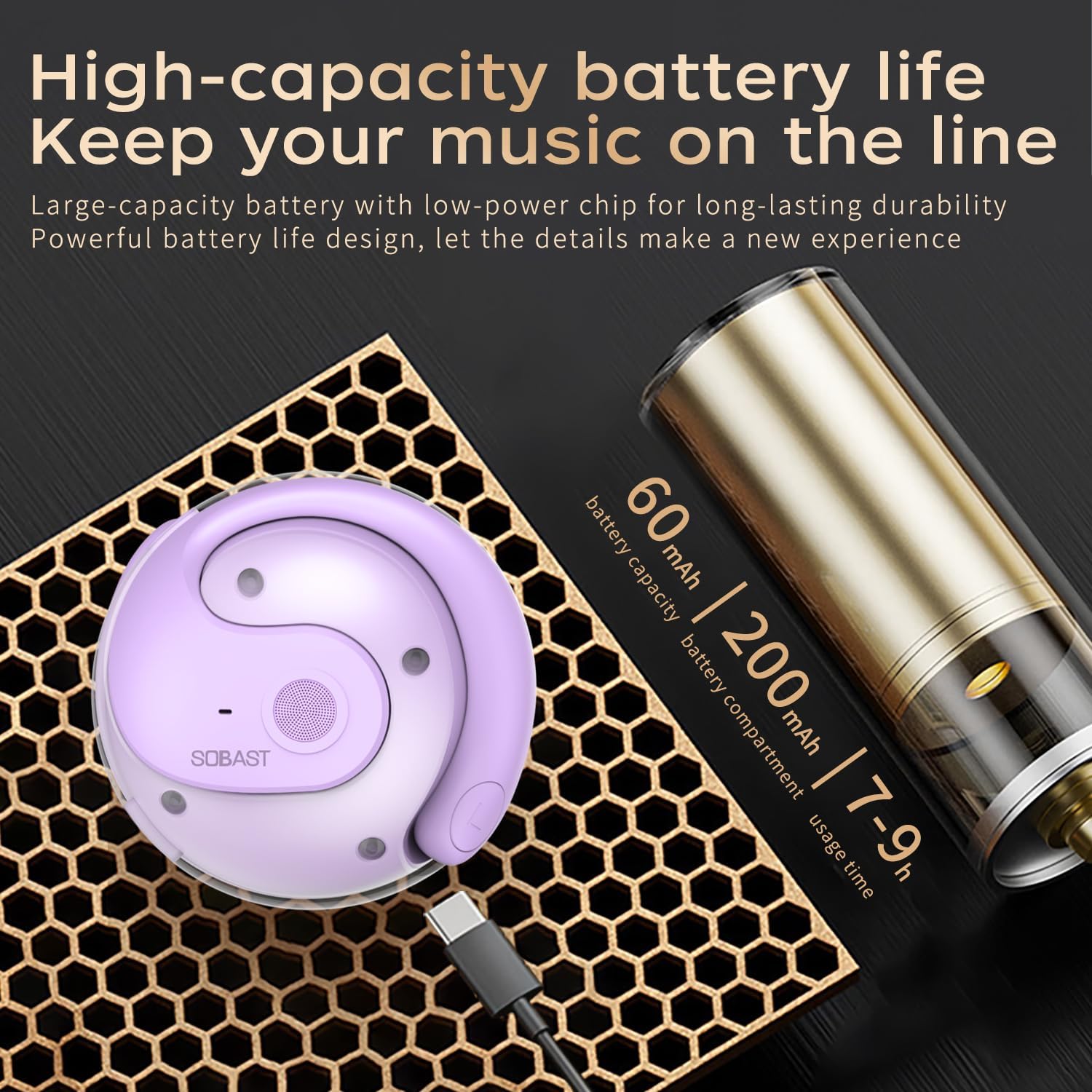
Image: The SOBAST T26pro charging case connected to a USB-C cable, with text indicating 60mAh earbud battery capacity, 200mAh charging bay capacity, and 7-9 hours of usage time.

Слика: Детаљна view of the Bluetooth 5.3 chip, emphasizing faster connection and higher stability for the SOBAST T26pro earbuds.
Спецификације
| Феатуре | Спецификација |
|---|---|
| Назив модела | SOBAST S-T26pro |
| Технологија повезивања | Бежично (Bluetooth 5.4) |
| Постављање уха | On Ear (Open-ear Curved Hook) |
| Тип аудио драјвера | Динамички драјвер (14.2 мм) |
| Фреквенцијски опсег | 20Хз-20кХз |
| Трајање батерије (слушалице) | 6 сата |
| Кућиште за пуњење Трајање батерије | 24 сата |
| Време пуњења | 1.5 Hours (Earbuds), 1 Hour (Case) |
| Блуетоотх домет | 33 стопа (10 метара) |
| Ниво отпорности на воду | ИПКС4 отпоран на прскање |
| Тежина ставке (слушалице) | 4.2 грама (0.004 унци) |
| Димензије производа | 2.36 к 1.97 к 1.57 инча |
| Тип контроле | Контрола додиром |
| Контрола буке | Хибридно поништавање буке |
Одржавање
To ensure the longevity and optimal performance of your SOBAST T26pro earbuds, follow these maintenance guidelines:
- Чишћење: Gently wipe the earbuds and charging case with a soft, dry, lint-free cloth. Do not use harsh chemicals, cleaning solvents, or strong detergents.
- Изложеност води: The earbuds are IPX4 splashproof, meaning they can withstand light splashes of water. Do not submerge them in water or expose them to heavy rain. Dry them thoroughly if they get wet.
- Складиштење: Када се не користе, чувајте слушалице у њиховој футроли за пуњење како бисте их заштитили од прашине и оштећења. Чувајте их на хладном и сувом месту, даље од екстремних температура.
- Пуњење: Use the provided USB charging cable. Avoid using damaged cables or chargers.
- Избегавајте капи: While designed for durability, avoid dropping the earbuds or case from significant heights to prevent internal damage.
Решавање проблема
If you encounter issues with your SOBAST T26pro earbuds, try the following solutions:
- Нема звука/лош квалитет звука:
- Уверите се да су слушалице потпуно напуњене.
- Check Bluetooth connection; try re-pairing.
- Очистите све остатке са звучника слушалица.
- Подесите јачину звука и на слушалицама и на повезаном уређају.
- Слушалице се не упарују:
- Ensure earbuds are in pairing mode (usually by opening the case).
- Искључите и укључите Блутут на свом уређају.
- Заборавите уређај у подешавањима Bluetooth-а и покушајте поново да га упарите.
- Ensure the earbuds are within the 10-meter Bluetooth range.
- App Issues (Nebula Translation):
- Уверите се да је апликација ажурирана на најновију верзију.
- Restart the app or your phone.
- Check your internet connection for translation features.
- Verify the activation code is correctly entered and activated.
- Проблеми са пуњењем:
- Проверите кабл за пуњење и адаптер за напајање.
- Уверите се да су слушалице правилно постављене у кућиште за пуњење.
- Очистите контакте за пуњење и на слушалицама и на кућишту.
Гаранција и подршка
Your SOBAST T26pro OWS Open Wireless Earbuds come with a standard manufacturer's warranty. Please refer to the warranty information provided with your purchase for details on coverage and duration.
For technical support, troubleshooting assistance, or warranty claims, please contact SOBAST customer service through the contact information provided on the official SOBAST website or your retailer's support channels. Have your product model number (S-T26pro) and proof of purchase ready when contacting support.
Ask a question about this manual
Ask about setup, troubleshooting, compatibility, parts, safety, or missing instructions. Manuals+ will review the question and use this page’s manual context to help answer it.