
Увод
Thank you for choosing the Belkin Portable 20,000 mAh Power Bank. This device is designed to provide reliable and fast charging for your mobile devices, featuring an integrated USB-C cable and 30W Power Delivery. Its compact and lightweight design makes it ideal for travel, ensuring your devices stay powered wherever you go. This manual provides essential information on how to set up, operate, maintain, and troubleshoot your power bank.

Image: The Belkin Portable 20,000 mAh Power Bank in blue, showcasinг његов елегантан дизајн.
Кључне карактеристике
- Интегрисани USB-C кабл: For convenient charging on the go.
- Испорука снаге 30В: Enables fast charging for smartphones, tablets, and even some laptops like the MacBook Air.
- Капацитет 20,000 мАх: Provides up to 87 hours of additional battery life for an iPhone 16 Pro, charging 0-50% in approximately 25 minutes.
- Истовремено пуњење: Charge up to three devices concurrently using the integrated USB-C cable, USB-C port, and USB-A port, with a shared output of 30W.
- ЛЕД индикатор: Displays the power bank's charging status.
- Пролазно пуњење: Charge your devices while the power bank itself is being recharged.
- Lightweight and Travel-Friendly: Weighing less than 395 grams, it meets aviation safety standards for carry-on luggage.
- Одрживи дизајн: Made from 72% post-consumer recycled materials with 100% plastic-free packaging.
Сетуп
Прво пуњење преносне батерије
Before first use, fully charge your Belkin Power Bank. Connect the power bank to a wall charger using a compatible USB-C cable (not included for recharging the power bank itself, only the integrated cable is for output). The LED indicators will show the charging progress. A full charge typically takes up to 12 hours.

Image: The power bank connected to a wall outlet for recharging, simultaneously charging a smartphone via its integrated cable. This illustrates pass-through charging.
Упутство за употребу
Пуњење ваших уређаја
- Коришћење интегрисаног USB-C кабла: Extend the integrated USB-C cable from the power bank and connect it directly to your USB-C compatible device.
- Коришћење USB-C порта: Connect your device's USB-C charging cable to the power bank's USB-C output port.
- Коришћење USB-A порта: Connect your device's USB-A charging cable to the power bank's USB-A output port.

Image: The Belkin power bank connected to an iPhone via its integrated USB-C cable, demonstrating seamless high-speed charging.
Пуњење више уређаја
The power bank supports charging up to three devices simultaneously with a combined output of 30W. You can use the integrated USB-C cable, the USB-C port, and the USB-A port at the same time.
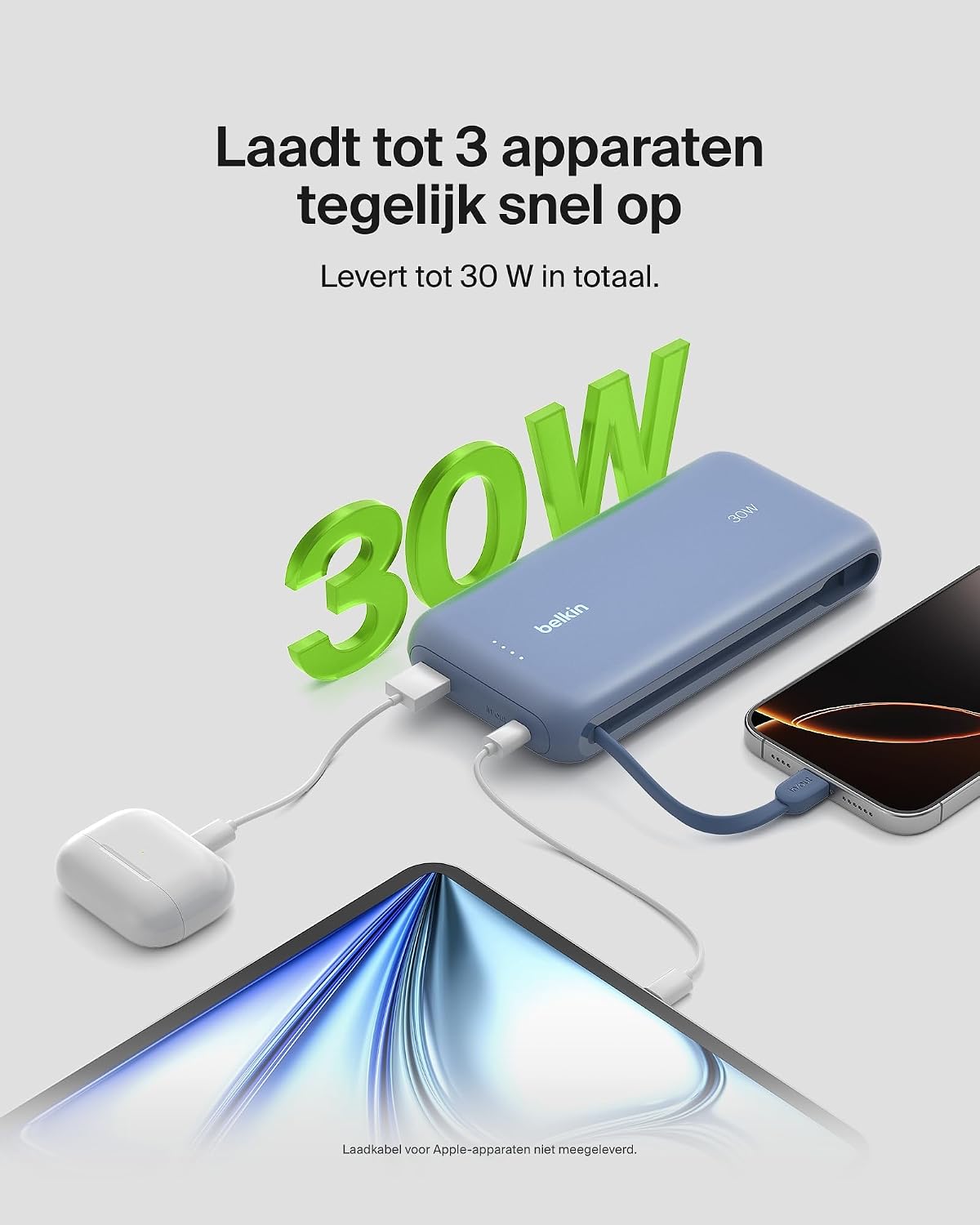
Image: The power bank simultaneously charging a smartphone, a tablet, and wireless earbuds, illustrating its capability to charge up to three devices with a total output of 30W.
ЛЕД индикатор статуса батерије
The power bank features LED lights that indicate the remaining battery level and charging status. Refer to the table below for interpretation:
| Статус ЛЕД-а | Значење |
|---|---|
| Све ЛЕД диоде су чврсте | Потпуно напуњен |
| LEDs blinking sequentially | Пуњење је у току |
| Fewer LEDs solid | Преостали капацитет батерије |
Одржавање
- Чишћење: Користите меку, суву крпу за чишћење преносног пуњача. Избегавајте употребу јаких хемикалија или абразивних материјала.
- Складиштење: Чувајте преносни пуњач на хладном и сувом месту, даље од директне сунчеве светлости и екстремних температура.
- Одржавање батерије: Да бисте продужили век трајања батерије, избегавајте редовно потпуно пражњење преносне батерије. Пуните је када је ниво батерије низак.
- Integrated Cable Care: When not in use, ensure the integrated USB-C cable is properly stowed to prevent damage.
Решавање проблема
Уобичајени проблеми и решења
- Уређај се не пуни:
- Ensure the power bank is charged. Check the LED indicators.
- Проверите да ли је кабл за пуњење безбедно повезан и са преносном батеријом и са вашим уређајем.
- Try a different charging cable or port on the power bank.
- Уверите се да је ваш уређај компатибилан са спецификацијама пуњења преносне батерије.
- Споро пуњење:
- Ensure your device supports fast charging (Power Delivery) to utilize the 30W output.
- If charging multiple devices, the total 30W output is shared, which may result in slower charging for individual devices.
- Check if the cable used supports fast charging.
- Преносна батерија се не пуни:
- Ensure the wall adapter and cable used for recharging the power bank are functional and properly connected.
- Try a different wall adapter or cable.
Belkin SmartProtect Safety Features
The Belkin Power Bank is equipped with SmartProtect technology, which includes multiple safety features to protect your devices and the power bank itself:
- Заштита од преоптерећења
- Оверцуррент Протецтион
- Оверповер Протецтион
- Заштита од кратког споја
- Оутпут Оверволtagе Заштита
- Output High/Low Temperature Protection
- Input High/Low Temperature Protection
- Signal Interference Protection
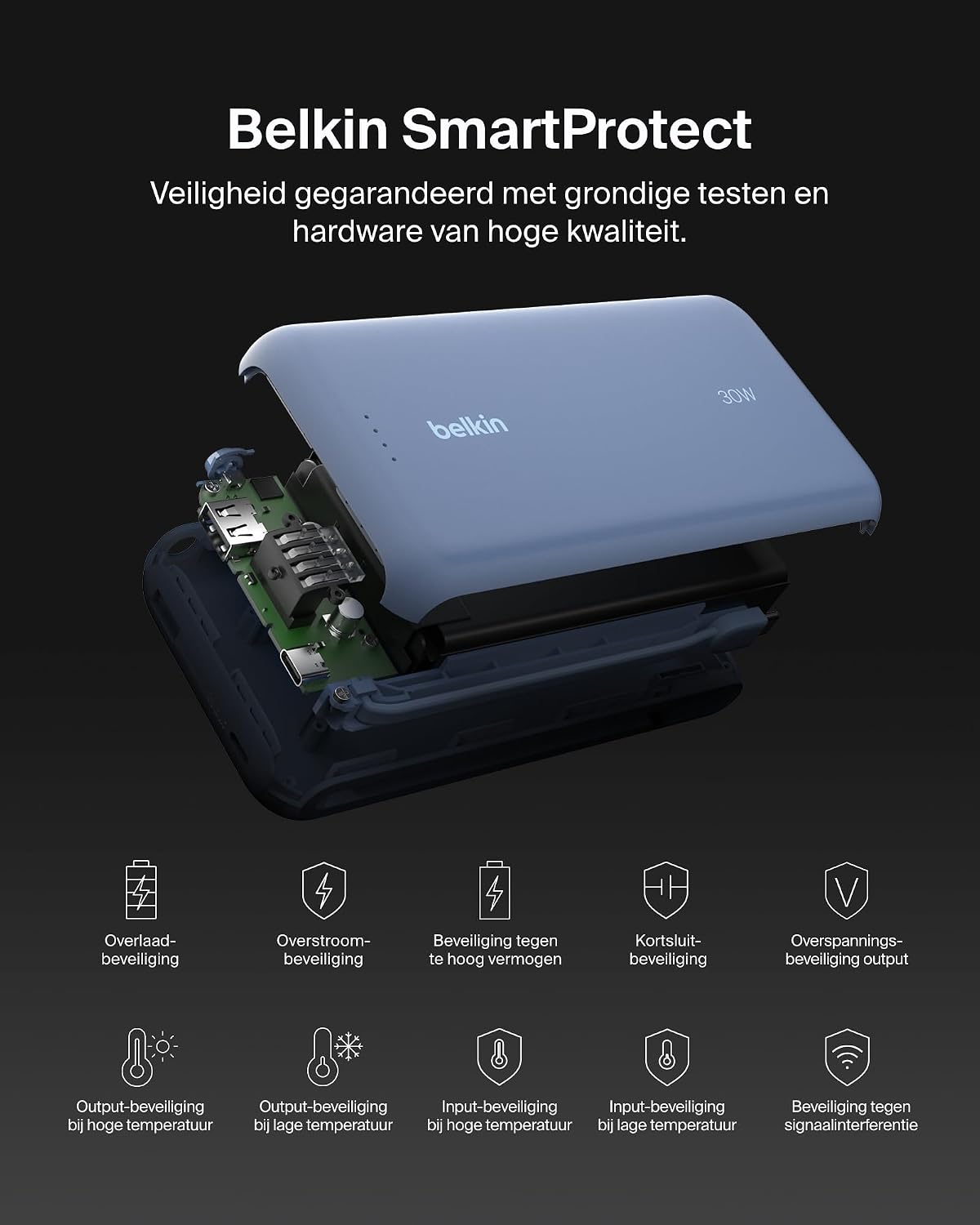
Слика: Експлодирана view of the Belkin Power Bank, highlighting its internal components and the comprehensive Belkin SmartProtect safety features, including protection against overcharge, overcurrent, and short-circuits.
Спецификације
| Феатуре | Детаљ |
|---|---|
| Број модела | BPB024hqBL |
| Капацитет батерије | 20,000 мАх |
| Излазна снага | Up to 30W Power Delivery (shared) |
| Тип конектора | Integrated USB-C cable, 1x USB-C port, 1x USB-A port |
| Волtage | 5 Волтс |
| Ampераге | 3 Ampере |
| Време пуњења (преносна батерија) | Прибл. 12 сата |
| Димензије производа | 15.4 к 7.62 к 2.51 цм |
| Тежина артикла | 395 грама |
| Састав батерије батерије | Литијум-јонски |
| Компатибилни уређаји | Apple iPhone 16 series, iPhone 15 series, iPhone 14 series, iPhone 13 series, Samsung Galaxy S22/S23/S24/S25 series, iPad Pro, iPad Air, iPad, iPad Mini, and other USB-C/USB-A compatible devices. |
Гаранција и подршка
Информације о гаранцији
This Belkin Portable Power Bank comes with a Двогодишња гаранција произвођача. Additionally, it includes a Connected Equipment Warranty, providing peace of mind for your connected devices. Please retain your proof of purchase for warranty claims.
Корисничка подршка
For further assistance, technical support, or warranty inquiries, please visit the official Belkin support webсајт или контактирајте њихову корисничку службу. Више информација можете пронаћи на ввв.белкин.цом/суппорт.