
Увод
Хвала вам на куповиниasing the Sharp Digital Alarm Clock, Model SPC5148AMZ. This alarm clock features a large, easy-to-read red LED display, dual alarms, adjustable alarm volume, and a convenient snooze function. It is designed for simple operation and includes a battery backup feature to maintain time and alarm settings during power outagес.
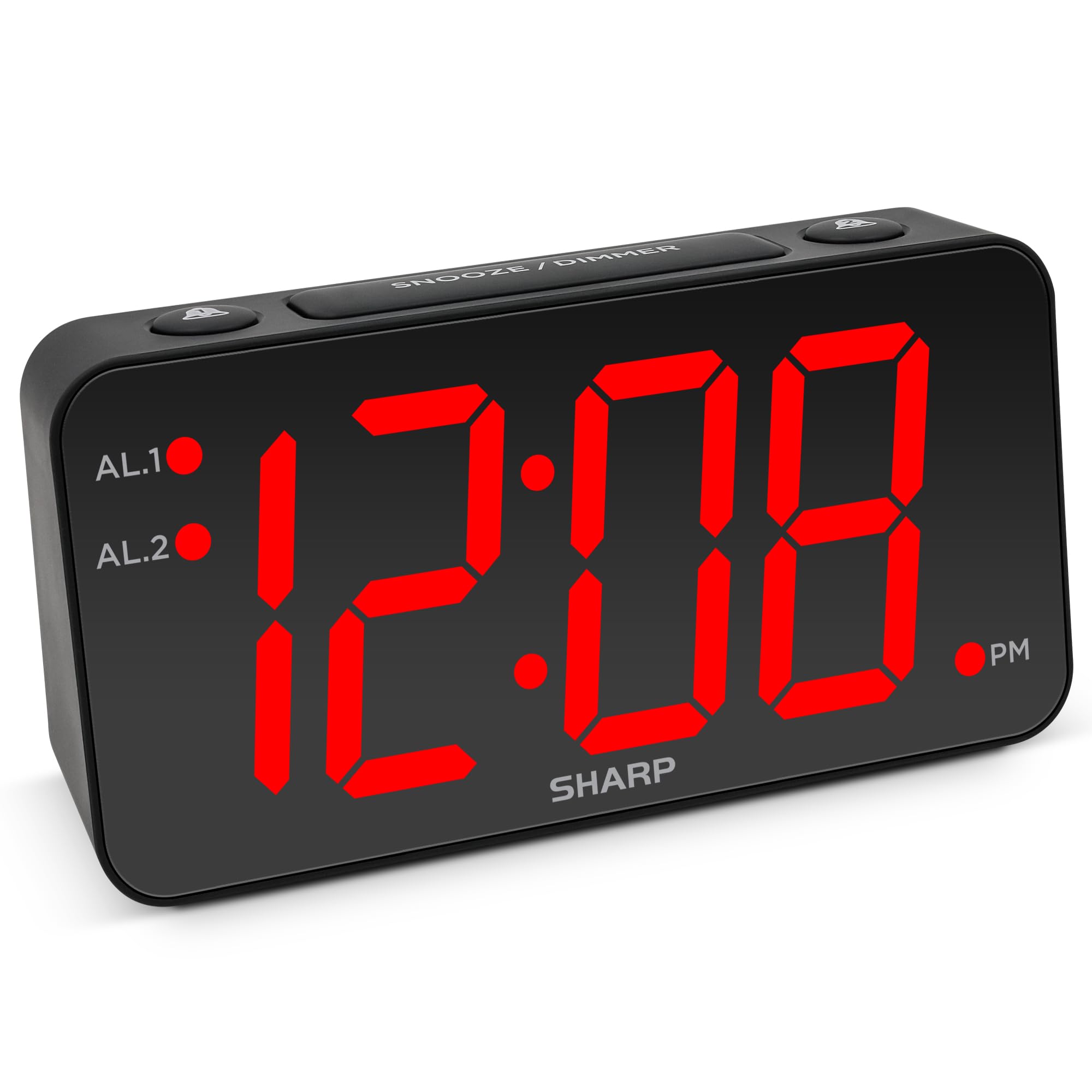
Слика: Фронт view of the Sharp Digital Alarm Clock, Model SPC5148AMZ, showcasing its large red LED time display.
Компоненте и контроле производа
Упознајте се са различитим деловима и контролама вашег будилника.
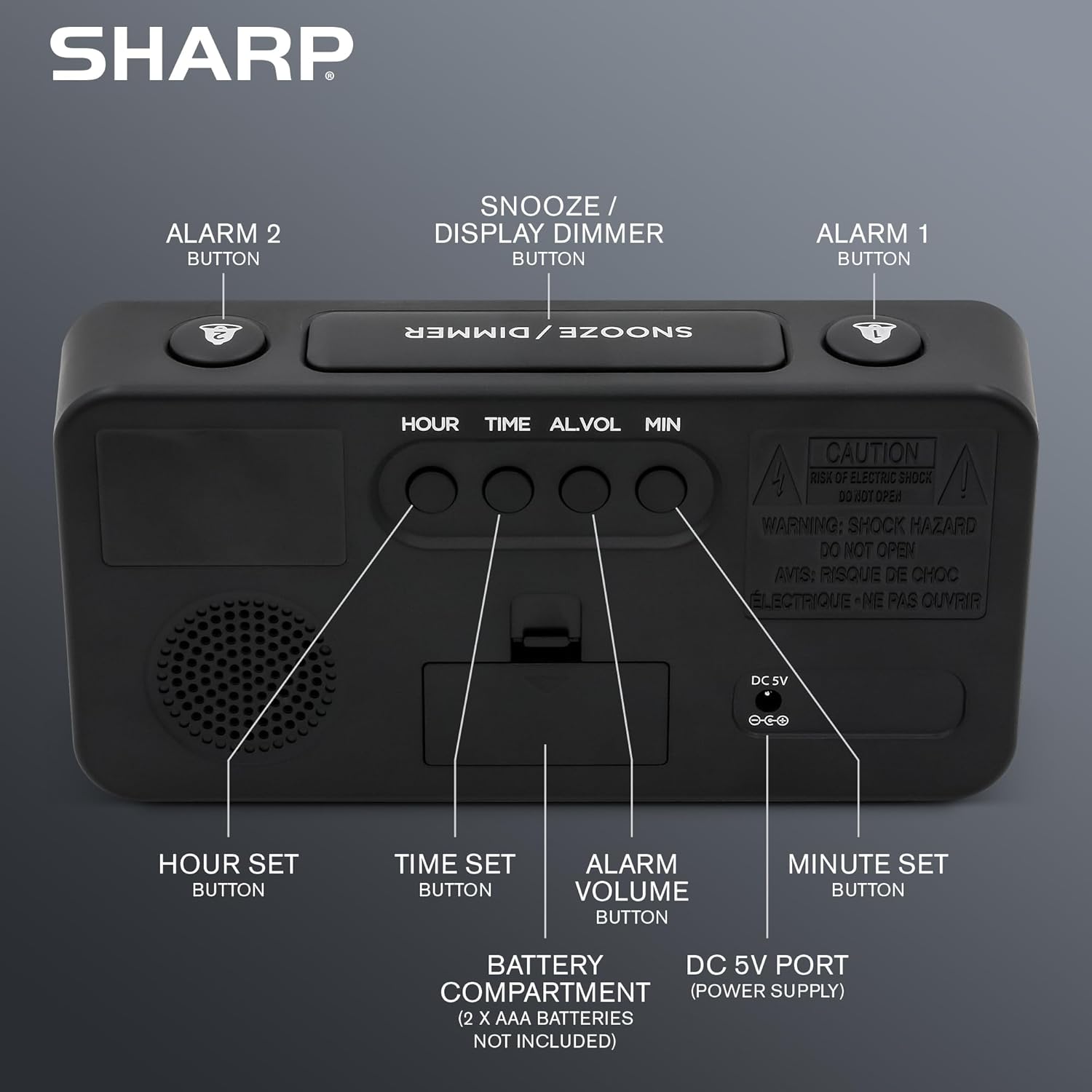
Слика: Позади view of the alarm clock, highlighting the Hour Set, Time Set, Alarm Volume, Minute Set buttons, Battery Compartment, and DC 5V Power Port.
- SNOOZE / DIMMER Button: Located on top. Press to snooze alarm or adjust display brightness.
- Дугме АЛАРМ 1: Located on top. Activates/deactivates Alarm 1.
- Дугме АЛАРМ 2: Located on top. Activates/deactivates Alarm 2.
- HOUR SET Button: Located on the back. Used to set the hour for time or alarm.
- Дугме за ПОДЕСИВАЊЕ ВРЕМЕНА: Located on the back. Used to enter time setting mode.
- ALARM VOLUME Button: Located on the back. Adjusts the alarm loudness.
- MINUTE SET Button: Located on the back. Used to set the minute for time or alarm.
- ДЦ 5В порт: Power input for the clock.
- Одељак за батерије: Holds 2 x AAA batteries (not included) for backup.
Сетуп
Повер Цоннецтион
- Connect the provided power adapter to the DC 5V port on the back of the alarm clock.
- Plug the adapter into a standard 110V/120V AC power outlet. The display will illuminate.
Инсталација резервне батерије
For battery backup, which retains time and alarm settings during a power outage (display will be blank), install batteries:
- Отворите поклопац одељка за батерије на задњој страни уређаја.
- Insert 2 new AAA batteries (not included), observing the correct polarity (+ and -).
- Добро затворите поклопац одељка за батерије.
Важно: Batteries are for backup only. The clock requires AC power for the display to function and for the alarm to sound at full volume.
Упутство за употребу
Подешавање времена
- Притисните и држите ВРЕМЕНСКИ СКЛОП дугме на полеђини сата док цифре сати не почну да трепћу.
- Притисните тастер ХОУР СЕТ button repeatedly to adjust the hour. Pay attention to the PM indicator light.
- Притисните тастер МИНУТЕ СЕТ више пута притисните дугме да бисте подесили минуте.
- Once the desired time is set, press the ВРЕМЕНСКИ СКЛОП поново притисните дугме да бисте потврдили и изашли из режима подешавања времена.
Setting the Alarm (Alarm 1 and Alarm 2)
This clock features dual alarms. The procedure is the same for both Alarm 1 and Alarm 2.
- Притисните и држите АЛАРМ 1 or АЛАРМ 2 button on the top of the clock until the alarm hour digits begin to flash.
- Притисните тастер ХОУР СЕТ button repeatedly to adjust the alarm hour. Ensure the correct AM/PM is selected.
- Притисните тастер МИНУТЕ СЕТ више пута притисните дугме да бисте подесили минуте аларма.
- Притисните тастер АЛАРМ 1 or АЛАРМ 2 button again to confirm the alarm time. The corresponding alarm indicator light (AL.1 or AL.2) will illuminate on the display, indicating the alarm is active.
Activating/Deactivating Alarms
- To activate an alarm: Press the АЛАРМ 1 or АЛАРМ 2 button once. The corresponding indicator light will turn on.
- To deactivate an alarm: Press the АЛАРМ 1 or АЛАРМ 2 button again. The corresponding indicator light will turn off.
Функција одлагања
Када се огласи аларм, притисните велико СНООЗЕ / ДИММЕР button on top of the clock. The alarm will pause for 9 minutes and then sound again. You can repeat this process until the alarm is manually turned off.
Adjusting Display Brightness (Dimmer)
Притисните тастер СНООЗЕ / ДИММЕР button (when the alarm is not sounding) to cycle through the display brightness levels: High, Medium, Low, or OFF.
Подешавање јачине звука аларма
Притисните тастер ЗВУК АЛАРМА button on the back of the clock to cycle through the alarm loudness levels: High, Medium, Low.
Одржавање
- Чишћење: Обришите сат меком, сувом крпом. Не користите абразивна средства за чишћење или раствараче.
- Замена батерије: Replace backup batteries annually or when the clock experiences frequent power outages to ensure settings are retained.
- Пласман: Place the clock on a stable, flat surface. Avoid direct sunlight, extreme temperatures, and high humidity.
Решавање проблема
| Проблем | Решење |
|---|---|
| Приказ сата је празан. | Ensure the AC power adapter is securely plugged into both the clock and a working electrical outlet. Check if there's a power outage. If using battery backup, the display will be blank during an outage, but timekeeping continues. |
| Аларм се не оглашава. |
|
| Cannot set time or alarm. | Ensure you are pressing and holding the correct SET button until the digits flash. Release the button, then use HOUR SET and MINUTE SET to adjust. Press the SET button again to confirm. |
| Екран је превише светао/таман. | Притисните тастер СНООЗЕ / ДИММЕР button (when alarm is not sounding) to cycle through brightness levels. |
Спецификације
- Модел: СПЦ5148АМЗ
- Бренд: Схарп
- Тип приказа: Дигитална ЛЕД диода (црвена)
- Величина екрана: 3 inches (Jumbo Numbers)
- Извор напајања: Corded Electric (110V/120V AC)
- Резервна батерија: 2 к ААА батерије (нису укључене)
- Димензије (Ш к В): 8.27 cm x 4.13 cm
- Тежина: 0.41 килограма
- Посебне карактеристике: Dual Alarms, Adjustable Brightness (High, Medium, Low, OFF), Adjustable Alarm Volume (High, Medium, Low), 9-minute Snooze.
Информације о гаранцији
Sharp products are manufactured and sold by M.Z. Berger & Co. Inc. This product comes with a limited warranty against defects in materials and workmanship. For specific warranty details, including duration and terms, please refer to the warranty card included in your product packaging or contact customer support.
Корисничка подршка
For assistance with your Sharp Digital Alarm Clock, please contact the manufacturer's customer support. Contact information can typically be found on the product packaging or the manufacturer's official webсајту.
Manufacturer: Sharp (M.Z. Berger & Co. Inc.)
Производ је завршенview Видео
Video: An official Sharp video showcasing various Sharp clocks, including features like alarm, decor, charging, precision, and specialty functions. This video provides a general overview of Sharp's clock offerings.