
1. Производ је готовview
This Wireless CarPlay & Android Auto Module is designed to integrate seamlessly with your vehicle's factory radio screen, providing enhanced connectivity and smartphone functionality. It operates as a LINUX-based system, not an aftermarket Android radio, and therefore does not support Google Play or app downloads. Video applications are not supported by either CarPlay or Android Auto through this module.
The module retains all original factory functions of your vehicle's infotainment system. It also supports the addition of aftermarket AHD front and rear cameras. CarPlay and Android Auto connect wirelessly, eliminating the need for additional cables for smartphone integration. The installation is designed to be plug-and-play, requiring no programming.
2. Компатибилност
This module is compatible with specific Infiniti and Nissan models equipped with an "APPS" button on the console. Please verify your vehicle's console features before installation.
2.1 Компатибилни модели возила
| МОДЕЛ | СИСТЕМ | ГОДИНА |
|---|---|---|
| ККС60 | ДЕНСО | 2014-2019 |
| ККС80 | ДЕНСО | 2014-2019 |
| К70 | ДЕНСО | 2014-2019 |
| Патрол | ДЕНСО | 2014-2019 |
| Армада | ДЕНСО | 2014-2019 |

Image: Compatible Vehicle Model List. This table outlines the specific Infiniti and Nissan models, their system type (DENSO), and model years (2014-2019) that are compatible with the module.
2.2 Console Button Requirement
The module requires your vehicle's console to have an "APPS" button for proper functionality. Consoles with "DISP", "TEL", or "INFO" buttons are not compatible.

Image: Vehicle Compatibility Check: "APPS" Button. This image illustrates the specific console button configurations, highlighting that only vehicles with an "APPS" button are compatible, while those with "DISP", "TEL", or "INFO" are not.
2.3 Important Note for 2020-2022 QX60
If your car is a 2020 to 2022 Infiniti QX60, this product is not suitable due to a different screen FPC (Flexible Printed Circuit) with 30 pins. Please contact customer support for assistance in finding the correct product for these specific models.

Image: Important Compatibility Note for 2020-2022 QX60. This image shows a circuit board and warns about incompatibility with certain QX60 models due to a different screen FPC.
3. Садржај пакета
Следеће ставке су укључене у пакет вашег производа:
- CarPlay/Android Auto Module
- Power Canbus Cable
- Screen Motherboard
- Video Connection Cable
- Video Connection Board
- WIFI Antenna (built-in)
- УСБ кабл
- Упутство за инсталацију

Image: Included Package Accessories. This image displays all components included in the package: the module, power canbus cable, USB/camera cable, manual, video cable, and screen motherboard.
4. Подешавање и инсталација
This module features a 100% plug-and-play design with dedicated connectors, eliminating the need for wire cutting or splicing. No programming is required.
4.1 Општи кораци инсталације
- Vehicle Disassembly: Carefully remove the necessary dash panels and components to access the vehicle's screen and radio unit. Refer to vehicle-specific guides or online video tutorials for detailed disassembly instructions, as the included manual may provide general guidance.
- Повезивање модула: Connect the CarPlay/Android Auto module using the provided power Canbus cable, video connection cable, and USB cable to the vehicle's existing wiring harness and screen motherboard.
- Screen Motherboard Integration: Install the screen motherboard as per the instructions, ensuring all ribbon cables are securely connected.
- тестирање: Before reassembling, power on the vehicle and test the module's functionality, including CarPlay/Android Auto, original system access, and camera inputs.
- Поновно састављање: Once confirmed operational, carefully reassemble all vehicle components.
Note: While the installation is plug-and-play, accessing the vehicle's internal components requires technical aptitude. If you are not comfortable with car electronics installation, professional installation is recommended. Online video resources for similar car stereo installations can be helpful.

Image: Module and CarPlay Interface. This image shows the physical module and an example of the CarPlay interface displayed on a compatible vehicle's screen after installation.
5. Упутство за употребу
5.1 Бежични CarPlay и Android Auto
The module enables seamless wireless integration of CarPlay and Android Auto. Your smartphone apps, including navigation, messaging, and music streaming, will be mirrored directly to your car's display.

Image: Wireless CarPlay and Android Auto Interfaces. This image displays side-by-side examples of the CarPlay and Android Auto interfaces on a vehicle's screen.
5.2 Пребацивање између система
Your vehicle's factory system remains fully accessible. To switch between the factory system and the CarPlay/Android Auto interface, hold the 'Back' button on your console for 3 seconds.
5.3 Аудио конфигурација
For optimal sound quality, the module utilizes your car's original Bluetooth system for audio output. Follow these steps to configure audio:
- In the module's settings, navigate to "Audio Setting".
- Set "use original bluetooth audio" to "ON".
- Ensure your phone's Bluetooth is on and discoverable.
- When entering CarPlay/Android Auto, your phone's Bluetooth will temporarily disconnect and then automatically reconnect to the car's Bluetooth.
- Set the audio source in your car's audio settings to Bluetooth to play sound.
The module uses your vehicle's original microphone for calls, eliminating the need for an external microphone.

Image: Original Microphone and Bluetooth Audio Integration. This image highlights the use of the vehicle's original microphone for calls and the integration with the original Bluetooth audio system.
5.4 Control Integration
The module maintains complete OEM protocol compatibility, ensuring that all built-in controls, including the steering wheel buttons, console knob, and touchscreen (if applicable), function perfectly within the CarPlay/Android Auto interface.
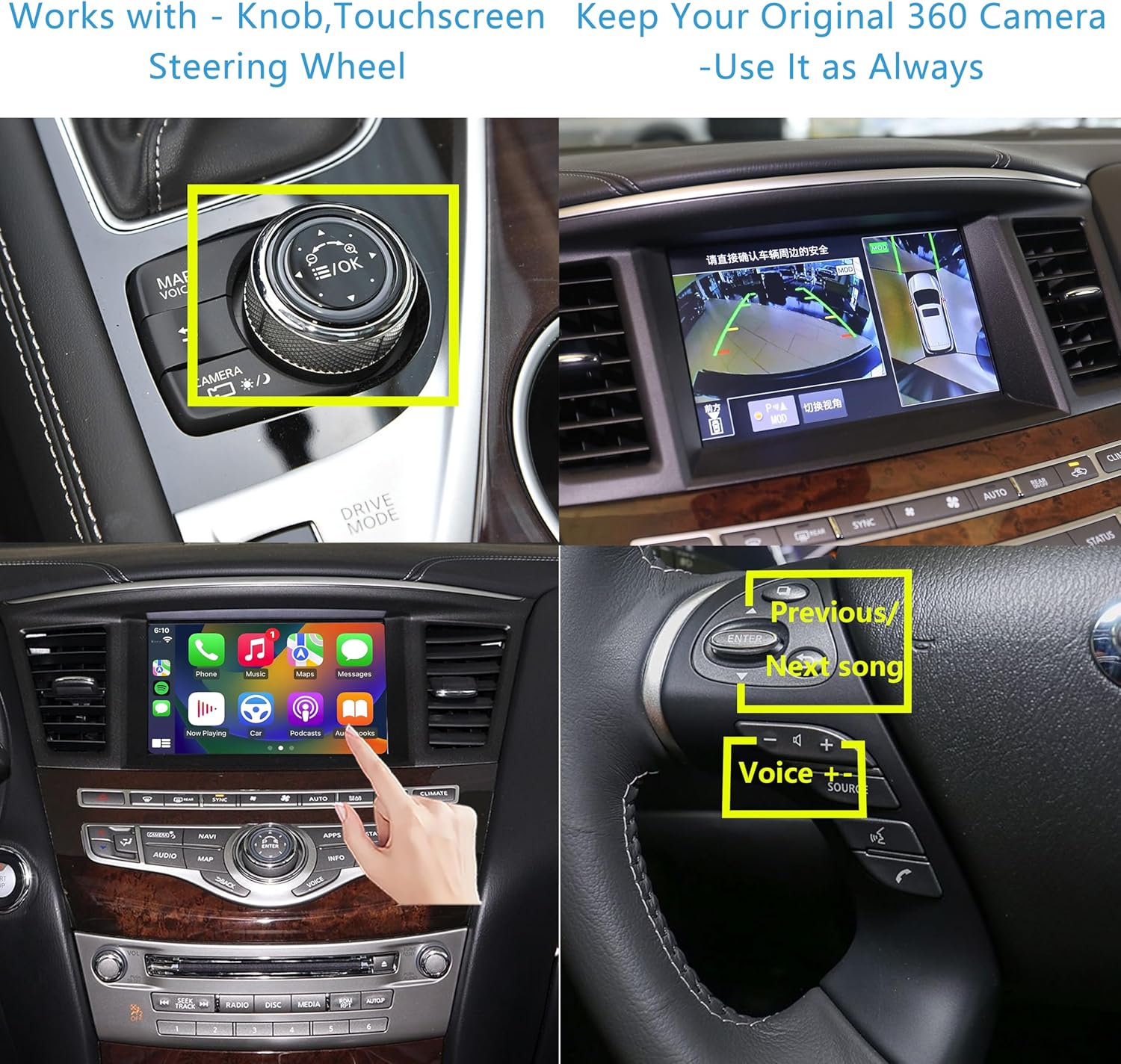
Image: Control Integration and Original Camera Support. This image demonstrates the module's compatibility with the vehicle's original controls (knob, touchscreen, steering wheel) and its ability to retain the original 360-degree camera view.
6. Одржавање
The Wireless CarPlay & Android Auto Module is designed for durability and requires minimal maintenance. Keep the module and surrounding areas clean and free from dust and debris. Avoid exposing the unit to extreme temperatures or moisture. No user-serviceable parts are inside the module.
КСНУМКС. Решавање проблема
7.1 Проблеми са повезивањем
- Ensure that both your phone's Bluetooth and your car's Bluetooth are turned on and discoverable.
- Some car models may require manually switching the audio source to Bluetooth after connecting.
- If connection issues persist, try restarting your phone and the module (by turning the car off and on).
- The module supports dual-band 5GHz WiFi for stable connectivity, minimizing dropouts.
7.2 Functionality Limitations
Please note the following functionalities are није подржано by this device:
- МиррорЛинк
- Google Voice Assistant (voice commands for Google Assistant are not supported)
- External USB playback
- Video applications within CarPlay or Android Auto
- Downloading apps (as it is a LINUX-based system)
8. Спецификације
| Феатуре | Спецификација |
|---|---|
| Тежина артикла | 1.34 фунти |
| Димензије пакета | 9.84 к 5.12 к 3.94 инча |
| Технологија повезивања | Блутут, Ви-Фи (5 ГХз) |
| Тип контролера | iOS (CarPlay), Android (Android Auto) |
| Компатибилни уређаји | Смартпхоне |
| Тип конектора | ХДМИ, РЦА, УСБ |
| Режим аудио излаза | Стерео, сурроунд звук |
| Конфигурација канала сурроунд звука | 5.1 |
| Видео Енцодинг | H.264, H.265/HEVC, MPEG-4 |
| Број канала | 2 |

Image: Internal Chip for Connectivity. This image shows a circuit board with a 5G chip, illustrating the internal components responsible for the module's connectivity.
9. Подршка и гаранција
9.1 Техничка помоћ
For technical assistance or any questions regarding installation or operation, please contact Caramco Autokits customer support. Responses are typically provided within 24 hours.
9.2 Политика враћања
A 30-day return policy is available for refund or replacement. Please refer to your purchase documentation for specific terms and conditions.