
1. Увод
The ANLEON S0-PRo is a wired, in-ear headphone amplifier designed for personal monitoring applications. It provides a simple and effective solution for musicians, particularly those in fixed stage positions like drummers and keyboard players, to monitor their own performance audio. Its user-friendly design ensures quick setup and operation.
2. Карактеристике производа
- Personal Monitoring: Specifically designed for in-ear monitoring, allowing musicians to hear their own mix clearly.
- Контрола јачине звука: Features a dedicated volume knob with an integrated on/off switch for easy level adjustment.
- Робусна повезаност: Equipped with a locking XLR input for secure connection and a 3.5mm jack for headphones.
- Компактан и преносив: Small dimensions and lightweight design make it easy to transport and integrate into any setup.
- Дуг век трајања батерије: Internal 350mAh battery provides approximately 14 hours of operation.
- Брзо пуњење: Потпуно се пуни за отприлике 2 сата.
3. Садржај пакета
The ANLEON S0-PRo package typically includes:
- ANLEON S0-PRo Personal In-Ear Monitor Headphone Ampлифиер
- Упутство за употребу
- Note: A 1/4" TRS to XLR Male cable is not included and must be purchased separately.
4. Подешавање
- Укључивање/искључивање: Rotate the volume knob clockwise to turn the unit on. A green LED indicator will illuminate. Rotate counter-clockwise until it clicks to turn off.
- Повежите аудио улаз: Connect an XLR cable (not included) from your audio source (e.g., mixing console, audio interface) to the XLR input port on the S0-PRo. The XLR input features a locking mechanism for secure connection.
- Повежите слушалице: Plug your in-ear monitors or headphones into the 3.5mm stereo jack output.
- Пуњење: To charge the device, connect a USB charging cable (not included) to the charging port. The charging time is approximately 2 hours.

Image: The ANLEON S0-PRo unit shown connected to an XLR cable at the bottom and a USB charging cable on the side. This illustrates the input and charging connections.

Слика: Крупни план view of the bottom of the ANLEON S0-PRo, highlighting the 3.5mm headphone output jack and the volume control knob with its triangular indicator.
XLR Pinout Information:
For proper connection, note the XLR pinout configuration:
- XLR pin 1 is connected to the 1/4″ plug sleeve.
- XLR pin 2 is connected to the 1/4″ plug tip.
- XLR pin 3 is connected to the 1/4″ plug ring.
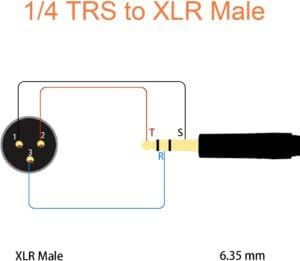
Image: A wiring diagram illustrating the connection between a 1/4" TRS plug and an XLR Male connector, detailing which pins correspond to the tip, ring, and sleeve for proper audio signal transmission.
5. Упутство за употребу
- Укључено: Ensure the S0-PRo is charged or has sufficient battery life. Turn the volume knob clockwise to power on the device. The green indicator light will confirm it is active.
- Подесите јачину звука: Slowly rotate the volume knob to adjust the monitoring level to a comfortable listening volume. Start with a low volume and gradually increase it to avoid sudden loud sounds.
- Аудио монитора: Once connected and powered on, you will hear the audio signal from your source through your connected headphones.
- Искључивање: When finished, rotate the volume knob counter-clockwise until it clicks to power off the unit. This conserves battery life.
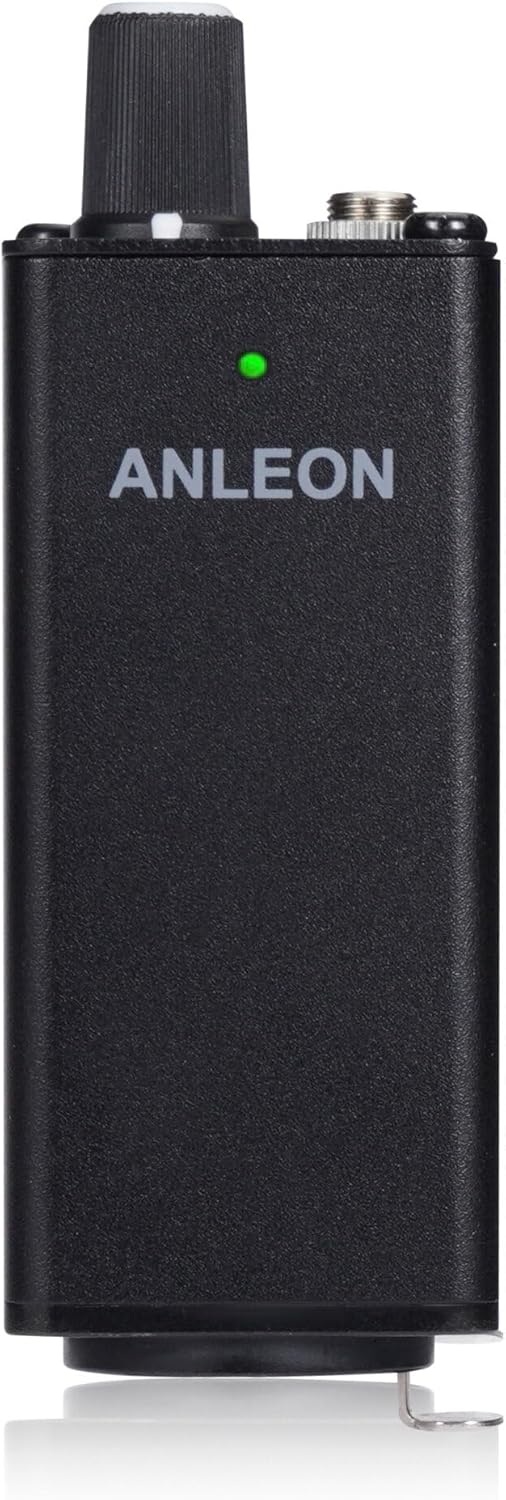
Слика: Предња страна view of the ANLEON S0-PRo, showing the brand name and a small green LED indicator light, which signifies the unit is powered on.
6. Одржавање
- Чишћење: Користите меку, суву крпу за чишћење спољашњости уређаја. Не користите течна средства за чишћење или раствараче.
- Складиштење: Store the S0-PRo in a cool, dry place away from direct sunlight and extreme temperatures.
- Одржавање батерије: За оптималан век трајања батерије, избегавајте често потпуно пражњење батерије. Редовно пуните уређај, чак и ако се не користи дуже време.
- Избегавајте влагу: Keep the device away from water and high humidity to prevent damage to internal components.
КСНУМКС. Решавање проблема
| Проблем | Могући узрок | Решење |
|---|---|---|
| Нема звука из слушалица. |
|
|
| Изобличен звук. |
|
|
| Уређај се не пуни. |
|
|
8. Спецификације
| Феатуре | Детаљ |
|---|---|
| Инпут | XLR, stereo (XLR pin 1 to 1/4″ plug sleeve, XLR pin 2 to 1/4″ plug tip, XLR pin 3 to 1/4″ plug ring) |
| Излаз | 3.5 mm jack, stereo |
| Макс. Излазна снага | 2 x 100 mW @ 16 Ω |
| Импеданса слушалица | 32-600 Охм |
| Димензије | 30 x 30 x 90 mm (приближно 1.18" Д x 1.18" Ш x 3.54" В) |
| Батерија | 350мАх |
| Трајање батерије | ~14 сата |
| Време пуњења | Тип. 2 сати |
| Тежина | 90 г (приближно 3.17 оз) |
| Боја | Црно |
| Материјал | Алуминијум |
9. Гаранција и подршка
ANLEON products are designed for reliability and performance. For warranty information and technical support, please refer to the official ANLEON webсајт или контактирајте свог локалног дистрибутера.
Молимо вас да сачувате доказ о куповини за евентуалне рекламације у вези са гаранцијом.