
1. Производ је готовview
The Hisense 65E7Q QLED Smart TV offers a premium viewing experience with its 65-inch QLED display. This television integrates advanced technologies such as Dolby Vision and Dolby Atmos for immersive audio-visuals, AI Smooth Motion for fluid images, and dedicated modes for gaming and sports. Powered by the VIDAA operating system, it provides easy access to a wide range of streaming content and smart features, including voice control.

Фронт view of the Hisense 65E7Q QLED Smart TV.
Кључне карактеристике:
- QLED боја: Experience rich, vibrant, and realistic colors.
- АИ глатко кретање: Advanced MEMC and 3D Noise Reduction for fluid, blur-free images.
- Долби Висион и Долби Атмос: Cinematic picture and immersive sound for an enhanced entertainment experience.
- Режим игре Плус: Reduces input lag to 16ms, with 60Hz VRR and ALLM for ultra-fluid gaming.
- АИ спортски режим: Optimizes picture and sound for sports content, reducing motion blur and enhancing stadium-like audio.
- АИ надоградња на 4K: Enhances blurry images to near-4K quality.
- VIDAA Smart TV OS: Fast, secure, and intuitive operating system with access to popular streaming applications.
- Контрола гласом: Integrated Alexa and VIDAA Voice for convenient operation.
2. Безбедносне информације
Please read all safety instructions carefully before using your TV. Keep this manual for future reference. Always ensure the TV is placed on a stable surface to prevent tipping. Do not expose the TV to rain or moisture. Refer to the full safety guidelines in the included safety manual.
3. Садржај пакета
Проверите да ли су све ставке присутне у кутији:
- Паметни телевизор Hisense 65E7Q QLED
- Повер Цабле
- Remote Control (with 1 AAAA battery included)
- ТВ сталак (2 комада)
- Вијци за склапање постоља
- Кориснички приручник (овај документ)
- Гарантни лист
4. Подешавање
4.1 Састављање постоља
- Пажљиво поставите телевизор екраном надоле на меку, равну површину како бисте спречили оштећења.
- Поравнајте делове постоља са одговарајућим отворима на дну телевизора.
- Причврстите делове постоља помоћу приложених завртња. Уверите се да су чврсто затегнути.

Diagram illustrating TV dimensions and stand installation points.
4.2 Монтажа на зид
If you plan to wall mount your TV, ensure you use a VESA-compatible wall mount kit (not included). The Hisense 65E7Q supports a VESA mounting standard of 600 x 400 mm. Follow the instructions provided with your wall mount kit for safe installation.
4.3 Повезивање периферних уређаја
Connect your external devices to the TV's ports as needed. Refer to the port diagram below:

Позади view showing available ports and connections.
- HDMI портови (x3): Connect Blu-ray players, game consoles, and other HDMI devices. One port supports eARC for enhanced audio return.
- USB портови (x2): Connect USB flash drives for media playback. (1x USB 3.0, 1x USB 2.0)
- Антенски улази (x2): Повежите земаљску или кабловску антену.
- Етхернет (ЛАН): За жичану мрежну везу.
- Оптички аудио излаз: Повежите се са саундбаром или аудио ресивером за дигитални звук.
- Слушалице: За приватно слушање.
- АВ улази: За повезивање старијих уређаја помоћу композитних видео и стерео аудио каблова.
4.4 Почетно укључивање
- Прикључите кабл за напајање на телевизор, а затим на утичницу.
- Притисните дугме за напајање на даљинском управљачу или на телевизору.
- Пратите упутства на екрану да бисте завршили почетно подешавање, укључујући избор језика, мрежну везу и скенирање канала.
5. Управљање телевизором
5.1 Даљински управљач
The included remote control allows you to navigate the TV's features. Insert the provided AAAA battery into the remote. The remote supports voice control for convenient operation.
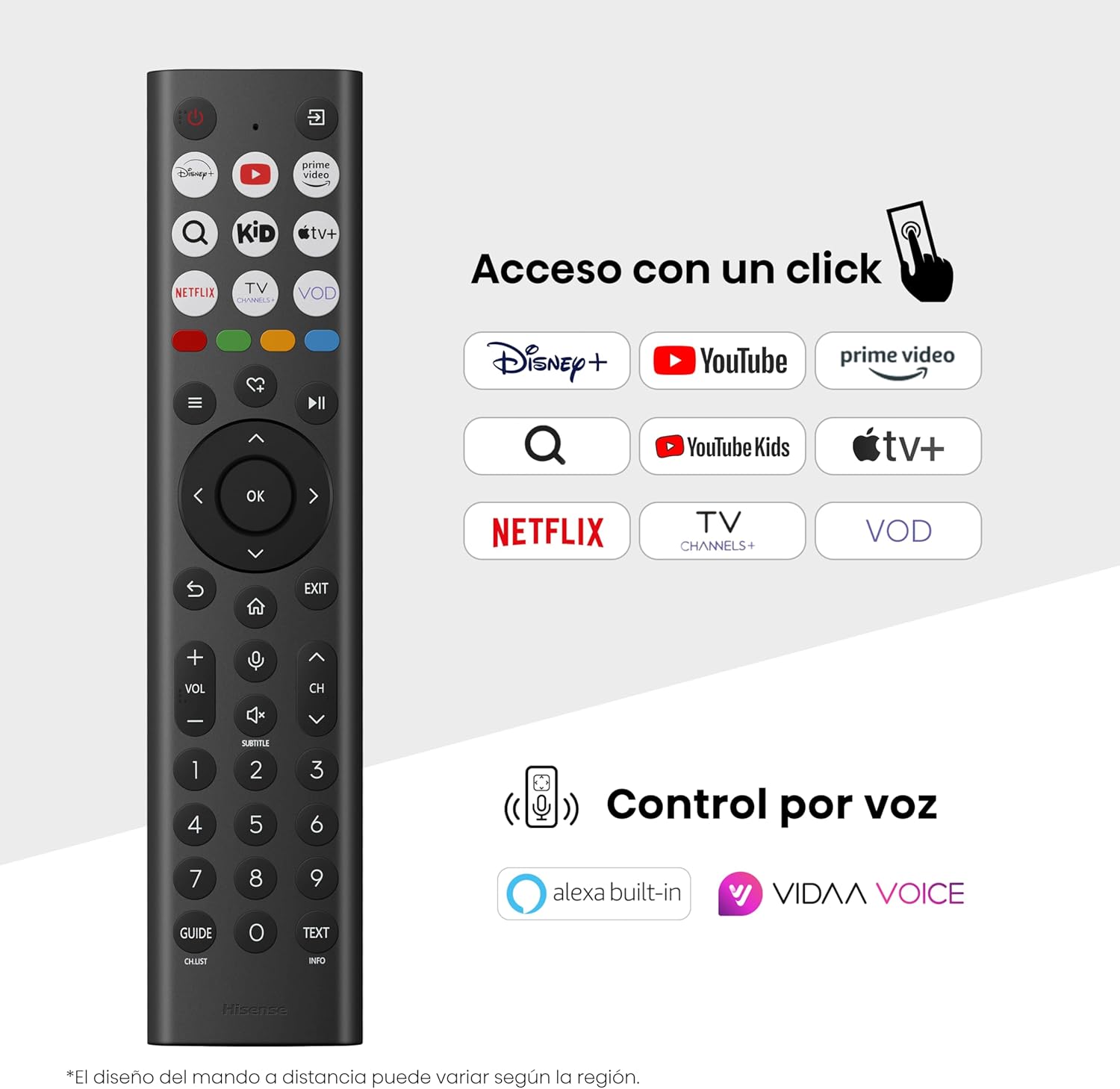
Hisense Smart TV remote control with dedicated app buttons and voice control.
5.2 Функције Смарт ТВ-а (ВИДАА ОС)
Your Hisense TV runs on the VIDAA operating system, offering a user-friendly interface for accessing various applications and services.

The VIDAA Smart TV interface with popular streaming applications.
- Пријаве: Access pre-installed apps like Netflix, YouTube, Prime Video, and more.
- Контрола гласом: Use the remote's voice function to search for content, adjust settings, or interact with Alexa built-in and VIDAA Voice.
- Screen Mirroring (AirPlay): Share content from your Apple devices directly to the TV.
- Share to TV: Easily send content from your mobile devices to the TV.
5.3 Подешавања слике
Оптимизујте своје viewing experience with various picture enhancement technologies:
- QLED боја: Delivers over a billion shades of vibrant, lifelike colors.
- АИ надоградња на 4K: Automatically enhances lower-resolution content to near-4K quality.
- АИ глатко кретање: Reduces motion blur in fast-paced scenes, ensuring clear and fluid visuals.
- Долби Висион: Provides stunning brightness, contrast, and color for a dramatic visual experience.
- Режим филмаџија: Preserves the original aspect ratio, colors, and frame rates to display movies as intended by the director.
- АИ сензор светлости: Intelligently adjusts screen brightness based on ambient light for optimal viewи енергетска ефикасност.
- Режим неге очију: Reduces blue light emission to minimize eye strain.
- Режим уштеде енергије: Optimizes power consumption without significantly compromising picture quality.

QLED technology delivers over a billion vibrant color tones.

AI 4K Upscaler enhances lower resolution content to near 4K clarity.

AI Smooth Motion ensures fluid images without blur, especially in fast-moving scenes.

Filmmaker Mode presents content exactly as the director intended.
5.4 Подешавања звука
Enhance your audio experience with:
- Долби Атмос: Immersive, multi-dimensional sound that fills your room.
- Интегрисани звучник: Built-in speakers with a maximum output of 1 Watt per channel.
- ЕзПлеј: Seamlessly control compatible Hisense soundbars directly from your TV screen.

Dolby Vision and Dolby Atmos combine for a spectacular audio-visual experience.
5.5 Функције за игре
За играче, телевизор нуди:
- Режим игре Плус: Reduces input lag to 16ms, ensuring responsive gameplay.
- 60Hz VRR (Variable Refresh Rate): Synchronizes the TV's refresh rate with the game console's output to prevent screen tearing.
- АЛЛМ (Аутоматски режим ниске латенције): Automatically switches the TV to low-latency mode when a game is detected.
- Трака са играма: An integrated control center for quick access to game settings and real-time performance monitoring.

Game Mode Plus provides ultra-fluid, lag-free gaming.

The Game Bar offers centralized control for game settings.
5.6 Спортске карактеристике
- АИ спортски режим: Automatically detects sports content and optimizes picture and sound settings for a stadium-like experience, enhancing clarity and audio effects.
6. Одржавање
6.1 Чишћење телевизора
- Увек искључите телевизор из струје пре чишћења.
- Користите меку, суву крпу која не оставља влакна да нежно обришете екран и кућиште телевизора.
- За тврдокорне трагове, лагано дampОбришите крпу водом или специјализованим средством за чишћење екрана (не прскајте директно по екрану).
- Избегавајте употребу абразивних средстава за чишћење, алкохола, бензена или разређивача, јер могу оштетити површину телевизора.
6.2 Ажурирања софтвера
Your TV may receive software updates periodically to improve performance and add new features. Ensure your TV is connected to the internet to receive these updates. You can usually check for updates manually in the TV's settings menu.
КСНУМКС. Решавање проблема
Ако наиђете на проблеме са телевизором, погледајте следећа уобичајена решења:
- Нема напајања: Проверите да ли је кабл за напајање добро повезан и да ли утичница ради. Покушајте са другом утичницом.
- Нема слике/звука: Уверите се да је изабран исправан улазни извор. Проверите све кабловске везе (HDMI, антена).
- Даљински управљач не ради: Check the battery (1 AAAA battery). Ensure there are no obstructions between the remote and the TV.
- Проблеми са мрежном везом: Проверите лозинку за Wi-Fi или везу са Ethernet каблом. Рестартујте рутер.
- Лош квалитет слике: Подесите подешавања слике (осветљеност, контраст, оштрина). Уверите се да улазни извор пружа висококвалитетни сигнал.
- Изобличење звука: Check audio settings. If using external speakers, ensure they are connected correctly.
For more detailed troubleshooting, consult the full electronic user manual or contact Hisense customer support.
8. Спецификације
Детаљне техничке спецификације за Hisense 65E7Q QLED Smart TV:
| Феатуре | Спецификација |
|---|---|
| Број модела | 65Е7К |
| Величина екрана | 65 инча |
| Дисплаи Тецхнологи | КЛЕД |
| Резолуција | 4К (3840 к 2160) |
| Рефресх Рате | 60 Хз |
| Подршка за ХДР формат | Долби Висион |
| Motion Enhancement Technology | АИ глатко кретање |
| Побољшање квалитета слике | AI 4K Upscaler, AI Smooth Motion, QLED Colour |
| Време одговора | 100 милисекунди |
| Конфигурација позадинског осветљења | Direct Illumination, Dimming |
| Опис звучника | Integrated speaker with Dolby Atmos |
| Максимална излазна снага звучника | 1 Ватт |
| Аудио канали | Вишеканални |
| Surround Sound Format | Долби Атмос |
| Оперативни систем | ВИДАА |
| Капацитет меморије | 1 ГБ |
| Контролни метод | Глас |
| Технологија повезивања | Блутут, ХДМИ, Ви-Фи |
| Internet Applications | Netflix, YouTube, Prime Video, AirPlay 2 |
| ХДМИ портови | 3 (including HDMI 2.1 with eARC) |
| УСБ портови | 2 (1x USB 3.0, 1x USB 2.0) |
| Бежична технологија | Ви-Фи |
| Screen Mirroring Technology | АирПлаи |
| ВЕСА стандард за монтажу | 600 к 400 мм |
| Димензије производа (ДкШкВ) | 7.6 к 145.3 к 83.8 цм |
| Тежина производа | 15.2 кг (са постољем) |
| Класа енергетске ефикасности | E |
| Годишња потрошња енергије | 84 kWh/1000h (SDR), 160 kWh/1000h (HDR) |
| Повер | 1 ват (у стању приправности) |
| Волtage | 100-240 VCA 50-60 Hz |
| Укључене компоненте | Кабл за напајање, даљински управљач, постоље |
| Модел Иеар | 2025 |
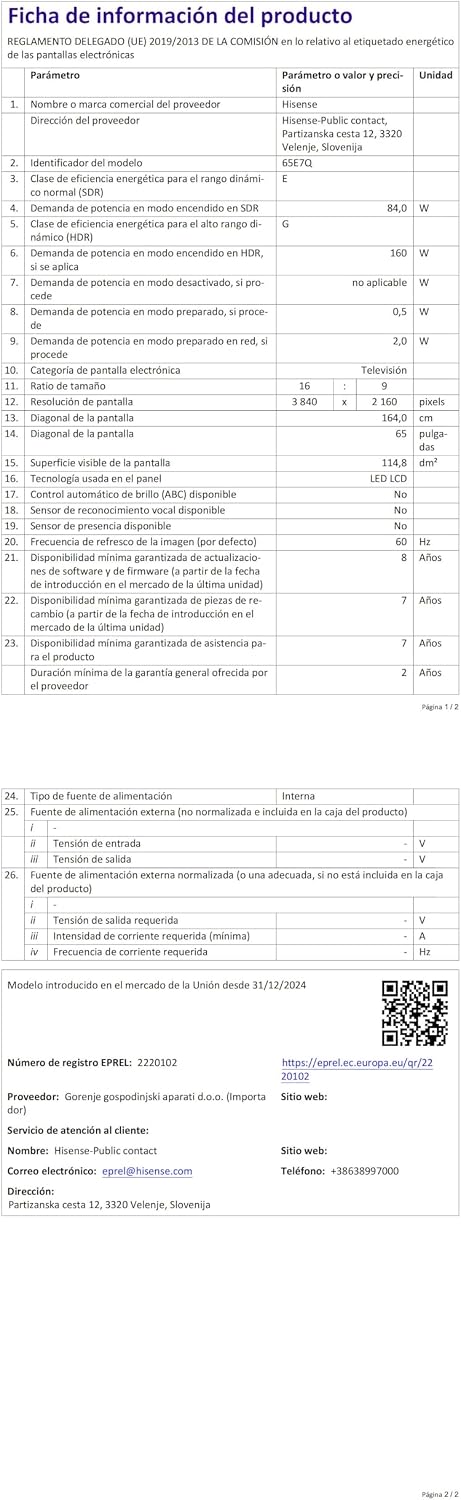
Energy label for the Hisense 65E7Q TV.
За детаљније информације о производу, погледајте EPREL базу података: https://eprel.ec.europa.eu/qr/2220102
9. Гаранција и подршка
9.1 Гаранција на производ
Овај Хајсенс телевизор долази са 3-годишња гаранција на производМолимо вас да сачувате доказ о куповини за потребе гаранције.
9.2 Доступност резервних делова
Spare parts for this model are guaranteed to be available in the EU for a duration of 10 године from the product's market introduction.
9.3 Корисничка подршка
For technical assistance, troubleshooting, or warranty service, please contact Hisense customer support. Refer to the contact information provided in your warranty card or visit the official Hisense webсајт за ваш регион.