
Oilsky M303
Oilsky M303 Android 9.0 MP3 Player User Manual
Модел: М303
1. Увод
The Oilsky M303 is a versatile digital audio and video player running on Android 9.0. It features a 4-inch full-touch screen, 8-core processor, 2GB RAM, 16GB internal storage (expandable with a 64GB microSD card included), Wi-Fi, and Bluetooth connectivity. This manual provides essential information for operating your device.
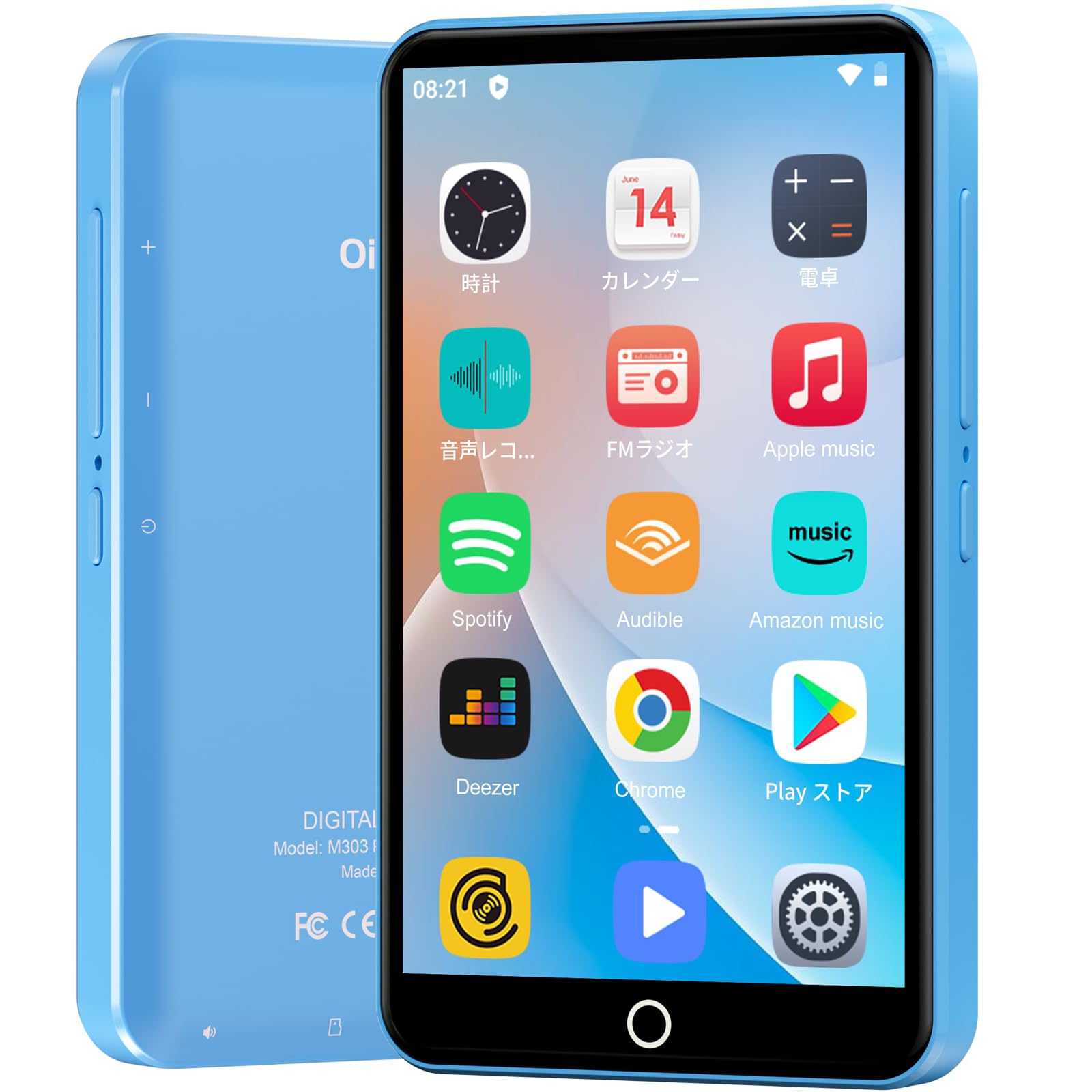
Слика: Фронт view of the Oilsky M303 MP3 Player, showcasing its compact design and touchscreen interface.
2. Шта је у кутији
Молимо вас да проверите да ли су све следеће ставке укључене у ваш пакет:
- Oilsky M303 Main Unit
- Слушалице
- Кабл за податке типа Ц
- Protective Film (one pre-installed, one spare)
- Multi-language User Manual (including Japanese)
- Силиконска заштитна футрола
- Меморијска картица од 64 ГБ

Image: All included accessories for the Oilsky M303 MP3 Player, neatly arranged.
3. Производ је готовview
Familiarize yourself with the device's physical features and controls.
3.1. Изглед уређаја

Слика: Са стране view of the Oilsky M303, highlighting the volume buttons, power button, and USB-C port.
- Дугме за напајање: Притисните и држите да бисте укључили/искључили уређај или поново покренули уређај. Кратко притисните да бисте укључили/искључили екран.
- Дугмад за јачину звука: Подесите јачину звука.
- УСБ-Ц порт: За пуњење и пренос података.
- 3.5 мм прикључак за слушалице: Connect wired earphones.
- Утор за мицроСД картицу: Уметните microSD картицу за проширену меморију.
- Уграђени звучник: За репродукцију звука без слушалица.
4. Подешавање
4.1. Почетно пуњење
Before first use, fully charge the device. Connect the provided Type-C data cable to the player and a USB power adapter (not included). A full charge takes approximately 3 hours. The device has a 2000mAh battery for extended use.
4.2. Укључивање/искључивање
- За укључивање: Притисните и држите дугме за укључивање док се екран не укључи.
- За искључивање: Притисните и држите дугме за напајање, а затим изаберите „Искључивање“ из понуђених опција.
- Екран укључен/искључен: Short press the Power button to turn the screen on or off.
4.3. Језичка подешавања
Upon first boot, you may need to set the language. Navigate to Подешавања > Систем > Језици и унос > Језици to select your preferred language, such as English or Japanese.
4.4. Ви-Фи веза
Да бисте приступили онлајн функцијама и преузели апликације, повежите се са Wi-Fi мрежом:
- Иди на Подешавања > Мрежа и интернет > Wi-Fi.
- Укључи/искључи Wi-Fi On.
- Изаберите жељену мрежу са листе и унесите лозинку ако се то од вас затражи.
4.5. Google Play Store
The Oilsky M303 supports Google Play Store, allowing you to download various applications.
- Уверите се да сте повезани на Wi-Fi.
- Отворите Плаи продавница апликацију са почетног екрана.
- Пријавите се са својим Гоогле налогом.
- Тражи and install desired applications like YouTube, Spotify, or other streaming services.

Image: The Oilsky M303 screen showing the Google Play Store interface with various app icons.
5. Упутство за употребу
5.1. Репродукција музике
The device supports various audio formats including MP3, WMA, WAV, FLAC, OGG, AAC, APE, and M4A.
- Transfer Music: Connect the player to your computer using the Type-C cable and transfer audio files to the device's internal storage or the microSD card.
- Пусти музику: Open the Music app. You can browse by artist, album, song, or create custom playlists.
- Екуализер: Adjust sound settings using the built-in equalizer for a personalized audio experience.
- Online Lyrics: The player supports displaying online lyrics for songs.

Image: The Oilsky M303 displaying its music playback interface, showing options for song classification, search, playlist creation, and equalizer settings.
5.2. Видео репродукција
Enjoy videos on the 4-inch IPS full-touch screen with 480x800px resolution, supporting up to 1080P Full HD video playback. Supported formats include RM, AVI, RMVB, FLV, MP4, DAT, MKV, MPG, MOV, TS.
- Transfer Videos: Пренесите видео fileс вашег рачунара на уређај.
- Пусти видео снимке: Open the Video app and select your desired video.
- Опције репродукције: Features include loop or random playback, variable speed playback, sleep timer, and gesture controls for zoom.

Image: The Oilsky M303 displaying a video on its 4-inch screen, illustrating its video playback capabilities.
5.3. Блуетоотх веза
Connect your player to Bluetooth headphones, speakers, or car audio systems.
- Иди на Подешавања > Повезани уређаји > Блутут.
- Укључите Блуетоотх On.
- Make sure your Bluetooth accessory is in pairing mode.
- Изаберите додатну опрему са листе доступних уређаја за упаривање.

Image: The Oilsky M303 demonstrating its Bluetooth connectivity with various audio devices like speakers and headphones.
5.4. ФМ радио
The device includes an FM radio function. Connect wired earphones to act as an antenna for optimal reception.
5.5. Диктафон
Use the built-in voice recorder for capturing audio notes or lectures. Open the Снимач звука app to start recording.
5.6. File Менаџмент
The player comes with 16GB of internal storage and a 64GB microSD card, providing a total of 80GB usable storage. This can be expanded further up to 512GB using a larger microSD card. Use the File Manager app to organize your media and documents.
6. Одржавање
- Чишћење: Користите меку, суву крпу за чишћење уређаја. Избегавајте течна средства за чишћење или абразивне материјале.
- Складиштење: Уређај чувајте на хладном и сувом месту, даље од директне сунчеве светлости и екстремних температура.
- Одржавање батерије: Да бисте продужили век трајања батерије, избегавајте често потпуно пражњење батерије. Редовно је пуните.
- Ажурирања софтвера: Check for system updates periodically in Подешавања > Систем > Напредно > Ажурирање система како би се осигурале оптималне перформансе и безбедност.
КСНУМКС. Решавање проблема
| Проблем | Могуће решење |
|---|---|
| Уређај се не укључује. | Уверите се да је батерија напуњена. Повежите је са пуњачем најмање 30 минута пре него што поново покушате да је укључите. |
| Повезивање на Ви-Фи није могуће. | Check if Wi-Fi is enabled in settings. Ensure the password is correct. Restart the device and your Wi-Fi router. |
| Bluetooth connection is unstable or disconnects. | Ensure the player and Bluetooth accessory are within close range. Avoid areas with strong electromagnetic interference. Try re-pairing the devices. |
| Apps are slow or unresponsive. | Close unnecessary background applications. Clear app cache (Settings > Apps & notifications > See all apps > [App Name] > Storage & cache > Clear cache). Restart the device. |
| Уређај се загрева током употребе. | It is normal for the device to warm up during intensive use (e.g., video playback, gaming). If it becomes excessively hot, close applications and let it cool down. |
| Cannot charge with USB-C PD charger. | The device may not support USB-C Power Delivery (PD) protocols. Use a standard USB-A to USB-C cable with a compatible USB-A power adapter (5V, up to 900mA). |
8. Спецификације
| Бранд | Оилски |
| Модел | М303 |
| Оперативни систем | Андроид 9.0 |
| Екран | 4-inch Full-touch IPS LCD (480x800px) |
| Процесор | 8-core (MTK 8-Core) |
| РАМ | 2ГБ |
| Интерна меморија | 16ГБ |
| Екпандабле Стораге | MicroSD card up to 512GB (64GB card included) |
| Батерија | 2000мАх |
| Повезивање | Ви-Фи, Блуетоотх |
| Подржани аудио формати | MP3, WMA, WAV, FLAC, OGG, AAC, APE, M4A |
| Подржани видео формати | RM, AVI, RMVB, FLV, MP4, DAT, MKV, MPG, MOV, TS (up to 1080P) |
| Димензије (Д к Ш к В) | 1 к 6.1 к 10.3 цм |
| Карактеристике | Touchscreen, Voice Recorder, Built-in Speaker, Video Playback, FM Radio, Calculator, Calendar, Alarm |
| Порекло | Кина |
9. Гаранција и подршка
The Oilsky M303 MP3 Player comes with a 1 година гаранције од датума куповине. Молимо вас да сачувате доказ о куповини за потребе гаранције.
For technical support or warranty inquiries, please contact the retailer or manufacturer directly. Refer to the contact information provided in the packaging or on the official Oilsky webсајту.
Ask a question about this manual
Ask about setup, troubleshooting, compatibility, parts, safety, or missing instructions. Manuals+ will review the question and use this page’s manual context to help answer it.