
1. Увод
This manual provides detailed instructions for the installation, operation, and maintenance of your AINAVIGO 6.36" Single DIN Car Stereo. This unit features Wireless CarPlay and Android Auto compatibility, a Linux operating system, HD IPS touchscreen, Bluetooth 5.0, USB-C/USB/FM radio, and EQ controls. Please read this manual thoroughly before use to ensure proper functionality and safety.
2. Шта је укључено
Пажљиво распакујте кутију и уверите се да су све ставке наведене испод присутне и у добром стању.
- 6.36-Inch Single DIN Touchscreen Car Stereo (Head Unit)
- Упутство за употребу
- Повер Цабле
- Микрофон
- Алат за уклањање оквира
- ГПС антена
- USB 6Pin Cable
- Snap*4 (Mounting Brackets)

Image: Components included in the product package. This shows the main head unit, car microphone, radio antenna, power cable, and four mounting snaps.
3. Подешавање и инсталација
Installation of the AINAVIGO Single DIN Car Stereo requires basic automotive electrical knowledge. If you are unsure, professional installation is recommended.
3.1 Физичка инсталација
- Припрема: Искључите негативни терминал акумулатора возила пре почетка било каквих електричних радова.
- Уклоните стару јединицу: Carefully remove your existing car stereo using appropriate tools.
- Монтажа: The AINAVIGO unit is a standard single DIN size. Secure the head unit into the dashboard opening using the provided mounting brackets (snaps).
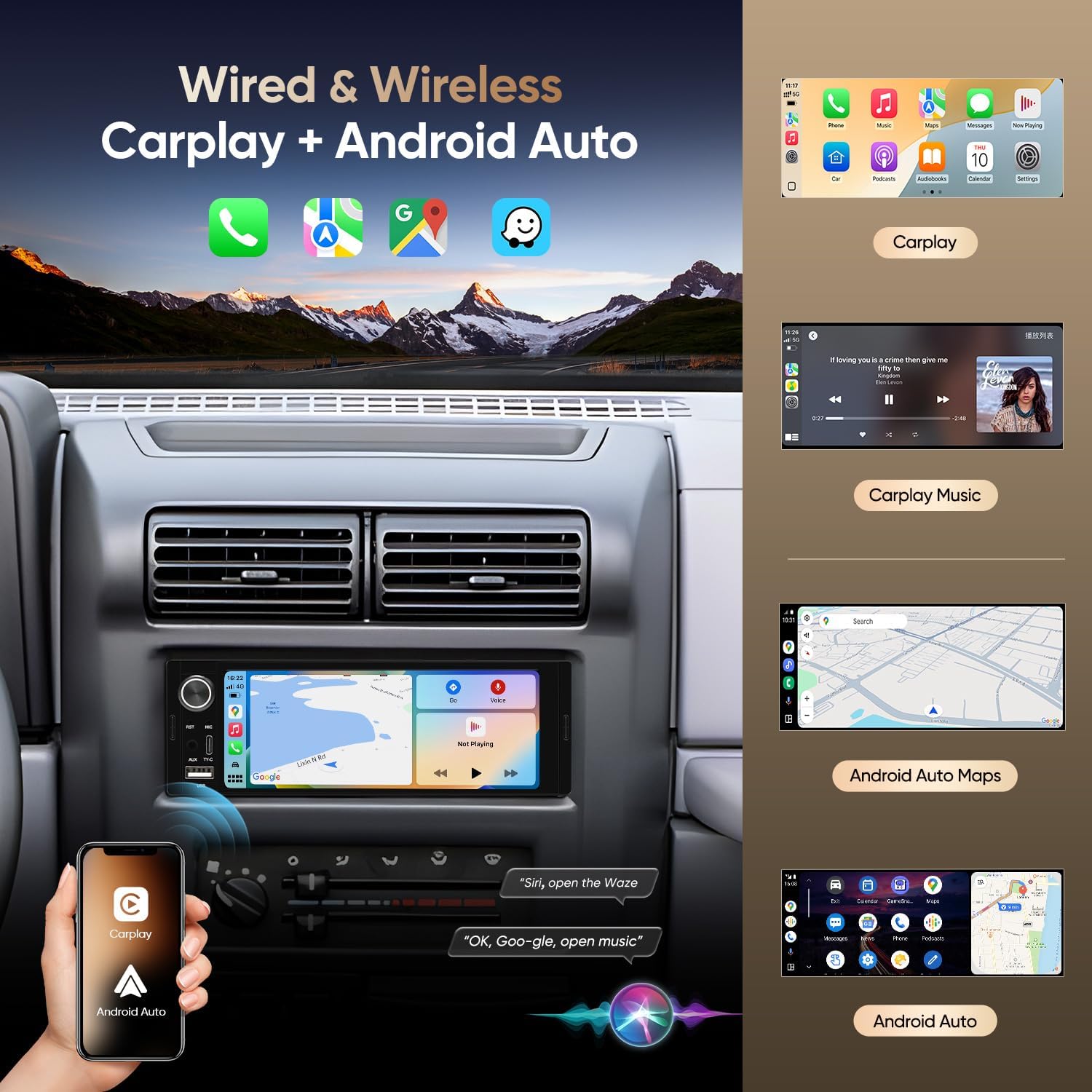
Image: Visual comparison showing a car dashboard before and after the installation of the AINAVIGO car stereo, demonstrating the integrated appearance.
3.2 Ожичење
Refer to the wiring diagram provided with your power cable. Key connections include:
- Кабл за напајање: Connect the power cable to your vehicle's wiring harness. Ensure correct connections for constant power (yellow), accessory power (red), and ground (black).
- Жице за звучнике: Connect the speaker output wires to your vehicle's speakers. Pay attention to positive and negative terminals for each speaker.
- микрофон: Plug the external microphone into the designated port for hands-free calling and voice commands.
- ГПС антена: Повежите ГПС антену и монтирајте је на место са јасним view неба за оптималан пријем сигнала.
- USB/USB-C: Connect the provided USB cables for data transfer and device charging.
3.3 Повезивање задње камере (опционо)
Ако инсталирате задњи део view camera, follow the diagram below for proper connection:

Image: Wiring diagram for connecting a rear view camera to the car stereo. It details how to connect the camera's power to the reversing light and the video signal to the head unit's CVBS input.
4. Упутство за употребу
This section details the primary functions and how to operate your AINAVIGO car stereo.
4.1 Бежични CarPlay и Android Auto
Connect your smartphone wirelessly to access navigation, music, calls, and voice assistants directly on the stereo's display.
- Омогући Блуетоотх: Уверите се да је Блутут омогућен на вашем паметном телефону и стерео уређају у аутомобилу.
- Упарите уређај: On the stereo, navigate to the Bluetooth settings and pair with your phone.
- Активирајте CarPlay/Android Auto: Once paired, select the CarPlay or Android Auto icon on the stereo's main menu. Follow any on-screen prompts on your phone to complete the connection.

Image: The car stereo screen showing the Apple CarPlay interface with various app icons, and a hand holding a smartphone displaying the CarPlay and Android Auto logos.

Слика: Оверview of the wired and wireless CarPlay and Android Auto functionalities, showing examples of navigation, music playback, and voice assistant interaction on the stereo screen.
4.2 Bluetooth Hands-Free and Music Streaming
The built-in Bluetooth 5.0 allows for safe hands-free communication and wireless audio playback.
- Упаривање: Enable Bluetooth on your phone and search for the stereo (usually named "AINAVIGO" or similar). Select it to pair.
- Хандс-фрее позиви: Once paired, you can make and receive calls directly through the stereo. Use the external microphone for clear audio.
- Репродукција музике: Stream audio from your phone to the stereo. Control playback (play/pause, skip) from the stereo's touchscreen.

Image: The car stereo interface showing Bluetooth functions, including a dial pad for calls and music playback controls. A smartphone is depicted receiving an incoming call via Bluetooth.
4.3 ФМ Радио
Access local radio stations with the integrated FM tuner.
- подешавање: Select the FM radio application. Use the touchscreen to manually tune or auto-scan for available stations.
- Чување унапред подешених вредности: You can save up to 18 FM stations for quick access.
4.4 USB and USB-C Connectivity
The unit supports both standard USB and USB-C connections.
- Пренос података: Повежите УСБ дискове да бисте репродуковали медије files (audio/video) directly from the storage.
- Пуњење: Use the USB ports to charge compatible devices.

Слика: Детаљна view of the USB and USB-C ports on the car stereo, indicating their use for USB data transfer and Type-C connections.
4.5 ЕК контроле
Adjust the audio output to your preference using the built-in equalizer.
- Access EQ: Navigate to the audio settings or EQ menu on the touchscreen.
- Подесите подешавања: Modify bass, treble, balance, fader, and other sound parameters. Preset EQ modes may also be available.

Image: The car stereo's display showing the Digital Sound Processor (DSP) and Equalizer (EQ) interface, allowing users to fine-tune audio output with various frequency bands and sound field adjustments.
5. Одржавање
Правилно одржавање осигурава дуготрајност и оптималне перформансе вашег ауто стерео уређаја.
- Чишћење екрана: Користите меку крпу која не оставља влакна да нежно обришете екран осетљив на додир. Избегавајте абразивна средства за чишћење или раствараче.
- Генерално чишћење: Држите уређај чистим од прашине и остатака. Користите меку четку или компримовани ваздух за тешко доступна места.
- Ажурирања софтвера: Периодично проверавајте произвођачеве website for any available software updates to improve performance and add features.
КСНУМКС. Решавање проблема
Овај одељак се бави уобичајеним проблемима на које можете наићи. За сложеније проблеме, контактирајте корисничку подршку.
- Нема напајања: Check all power connections (yellow, red, black wires). Ensure the vehicle's fuse for the stereo is not blown.
- Нема звука: Verify speaker connections. Check volume levels and EQ settings. Ensure the mute function is not active.
- CarPlay/Android Auto се не повезује: Ensure Bluetooth is on and paired. Try restarting both the stereo and your smartphone. Check USB cable connection if using wired mode.
- Слаб радио пријем: Check the GPS antenna connection and placement. Ensure the antenna is not obstructed.
- Екран осетљив на додир не реагује: Try restarting the unit. If the issue persists, a factory reset might be necessary (refer to settings menu).
7. Спецификације
| Феатуре | Спецификација |
|---|---|
| Број модела | 01b514b3-346c-4768-9599-6cfc156957a0 |
| Величина екрана | 6.36 inches (Visible screen diagonal: 7" / 17 cm) |
| Систем | Линук |
| Повезивање | Wireless, Bluetooth 5.0, Wired, Wi-Fi, USB, Type-C |
| Компатибилни уређаји | Smartphone (CarPlay, Android Auto) |
| Режим аудио излаза | Стерео |
| Тежина артикла | 1.65 фунти |
| Димензије пакета | 7.95 к 5.12 к 5 инча |
8. Гаранција и подршка
AINAVIGO is committed to providing quality products and customer service. Your product includes:
- 24-Hour Engineer Support: Access to pre-sale and after-sale services from qualified engineers.
For any issues, missing accessories, or operational difficulties, please contact the seller directly through your purchase platform. Provide your order details for prompt assistance.

Image: A visual guide demonstrating how to contact technical support through the Amazon platform by navigating to the seller's store and using the 'Ask a question' feature.