
1. Увод
This manual provides essential information for the M5Stack ATOMS3R Compact ESP32-S3 Development Kit. The ATOMS3R is a highly integrated, compact programmable controller designed for various embedded smart device applications. It features an ESP32-S3 main controller, a 0.85-inch color IPS screen, and multiple integrated sensors and expansion capabilities.
Please read this manual thoroughly before operating the device to ensure proper usage and to maximize its potential.
2. Производ је готовview
The M5Stack ATOMS3R is built around the ESP32-S3-PICO-1-N8R8 main controller, offering built-in WiFi, 8MB onboard FLASH, and 8MB PSRAM. Its compact size (24x24x12.9mm) makes it ideal for space-constrained projects.
2.1 Кључне карактеристике
- ESP32-S3-PICO-1-N8R8 main controller with integrated WiFi.
- 8MB onboard FLASH and 8MB PSRAM for enhanced performance.
- 0.85-inch color IPS screen (128x128px) for visual feedback.
- Programmable button located beneath the screen.
- Integrated 3-axis BMM150 geomagnetic sensor and 6-axis BMI270 attitude sensor.
- Type-C interface for power supply and firmware downloads.
- HY2.0-4P expansion port (Port.A) for I2C/GPIO/ADC/UART.
- Six GPIO and power pins reserved at the bottom for easy expansion.
- Enhanced 3D antenna for improved wireless performance and stability.
- Infrared (IR) emission function.
2.2 Идентификација компоненте
The following image illustrates the main components and interfaces of the ATOMS3R development kit.

Опис слике: This diagram shows the M5Stack ATOMS3R from an angled top-front perspective, highlighting its key features. Labels point to the 0.85-inch IPS LCD screen, the internal button, the USB-C port for power and programming, the HY2.0-4P Port.A for expansion, and the six external GPIO pins. It also indicates the internal BMI270 and BMM150 sensors, IR LED, and the ESP32-S3-PICO controller with 8MB Flash and 8MB PSRAM. Dimensions are noted as 24x24x12.9mm.
A closer look at the pinout and expansion ports:
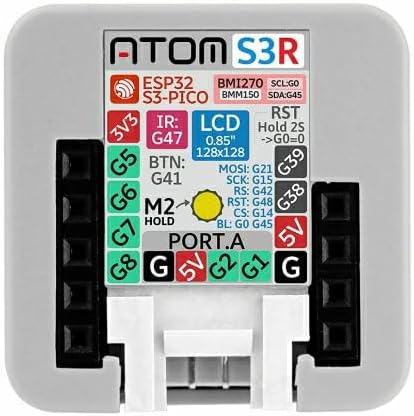
Опис слике: Ова слика пружа поглед одозго надоле view of the M5Stack ATOMS3R, clearly showing the pinout configuration. Labels indicate the 3V3, 5V, and Ground (G) pins, as well as specific GPIO pins (G1, G2, G5, G6, G7, G8, G38, G39, G41, G42, G45, G47, G48). It also details the connections for the LCD (MOSI, SCK, RS, CS, BL), IR LED, and the button (BTN). The Port.A connector is visible at the bottom center.
3. Шта је у кутији
Након отварања пакета, требало би да пронађете следећу ставку:
- 1x M5Stack ATOMS3R Development Kit
The ATOMS3R is typically packaged as shown:
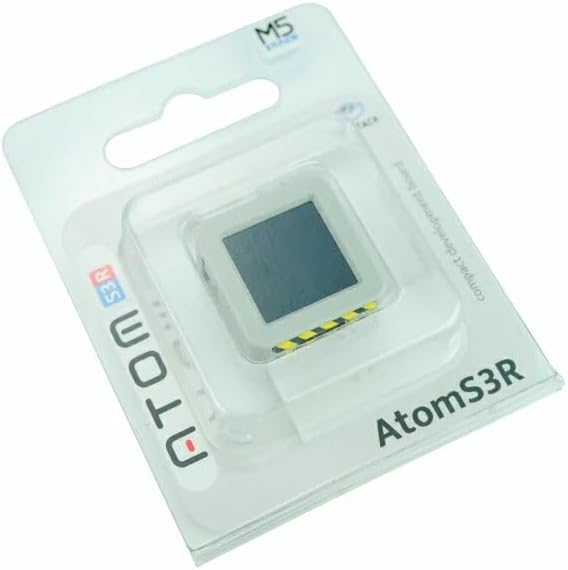
Опис слике: The M5Stack ATOMS3R is shown in its clear blister packaging, with the device visible through the plastic. The packaging features the 'ATOM S3R' branding and the M5Stack logo.
4. Подешавање
4.1 Напајање уређаја
The ATOMS3R is powered via its USB Type-C port. Connect a standard USB Type-C cable to the device and to a 5V power source (e.g., a computer USB port or a USB wall adapter).

Опис слике: This image displays the bottom side of the M5Stack ATOMS3R, clearly showing the USB Type-C port for power and data, and the HY2.0-4P Port.A connector for external peripherals. A yellow and black striped warning label is visible near the USB-C port.
4.2 Подешавање софтверског окружења
The ATOMS3R supports various development environments. Choose one based on your preference and project requirements:
- Ардуино ИДЕ: For C/C++ programming. You will need to install the ESP32 board support package for Arduino. Refer to the official M5Stack documentation for detailed installation instructions.
- UIFlow: A web-based graphical programming platform, ideal for beginners. Access UIFlow through your web browser and connect your ATOMS3R.
- Micropython: For Python-based programming. You will need to flash the Micropython firmware onto the device and use a serial terminal or IDE to interact with it.
Detailed guides for setting up each environment can be found on the official M5Stack webсајт: M5Stack Documentation.
4.3 Firmware Download
Firmware can be downloaded to the ATOMS3R via the USB Type-C interface. Depending on your chosen development environment, specific tools (e.g., ESP-IDF, Arduino IDE uploader, UIFlow desktop IDE) will be used for this process.
5. Упутство за употребу
5.1 Основни рад
- Укључено: Connect the ATOMS3R to a 5V power source via the USB Type-C port. The device will power on automatically.
- Екран: The 0.85-inch IPS screen will display information as programmed.
- Програмабилно дугме: A button is located beneath the screen. Its function is determined by the loaded firmware. Typically, a short press might trigger an event, while a long press (e.g., 2 seconds) might initiate a reset or enter a specific mode.
5.2 Using Expansion Ports and Pins
- Port.A (HY2.0-4P): This port provides I2C, GPIO, ADC, and UART capabilities. It is compatible with M5Stack's Grove-compatible units for easy expansion.
- Bottom GPIO Pins: Six GPIO and power pins are exposed at the bottom of the device, allowing for custom connections to breadboards or other peripherals. Refer to the pinout diagram in Section 2.2 for specific pin assignments.
5.3 Integrated Sensors
- BMM150 Geomagnetic Sensor: Provides 3-axis magnetic field data, useful for compass applications.
- BMI270 Attitude Sensor: Provides 6-axis inertial measurement unit (IMU) data (3-axis gyroscope and 3-axis accelerometer), useful for motion sensing and orientation tracking.
Accessing data from these sensors requires appropriate libraries and programming within your chosen development environment.
6. Спецификације
| Феатуре | Детаљ |
|---|---|
| Главни контролер | ESP32-S3-PICO-1-N8R8 |
| Фласх меморија | 8MB на борту |
| ПСРАМ | 8MB на борту |
| Дисплаи | 0.85-inch Color IPS Screen (128x128px) |
| Бежично повезивање | Wi-Fi (802.11bgn) |
| Сензори | BMM150 (3-axis geomagnetic), BMI270 (6-axis attitude) |
| Интерфејс | USB Type-C, HY2.0-4P (Port.A), 6x GPIO/Power Pins |
| Подршка за оперативни систем | Arduino, UIFlow, Micropython |
| Димензије (ДкШкВ) | 0.95 к 0.95 к 0.5 инча (24 к 24 к 12.9 мм) |
| Тежина | 0.24 унци (приближно 6.8 г) |
| Боја | Бела |
КСНУМКС. Решавање проблема
7.1 Уређај се не укључује
- Ensure the USB Type-C cable is securely connected to both the ATOMS3R and the power source.
- Verify that the power source (e.g., computer USB port, wall adapter) is functional and providing 5V.
- Пробајте други USB Type-C кабл.
7.2 Firmware Upload Issues
- Confirm that the correct drivers for the ESP32-S3 are installed on your computer.
- Select the correct COM port in your development environment (Arduino IDE, etc.).
- Ensure the correct board type (e.g., ESP32-S3 Dev Module) is selected in your IDE.
- Check for any error messages in the IDE's output console.
7.3 Екран се не приказује
- Verify that your code includes the necessary display initialization and drawing commands.
- Ensure the display library is correctly configured for the 0.85-inch IPS screen.
7.4 Проблеми са Wi-Fi повезивањем
- Double-check your Wi-Fi SSID and password in your code.
- Ensure the ATOMS3R is within range of your Wi-Fi access point.
- Confirm that your Wi-Fi network is operating on a 2.4GHz band, as ESP32-S3 typically supports this band.
8. Одржавање
- Чишћење: Use a soft, dry cloth to clean the device. Avoid using liquids or abrasive cleaners.
- Складиштење: Store the ATOMS3R in a cool, dry place away from direct sunlight and extreme temperatures.
- Руковање: Handle the device with care to avoid physical damage to the screen, ports, or pins.
- Ажурирања фирмвера: Regularly check the M5Stack official website for the latest firmware and library updates to ensure optimal performance and access to new features.
9. Гаранција и подршка
For detailed warranty information, technical support, and additional resources, please visit the official M5Stack webсајт:
- Службено Webсајт: м5стацк.цом
- Документација: доцс.м5стацк.цом
- Форуми заједнице: Engage with other users and find solutions on M5Stack's community platforms.
Молимо вас да сачувате доказ о куповини за евентуалне рекламације у вези са гаранцијом.