
1. Увод
This manual provides essential information for the safe and efficient operation of your ZDSSY ZD-L018AQ Smart Projector. This device offers 1080P native resolution with 4K support, 600 ANSI lumens brightness, electric focus, and auto keystone correction. It features integrated WiFi 6 and Bluetooth 5.2 for seamless connectivity and a built-in Smart TV OS with access to various applications.

Image 1.1: ZDSSY ZD-L018AQ Smart Projector, a compact device with a lens on the front and a stand for adjustable positioning.
2. Шта је у кутији
Проверите да ли су све ставке присутне након распакивања:
- Мини пројектор
- Ремоте Цонтрол
- Повер Цорд
- Кориснички приручник (овај документ)
3. Производ је готовview
Familiarize yourself with the projector's components and ports.
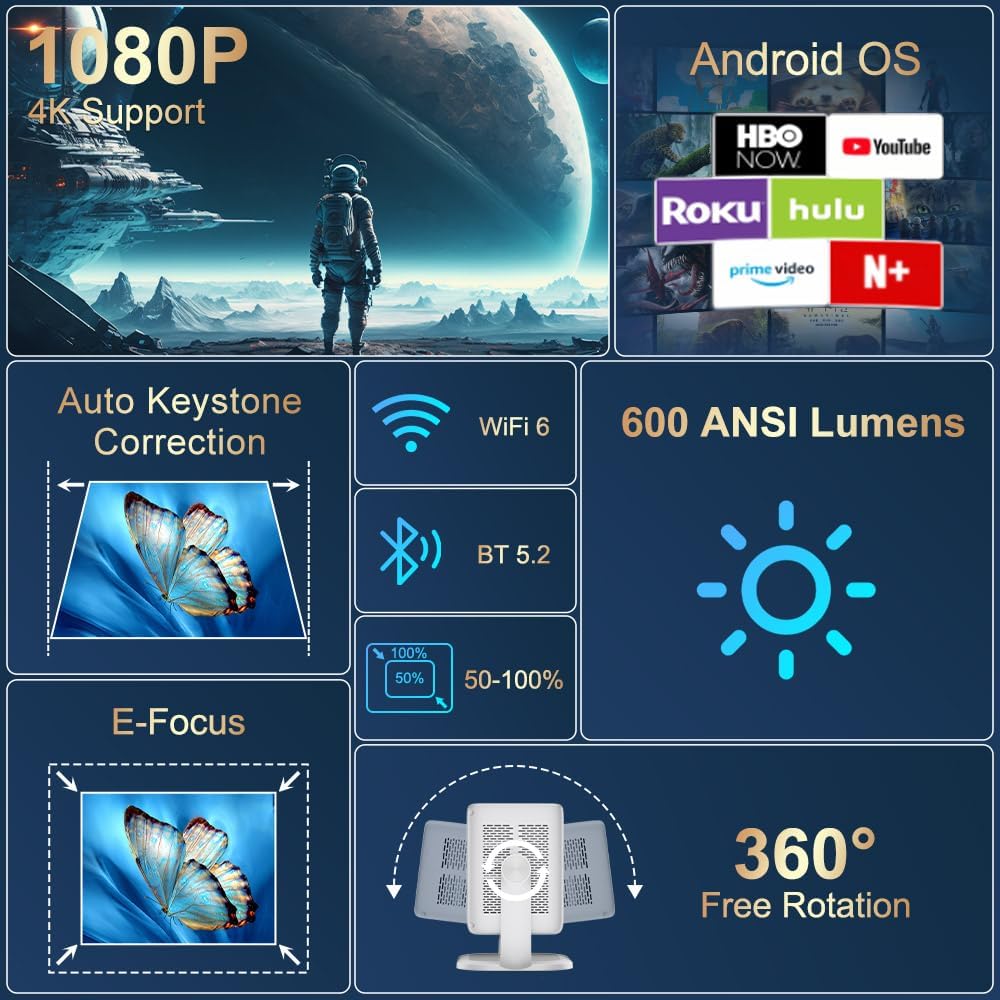
Слика 3.1: Готовоview of the projector's key features including 1080P 4K support, Auto Keystone, WiFi 6, Bluetooth 5.2, E-Focus, 600 ANSI Lumens, and 360° Free Rotation.
3.1 Предња плоча
- Пројекционо сочиво: Емитује слику на екран или површину.
- Прстен за фокусирање: Manual adjustment for image sharpness (though electric focus is primary).
3.2 Задња плоча
- Напајање: Повезује се са приложеним каблом за напајање.
- ХДМИ порт: Connects to external devices like laptops, gaming consoles, or DVD players.
- УСБ порт: За повезивање УСБ уређаја за складиштење или других периферних уређаја.
- Аудио излаз (3.5 мм прикључак): За повезивање екстерних слушалица или звучника.
- Дугме за напајање: Укључује/искључује пројектор.
4. Подешавање
4.1 Прикључак за напајање
- Connect the included power cord to the projector's power port.
- Укључите други крај кабла за напајање у стандардну електричну утичницу.
4.2 Постављање и подешавање
Position the projector on a stable, flat surface. The integrated 360° rotatable and adjustable stand allows for flexible projection angles, including ceilings and walls.
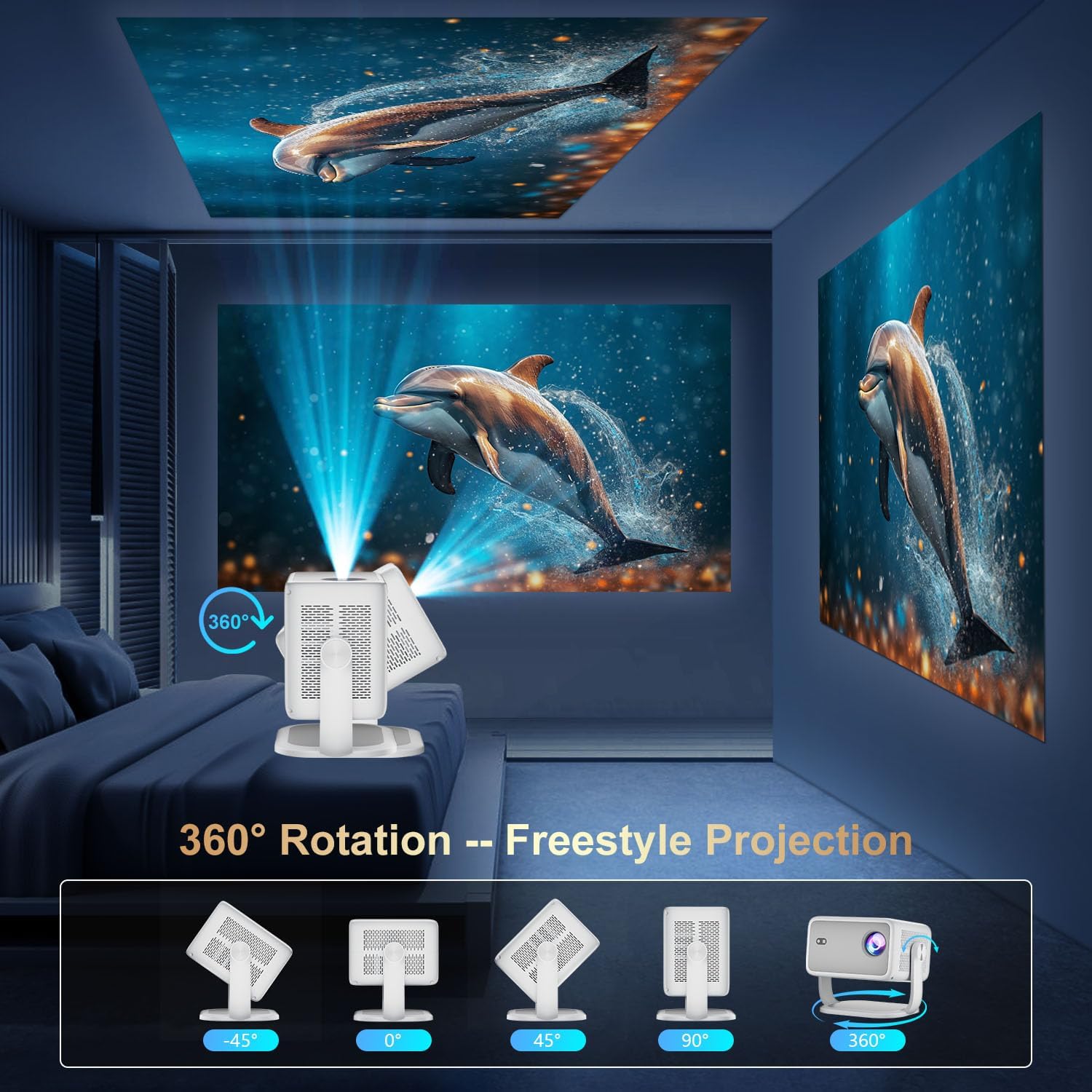
Image 4.1: The projector demonstrating its 360-degree rotation capability for versatile projection angles.
4.3 Фокус и корекција трапезоидног изобличења
The projector features automatic keystone correction and electric focus for quick image alignment and sharpness. Digital zoom (50%-100%) allows for image resizing without moving the unit.

Image 4.2: The projector automatically adjusting focus and keystone correction for a perfectly aligned and sharp image.
4.4 Initial Network Setup
- Power on the projector using the power button on the rear panel or the remote control.
- Navigate to 'Networking Setting' on the home screen using the remote.
- Select your WiFi network and enter the password to connect.
5. Оперативни
5.1 Употреба даљинског управљача
The included remote control is the primary interface for navigating the projector's Smart TV OS. It requires two AAA batteries (not included).
- Дугме за напајање: Укључује/искључује пројектор.
- Дугмад за навигацију: Use the directional arrows to move between menu options.
- Дугме ОК: Потврђује изборе.
- Дугме за назад: Враћа се на претходни екран.
- Дугмад за јачину звука: Подешава аудио излаз.
5.2 Smart TV OS and Applications
The projector runs on a Smart TV OS, providing access to various streaming applications.

Image 5.1: The projector's home screen displaying various built-in applications such as Netflix, YouTube, Prime Video, and Hulu.
- From the home screen, select the desired application (e.g., Netflix, YouTube, Hulu, Prime Video).
- Пријавите се са својим налогом ако је потребно.
- Browse and enjoy content.
- Additional apps can be downloaded from the App Store.
5.3 Повезивање екстерних уређаја
Connect external devices via HDMI or USB:
- ДВИ: Connect an HDMI cable from your external device to the projector's HDMI port. Select 'HDMI' input from the projector's home screen.
- УСБ: Insert a USB drive into the USB port. Navigate to 'Files' on the home screen to access content.
5.4 Wireless Screen Mirroring (Miracast/AirPlay)
The projector supports Miracast and AirPlay for wireless screen mirroring from compatible devices (Windows, iOS, Android).

Image 5.2: A smartphone wirelessly mirroring its screen content to the ZDSSY ZD-L018AQ Smart Projector via WiFi.
- Ensure your device and the projector are connected to the same WiFi network.
- On the projector, select the 'AirPin' or 'ScreenCast' option (may vary by firmware version).
- On your mobile device, activate screen mirroring/casting and select the projector from the list of available devices.
5.5 Блуетоотх аудио
Повежите екстерне Bluetooth звучнике или слушалице за побољшани звук.

Image 5.3: The projector wirelessly connected to a soundbar via Bluetooth 5.2, enhancing the audio experience.
- Navigate to 'Bluetooth Setting' on the projector's home screen.
- Омогућите Блуетоотх и потражите доступне уређаје.
- Select your Bluetooth audio device to pair.
6. Одржавање
Редовно одржавање осигурава оптималне перформансе и дуготрајност вашег пројектора.
- Чишћење сочива: Use a soft, lint-free cloth specifically designed for optical lenses to gently wipe the projection lens. Avoid abrasive materials or harsh chemicals.
- вентилација: Ensure the projector's ventilation openings are clear of dust and obstructions to prevent overheating. Do not block the vents during operation.
- Складиштење: When not in use, store the projector in a cool, dry place, away from direct sunlight and extreme temperatures. Use the original packaging or a protective case if available.
- Искључивање: Always power off the projector properly before unplugging it.
КСНУМКС. Решавање проблема
Погледајте овај одељак за решења уобичајених проблема.
| Проблем | Могући узрок | Решење |
|---|---|---|
| Но Повер | Кабл за напајање није повезан; проблем са утичницом. | Проверите везу кабла за напајање; покушајте са другом утичницом. |
| Нема слике | Input source not selected; external device not connected. | Select correct input source (HDMI, USB); ensure external device is on and connected. |
| Мутна слика | Focus not adjusted; projector too close/far. | Use electric focus or manual focus ring; adjust projector distance. |
| Нема звука | Volume too low; external audio device not connected/paired. | Increase volume; check Bluetooth pairing or 3.5mm audio cable connection. |
| WiFi/Bluetooth Connectivity Issues | Incorrect password; device out of range; interference. | Re-enter password; move closer to router/device; reduce interference. |
8. Спецификације
| Феатуре | Детаљ |
|---|---|
| Бранд | ZDSSY |
| Број модела | ZD-L018AQ |
| Резолуција екрана | 1920 x 1080 (изворно) |
| 4К подршка | Да |
| Осветљеност | КСНУМКС АНСИ Луменс |
| Технологија повезивања | Bluetooth 5.2, HDMI, USB, Wi-Fi 6 |
| Посебне карактеристике | Auto Screen Alignment, Built-In Speaker, Built-In Wi-Fi, Portable, Electric Focus |
| Препоручена употреба | Индоор/Оутдоор |
| Димензије производа | 6.69 к 5.9 к 9.05 инча |
| Тежина артикла | 2.97 фунти |
9. Гаранција и подршка
ZDSSY is committed to providing high-quality products and customer satisfaction.
- Служба за кориснике: 24/7 Professional Service is available for any inquiries or assistance.
- Повраћај/Замена: A 30-day return or exchange policy is offered.
- техничка подршка: За ваш производ је обезбеђена доживотна техничка подршка.
For further assistance, please refer to the contact information provided with your purchase or visit the official ZDSSY webсајту.