
Увод
Thank you for choosing the KOSUMOSU Small Digital Alarm Clock. This manual provides detailed instructions for setting up and operating your new clock. Designed for clarity and convenience, this 6.7-inch digital clock features time, date, day of the week, room temperature, auto/manual dimming, and dual alarms with snooze functionality. Please read this manual thoroughly before use to ensure optimal performance.
Садржај пакета
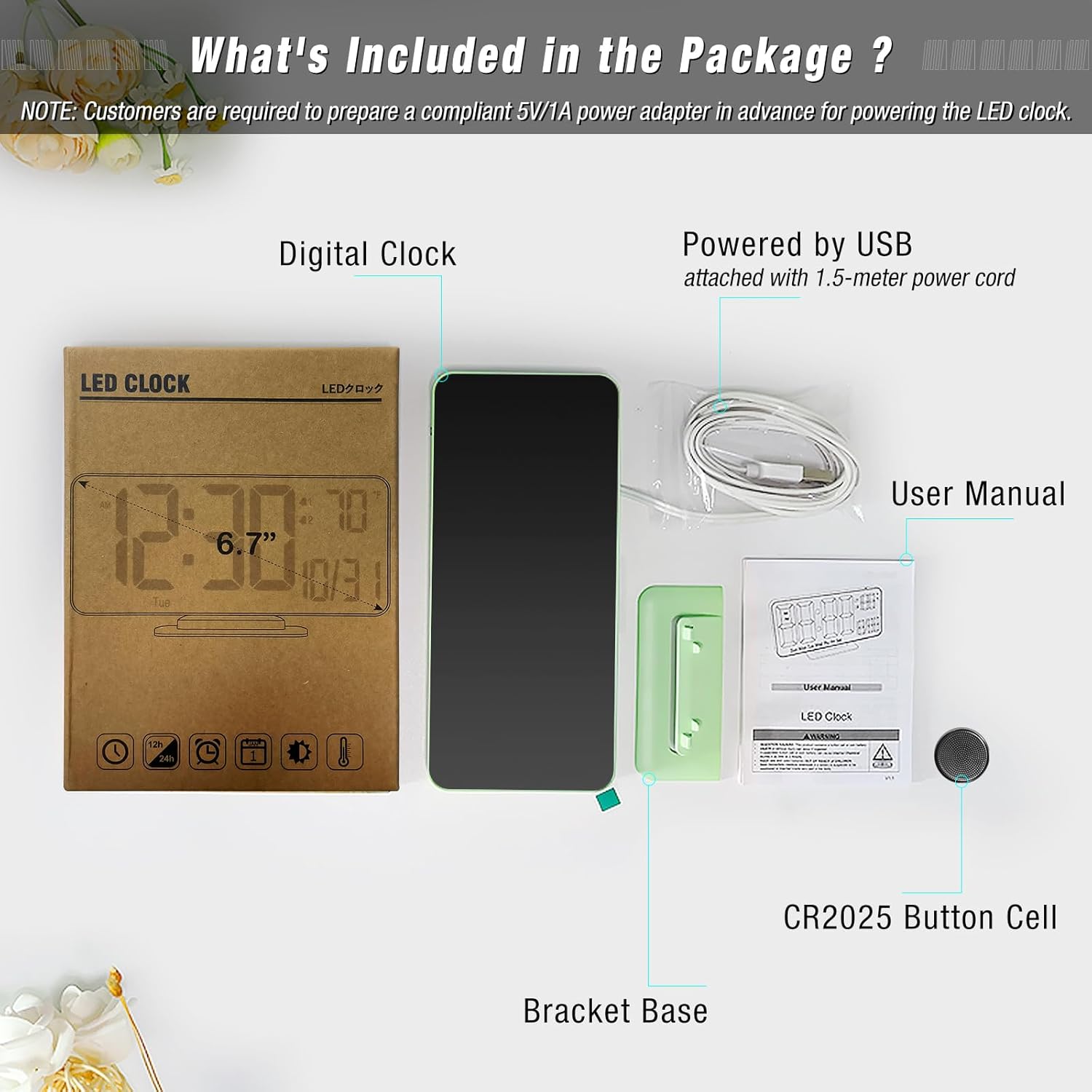
Проверите да ли су све ставке присутне у пакету:
- Digital Clock (Model: ACD-330)
- USB-A Power Cable (1.5 meters, permanently attached)
- Брацкет Басе
- CR2025 Button Cell (pre-installed for time backup)
- Упутство за употребу
Производ је завршенview
The KOSUMOSU Digital Alarm Clock features a sleek design with a clear LED display. It is approximately 6.4 inches wide by 3.3 inches high, making it compact for various spaces.

Контролна дугмад:
- Dimming (+/-): Press to manually adjust brightness (High, Medium, Low, Off). Long press for auto-dimming.
- °F/°C/Sec (-): Press to switch between Fahrenheit and Celsius temperature display. Long press to fix time separator (seconds display).
- 12h/24h (SET): Press to set 12h/24h format. Long press to set date and time.
- Alarm 1 Set: Press to toggle Alarm 1 on/off. Long press to set Alarm 1 time.
- Alarm 2 Set: Press to toggle Alarm 2 on/off. Long press to set Alarm 2 time.
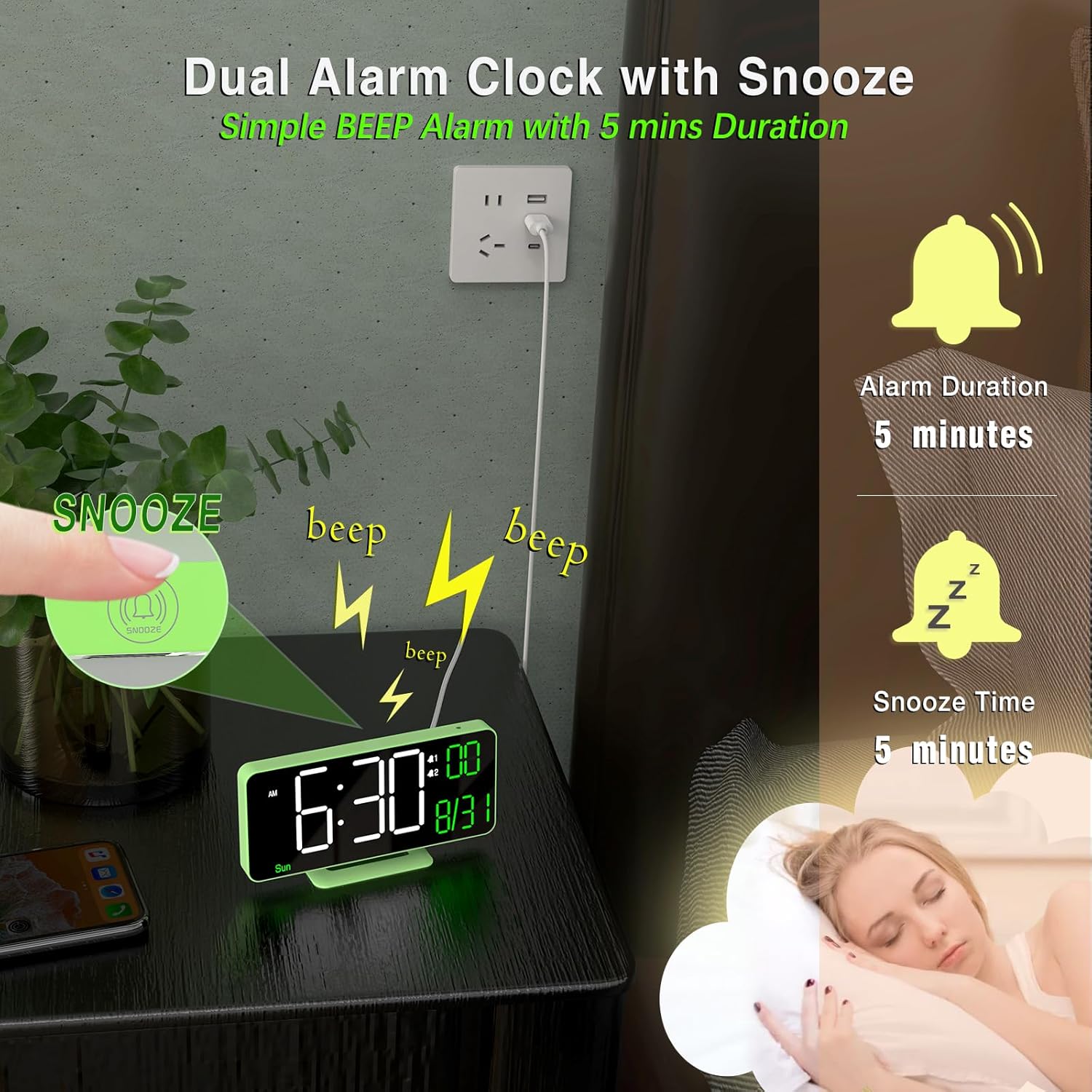
- Дугме за одлагање: Located on top of the clock. Press to activate snooze during an alarm.
Сетуп
- Прикључак за напајање: Connect the attached USB-A power cable to a 5V/1A AC adapter (not included) and plug it into a power outlet. The clock requires continuous power to operate.
- Резервна батерија: The pre-installed CR2025 button cell provides time backup in case of a power outage, ensuring your settings are retained. It does not power the display for regular use.
- Attach Bracket Base: Securely attach the provided bracket base to the bottom of the clock for tabletop use. The clock can also be wall-mounted using the keyhole slot on the back.
Упутство за употребу
Подешавање времена и датума:
- Дуго притисните СЕТ дугме на 2 секунде да бисте ушли у режим подешавања.
- Приказ сати ће трептати. Користите + or - дугмад за подешавање сата.
- Притисните СЕТ again to confirm the hour and move to minutes. Adjust minutes using + or -.
- Наставите да притискате СЕТ и коришћење + or - to set the year, month, and date in sequence.
- Након подешавања датума, притисните СЕТ one last time to exit setting mode. The day of the week will automatically update based on the date.
Подешавање аларма:
The clock supports two independent alarms (Alarm 1 and Alarm 2).
- To Set Alarm Time: Long press either the Аларм 1 подешен or Аларм 2 подешен button. The hour display will flash. Use + or - да подесите сат.
- Press the respective alarm button again to confirm the hour and move to minutes. Adjust minutes using + or -.
- Press the alarm button again to confirm minutes and select the alarm cycle (Workdays, Weekends, or Everyday). Use + or - бирати.
- Press the alarm button one last time to save the alarm setting.
- To Toggle Alarm On/Off: Кратко притисните Аларм 1 подешен or Аларм 2 подешен button. An alarm icon will appear/disappear on the display to indicate its status.
Одгода функција:
Када се огласи аларм, притисните дугме Одложи button (located on top of the clock) to temporarily silence it for 5 minutes. The alarm will sound again after the snooze period ends.
Подешавање осветљености (затамњивање):
The clock offers both manual and automatic dimming options.
- Ручно затамњење: Кратко притисните Затамњивање + or Dimming - buttons to cycle through brightness levels: High, Medium, Low, or LED display OFF.
- Аутоматско затамњивање: Дуго притисните Затамњивање + button to activate auto-dimming. The clock will automatically adjust its brightness based on ambient light conditions detected by the light sensor.
Приказ температуре:
The clock displays the room temperature.
- To switch between Fahrenheit (°F) and Celsius (°C), briefly press the °F/°C/Sec (-) дугме.
12/24-часовни формат:
To switch between 12-hour and 24-hour time formats, briefly press the 12h/24h (SET) дугме када није у режиму подешавања.
Seconds Display:
To display or hide the seconds, long press the °F/°C/Sec (-) дугме.
Одржавање
- Clean the clock's display and body with a soft, dry cloth. Avoid abrasive cleaners or solvents.
- Ensure the clock is placed on a stable surface or securely mounted to prevent falls.
- Keep the clock away from extreme temperatures, direct sunlight, and moisture.
Решавање проблема
- Екран је празан: Ensure the USB power cable is securely connected to a 5V/1A AC adapter and plugged into a working power outlet. The button cell only provides backup for settings, not for powering the display.
- Време/датум је нетачан: Follow the "Setting Time and Date" instructions to manually adjust. Ensure the CR2025 button cell is correctly installed and functional for backup.
- Аларм се не оглашава: Verify that the alarm is enabled (alarm icon visible on display) and the volume is not set to zero. Check that the alarm time is correctly set.
- Display too bright/dim: Adjust brightness using the Dimming buttons or activate auto-dimming.
Спецификације
| Бранд | КОСУМОСУ |
| Број модела | АЦД-330 |
| Дисплаи Типе | Дигитал ЛЕД |
| Величина екрана | 6.7 инча |
| Димензије производа | 6.4"W x 3.3"H (16.2 x 8.3 cm) |
| Извор напајања | Corded Electric (5V/1A USB-A adapter NOT included) |
| Баттери Бацкуп | 1 к ЦР2025 ћелија са дугметом (укључено) |
| Материјал | Пластика |
| Посебне карактеристике | Adjustable Brightness (Auto/Manual), Dual Alarms, Snooze, Calendar Display, Temperature Display (°F/°C), 12/24-Hour Format, Seconds Display |
Гаранција и подршка
KOSUMOSU offers a 2 година гаранције on this product. If you encounter any quality or usage-related problems, please do not hesitate to contact us via email at support@sz-krs.com. Our customer service team is ready to assist you.