
1. Увод
Хвала вам на куповиниasing the Karlsson Vogue Alarm Clock. This versatile device combines a digital alarm clock, a wireless induction charger, and a Bluetooth speaker, designed to enhance your daily routine. Please read this manual carefully before using the product to ensure proper operation and to maximize its lifespan. Keep this manual for future reference.
Мере предострожности
- Не излажите уређај води или прекомерној влажности.
- Избегавајте екстремне температуре.
- Не растављајте или покушавајте сами да поправите уређај.
- Use only the provided or recommended USB adapter for power.
- Обезбедите одговарајућу вентилацију око уређаја током рада.
2. Производ је готовview
The Karlsson Vogue Alarm Clock features a sleek design with a fabric-covered front and intuitive controls. Below is an overview његових главних компоненти и контрола.
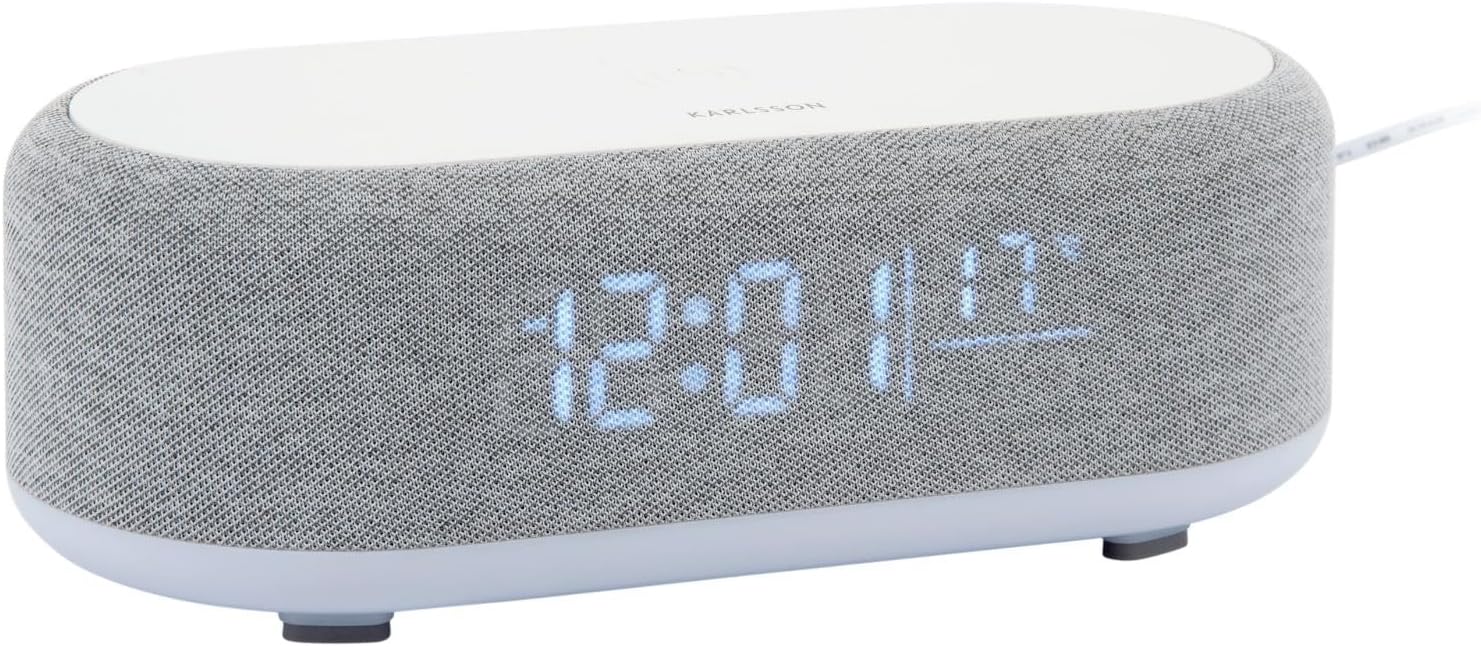
Слика 2.1: Предња страна view of the Karlsson Vogue Alarm Clock, displaying the digital time and temperature.
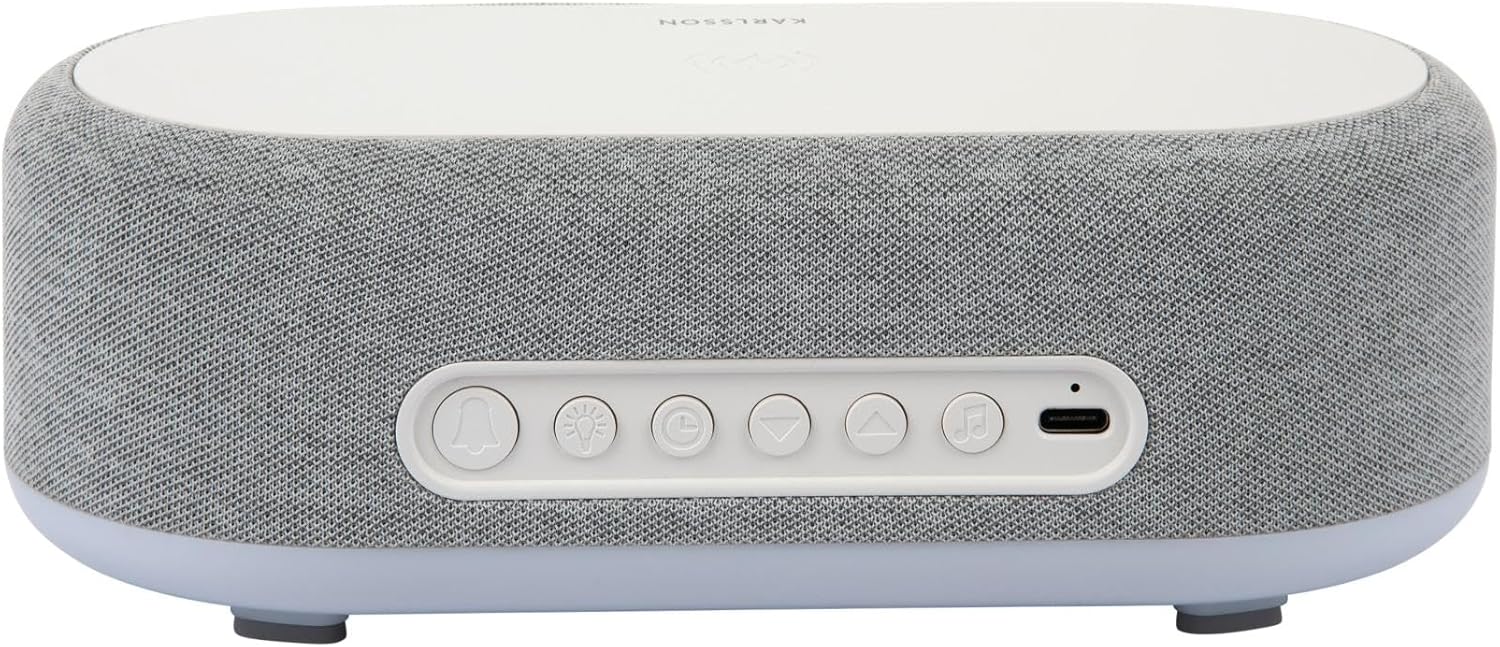
Слика 2.2: Задња страна view of the alarm clock, highlighting the control buttons and USB-C power input.
Control Buttons (from left to right on rear panel):
- Дугме за аларм 1: Press to activate/deactivate Alarm 1. Long press to set Alarm 1 time.
- Дугме за аларм 2: Press to activate/deactivate Alarm 2. Long press to set Alarm 2 time.
- Brightness/Snooze Button: Press to adjust display brightness. When alarm sounds, press to snooze.
- Дугме за подешавање времена: Дуго притисните да бисте ушли у режим подешавања времена.
- Дугме доле: Decrease values during setting, navigate menus.
- Дугме горе: Increase values during setting, navigate menus.
- Дугме Bluetooth/Пусти/Пауза: Long press to enter Bluetooth pairing mode. Press to play/pause music.
- УСБ-Ц улаз за напајање: Повежите адаптер за напајање овде.
Горња плоча:
- Подлога за бежично пуњење: Поставите компатибилне уређаје овде за бежично пуњење.
3. Подешавање
3.1 Прикључак за напајање
- Connect the provided USB adapter to the USB-C Power Input port on the rear of the alarm clock.
- Plug the USB adapter into a standard wall outlet.
- Екран ће се упалити, што указује да је уређај укључен.
3.2 Почетно подешавање времена
- Дуго притисните Дугме за подешавање времена (clock icon) on the rear panel. The hour digits will start flashing.
- Користите Up и Дугмад надоле да подесите сат.
- Притисните тастер Дугме за подешавање времена поново да бисте потврдили сат и прешли на подешавање минута. Цифре за минуте ће трептати.
- Користите Up и Дугмад надоле да подесите минут.
- Притисните тастер Дугме за подешавање времена one more time to confirm the minute and exit time setting mode.
4. Упутство за употребу
4.1 Подешавање аларма
The device supports two independent alarms (Alarm 1 and Alarm 2).
- To set Alarm 1: Дуго притисните Дугме аларма 1 (bell icon with '1'). The hour digits for Alarm 1 will flash.
- Користите Up и Дугмад надоле да подесите сат аларма.
- Притисните тастер Дугме аларма 1 again to confirm the hour and move to minute setting.
- Користите Up и Дугмад надоле да подесите минут аларма.
- Притисните тастер Дугме аларма 1 one more time to confirm and exit alarm setting. The alarm icon will appear on the display.
- To set Alarm 2: Follow the same steps using the Дугме аларма 2 (bell icon with '2').
4.2 Activating/Deactivating Alarms
- Притисните одговарајуће Дугме аларма 1 or Дугме аларма 2 briefly to toggle the alarm on or off. The alarm icon on the display will indicate its status.
4.3 Функција одлагања
- Када се огласи аларм, притисните дугме Brightness/Snooze Button (light bulb icon) to activate snooze. The alarm will temporarily stop and sound again after approximately 9 minutes.
- To turn off the alarm completely, press any other button on the rear panel.
4.4 Рад Bluetooth звучника
- Упаривање: Дуго притисните Дугме Bluetooth/Пусти/Пауза (music note icon) until the display shows "BT" and starts flashing, indicating pairing mode.
- On your mobile device, enable Bluetooth and search for "Karlsson Vogue". Select it to connect.
- Once connected, the "BT" indicator will stop flashing. You can now play audio through the alarm clock's speaker.
- Репродукција: Притисните тастер Дугме Bluetooth/Пусти/Пауза кратко да бисте репродуковали или паузирали музику.
- Volume control is managed via your connected mobile device.
4.5 Wireless Induction Charging
The top surface of the alarm clock features a wireless charging pad compatible with Qi-enabled devices.
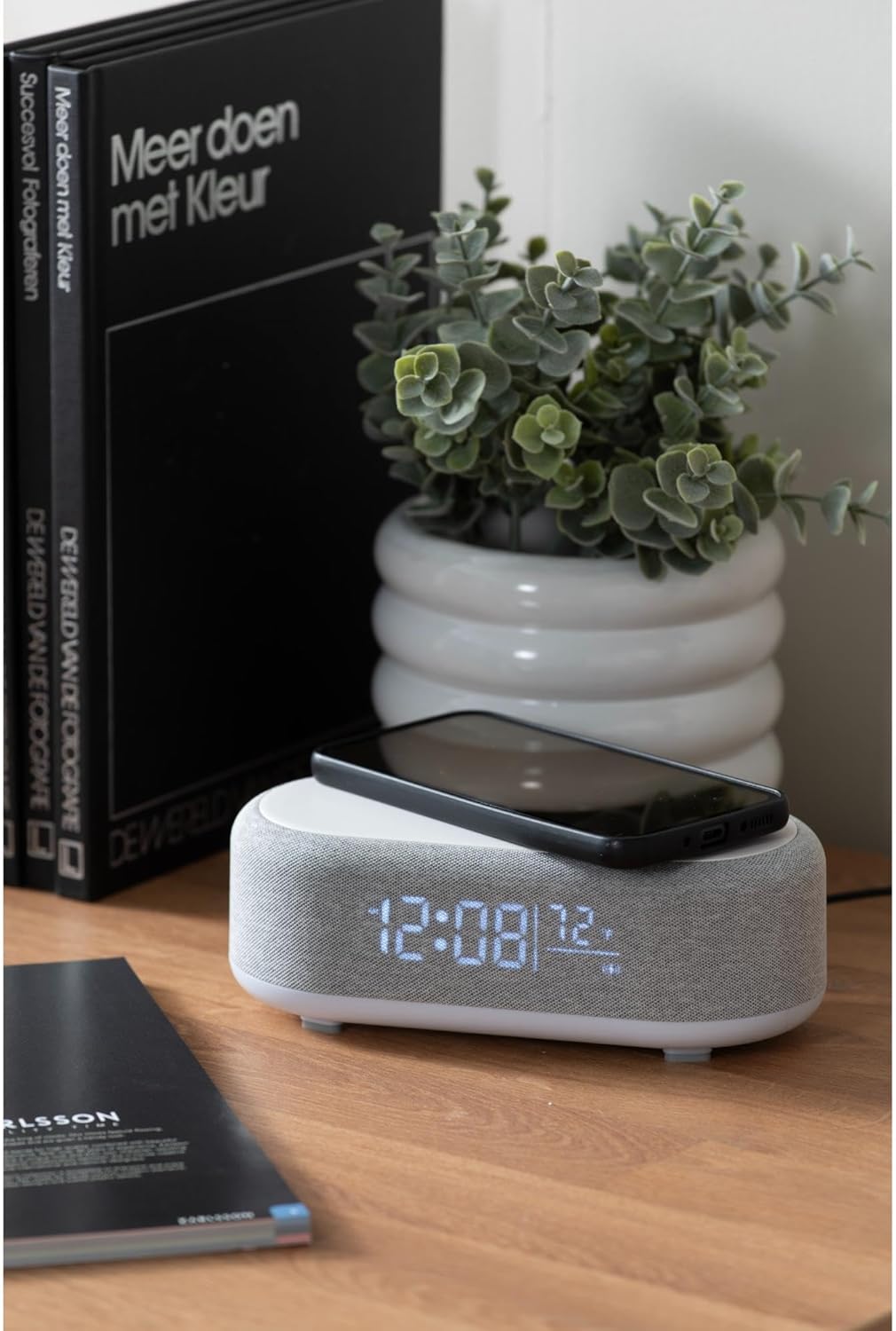
Figure 4.1: A smartphone placed on the wireless charging pad of the alarm clock.
- Place your Qi-compatible smartphone or other device directly onto the center of the top charging pad.
- Ensure the device is properly aligned. A charging indicator (usually on your phone screen) will confirm charging has begun.
- Уклоните уређај када се потпуно напуни.
4.6 Подешавање осветљености екрана
- Притисните тастер Brightness/Snooze Button (light bulb icon) repeatedly to cycle through different brightness levels for the display.
5. Одржавање
5.1 Чишћење
- Пре чишћења, искључите адаптер за напајање.
- Обришите површину будилника меком, сувом или благо длакомamp тканина.
- Do not use abrasive cleaners, solvents, or strong chemicals, as they may damage the surface.
5.2 Складиштење
- If storing the device for an extended period, disconnect it from power.
- Чувати на хладном и сувом месту далеко од директне сунчеве светлости и екстремних температура.
КСНУМКС. Решавање проблема
| Проблем | Могући узрок | Решење |
|---|---|---|
| Уређај се не укључује. | Нема прикључка за напајање или је адаптер неисправан. | Ensure the USB-C cable is securely connected and the adapter is plugged into a working outlet. Try a different outlet. |
| Блутут се не повезује. | Device not in pairing mode; already connected to another device; mobile device Bluetooth off. | Long press the Bluetooth button to enter pairing mode. Ensure no other device is connected. Turn off and on Bluetooth on your mobile device. |
| Бежично пуњење не ради. | Phone not Qi-compatible; phone not aligned; phone case too thick. | Ensure your device supports Qi wireless charging. Re-position the device on the center of the pad. Remove thick phone cases. |
| Аларм се не оглашава. | Alarm deactivated; volume too low (for Bluetooth alarm). | Check if the alarm icon is displayed. Ensure the alarm time is set correctly. If using Bluetooth audio for alarm, ensure phone volume is adequate. |
7. Спецификације
| Феатуре | Детаљ |
|---|---|
| Бранд | Карлсон |
| Број модела | КА6033ГИ |
| Боја | Греи |
| Материјал | Пластика (АБС) |
| Димензије (Д к Ш к В) | КСНУМКС к КСНУМКС к КСНУМКС цм (КСНУМКС к КСНУМКС к КСНУМКС инча) |
| Тежина | 0.46 кг (1.01 лбс) |
| Повер Инпут | USB (Adapter included) |
| Бежично пуњење | Induction (Qi-compatible) |
| Повезивање | Блуетоотх |
8. Гаранција и подршка
For warranty information and customer support, please refer to the documentation provided with your purchase or contact your retailer. You may also visit the official Karlsson webсајт за даљу помоћ.
Webсајт: Karlsson Official Store