
1. Увод
The YARDCARE M800Plus is an advanced cordless robotic lawn mower designed to simplify lawn maintenance. Featuring an upgraded GPS system and 3D Visual Navigation, it offers precise and efficient mowing without the need for boundary wires. Its intelligent AI obstacle avoidance system detects over 150 common garden obstacles, ensuring safe and uninterrupted operation. Control and customize your mowing experience through the dedicated YARDCARE app, which also provides real-time location tracking and OTA updates.

Figure 1: YARDCARE M800Plus Robotic Lawn Mower and its accompanying mobile application interface.
2. Безбедносне информације
Always read and understand all safety instructions before operating the robotic lawn mower. Failure to follow these instructions may result in serious injury or property damage.
- Држите руке и ноге даље од оштрица.
- Do not operate the mower on steep slopes exceeding its specified climbing ability.
- Ensure the mowing area is clear of obstacles, pets, and children before operation.
- Не подижите или носите косилицу док ради.
- Искључите косилицу и извадите сигурносни кључ пре него што извршите било какво одржавање или чишћење.
- Store the mower and charging station in a dry, protected area.
3. Садржај пакета
Проверите да ли су све ставке наведене у наставку укључене у ваш пакет:

Figure 2: Visual representation of the YARDCARE M800Plus package contents.
- Mower: 1 pc
- Instruction Manual: 1 pc
- Charging Station: 1 pc
- Hex Key: 1 pc
- Charging Station Fixing Screws: 6 pcs
- M4*10 Screws for Blade: 3 pcs
- Blade: 3 pcs
- Power Adapter: 1 pc
4. Подешавање
4.1 Постављање станице за пуњење
Select a suitable location for the charging station. It should be on a flat, level surface with access to a power outlet. Ensure the area around the charging station is clear of obstructions to allow the mower to dock easily. The mower uses 3D vision to identify boundaries and locate the charging pile.

Figure 3: The YARDCARE M800Plus operates wirelessly, eliminating the need for boundary wires or RTK systems.
4.2 Почетно пуњење
Connect the charging station to a power outlet. Place the mower onto the charging station. The mower will automatically begin charging. A full charge typically takes several hours. The mower will return to the charging station automatically when its battery drops below 20% and will restart mowing when charged to 90%.

Figure 4: The mower automatically returns to its charging station when needed and features a built-in rain sensor.
4.3 Инсталација и повезивање апликације
Download the YARDCARE app from your smartphone's app store (Google Play or Apple App Store). Follow the in-app instructions to connect your mower to your home Wi-Fi network. The app allows you to set custom mowing plans, switch between mowing modes, and receive error alerts.

Figure 5: Smart APP Control allows full management of the mower from your smartphone.
4.4 Boundary Setup
The YARDCARE M800Plus utilizes GPS and 3D Visual Navigation for boundary recognition, eliminating the need for physical boundary wires. The AI vision identifies non-lawn areas and auto-detects lawn edges. This system is best suited for lawns with clear, defined boundaries.
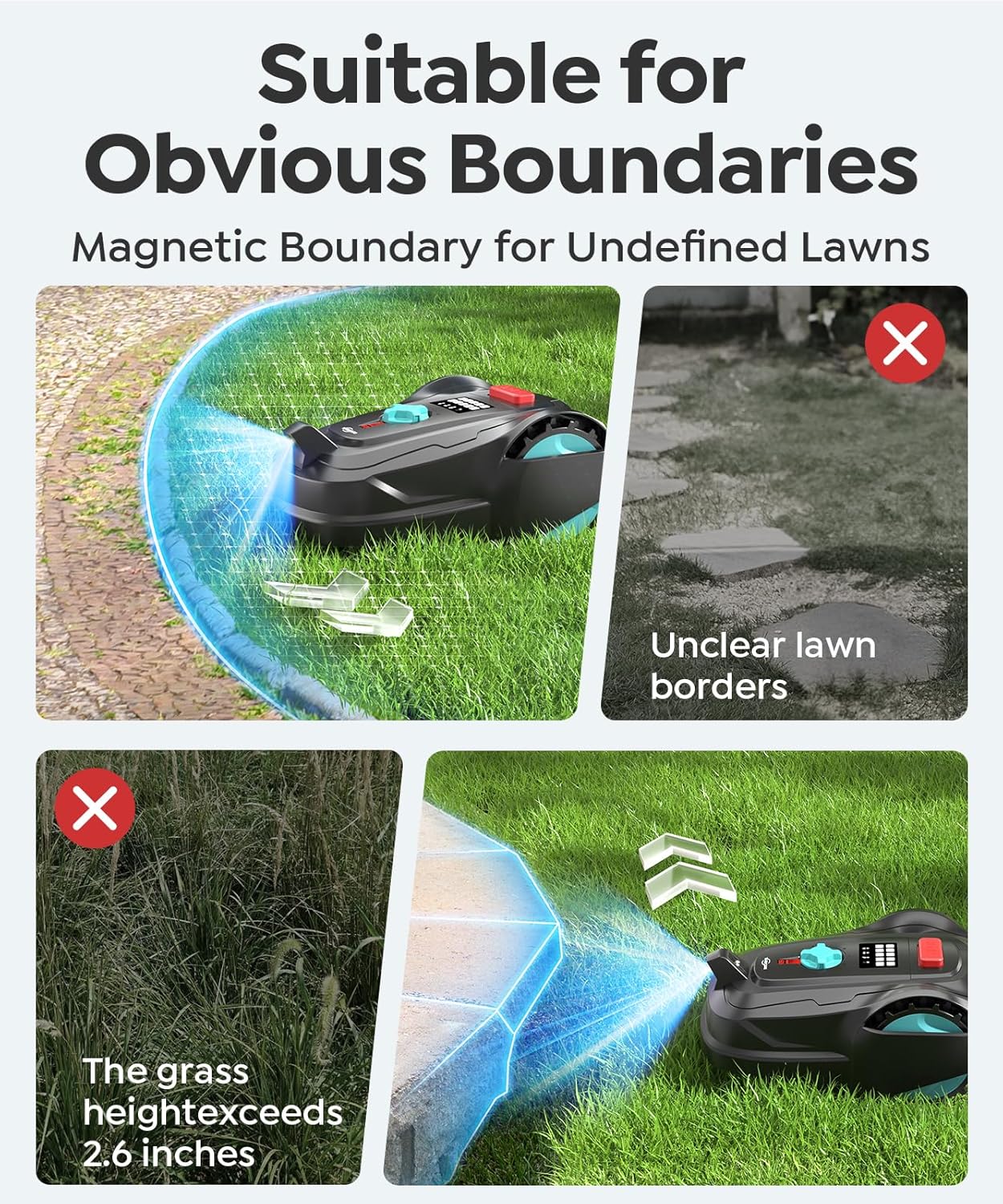
Figure 6: The mower is designed for lawns with obvious boundaries. Avoid areas with unclear borders or grass exceeding 2.6 inches.
5. Упутство за употребу
5.1 Режими кошења
The mower offers flexible mowing modes to suit your lawn's needs:
- Bow-Shaped Path Mowing: The mower performs 40 minutes of neat, orderly row mowing.
- Насумично кошење: After orderly mowing, it switches to 60 minutes of random mowing to fill any gaps.
The mower will return to charge and then repeat the process in the other direction, ensuring comprehensive coverage.

Figure 7: The mower combines bow-shaped path mowing with random mowing for optimal coverage.
5.2 Подешавање висине
The cutting height can be manually adjusted to five different levels to achieve your desired lawn precision. The mower can also sense thicker patches of grass and will go over them repeatedly until the desired height is reached.

Figure 8: Manually adjustable cutting height for precise lawn care.
5.3 Избегавање препрека
Equipped with a 135° wide-angle camera and AI-powered recognition, the YARDCARE M800Plus intelligently detects over 150 common garden obstacles, including ground lights, pets, pavements, fences, trees, stones, and toys. This advanced system ensures precise, real-time avoidance, maintaining a safe distance while delivering uninterrupted mowing.

Figure 9: The mower's 3D visual obstacle avoidance system identifies over 150 types of obstacles.
5.4 GPS Anti-theft Feature
Once connected to your Wi-Fi, the mower's real-time location is displayed on the app, allowing you to track its position anytime. If the mower is unexpectedly moved, you will see the location change immediately (prerequisite: powered on and connected to Wi-Fi).

Figure 10: GPS Anti-theft feature provides real-time location tracking via the app.
5.5 Slope Climbing Ability
The YARDCARE M800Plus is capable of handling slightly sloped lawns, with a climbing ability of up to 36.4% (20°).

Figure 11: The mower demonstrates its 36.4% (20°) slope climbing ability.
6. Одржавање
6.1 Чишћење
Regular cleaning ensures optimal performance. The underside of the mower, including the blades and wheels, can be rinsed gently with a light spray of water. Avoid using high-pressure water directly on the electronic components.
6.2 Замена оштрице
The mower comes with spare blades. Refer to the detailed instructions in the included user manual for safe and proper blade replacement procedures.
КСНУМКС. Решавање проблема
If you encounter any issues with your YARDCARE M800Plus, refer to the following common problems and solutions:
| Проблем | Могући узрок | Решење |
|---|---|---|
| Косилица се не покреће | Low battery; Safety key not inserted; STOP button pressed. | Charge the mower; Insert safety key fully; Release STOP button. |
| Mower not docking | Charging station obstructed; Poor signal. | Clear obstructions around charging station; Check Wi-Fi signal strength. |
| Неравномерно кошење | Blades dull or damaged; Grass too tall. | Replace blades; Trim tall grass before robotic mowing. |
| Косилица се често заглављује | Excessive obstacles; Uneven terrain. | Remove small obstacles; Ensure lawn is suitable for robotic mower. |
For more detailed troubleshooting, please refer to the comprehensive user manual.
8. Спецификације
| Феатуре | Спецификација |
|---|---|
| Бранд | ОДРЖАВАЊЕ ДВОРИШТА |
| Број модела | М800ПЛУС |
| Извор напајања | Напаја се батеријама (1 литијум-јонска батерија је укључена) |
| Боја | Црно |
| Тежина артикла | 20.6 фунти |
| Ширина сечења | 7.08 инча |
| Оперативни режим | Аутоматски |
| Димензије производа | 12.6"Д к 20.47"Ш к 24.8"В |
| Максимална подесива висина кошења | 2.36 инча |
| Минимална подесива висина кошења | 0.79 инча |
| Навигација | GPS System + 3D Visual Navigation |
| Препрека препрека | Intelligent AI (150+ common garden obstacles) |
| Контрола апликација | YARDCARE App (Custom plans, 3 mowing modes, error alerts, OTA updates) |
| Mowing Coverage | Up to 8,611 sq. ft. (1/5 Acre) |
| Време рада по пуњењу | КСНУМКС минута |
9. Гаранција и подршка
YARDCARE products are backed by a manufacturer's warranty. For specific warranty details, please refer to the warranty card included in your product packaging or visit the official YARDCARE website. For technical support, troubleshooting assistance, or spare parts, please contact YARDCARE customer service through the contact information provided in your user manual or on the YARDCARE webсајту.